


- Posts: 11
- Thank you received: 1
3 Post Moderation Rule for New Boarders (25 Jan 2021)
New boarders will have their posts moderated - Don't worry if you cannot see your post immediately.
Faces floating around in movie
17 Jun 2017 19:29 #88822
by JuG01
Faces floating around in movie was created by JuG01
Hi everyone,
I am completely new to this forum and I also have not too much experience with Final Cut Pro X. I have used it for quite a while, but never done anything too complex. Now I wanted to create something for my family:
I have sorted my Photos library and all the faces are perfectly in groups and named and so on. Now I picked about fifty pictures of each person I want to feature in the movie and created an album for them. Then I imported those pictures into FCP X and now I wanted to create the following: I wish to make only the faces "float" around on the screen. The pictures of each persons face is supposed to change every second or so. I would also like to be able to then edit alle the pictures of one person at once (for example to make one person fade over time).
My idea was to take one persons pictures, put a Vignette Mask around, center the face, cut out all the other people in the picture and done. Now I started doing this and there is two problems I encountered: When I trim the picture to get only the face, it is not in the center (even though though the center of the trimmed part is the face). When I crop I though, the Vignette Mask takes the original center point as its center and therefore my Vignette mask is all over the place, but not around the face.
I hope it gets clear what I am trying to do.
Thanks
I am completely new to this forum and I also have not too much experience with Final Cut Pro X. I have used it for quite a while, but never done anything too complex. Now I wanted to create something for my family:
I have sorted my Photos library and all the faces are perfectly in groups and named and so on. Now I picked about fifty pictures of each person I want to feature in the movie and created an album for them. Then I imported those pictures into FCP X and now I wanted to create the following: I wish to make only the faces "float" around on the screen. The pictures of each persons face is supposed to change every second or so. I would also like to be able to then edit alle the pictures of one person at once (for example to make one person fade over time).
My idea was to take one persons pictures, put a Vignette Mask around, center the face, cut out all the other people in the picture and done. Now I started doing this and there is two problems I encountered: When I trim the picture to get only the face, it is not in the center (even though though the center of the trimmed part is the face). When I crop I though, the Vignette Mask takes the original center point as its center and therefore my Vignette mask is all over the place, but not around the face.
I hope it gets clear what I am trying to do.
Thanks
Please Log in to join the conversation.
- Karsten Schlüter
-

- Offline
- Moderator
-

Less
More
- Posts: 3790
- Thank you received: 718
18 Jun 2017 05:09 - 18 Jun 2017 05:10 #88835
by Karsten Schlüter
Replied by Karsten Schlüter on topic Faces floating around in movie
Welcome, Julius, to fcp.co 
hmm, not exactly understanding what you haven mind, but anyhow:
When handling stills, I can only recommend to prep those in any pic-processor, Photo, Affinity, Pixelmator etc.
It is much easier to manipulate pics to your needs with such tools, for highlighting a person, 'punch out', vignetting etc.
and:
make a pic in two versions: prepped and unprepared, then apply in FCPX a simple dissolve = magic
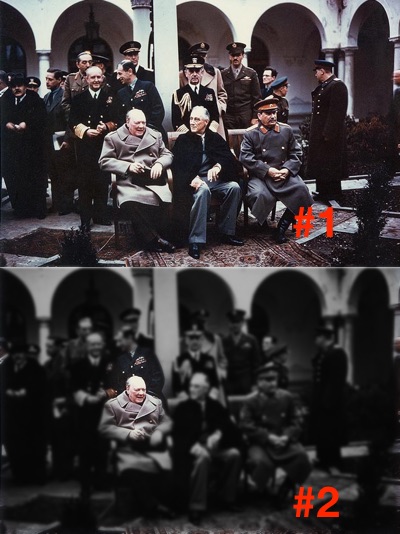
hmm, not exactly understanding what you haven mind, but anyhow:
When handling stills, I can only recommend to prep those in any pic-processor, Photo, Affinity, Pixelmator etc.
It is much easier to manipulate pics to your needs with such tools, for highlighting a person, 'punch out', vignetting etc.
and:
make a pic in two versions: prepped and unprepared, then apply in FCPX a simple dissolve = magic
Last edit: 18 Jun 2017 05:10 by Karsten Schlüter.
Please Log in to join the conversation.
18 Jun 2017 17:15 #88844
by JuG01
Replied by JuG01 on topic Faces floating around in movie
Hi,
so yeah, you kind of got what I was trying to do. However, I only want the face itself to be in the video and then I want to add all the other faces "around", so there is like 15 faces, but the pictures of those 15 people change.
So I am trying to get to a workflow, where I only have to tell the person where the center of the face is, the software adds a vignette mask and cuts out everything that is then black. For each person I want about lets say 40-50 pictures, maybe a little less. Then at the end, these evolving faces should be put all into one movie where they just "float" next to each other without anything else.
Maybe this gets a little clearer.
Thanks
so yeah, you kind of got what I was trying to do. However, I only want the face itself to be in the video and then I want to add all the other faces "around", so there is like 15 faces, but the pictures of those 15 people change.
So I am trying to get to a workflow, where I only have to tell the person where the center of the face is, the software adds a vignette mask and cuts out everything that is then black. For each person I want about lets say 40-50 pictures, maybe a little less. Then at the end, these evolving faces should be put all into one movie where they just "float" next to each other without anything else.
Maybe this gets a little clearer.
Thanks
Please Log in to join the conversation.


18 Jun 2017 22:56 #88848
by JoeEditor
Replied by JoeEditor on topic Faces floating around in movie
Yeah, I'd agree with Karsten, you have to cut all of that up in Pixelmator or Photoshop or something, into individual graphics, then put them all together in your NLE. Goes faster than you think.
There's no magic "do what I see in my head without the effort" button.
There's no magic "do what I see in my head without the effort" button.
Please Log in to join the conversation.
- Karsten Schlüter
-
- Offline
- Moderator
-
Less
More
- Posts: 3790
- Thank you received: 718
19 Jun 2017 03:08 #88850
by Karsten Schlüter
Replied by Karsten Schlüter on topic Faces floating around in movie
let's forget for a second that 'floating around thing' but …
…wot?? :blink:
The center of a face/head is about between the eyes … in any face.
plus, we humans tend to 'focus' on the eyes of person...
That was the concept of 1985 (gosh, I'm so old!) Godley&Cream's famous video 'Cry'
You can adjust the heads in post (create a layover with two dots = zoom, position, rotation of eyes) or while shooting …
But why 50 mostly identical shots??? Diff. face expressions/moods?
And: you want a software to 'cut out' just the face … automatically? No way (yet), young Skywalker!
No 'make a wish'-button … (charming idea, Ben :lol: ) … demands plain craftsmanship...
Plus that 'floating'-thing cries for Motion…
Seriously: some (how many?) 'graphics', changing its appearance 50x, and floating around the screen - no rocket-science
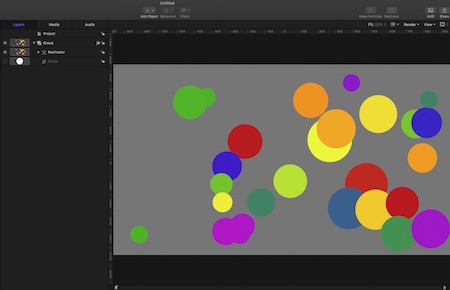
(replace dot=face)
… spacey idea …
JuG01 wrote: … tell the person where the center of the face is, the software adds a vignette mask and cuts out everything that is then black. For each person I want about lets say 40-50 pictures,…
…wot?? :blink:
The center of a face/head is about between the eyes … in any face.
plus, we humans tend to 'focus' on the eyes of person...
That was the concept of 1985 (gosh, I'm so old!) Godley&Cream's famous video 'Cry'
You can adjust the heads in post (create a layover with two dots = zoom, position, rotation of eyes) or while shooting …
But why 50 mostly identical shots??? Diff. face expressions/moods?
And: you want a software to 'cut out' just the face … automatically? No way (yet), young Skywalker!
No 'make a wish'-button … (charming idea, Ben :lol: ) … demands plain craftsmanship...
Plus that 'floating'-thing cries for Motion…
Seriously: some (how many?) 'graphics', changing its appearance 50x, and floating around the screen - no rocket-science
(replace dot=face)
… spacey idea …
Please Log in to join the conversation.
19 Jun 2017 05:38 #88852
by JuG01
Replied by JuG01 on topic Faces floating around in movie
Okay, I am sorry, I kind of explained it really badly.
I just put the workhours in it today... Took quite a while but I think I can get where I want to.
So yes your graphic shows pretty much what I want. However, the faces are from like ten year ago to now, so you see (its about young people) how they change a lot...
I did it all in FCP X now, think it went pretty well.
I have now all the peoples faces evolving and now I only have to put them into a new project where I will arrange them (A little bit scared whether my MacBook Air can handle that...)
I was thinking about the photos app which can show you just the face, but doesn't let you export it like that...
(An btw the face recognition is pretty good, so they technically could do something I was fantasizing about.)
(Also I meant: tell the software where the center of the face is, the software adds ...)
Thanks anyway!
I just put the workhours in it today... Took quite a while but I think I can get where I want to.
So yes your graphic shows pretty much what I want. However, the faces are from like ten year ago to now, so you see (its about young people) how they change a lot...
I did it all in FCP X now, think it went pretty well.
I have now all the peoples faces evolving and now I only have to put them into a new project where I will arrange them (A little bit scared whether my MacBook Air can handle that...)
I was thinking about the photos app which can show you just the face, but doesn't let you export it like that...
(An btw the face recognition is pretty good, so they technically could do something I was fantasizing about.)
(Also I meant: tell the software where the center of the face is, the software adds ...)
Thanks anyway!
Please Log in to join the conversation.
