


- Posts: 4
- Thank you received: 0
3 Post Moderation Rule for New Boarders (25 Jan 2021)
New boarders will have their posts moderated - Don't worry if you cannot see your post immediately.
Need Help loading Projects (.fcpproject) files
02 Jun 2017 00:48 #88542
by Aye
Need Help loading Projects (.fcpproject) files was created by Aye
Hi. I am a complete novice with Final Cut and I think I may have phuked up something massively with a project by moving a bunch of folders, deleting, and then undeleting several items. If anybody can assist me or at least answer if there is a solution I'd appreciate it.
Roughly speaking. I had an old project that I was titled 'New Project' (because I never new anything about how to save or anything or what was going on). I Updated the project and events on my computer. the 1st run of everything goes well. it asks me to delete the old files I say yes and in the trash they are. The new version loads up fine.
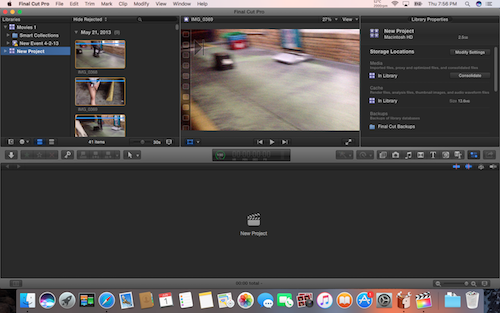
I then decide that "oh man this is taking up a lot of space on the Mac so I'll delete it and just do it form the external HD Im using instead." So I do the same thing with the files and update em through Final Cut and instead I save em this time. open up final Cut and it can't read ANY event (video file). Ok, "Whatever. I'll just load it all back from the computer and do it directly from the Mac HD." I move everything back to Mac HD and I go to update the files and it says there are none to update. understandable. I have moved and done em 2 or 3 times. however, loading up Final Cut pro the project area says "New Project". Now there was 1 video that didn't load before but everything else loaded up fine before. I was going to replace the red area with different video but then the entire project part was was gone all the music edits video cut although the video and music track where still in the side. :S
So I tirelessly tried to correct this by moving and merging the various folders until they've been jumbled into a random mesh of folders/files in my 'Movie' directory and clicking on the different new .fcpbundle files. None of them load the anything in project area now and even when I manage to get an older folder to update that produces no different result. I though I there might be some way to load the file labeled 'CurrentProject.fcpproject' but you can't. I'm completely lost. I don't know how to fix this or if it is fixable, Ideas are appreciated.
Thanks. -Ayé
Roughly speaking. I had an old project that I was titled 'New Project' (because I never new anything about how to save or anything or what was going on). I Updated the project and events on my computer. the 1st run of everything goes well. it asks me to delete the old files I say yes and in the trash they are. The new version loads up fine.
I then decide that "oh man this is taking up a lot of space on the Mac so I'll delete it and just do it form the external HD Im using instead." So I do the same thing with the files and update em through Final Cut and instead I save em this time. open up final Cut and it can't read ANY event (video file). Ok, "Whatever. I'll just load it all back from the computer and do it directly from the Mac HD." I move everything back to Mac HD and I go to update the files and it says there are none to update. understandable. I have moved and done em 2 or 3 times. however, loading up Final Cut pro the project area says "New Project". Now there was 1 video that didn't load before but everything else loaded up fine before. I was going to replace the red area with different video but then the entire project part was was gone all the music edits video cut although the video and music track where still in the side. :S
So I tirelessly tried to correct this by moving and merging the various folders until they've been jumbled into a random mesh of folders/files in my 'Movie' directory and clicking on the different new .fcpbundle files. None of them load the anything in project area now and even when I manage to get an older folder to update that produces no different result. I though I there might be some way to load the file labeled 'CurrentProject.fcpproject' but you can't. I'm completely lost. I don't know how to fix this or if it is fixable, Ideas are appreciated.
Thanks. -Ayé
Please Log in to join the conversation.
- Tom Wolsky
-

- Offline
- Moderator
-

02 Jun 2017 06:45 #88549
by Tom Wolsky
Replied by Tom Wolsky on topic Need Help loading Projects (.fcpproject) files
Not sure I can help, but what version are you using? Pre-10.1?
Please Log in to join the conversation.
02 Jun 2017 18:24 #88555
by Aye
Replied by Aye on topic Need Help loading Projects (.fcpproject) files
Hey thanks. I was using version 10.0.6 and switched to 10.2. I hadn't touched the project in over 2 years when the update stopped my version from working.
Please Log in to join the conversation.
02 Jun 2017 18:33 #88558
by Aye
Replied by Aye on topic Need Help loading Projects (.fcpproject) files
Please Log in to join the conversation.
- Tom Wolsky
-
- Offline
- Moderator
-
03 Jun 2017 05:41 #88563
by Tom Wolsky
Replied by Tom Wolsky on topic Need Help loading Projects (.fcpproject) files
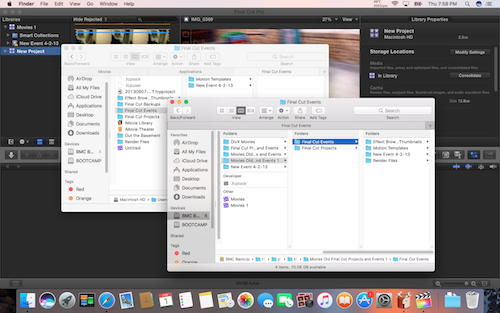
This is pre-10.1 content but it looks like it may be in the wrong location. It has to be updated to libraries.
Read about updating this content here
www.fcpxbook.com/updates/101/101libraries.html
Read about updating this content here
www.fcpxbook.com/updates/101/101libraries.html
Please Log in to join the conversation.
06 Jun 2017 17:45 #88632
by Aye
Replied by Aye on topic Need Help loading Projects (.fcpproject) files
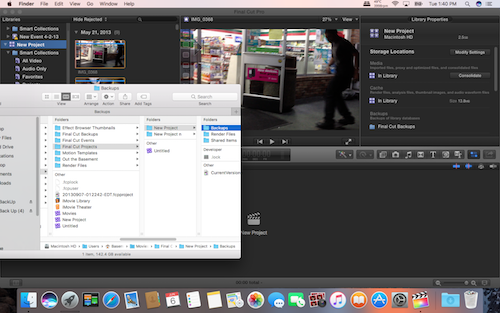
I tried to correct the folder path but I'm unsure how it's supposed to be.
Please Log in to join the conversation.
- Tom Wolsky
-
- Offline
- Moderator
-
06 Jun 2017 18:02 #88633
by Tom Wolsky
Replied by Tom Wolsky on topic Need Help loading Projects (.fcpproject) files
THE link I posted explains the location of where the Final Cut Events and Final Cut Projects folders need to be so that they can be updated in 10.2.
Try to make a screenshot of part of the screen. The image resolution of the fullscreen image is too low to be legible.
Try to make a screenshot of part of the screen. The image resolution of the fullscreen image is too low to be legible.
Please Log in to join the conversation.
