- Posts: 19
- Thank you received: 1
3 Post Moderation Rule for New Boarders (25 Jan 2021)
New boarders will have their posts moderated - Don't worry if you cannot see your post immediately.
I'm stupid : How do I "repair" a blade cut ?
- milesdavis100
-
 Topic Author
- Offline
- New Member
-

Less
More
24 May 2017 00:15 #88281
by milesdavis100
I'm stupid : How do I "repair" a blade cut ? was created by milesdavis100
Hi !
FOr some reason I cant figure this out ...
say I have a clip and I put a blade cut in it , but then I decide I no longer want that cut and I want to restore that section so it is back connected with the main clip .... how do I do it ??
Someone had suggested the "Trim" tool -- but I then have to kinda pull the cut all the way to the start of the clip and that doesnt work if there is another blade cut ....
isnt there just a simple way to "heal" or rejoin the two ??
Thanks!
FOr some reason I cant figure this out ...
say I have a clip and I put a blade cut in it , but then I decide I no longer want that cut and I want to restore that section so it is back connected with the main clip .... how do I do it ??
Someone had suggested the "Trim" tool -- but I then have to kinda pull the cut all the way to the start of the clip and that doesnt work if there is another blade cut ....
isnt there just a simple way to "heal" or rejoin the two ??
Thanks!
Please Log in to join the conversation.


24 May 2017 00:17 #88284
by JoeEditor
Replied by JoeEditor on topic I'm stupid : How do I "repair" a blade cut ?
1- Click the edit point to select it (either side).
2. Hit the Delete key.
2. Hit the Delete key.
Please Log in to join the conversation.
- milesdavis100
-
Topic Author
- Offline
- New Member
-
Less
More
- Posts: 19
- Thank you received: 1
24 May 2017 00:21 #88286
by milesdavis100
Replied by milesdavis100 on topic I'm stupid : How do I "repair" a blade cut ?
Hi -
Thanks for the quick reply...
so whenever I do that it just 'beeps' when you say select the edit point ...
using select, I click the end of the clip - the "handle" turns yellow on one side .... I click "delete"
it just beeps?
Am I using the wrong tool?
ps. speaking of delete, sorry for hte double post - how do I delete that post lol
Thanks for the quick reply...
so whenever I do that it just 'beeps' when you say select the edit point ...
using select, I click the end of the clip - the "handle" turns yellow on one side .... I click "delete"
it just beeps?
Am I using the wrong tool?
ps. speaking of delete, sorry for hte double post - how do I delete that post lol
Please Log in to join the conversation.
24 May 2017 00:27 - 24 May 2017 00:37 #88289
by JoeEditor
Replied by JoeEditor on topic I'm stupid : How do I "repair" a blade cut ?
This requires you have a cut, in the middle of a clip, with no media missing in the cut.
If you have two different clips next to each other, won't work.
If you have a single clip, you blade it, and trim or otherwise remove media at that edit point, won't work.
So, I'm not clear what you're doing exactly. You're doing more than just cutting a clip with the blade tool.
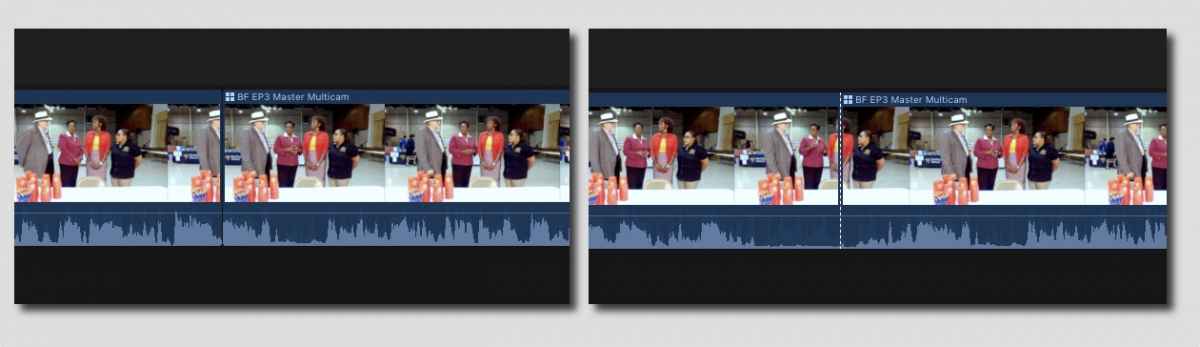
Here's the difference. On the left, media missing between the clips (solid line). On the right, a simple blade cut in a single clip (dotted line).
Not seeing the "Add File" button, will insert graphic in next post.
If you have two different clips next to each other, won't work.
If you have a single clip, you blade it, and trim or otherwise remove media at that edit point, won't work.
So, I'm not clear what you're doing exactly. You're doing more than just cutting a clip with the blade tool.
Here's the difference. On the left, media missing between the clips (solid line). On the right, a simple blade cut in a single clip (dotted line).
Not seeing the "Add File" button, will insert graphic in next post.
Last edit: 24 May 2017 00:37 by JoeEditor.
Please Log in to join the conversation.