


- Posts: 2
- Thank you received: 0
3 Post Moderation Rule for New Boarders (25 Jan 2021)
New boarders will have their posts moderated - Don't worry if you cannot see your post immediately.
Exedentlly overwright the original file
- martin.ingerby
-
 Topic Author
- Offline
- New Member
-

Less
More
20 May 2017 22:39 #88193
by martin.ingerby
Exedentlly overwright the original file was created by martin.ingerby
Hi,
Im totally new at FCP (10.3). So me and my students (im a teacher) have done this film and im edeting in FCP. The move was done and I saved it down to one file to put subtitles on it. after a few hours I was done and was about to save it down when I got the question if I wanted to overwright the other file with the same name. Ok this is the version I want some I pressed yes and secounds later I realizedthat I overwrighted the original files so now I onley have red "missing file" everywere.
Is it possible to save it some how?
Thanks for your help.
Martin
Im totally new at FCP (10.3). So me and my students (im a teacher) have done this film and im edeting in FCP. The move was done and I saved it down to one file to put subtitles on it. after a few hours I was done and was about to save it down when I got the question if I wanted to overwright the other file with the same name. Ok this is the version I want some I pressed yes and secounds later I realizedthat I overwrighted the original files so now I onley have red "missing file" everywere.
Is it possible to save it some how?
Thanks for your help.
Martin
Please Log in to join the conversation.
- Karsten Schlüter
-

- Offline
- Moderator
-

Less
More
- Posts: 3790
- Thank you received: 718
21 May 2017 03:20 #88199
by Karsten Schlüter
hopefully not for English ... SCNR!!!
(I guess, we should blame autocorrect …)
Welcome, Martin, to fcp.co …
a bit confusing your description - you can 'overwrite' only on Share aka Export a project. That keeps sources, for sure, untouched. And if sources are missing aka Red Frames, you can not export … <scratching head>
So, if media is missing in the Event Browser, simply re-connect your media … you do have an archive or at last a backup of your sources? Don't you? …
Replied by Karsten Schlüter on topic Exedentlly overwright the original file
martin.ingerby wrote: … (im a teacher) …
hopefully not for English ... SCNR!!!
(I guess, we should blame autocorrect …)
Welcome, Martin, to fcp.co …
a bit confusing your description - you can 'overwrite' only on Share aka Export a project. That keeps sources, for sure, untouched. And if sources are missing aka Red Frames, you can not export … <scratching head>
So, if media is missing in the Event Browser, simply re-connect your media … you do have an archive or at last a backup of your sources? Don't you? …
Please Log in to join the conversation.


21 May 2017 13:48 - 21 May 2017 13:51 #88211
by JoeEditor
Replied by JoeEditor on topic Exedentlly overwright the original file
"That keeps sources, for sure, untouched." Not always true, done this, been there, got the t-shirt.
IF you imported with "Leave In Place" checked, yes, you could have overwritten your original. In which case, you can find a data recovery application. And most of the time those won't recover what you need. About a year ago I accidentally, not paying attention, did this same thing. Yes, you CAN in fact overwrite an original file.
Techno-bable;
When you delete a file (overwrite it, trash it, etc) it is not really erased. All that happens is the directory on that drive changes it's database to show those sectors and blocks that used the file are now available to write to.
Problem is, especially if this is your system drive, your computer writes hidden, temporary working files all the time to the hard drive. And the new file may have also used some of those sectors and blocks the original file was stored on.
Yes, it can happen, and you simply have to be on your toes. Be aware if you imported "Leave In Place" or "Copy To Library". Be aware of where your original media is. NEVER export a Timeline with the same name as something you imported.
I doubt you'll get that original back from your own hard drive if you did in fact overwrite it.
IF you imported with "Leave In Place" checked, yes, you could have overwritten your original. In which case, you can find a data recovery application. And most of the time those won't recover what you need. About a year ago I accidentally, not paying attention, did this same thing. Yes, you CAN in fact overwrite an original file.
Techno-bable;
When you delete a file (overwrite it, trash it, etc) it is not really erased. All that happens is the directory on that drive changes it's database to show those sectors and blocks that used the file are now available to write to.
Problem is, especially if this is your system drive, your computer writes hidden, temporary working files all the time to the hard drive. And the new file may have also used some of those sectors and blocks the original file was stored on.
Yes, it can happen, and you simply have to be on your toes. Be aware if you imported "Leave In Place" or "Copy To Library". Be aware of where your original media is. NEVER export a Timeline with the same name as something you imported.
I doubt you'll get that original back from your own hard drive if you did in fact overwrite it.
Last edit: 21 May 2017 13:51 by JoeEditor.
Please Log in to join the conversation.
- martin.ingerby
-
Topic Author
- Offline
- New Member
-
Less
More
- Posts: 2
- Thank you received: 0
21 May 2017 14:05 #88214
by martin.ingerby
Replied by martin.ingerby on topic Exedentlly overwright the original file
After a few hours searching I found the library that I had on an extern hard disk (I thought that was lost). The thing was that I had saved the film without subtitles. Then the library I thought I used didn't work. So I was so happy that I exported the film before I lost the library. Then I was going to put subtitles on it and when I was done I exported it but exedentely overweighted the original file.
But I'm so happy that I was able to salve the issue. Thanks for your time anyway. M
But I'm so happy that I was able to salve the issue. Thanks for your time anyway. M
Please Log in to join the conversation.
- Karsten Schlüter
-
- Offline
- Moderator
-
Less
More
- Posts: 3790
- Thank you received: 718
21 May 2017 17:19 - 21 May 2017 17:21 #88225
by Karsten Schlüter
been there, tried that, no shirt at all:
• saved some clip on my Desktop
• import with 'Leave file in place'
• Share... :
you have to [strike]maliciously[/strike] manually choose that drive, that folder.
on Share, the preset name is the Projects name! So you have to give the export file manually exact name of imported file...
when all perfectly set, FCPX starts to export … until:
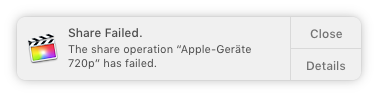
hmmm?
for _me_ it is impossible BY SHARING a Project to overwrite a SOURCE clip...
anyhow …
meanwhile Martin has found his precious …
Replied by Karsten Schlüter on topic Exedentlly overwright the original file
FCPX.guru wrote: "That keeps sources, for sure, untouched." Not always true, done this, been there, got the t-shirt.
IF you imported with "Leave In Place" checked, yes, you could have overwritten your original. ….
been there, tried that, no shirt at all:
• saved some clip on my Desktop
• import with 'Leave file in place'
• Share... :
you have to [strike]maliciously[/strike] manually choose that drive, that folder.
on Share, the preset name is the Projects name! So you have to give the export file manually exact name of imported file...
when all perfectly set, FCPX starts to export … until:
hmmm?
for _me_ it is impossible BY SHARING a Project to overwrite a SOURCE clip...
anyhow …
meanwhile Martin has found his precious …
Last edit: 21 May 2017 17:21 by Karsten Schlüter.
Please Log in to join the conversation.
22 May 2017 02:15 #88230
by JoeEditor
Replied by JoeEditor on topic Exedentlly overwright the original file
I've done it, more than once, just did it on purpose again to test. Never seen that error message. Though I wish I did.
Please Log in to join the conversation.
