


- Posts: 187
- Thank you received: 10
3 Post Moderation Rule for New Boarders (25 Jan 2021)
New boarders will have their posts moderated - Don't worry if you cannot see your post immediately.
What are FcpX renders made off ?
20 May 2017 11:09 #88177
by Stu Wart
What are FcpX renders made off ? was created by Stu Wart
Could we manage the render files like we use to in Fcp7... like save them, import them
those strange 0- 1023 files have the ProRes inside but no way to encapsulate them into a propper .mov
those strange 0- 1023 files have the ProRes inside but no way to encapsulate them into a propper .mov
Please Log in to join the conversation.
- Tom Wolsky
-

- Offline
- Moderator
-

20 May 2017 18:56 #88191
by Tom Wolsky
Replied by Tom Wolsky on topic What are FcpX renders made off ?
Could you explain a bit about what you mean? What were you doing in legacy FCP?
Please Log in to join the conversation.
20 May 2017 22:43 #88194
by Stu Wart
Replied by Stu Wart on topic What are FcpX renders made off ?
well, in Fcp 7, you could identify the render file and treat it as any .mov. ( I guess you remember that since you worked yourself on that sofware at early stage 
so in case of an "costly" (in time) render you wanted to secure without the hazzle of exporting it was just a matter of grabing it !
so in case of an "costly" (in time) render you wanted to secure without the hazzle of exporting it was just a matter of grabing it !
Please Log in to join the conversation.


20 May 2017 23:01 #88196
by JoeEditor
Replied by JoeEditor on topic What are FcpX renders made off ?
Legacy FCP couldn't import "render files", as in rendering the Timeline for playback.
Please Log in to join the conversation.
20 May 2017 23:23 #88197
by Stu Wart
yes it could ! just dragging & dropping from the " Video Renders" location. Used to do it in times of renders prone to "be gone" without a warning
Replied by Stu Wart on topic What are FcpX renders made off ?
FCPX.guru wrote: Legacy FCP couldn't import "render files", as in rendering the Timeline for playback.
yes it could ! just dragging & dropping from the " Video Renders" location. Used to do it in times of renders prone to "be gone" without a warning
Please Log in to join the conversation.
- ronny courtens
-

- Offline
- Moderator
-
Less
More
- Posts: 4455
- Thank you received: 962
21 May 2017 07:21 #88205
by ronny courtens
Replied by ronny courtens on topic What are FcpX renders made off ?
Yes, legacy FCP did save its render files as regular QT movies. You could play these files in QT player, you could even take them out of the render folder and put them back as regular clips into the FCP timeline.
The only time I have seen a practical use for this was when someone accidentally deleted some original media files because they had been messing around in their scratch folders. And, of course, they did not have any backups of the media. In that particular case we have been able to restore their project by simply dragging the render files back into the timeline so we could reconstruct the edit and export the video. But this was a highly exceptional case.
The major drawback of saving render files as video files was that every render file was a recompressed version of the original video. This quickly led to picture degradation after multiple render generations, especially when working with compressed media. I guess that's why Apple abandoned QT for the much better AV/Foundation.
Render files in FCP X are just text files with an XML plist that describe the changes made in the AV/Foundation clip metadata. So no, you cannot re-use FCP X render files as clips. Nor is there any need for this.
- Ronny
The only time I have seen a practical use for this was when someone accidentally deleted some original media files because they had been messing around in their scratch folders. And, of course, they did not have any backups of the media. In that particular case we have been able to restore their project by simply dragging the render files back into the timeline so we could reconstruct the edit and export the video. But this was a highly exceptional case.
The major drawback of saving render files as video files was that every render file was a recompressed version of the original video. This quickly led to picture degradation after multiple render generations, especially when working with compressed media. I guess that's why Apple abandoned QT for the much better AV/Foundation.
Render files in FCP X are just text files with an XML plist that describe the changes made in the AV/Foundation clip metadata. So no, you cannot re-use FCP X render files as clips. Nor is there any need for this.
- Ronny
Please Log in to join the conversation.

21 May 2017 11:00 #88207
by joema
Ronny, thanks for the interesting background. Are you sure that FCPX render files, ie render cache, are just text files? If so why does the project characteristics state render format is ProRes 422 by default? The render cache -- what the OP refers to as 0-1023 files -- appear very large. These are in Cache.fcpcache>Render Files>High Quality Data.
It's true the actual edit directives themselves are apparently stored in the Library in CurrentVersion.fcpevent, and they are very small. Examination of that with a hex viewer shows various SQL database calls to set up the schema, lists of any applied effects, and making edits on the timeline causes small changes to this file.
Replied by joema on topic What are FcpX renders made off ?
ronny courtens wrote: Yes, legacy FCP did save its render files as regular QT movies.... This quickly led to picture degradation after multiple render generations, especially when working with compressed media. I guess that's why Apple abandoned QT for the much better AV/Foundation....Render files in FCP X are just text files with an XML plist that describe the changes made in the AV/Foundation clip metadata. So no, you cannot re-use FCP X render files as clips. ...
Ronny, thanks for the interesting background. Are you sure that FCPX render files, ie render cache, are just text files? If so why does the project characteristics state render format is ProRes 422 by default? The render cache -- what the OP refers to as 0-1023 files -- appear very large. These are in Cache.fcpcache>Render Files>High Quality Data.
It's true the actual edit directives themselves are apparently stored in the Library in CurrentVersion.fcpevent, and they are very small. Examination of that with a hex viewer shows various SQL database calls to set up the schema, lists of any applied effects, and making edits on the timeline causes small changes to this file.
Please Log in to join the conversation.
21 May 2017 14:38 #88217
by JoeEditor
Replied by JoeEditor on topic What are FcpX renders made off ?
There's more to it than a simple XML .plist file. There's the "Frames X-X" file, which can get sizable. This one is 97.1MB for a Timeline that is only 35 seconds long.
I deleted all Library render files (both in File menu and manually verified inside Library package). Then I rendered only one Timeline. Here's what I find when I look inside that Library package.
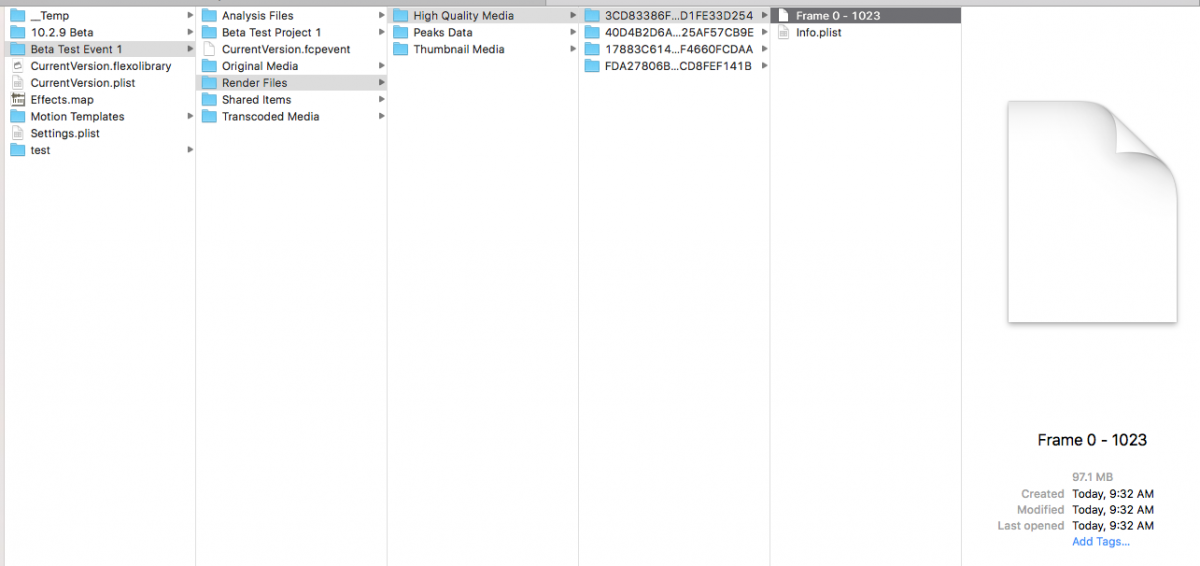
I deleted all Library render files (both in File menu and manually verified inside Library package). Then I rendered only one Timeline. Here's what I find when I look inside that Library package.
Please Log in to join the conversation.
21 May 2017 15:10 - 21 May 2017 15:11 #88221
by JoeEditor
Replied by JoeEditor on topic What are FcpX renders made off ?
Another example using a 30 minute long TV show. Again, verified all render files for this Library were deleted. Rendered out one single 30 minute long Project Timeline. The "High Quality" render folder is now 23.24GB. That's not simply an XML database. There are specially encoded files in there. Lots of them. That eat up a lot of space. FYI, an exported ProRes file is 24.45GB, slightly larger than the render files. So this is more than just "text files", they're very specially encoded video files, IMHO.
Last edit: 21 May 2017 15:11 by JoeEditor.
Please Log in to join the conversation.
- ronny courtens
-
- Offline
- Moderator
-
Less
More
- Posts: 4455
- Thank you received: 962
21 May 2017 15:50 #88222
by ronny courtens
Replied by ronny courtens on topic What are FcpX renders made off ?
Sometimes I over-simplify a reply when I feel that giving more details does not add anything useful to the post.
- The frame files inside the cache folders are AV/Foundation instructions that compose every aspect of the render file. These files can become very big.
- The .plist file is the XML reference for the render file. You can check the contents of it by changing the .plist extension to .txt and opening the file in Text Editor. These files are very small. When you look at the XML file you will see that this is where the codec and color space of the render file are specified (under <string>FFRenderProps).
There is nothing that anyone here can really do with this information, and that's why I simplified it in my initial reply. The OP just wanted to know if you can use FCP X render files as clips, like you could do with FCP render files. The simple answer is "no".
- Ronny
- The frame files inside the cache folders are AV/Foundation instructions that compose every aspect of the render file. These files can become very big.
- The .plist file is the XML reference for the render file. You can check the contents of it by changing the .plist extension to .txt and opening the file in Text Editor. These files are very small. When you look at the XML file you will see that this is where the codec and color space of the render file are specified (under <string>FFRenderProps).
There is nothing that anyone here can really do with this information, and that's why I simplified it in my initial reply. The OP just wanted to know if you can use FCP X render files as clips, like you could do with FCP render files. The simple answer is "no".
- Ronny
Please Log in to join the conversation.
21 May 2017 16:04 - 21 May 2017 16:07 #88223
by JoeEditor
Replied by JoeEditor on topic What are FcpX renders made off ?
.plist will open in Text Editor without changing anything, FYI. Also, you can see its contents with QuickView (space bar).
But no, you can't do anything with FCPX render files but create them and destroy them in a fiery maelstrom of death. No, with the File menu, that's what I meant.
But no, you can't do anything with FCPX render files but create them and destroy them in a fiery maelstrom of death. No, with the File menu, that's what I meant.
Last edit: 21 May 2017 16:07 by JoeEditor.
Please Log in to join the conversation.
21 May 2017 20:49 #88227
by Stu Wart
Replied by Stu Wart on topic What are FcpX renders made off ?
ok, my original demand was about use those renders in case of problems.
so... impossible to get the video from them...
last thing... FcpX itself has a way to convert them into video, so there is a way... well hidden inside Fcp
so... impossible to get the video from them...
last thing... FcpX itself has a way to convert them into video, so there is a way... well hidden inside Fcp
Please Log in to join the conversation.
21 May 2017 21:42 #88228
by joema
I personally think they may be video -- that's why you can select a specific render format such as ProRes 422, 4444, or uncompressed 10-bit under custom settings when creating a new project. When you select the larger formats the render cache gets bigger in expected ratio to the less dense encoding. Converting from a symbolic format to video at high resolution and frame rate would be almost impossible, so FCPX is likely reading the fully rendered video file from cache. However there is no exposed method of manually using those render files -- in that sense it's a moot point.
Ideally the product should be so refined that we never need to delve into the library, but there are cases such as proxy management where we sometimes do it. The problem is the internal library format is undocumented and manual manipulation is not a supported action.
Replied by joema on topic What are FcpX renders made off ?
Stu Wart wrote: ... FcpX itself has a way to convert them into video, so there is a way... well hidden inside Fcp....
I personally think they may be video -- that's why you can select a specific render format such as ProRes 422, 4444, or uncompressed 10-bit under custom settings when creating a new project. When you select the larger formats the render cache gets bigger in expected ratio to the less dense encoding. Converting from a symbolic format to video at high resolution and frame rate would be almost impossible, so FCPX is likely reading the fully rendered video file from cache. However there is no exposed method of manually using those render files -- in that sense it's a moot point.
Ideally the product should be so refined that we never need to delve into the library, but there are cases such as proxy management where we sometimes do it. The problem is the internal library format is undocumented and manual manipulation is not a supported action.
Please Log in to join the conversation.
22 May 2017 02:14 #88229
by JoeEditor
Replied by JoeEditor on topic What are FcpX renders made off ?
"FcpX itself has a way to convert them into video, so there is a way."
No, macOS does the work, it is all inside the macOS universal A/VFoundation. So, technically speaking, it is the OS that does it, not the App. The App only request the OS to do it.
No, macOS does the work, it is all inside the macOS universal A/VFoundation. So, technically speaking, it is the OS that does it, not the App. The App only request the OS to do it.
Please Log in to join the conversation.
22 May 2017 07:59 #88232
by Stu Wart
True that, but the fact that you can't " get you finger" into you library is to avoid uncle Henry to mess with it...
but Apple knows the avanced user will click "Show package content"
about the other thing.... ok, the OS does the job, not the app. So by the same token... if the OS can do it ... there is a way. Have you noticed that the Info.plist open up with XTools ? (wich corroborate what you say)
I concede that diving into that thing it's mostly passionate commitment
Replied by Stu Wart on topic What are FcpX renders made off ?
joema wrote:
Ideally the product should be so refined that we never need to delve into the library, but there are cases such as proxy management where we sometimes do it. The problem is the internal library format is undocumented and manual manipulation is not a supported action.
True that, but the fact that you can't " get you finger" into you library is to avoid uncle Henry to mess with it...
but Apple knows the avanced user will click "Show package content"
about the other thing.... ok, the OS does the job, not the app. So by the same token... if the OS can do it ... there is a way. Have you noticed that the Info.plist open up with XTools ? (wich corroborate what you say)
I concede that diving into that thing it's mostly passionate commitment
Please Log in to join the conversation.
22 May 2017 17:31 - 22 May 2017 17:32 #88239
by lichinho
Some plist files are text files, some are binary. The default program to open plist files is XCode, when it is installed. It can open both types of plist files.
The ones that are text can be opened with any text editor you like - just control-click, open with and choose whatever you like (Smultron, BBEdit, TextEdit...)
Replied by lichinho on topic What are FcpX renders made off ?
Stu Wart wrote:
about the other thing.... ok, the OS does the job, not the app. So by the same token... if the OS can do it ... there is a way. Have you noticed that the Info.plist open up with XTools ? (wich corroborate what you say)
Some plist files are text files, some are binary. The default program to open plist files is XCode, when it is installed. It can open both types of plist files.
The ones that are text can be opened with any text editor you like - just control-click, open with and choose whatever you like (Smultron, BBEdit, TextEdit...)
Last edit: 22 May 2017 17:32 by lichinho.
Please Log in to join the conversation.
