


- Posts: 13
- Thank you received: 0
3 Post Moderation Rule for New Boarders (25 Jan 2021)
New boarders will have their posts moderated - Don't worry if you cannot see your post immediately.
Do effects come in different resolution? 1080vs4k?
20 May 2017 00:17 #88172
by yalag
Do effects come in different resolution? 1080vs4k? was created by yalag
I am trying out a few effects from different companies, like pixel film studios or mlooks. They are basically filter in the photos world, just gives you a look.
But in FCPX I noticed a new option that is a checkbox for 4k. And it seems like none of these effects are 4k. Do effects have a resolution to themselves? If I use a non 4k effect on a 4k project, what happens?
But in FCPX I noticed a new option that is a checkbox for 4k. And it seems like none of these effects are 4k. Do effects have a resolution to themselves? If I use a non 4k effect on a 4k project, what happens?
Please Log in to join the conversation.
- Andreas Kiel
-

- Offline
- Platinum Member
-

Less
More
- Posts: 1077
- Thank you received: 189
20 May 2017 08:47 #88174
by Andreas Kiel
Replied by Andreas Kiel on topic Do effects come in different resolution? 1080vs4k?
Difficult to answer.
There might 4k res or whatever res effects .
To figure out the rule of thumb is: if the effects contains pixel based media these media might fulfill requirements for 4k or not.
If there are no media, the effect probably is resolution independent.
In case there are it's pretty obvious what they are.
The issue though is how they show up in FCP.
It's up to the vendor/creator to flag a effect as 4k or not.
If you feel save with XML you can edit the Motion XML and modify - or edit in Motion itself.
- Andreas
There might 4k res or whatever res effects .
To figure out the rule of thumb is: if the effects contains pixel based media these media might fulfill requirements for 4k or not.
If there are no media, the effect probably is resolution independent.
In case there are it's pretty obvious what they are.
The issue though is how they show up in FCP.
It's up to the vendor/creator to flag a effect as 4k or not.
If you feel save with XML you can edit the Motion XML and modify - or edit in Motion itself.
- Andreas
Please Log in to join the conversation.
21 May 2017 06:09 #88202
by yalag
Replied by yalag on topic Do effects come in different resolution? 1080vs4k?
Is there a way to tell if it contains pixel based media?
Please Log in to join the conversation.
- Karsten Schlüter
-

- Offline
- Moderator
-

Less
More
- Posts: 3790
- Thank you received: 718
21 May 2017 06:45 #88204
by Karsten Schlüter
In case the plugin is Motion made:
when you go into the Motion Templates Folder in Finder, any plugin has a 'Media' folder - if it contains any files, those are pixel based.
… but it doesn't tell you, wether the plugin is made for 4k …
And: plugins made with the pluginSDK are 'hidden' somewhere somehow on your drive…
So, I bet, fastest & easiest way to find out wether it works in 4k: just try
Replied by Karsten Schlüter on topic Do effects come in different resolution? 1080vs4k?
yalag wrote: Is there a way to tell if it contains pixel based media?
In case the plugin is Motion made:
when you go into the Motion Templates Folder in Finder, any plugin has a 'Media' folder - if it contains any files, those are pixel based.
… but it doesn't tell you, wether the plugin is made for 4k …
And: plugins made with the pluginSDK are 'hidden' somewhere somehow on your drive…
So, I bet, fastest & easiest way to find out wether it works in 4k: just try
Please Log in to join the conversation.

21 May 2017 14:49 #88218
by JoeEditor
Replied by JoeEditor on topic Do effects come in different resolution? 1080vs4k?
If it is just an effect, it's resolution independent (blur, coloring, etc don't care what resolution you're using).
If it contains, or is media (such as titles with graphics, or something like MotionVFX's Fog), it is resolution dependent.
If it contains, or is media (such as titles with graphics, or something like MotionVFX's Fog), it is resolution dependent.
Please Log in to join the conversation.
23 May 2017 02:31 - 23 May 2017 03:41 #88245
by yalag
Sorry but how do I just try? The effect will be applied regardless no? I just cant tell whether it will degrade the quality?
Replied by yalag on topic Do effects come in different resolution? 1080vs4k?
Karsten Schlüter wrote: //fullquote//
Sorry but how do I just try? The effect will be applied regardless no? I just cant tell whether it will degrade the quality?
Last edit: 23 May 2017 03:41 by Karsten Schlüter. Reason: please avoid full quotes
Please Log in to join the conversation.
- Karsten Schlüter
-
- Offline
- Moderator
-
Less
More
- Posts: 3790
- Thank you received: 718
23 May 2017 03:42 #88247
by Karsten Schlüter
if you can't tell a difference, quality is probably not affected?
Replied by Karsten Schlüter on topic Do effects come in different resolution? 1080vs4k?
yalag wrote: … I just cant tell whether it will degrade the quality?
if you can't tell a difference, quality is probably not affected?
Please Log in to join the conversation.
23 May 2017 03:45 #88248
by yalag
I can't tell the difference in one frame doesnt mean it wont show in another. Why can't there be a way to know if it is just an effect or it has media like the other poster as said
Replied by yalag on topic Do effects come in different resolution? 1080vs4k?
Karsten Schlüter wrote:
yalag wrote: … I just cant tell whether it will degrade the quality?
if you can't tell a difference, quality is probably not affected?
I can't tell the difference in one frame doesnt mean it wont show in another. Why can't there be a way to know if it is just an effect or it has media like the other poster as said
Please Log in to join the conversation.
- Karsten Schlüter
-
- Offline
- Moderator
-
Less
More
- Posts: 3790
- Thank you received: 718
23 May 2017 03:56 #88251
by Karsten Schlüter
I told you above, have a look in the MedIa folder of the effect - at last it can tell you if there are NO pixel-bases media.
If there ARE pixel-based media doesn't necessarily mean quality-degradation …
'quality' discussions can soon get academic, the zen-thing comes to mind, falling tree/nobody there to listen/noise, you know?
Replied by Karsten Schlüter on topic Do effects come in different resolution? 1080vs4k?
yalag wrote: … Why can't there be a way to know if it is just an effect or it has media like the other poster as said
I told you above, have a look in the MedIa folder of the effect - at last it can tell you if there are NO pixel-bases media.
If there ARE pixel-based media doesn't necessarily mean quality-degradation …
'quality' discussions can soon get academic, the zen-thing comes to mind, falling tree/nobody there to listen/noise, you know?
Please Log in to join the conversation.
23 May 2017 04:00 - 23 May 2017 04:06 #88252
by yalag
Ok thanks, I right clicked it and reveal in folder, it only has one .moef file. I guess that means theres no pixel based media?
Replied by yalag on topic Do effects come in different resolution? 1080vs4k?
Karsten Schlüter wrote: … have a look in the MedIa folder of the effect - at last it can tell you if there are NO pixel-bases media.…
Ok thanks, I right clicked it and reveal in folder, it only has one .moef file. I guess that means theres no pixel based media?
Last edit: 23 May 2017 04:06 by Karsten Schlüter. Reason: please avoid full qoutes
Please Log in to join the conversation.
- Karsten Schlüter
-
- Offline
- Moderator
-
Less
More
- Posts: 3790
- Thank you received: 718
23 May 2017 04:07 #88254
by Karsten Schlüter
most probably yes …
Replied by Karsten Schlüter on topic Do effects come in different resolution? 1080vs4k?
yalag wrote: … guess that means theres no pixel based media?
most probably yes …
Please Log in to join the conversation.
23 May 2017 21:16 #88278
by JoeEditor
Replied by JoeEditor on topic Do effects come in different resolution? 1080vs4k?
If you can find it in the Finder, double-click it and open it in Motion. Look, are there any layers that have physical material: photo, shape, generator, emitter, replicator, video? If not, you're good. I've made effects that contain media. Rare, but done.
Can you tell us the specific name of this effect and the company it is from? We can look it up and see.
Can you tell us the specific name of this effect and the company it is from? We can look it up and see.
Please Log in to join the conversation.
29 May 2017 06:47 #88419
by Axel
Replied by Axel on topic Do effects come in different resolution? 1080vs4k?
I also noticed this 4k only checkbox only recently, and I think it's relatively new. 90% of all native FCP X effects remain. None-4k-effects (i.e. subway shadows, don't know the english name, literally translated from german) will not render a preview. All fsorvin-effects disappear. Dashwood just leaves the Dead Pixel Finder. Photon Pro is gone (Neat still available). mLut gone.
Please Log in to join the conversation.
- Karsten Schlüter
-
- Offline
- Moderator
-
Less
More
- Posts: 3790
- Thank you received: 718
29 May 2017 07:54 - 29 May 2017 08:18 #88420
by Karsten Schlüter
[strike]hmm, no?
and: where do I find this '4k' checkbox??[/strike]
==edited==
read replies below…
Replied by Karsten Schlüter on topic Do effects come in different resolution? 1080vs4k?
Axel wrote: …Photon Pro is gone ….
[strike]hmm, no?
and: where do I find this '4k' checkbox??[/strike]
==edited==
read replies below…
Last edit: 29 May 2017 08:18 by Karsten Schlüter. Reason: wrong info
Please Log in to join the conversation.
29 May 2017 08:12 #88421
by Axel
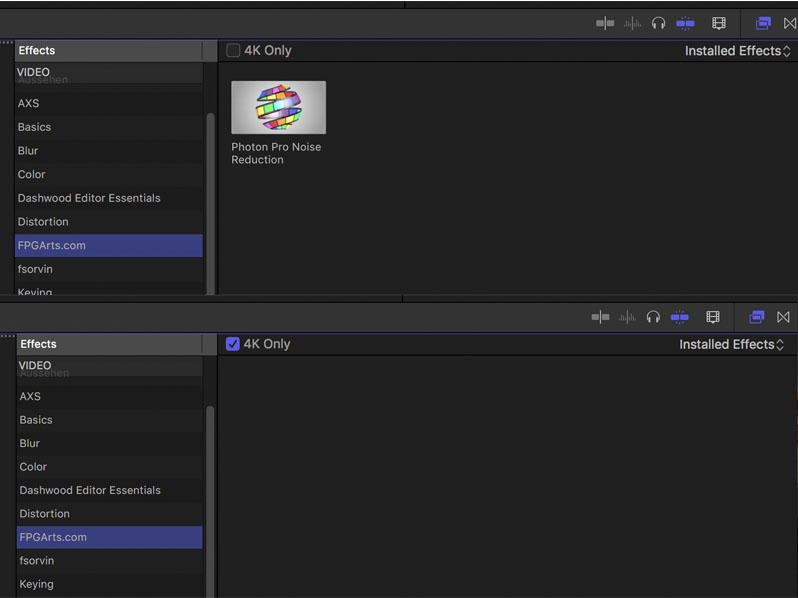
Replied by Axel on topic Do effects come in different resolution? 1080vs4k?
Karsten Schlüter wrote: ...and: where do I find this '4k' checkbox??
Please Log in to join the conversation.
- Andreas Kiel
-
- Offline
- Platinum Member
-
Less
More
- Posts: 1077
- Thank you received: 189
29 May 2017 08:14 #88422
by Andreas Kiel
Maybe that's a reason here for confusion.
Be sure to have 10.3.x, create a 4k project.
Click the Effects/Generators.
The "4K only" will be visible at top on the right side.
Hope it makes my first reply a bit clearer.
- Andreas
Replied by Andreas Kiel on topic Do effects come in different resolution? 1080vs4k?
and: where do I find this '4k' checkbox??
Maybe that's a reason here for confusion.
Be sure to have 10.3.x, create a 4k project.
Click the Effects/Generators.
The "4K only" will be visible at top on the right side.
Hope it makes my first reply a bit clearer.
- Andreas
Please Log in to join the conversation.
- Karsten Schlüter
-
- Offline
- Moderator
-
Less
More
- Posts: 3790
- Thank you received: 718
29 May 2017 08:16 #88423
by Karsten Schlüter
Replied by Karsten Schlüter on topic Do effects come in different resolution? 1080vs4k?
ahaaa!!
My mistake: applied a 4k clip to a 1080 Project = no 4k-checkbox!
thank you for teaching me new tricks… :whistle:
My mistake: applied a 4k clip to a 1080 Project = no 4k-checkbox!
thank you for teaching me new tricks… :whistle:
Please Log in to join the conversation.
