


- Posts: 80
- Thank you received: 5
3 Post Moderation Rule for New Boarders (25 Jan 2021)
New boarders will have their posts moderated - Don't worry if you cannot see your post immediately.
Audio Configuration , Mono Stereo in multichannel Audio
15 May 2017 09:22 #88056
by petersxs
Audio Configuration , Mono Stereo in multichannel Audio was created by petersxs
hi , i am working mostly Multicam recordings of theater & Shows , A lot with the Blackmagic Studio recorders .
We embed the Stereo Mix and all the Iso Mich on the 16 channels. resulting that some are more, some are stereo
In Fcp X i still didi not find a way to define that, only all mono or all stereo. interesting that there is a function
Split Stereo & mono . So it cam be done ! but just not manually. Besides being annoying and taking a very long time
for long programs i took that route in the past. But now the Analyse is making errors detecting stereo an mono, even different in Part 1 & part 2 opt the show , with no configuration changed .. Now what .? Can this be edited somewhere
i overlooked ? i find i very strange that there is still no way to the the program what ist Mono or Stereo , but there is an automatic for that. still a bug or missing feature this is pretty essential in my opinion. any ideas anyone ?
the only thing i see now to repair this is : set the roles, pan the tracks export the whole thing as audio quicklime with roles and re import the audio , thanks for inputs peter
We embed the Stereo Mix and all the Iso Mich on the 16 channels. resulting that some are more, some are stereo
In Fcp X i still didi not find a way to define that, only all mono or all stereo. interesting that there is a function
Split Stereo & mono . So it cam be done ! but just not manually. Besides being annoying and taking a very long time
for long programs i took that route in the past. But now the Analyse is making errors detecting stereo an mono, even different in Part 1 & part 2 opt the show , with no configuration changed .. Now what .? Can this be edited somewhere
i overlooked ? i find i very strange that there is still no way to the the program what ist Mono or Stereo , but there is an automatic for that. still a bug or missing feature this is pretty essential in my opinion. any ideas anyone ?
the only thing i see now to repair this is : set the roles, pan the tracks export the whole thing as audio quicklime with roles and re import the audio , thanks for inputs peter
Please Log in to join the conversation.
- Tom Wolsky
-

- Offline
- Moderator
-

15 May 2017 10:13 #88057
by Tom Wolsky
Replied by Tom Wolsky on topic Audio Configuration , Mono Stereo in multichannel Audio
The audio configuration for each clip should be available for the clip in the angle editor not in the multicam clip itself.
Please Log in to join the conversation.
15 May 2017 11:54 #88060
by petersxs
Replied by petersxs on topic Audio Configuration , Mono Stereo in multichannel Audio
yes but how can individual audio channels be configured mono or stereo ? , the 16 channels are embedded in one Clip  angle)
 Please Log in to join the conversation.
- Tom Wolsky
-
- Offline
- Moderator
-
15 May 2017 13:55 #88062
by Tom Wolsky
Replied by Tom Wolsky on topic Audio Configuration , Mono Stereo in multichannel Audio
Select the clip in the angle editor and go to audio cifgnuration. Do you not see the channels?
Please Log in to join the conversation.
15 May 2017 17:42 - 15 May 2017 17:45 #88066
by petersxs
Replied by petersxs on topic Audio Configuration , Mono Stereo in multichannel Audio
yes.. .. i see the channels , but where can mono or stereo be selected ? its not possible to select more than one track- the only selection is at the Top and there only 14 mono or 7 stereo c- and the result of the automatic ( 10 mono 2 stereo )which is wrong , no individual selection
Last edit: 15 May 2017 17:45 by petersxs.
Please Log in to join the conversation.


15 May 2017 20:13 #88071
by JoeEditor
Replied by JoeEditor on topic Audio Configuration , Mono Stereo in multichannel Audio
Can you give us a screen shot of what you're looking at?
Please Log in to join the conversation.
16 May 2017 10:43 #88082
by petersxs
Replied by petersxs on topic Audio Configuration , Mono Stereo in multichannel Audio
Here the audio configuration , from the clip in the browser , you see 10 mono 2 stereo , which is wrong , should be 8 mono- 4 stereo , 7 & 8 should also be stereo 10& 11 also
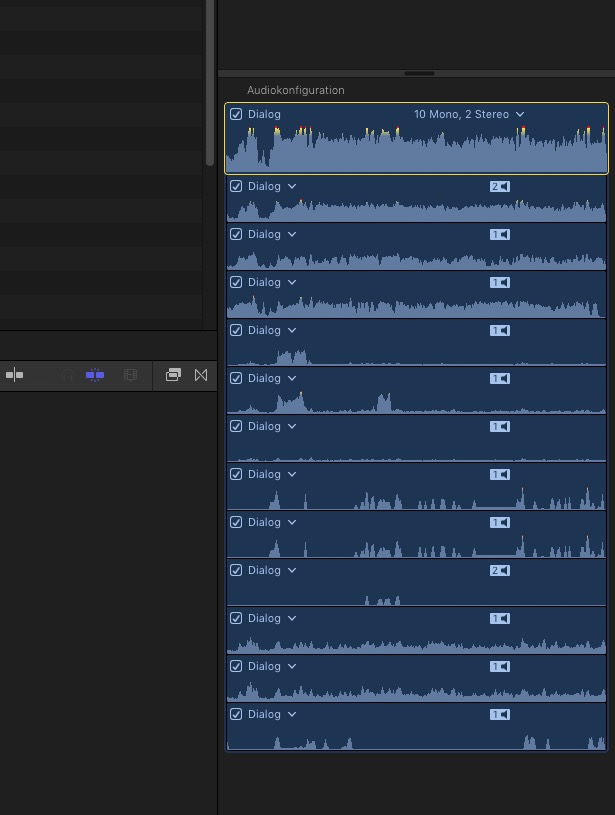
Please Log in to join the conversation.
17 May 2017 09:33 #88100
by petersxs
Replied by petersxs on topic Audio Configuration , Mono Stereo in multichannel Audio
seems like its not possible in fcpx (yet ). the solution for anyone with similar requirements . good old FCP 7 !
Open file , combine selected channels to stereo - create 16 channel outputs with respect to mono stereo - route to outputs - export quicklime - done
it looks like FCPx still got some things to learn from old fcp7 ( like flatten Multicam which i also miss )
regards peter
Open file , combine selected channels to stereo - create 16 channel outputs with respect to mono stereo - route to outputs - export quicklime - done
it looks like FCPx still got some things to learn from old fcp7
( like flatten Multicam which i also miss )regards peter
Please Log in to join the conversation.
17 May 2017 11:23 - 17 May 2017 11:23 #88106
by JoeEditor
Replied by JoeEditor on topic Audio Configuration , Mono Stereo in multichannel Audio
When you click the menu arrow by the configuration description, what choices does it give you? I'd like to see a screen shot of that. I've been able to group stereos and separate out mono channels easily on the rare occasions I get multichannel files.
Last edit: 17 May 2017 11:23 by JoeEditor.
Please Log in to join the conversation.
