



- Posts: 272
- Thank you received: 2
3 Post Moderation Rule for New Boarders (25 Jan 2021)
New boarders will have their posts moderated - Don't worry if you cannot see your post immediately.
Help Request: Blending modes fail when transitions added (ie they turn BLACK)
13 May 2017 04:14 #88015
by Slaughter
Help Request: Blending modes fail when transitions added (ie they turn BLACK) was created by Slaughter
Hi,
Can't find a solution anywhere for this.
FCPX 10.3.1
When transitions are used in a clip (ie fade in or fade out), whether the clip is subsequently made into a compound clip or not, FCPX says "nope" when you want to retain a blending mode such as "darken". ie. all you get is a sudden case of black, black, black.
As illustrated, this is what I'm working on. Where the transition happens >BLACK. Can't get around it. Have googled.
Thanks in advance for any help.
Can't find a solution anywhere for this.
FCPX 10.3.1
When transitions are used in a clip (ie fade in or fade out), whether the clip is subsequently made into a compound clip or not, FCPX says "nope" when you want to retain a blending mode such as "darken". ie. all you get is a sudden case of black, black, black.
As illustrated, this is what I'm working on. Where the transition happens >BLACK. Can't get around it. Have googled.
Thanks in advance for any help.
Please Log in to join the conversation.


13 May 2017 11:44 #88016
by JoeEditor
Replied by JoeEditor on topic Help Request: Blending modes fail when transitions added (ie they turn BLACK)
Don't see anything illustrated. Don't understand fully what you're doing. What exactly are you changing the Blend mode or?
Please Log in to join the conversation.
13 May 2017 23:20 #88026
by Slaughter
Replied by Slaughter on topic Help Request: Blending modes fail when transitions added (ie they turn BLACK)
Looks like my timeline image failed to insert. I'll try again.
oi68.tinypic.com/2wrgknc.jpg
I am creating standard transitions (ie fade in, or command-T)
These transitions instead of doing their job to smoothly transition from one image to the next, just go BLACK for their duration whenever the clip in a blend mode of anything other than "normal". In this case, the blend mode is "add", as I am using a transparency sort of effect between layers.
oi68.tinypic.com/2wrgknc.jpg
I am creating standard transitions (ie fade in, or command-T)
These transitions instead of doing their job to smoothly transition from one image to the next, just go BLACK for their duration whenever the clip in a blend mode of anything other than "normal". In this case, the blend mode is "add", as I am using a transparency sort of effect between layers.
Please Log in to join the conversation.
13 May 2017 23:22 #88027
by Slaughter
Replied by Slaughter on topic Help Request: Blending modes fail when transitions added (ie they turn BLACK)
Wow, the image "insert" function here is broken.
Again, I added my file, SAW the inserted link - which this time I copied and pasted and watched like a hawk:
And it *disappeared* when I viewed the submitted post. Weird.
Again, I added my file, SAW the inserted link - which this time I copied and pasted and watched like a hawk:
And it *disappeared* when I viewed the submitted post. Weird.
Please Log in to join the conversation.
13 May 2017 23:23 #88028
by Slaughter
Replied by Slaughter on topic Help Request: Blending modes fail when transitions added (ie they turn BLACK)
...and the copy and paste disappeared too!
Wow.
Wow.
Please Log in to join the conversation.
14 May 2017 04:13 #88029
by JoeEditor
Replied by JoeEditor on topic Help Request: Blending modes fail when transitions added (ie they turn BLACK)
I understand what you're doing. I do it a lot. I'm doing it now. I'm not seeing the same results. It's working as expected for me. If you export a file, does it go to black?
OH! Are you sure you don't have the fade to black transition in place by mistake? Naw, didn't think so. I just mean, if you're doing Cmd-T then you may have accidentally set something else to the Default transition.
That is very curious that it all goes black during the transitions. Those are just simple FCPX supplied cross dissolves?
OH! Are you sure you don't have the fade to black transition in place by mistake? Naw, didn't think so. I just mean, if you're doing Cmd-T then you may have accidentally set something else to the Default transition.
That is very curious that it all goes black during the transitions. Those are just simple FCPX supplied cross dissolves?
Please Log in to join the conversation.
14 May 2017 04:23 #88030
by Slaughter
Replied by Slaughter on topic Help Request: Blending modes fail when transitions added (ie they turn BLACK)
"If you export a file, does it go to black?"
Yes, but even if it didn't, the issue is that I need to *see what I am editing*
"Are you sure you don't have the fade to black transition in place by mistake?"
Yes. Because I am utilising *exactly the same stock standard "command T" transition I use everywhere else and have made NO changes to it. What is causing the black is the fact that FCPX evidently does not like to let you use standard transitions *with* the clip blend mode set to anything other than "normal"
When the clip blend mode is normal, the transition (fade) does what it is supposed to do.
Yes, but even if it didn't, the issue is that I need to *see what I am editing*
"Are you sure you don't have the fade to black transition in place by mistake?"
Yes. Because I am utilising *exactly the same stock standard "command T" transition I use everywhere else and have made NO changes to it. What is causing the black is the fact that FCPX evidently does not like to let you use standard transitions *with* the clip blend mode set to anything other than "normal"
When the clip blend mode is normal, the transition (fade) does what it is supposed to do.
Please Log in to join the conversation.
- Tom Wolsky
-

- Offline
- Moderator
-

14 May 2017 08:43 #88034
by Tom Wolsky
Replied by Tom Wolsky on topic Help Request: Blending modes fail when transitions added (ie they turn BLACK)
There is something switched off in front of each transitioning item. Each item is a compound clip. What's going on here? It's more complex than just a simple fade up of a clip. Try using opacity controls.
Please Log in to join the conversation.
- Karsten Schlüter
-

- Offline
- Moderator
-
Less
More
- Posts: 3790
- Thank you received: 718
14 May 2017 11:55 #88036
by Karsten Schlüter
tried, can not confirm:
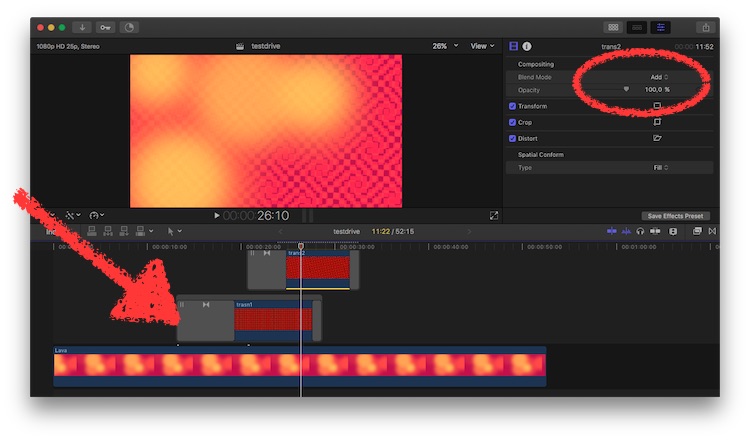
(which by the way contradicts Wow, the image "insert" function here is broken." )
two graphics.png, 'add' mode, cmd-T applied standard transition => works like charm in FCPX and as on export.
Your compounds look … strange (?).
Replied by Karsten Schlüter on topic Help Request: Blending modes fail when transitions added (ie they turn BLACK)
tj7 wrote: …What is causing the black is the fact that FCPX evidently does not like to let you use standard transitions *with* the clip blend mode set to anything other than "normal"
…
tried, can not confirm:
(which by the way contradicts Wow, the image "insert" function here is broken."
)two graphics.png, 'add' mode, cmd-T applied standard transition => works like charm in FCPX and as on export.
Your compounds look … strange (?).
Please Log in to join the conversation.
14 May 2017 12:43 #88039
by JoeEditor
Replied by JoeEditor on topic Help Request: Blending modes fail when transitions added (ie they turn BLACK)
What is inside of the Compound Clip?
Please Log in to join the conversation.
20 May 2017 23:51 #88198
by Slaughter
Replied by Slaughter on topic Help Request: Blending modes fail when transitions added (ie they turn BLACK)
Each clip is a an image.
I am gradually zooming into an image as that same image gradually changes.
In this case, the image is a series of of LED's arranged to form three faces (the Police's third LP cover). When zoomed out, the image is full of LED bars, and as the image is zoomed in, the extraneous LED bars gradually disappear. So the whole thing is a compound clip because one has to make clips compound clips to maintain whatever zoom and pan effect there is if you want to make transitional cuts along the way.
I wanted to *fade* my little LED bits out of the picture, but can't because I am applying a blending mode to the whole thing. The blending mode creates a really nice effect with the images beneath this LED sequence. As explained, FCPX evidently says "no" when you want to use fades (again, command-T standard transitions) and creates nothing but black for those transitions unless you remove the blending mode.
Perhaps I am explaining this poorly, so here is a several years old post from someone else with the same problem:
forums.creativecow.net/thread/344/6801
I have established that because my clips were not connected, FCPX was failing to fade between clips / images with a blend mode applied. Annoying, given it's a 5+ year old glitch and that connecting clips reduces your ability to go back and muck around with things, (I like to see everything mapped out in front of me) but at least there's a way to get the desired effect working.
I am gradually zooming into an image as that same image gradually changes.
In this case, the image is a series of of LED's arranged to form three faces (the Police's third LP cover). When zoomed out, the image is full of LED bars, and as the image is zoomed in, the extraneous LED bars gradually disappear. So the whole thing is a compound clip because one has to make clips compound clips to maintain whatever zoom and pan effect there is if you want to make transitional cuts along the way.
I wanted to *fade* my little LED bits out of the picture, but can't because I am applying a blending mode to the whole thing. The blending mode creates a really nice effect with the images beneath this LED sequence. As explained, FCPX evidently says "no" when you want to use fades (again, command-T standard transitions) and creates nothing but black for those transitions unless you remove the blending mode.
Perhaps I am explaining this poorly, so here is a several years old post from someone else with the same problem:
forums.creativecow.net/thread/344/6801
I have established that because my clips were not connected, FCPX was failing to fade between clips / images with a blend mode applied. Annoying, given it's a 5+ year old glitch and that connecting clips reduces your ability to go back and muck around with things, (I like to see everything mapped out in front of me) but at least there's a way to get the desired effect working.
Please Log in to join the conversation.
- Tom Wolsky
-
- Offline
- Moderator
-
21 May 2017 13:03 - 21 May 2017 13:03 #88210
by Tom Wolsky
Replied by Tom Wolsky on topic Help Request: Blending modes fail when transitions added (ie they turn BLACK)
It's the compound clip structure that's not working with the blend mode and the transition. A blend moded clip on top of another clip works correctly with a cross dissolve.
"I have established that because my clips were not connected"
I don't know what this means. Your earlier images show connected compound clips. By connected clips do you mean compound clips?
Did you try ramping the opacity on the compound clip rather than a cross dissolve?
"I have established that because my clips were not connected"
I don't know what this means. Your earlier images show connected compound clips. By connected clips do you mean compound clips?
Did you try ramping the opacity on the compound clip rather than a cross dissolve?
Last edit: 21 May 2017 13:03 by Tom Wolsky.
Please Log in to join the conversation.
- Karsten Schlüter
-
- Offline
- Moderator
-
Less
More
- Posts: 3790
- Thank you received: 718
21 May 2017 14:06 - 21 May 2017 14:07 #88215
by Karsten Schlüter
trying to re-built your timeline:
• some content in the timeline (here: a generator)
• on top, I added a still.png
• set comp mode to 'Add'
• for whatever reason, make it a compound
• for whatever reason, split it
• for whatever reason, 'mute' (V) the first part
• apply a dissolve (Standard, cmd-t)
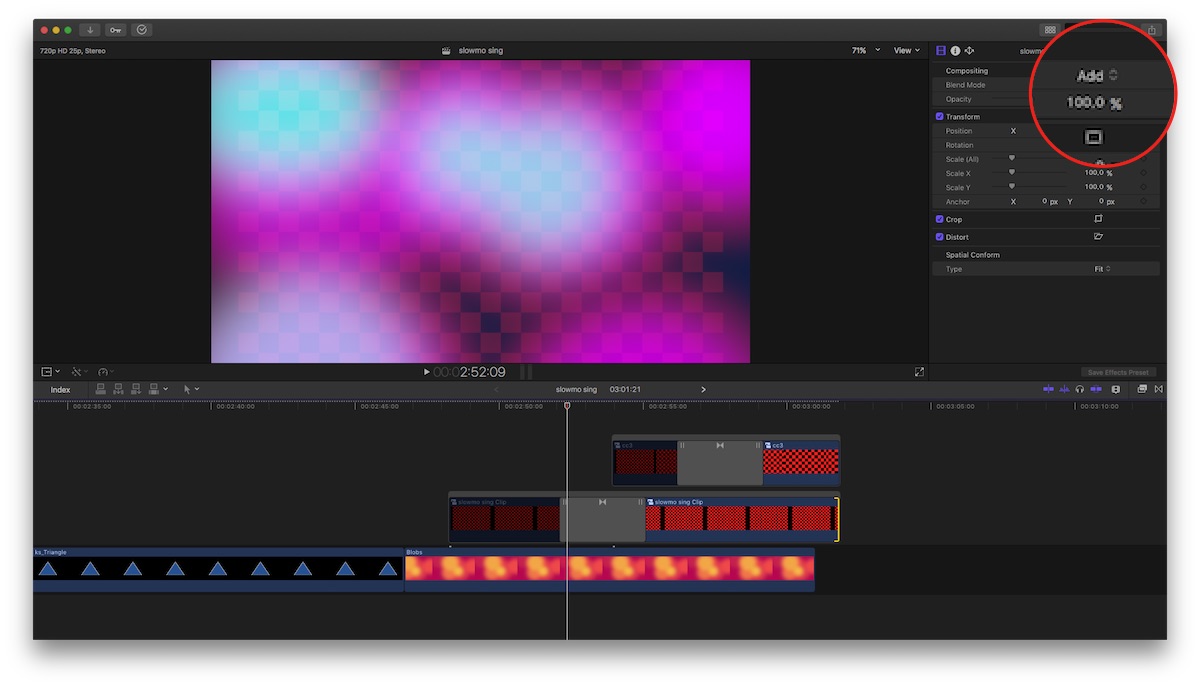
… looks like yours - but no 'black black black', but fades-in perfectly AND comps with Add
adding a second lane…
same as above, but with keyframes to zoom in…
Same strange arangement with compounds and spit and mute and…
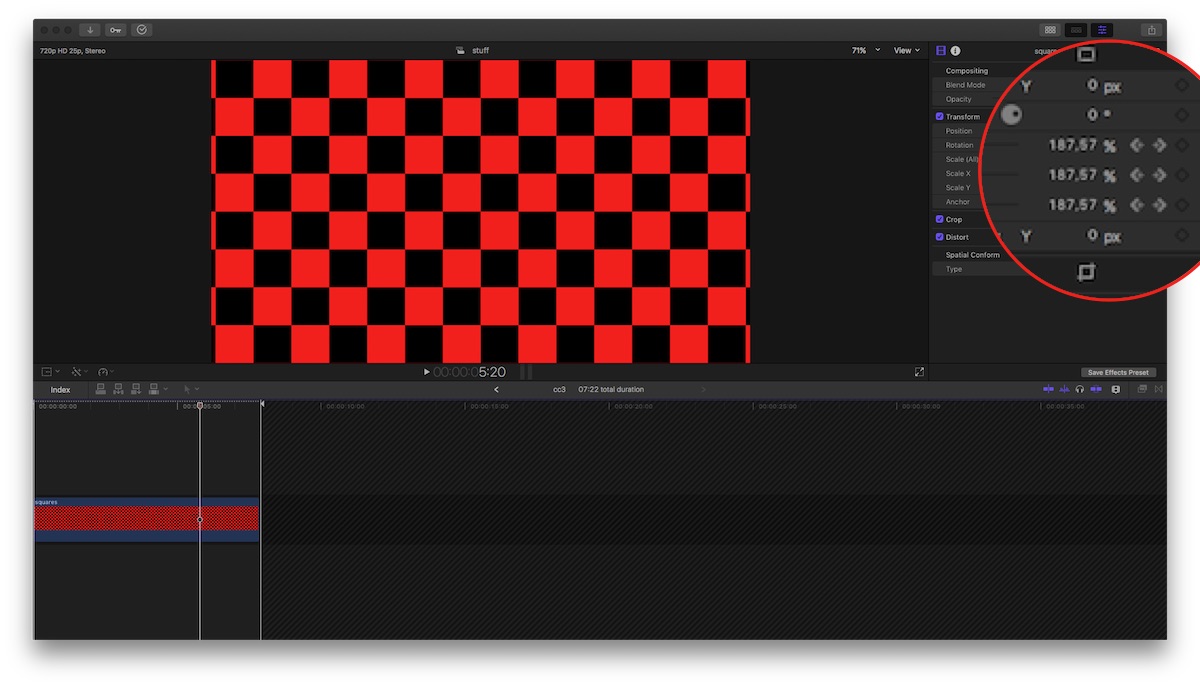
=> works like charm:
(to proof the animation…)
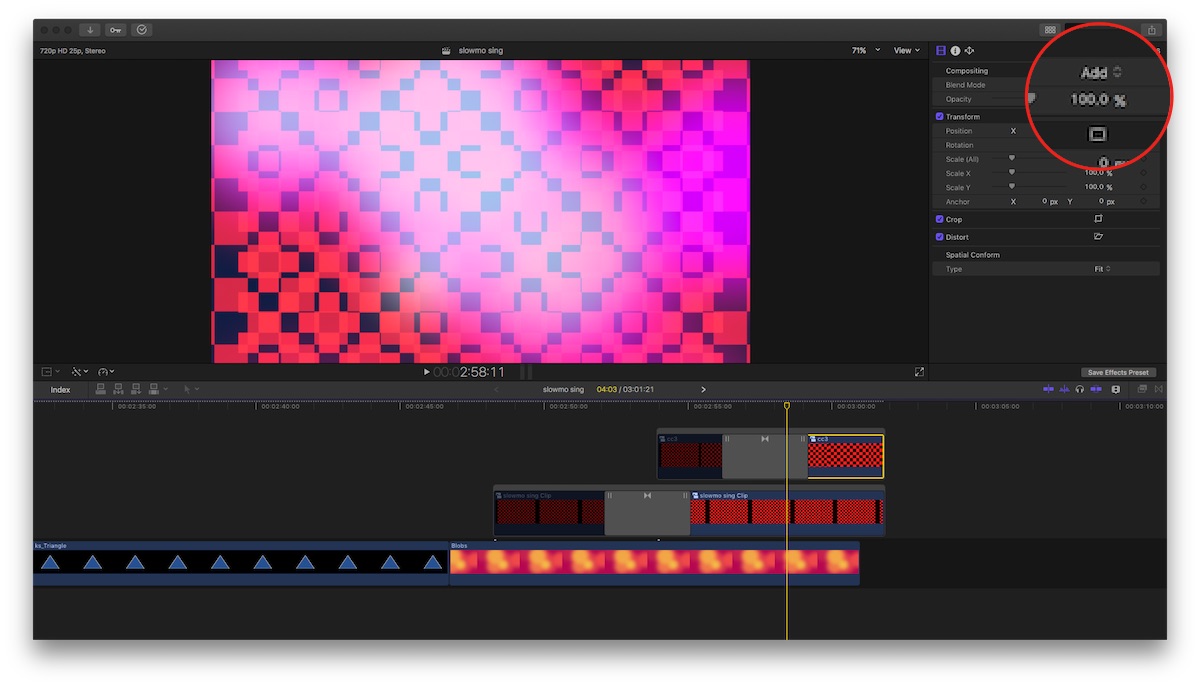
(and the final effect)
Now, the simple version, without compound and muted parts:
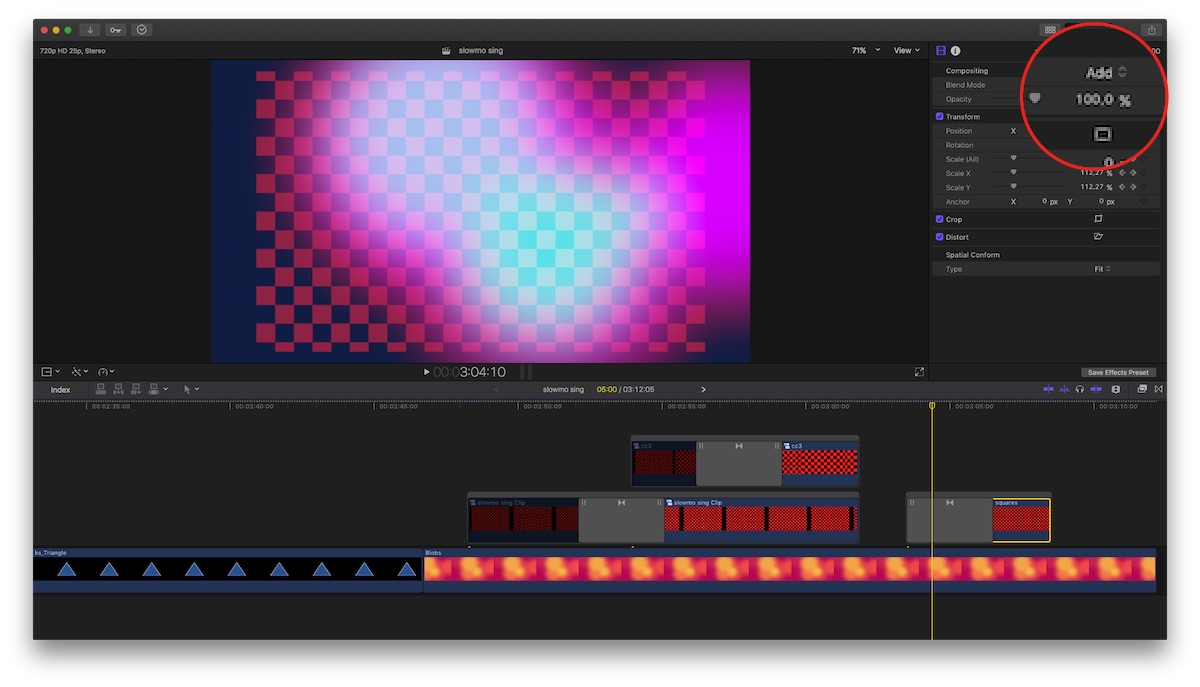
does 'Add' and dissolve either (less complicated)
???
Replied by Karsten Schlüter on topic Help Request: Blending modes fail when transitions added (ie they turn BLACK)
tj7 wrote: Each clip is a an image.
I am gradually zooming into an image as that same image gradually changes.….
trying to re-built your timeline:
• some content in the timeline (here: a generator)
• on top, I added a still.png
• set comp mode to 'Add'
• for whatever reason, make it a compound
• for whatever reason, split it
• for whatever reason, 'mute' (V) the first part
• apply a dissolve (Standard, cmd-t)
… looks like yours - but no 'black black black', but fades-in perfectly AND comps with Add
adding a second lane…
same as above, but with keyframes to zoom in…
Same strange arangement with compounds and spit and mute and…
=> works like charm:
(to proof the animation…)
(and the final effect)
Now, the simple version, without compound and muted parts:
does 'Add' and dissolve either (less complicated)
???
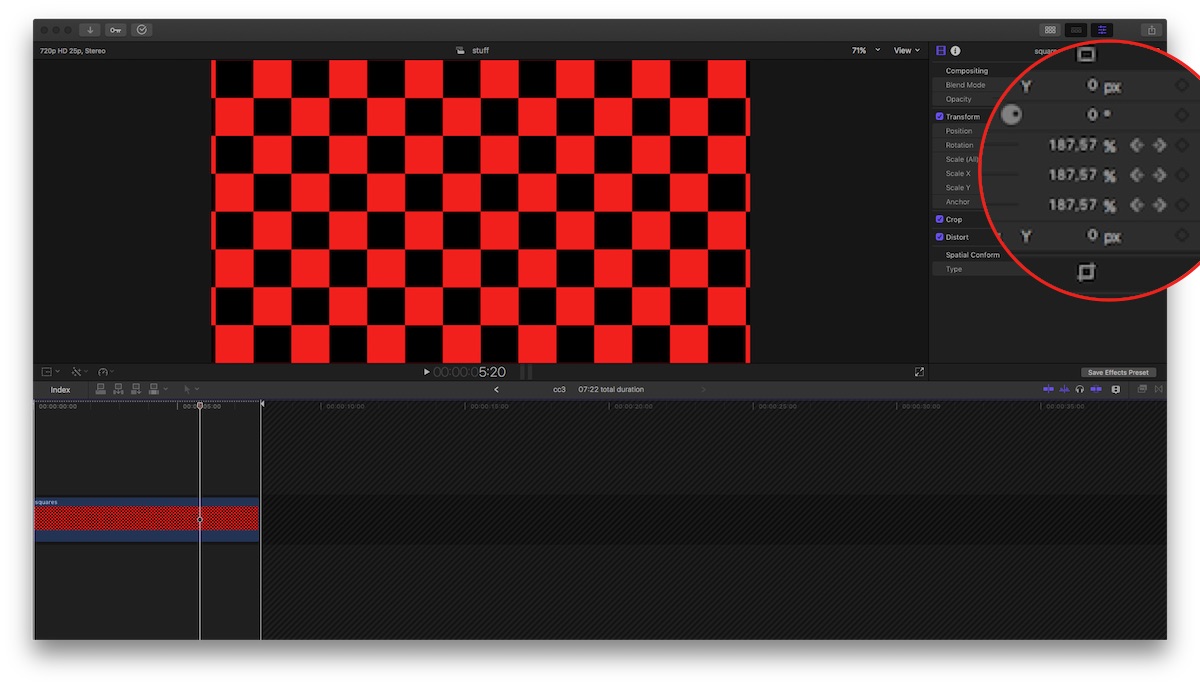
Last edit: 21 May 2017 14:07 by Karsten Schlüter.
Please Log in to join the conversation.
26 May 2017 05:56 #88346
by Slaughter
Replied by Slaughter on topic Help Request: Blending modes fail when transitions added (ie they turn BLACK)
Thankyou everyone for looking into this.
I appreciate it.
By "connected" I mean not layered on top of eachother but all in a single "row" if you will. A sausage-snake as opposed to a row with a shorter row on top and a shorter one on top... (my terminology is terrible).
That got it working for me.
Tom, Karsten, I don't have much choice with having each clip compounded. If I don't, the movement (ie ken burns) type effects are affected. It's not "for some reason", it's necessary. I have several image layers which are to transition from one to the next to the next, all based on the same image with incremental changes, whilst gradually zooming out. If each layer is not compounded, then I can't fade from one to the other because the zoom or pan settings reset with each break. Hope that makes sense.
I have no idea why it's not working for me, but working for Karsten, so I need to look at my timeline again.
To be continued...
I appreciate it.
By "connected" I mean not layered on top of eachother but all in a single "row" if you will. A sausage-snake as opposed to a row with a shorter row on top and a shorter one on top... (my terminology is terrible).
That got it working for me.
Tom, Karsten, I don't have much choice with having each clip compounded. If I don't, the movement (ie ken burns) type effects are affected. It's not "for some reason", it's necessary. I have several image layers which are to transition from one to the next to the next, all based on the same image with incremental changes, whilst gradually zooming out. If each layer is not compounded, then I can't fade from one to the other because the zoom or pan settings reset with each break. Hope that makes sense.
I have no idea why it's not working for me, but working for Karsten, so I need to look at my timeline again.
To be continued...
Please Log in to join the conversation.
