


- Posts: 244
- Thank you received: 12
3 Post Moderation Rule for New Boarders (25 Jan 2021)
New boarders will have their posts moderated - Don't worry if you cannot see your post immediately.
Length Indicators (diagonal strips) inside compound clip are inaccurate
- Doug Suiter
-
 Topic Author
- Offline
- Elite Member
-

Less
More
07 May 2017 22:53 - 07 May 2017 22:54 #87871
by Doug Suiter
Hi all - Ihave discovered lately that in the current FCPX release 10.3.3 running on MacOS 10.12.4 the diagonal striped indicating the "used in project" length of a compound clip do not reflect the actual length it ought to be.
Difficult to describe I know - so let me throw to our reporter on the scene:
vimeo.com/user1614562/review/216420510/d1940f11ab
Difficult to describe I know - so let me throw to our reporter on the scene:
vimeo.com/user1614562/review/216420510/d1940f11ab
Last edit: 07 May 2017 22:54 by Doug Suiter.
Please Log in to join the conversation.


07 May 2017 23:06 #87873
by JoeEditor
Replied by JoeEditor on topic Length Indicators (diagonal strips) inside compound clip are inaccurate
The timecode makes sense. In the Project timeline you only have the clip are between (not including) the transitions highlighted, so it is 2 seconds shorter (each transition is 1 second of extra media each). The Compound Clip timeline shows the entire clip INCLUDING the media used for the transitions. FCPX has always behaved this way.
In the Project timeline, select the clip PLUS each transition to get the TOTAL time of what's being used. FCPX is showing exactly what you have selected.
In the Project timeline, select the clip PLUS each transition to get the TOTAL time of what's being used. FCPX is showing exactly what you have selected.
Please Log in to join the conversation.
- Doug Suiter
-
Topic Author
- Offline
- Elite Member
-
Less
More
- Posts: 244
- Thank you received: 12
07 May 2017 23:20 #87875
by Doug Suiter
Replied by Doug Suiter on topic Length Indicators (diagonal strips) inside compound clip are inaccurate
I see what you are saying but I don't think it's correct in this case because
1. I can extend the edit in the project sequence to expose more media - I shouldn't be able to do that if I am at the limit which is what is as indicated by the diagonal stripes boundary
2 .A one second transition would only extend a half second beyond the boundary. Two transitions would yield one second extra, not two.
1. I can extend the edit in the project sequence to expose more media - I shouldn't be able to do that if I am at the limit which is what is as indicated by the diagonal stripes boundary
2 .A one second transition would only extend a half second beyond the boundary. Two transitions would yield one second extra, not two.
Please Log in to join the conversation.
- Doug Suiter
-
Topic Author
- Offline
- Elite Member
-
Less
More
- Posts: 244
- Thank you received: 12
07 May 2017 23:31 #87876
by Doug Suiter
Replied by Doug Suiter on topic Length Indicators (diagonal strips) inside compound clip are inaccurate
For clarity I have made a quick followup explanation:
vimeo.com/user1614562/review/216423726/b3cbf2cd30
vimeo.com/user1614562/review/216423726/b3cbf2cd30
Please Log in to join the conversation.
08 May 2017 03:24 - 08 May 2017 03:50 #87880
by JoeEditor
Replied by JoeEditor on topic Length Indicators (diagonal strips) inside compound clip are inaccurate
AS for your second demo video, yes, that is an issue. I am now seeing this myself. But it gets worse. The CC is only showing the range of the original clip I has placed in the Timeline. When I try to expand the head and tail of the CC it only lets me go as far as that original range. If I double-click to get inside the CC, I can then expand the head and/or tail to gain access to the entire original media. This isn't correct. Feedback page time.
Last edit: 08 May 2017 03:50 by JoeEditor.
Please Log in to join the conversation.
- Doug Suiter
-
Topic Author
- Offline
- Elite Member
-
Less
More
- Posts: 244
- Thank you received: 12
08 May 2017 03:52 - 08 May 2017 03:52 #87881
by Doug Suiter
Yes but of those two half seconds for each transition one half second is already in the boundary of used material meaning only an extra half second is required for each transition making a total of one *extra* second not two.
Also when FCPX is operating as per normal the extra media is not pulled into the clear area but rather hangs over in the striped area, the boundary being the centre point of the transition.
Apart from the - I can't say I'm glad you're seeing the same issue but I am glad it's not me alone.
I appreciate your time letting me know - if off to the feedback page!
Replied by Doug Suiter on topic Length Indicators (diagonal strips) inside compound clip are inaccurate
Incorrect, for a 1 second transition, both sides of the edit point much use one second of media to cover it equally.
Yes but of those two half seconds for each transition one half second is already in the boundary of used material meaning only an extra half second is required for each transition making a total of one *extra* second not two.
Also when FCPX is operating as per normal the extra media is not pulled into the clear area but rather hangs over in the striped area, the boundary being the centre point of the transition.
Apart from the - I can't say I'm glad you're seeing the same issue but I am glad it's not me alone.
I appreciate your time letting me know - if off to the feedback page!
Last edit: 08 May 2017 03:52 by Doug Suiter.
Please Log in to join the conversation.
- ronny courtens
-

- Offline
- Moderator
-

Less
More
- Posts: 4455
- Thank you received: 962
08 May 2017 12:01 #87894
by ronny courtens
Replied by ronny courtens on topic Length Indicators (diagonal strips) inside compound clip are inaccurate
Hi Doug,
I can confirm what you see. Time to hit the feedback page.
- Ronny
I can confirm what you see. Time to hit the feedback page.
- Ronny
Please Log in to join the conversation.
- Doug Suiter
-
Topic Author
- Offline
- Elite Member
-
Less
More
- Posts: 244
- Thank you received: 12
08 May 2017 22:10 #87917
by Doug Suiter
Replied by Doug Suiter on topic Length Indicators (diagonal strips) inside compound clip are inaccurate
Feedback fed back 
Please Log in to join the conversation.


Less
More
- Posts: 971
- Thank you received: 46
11 May 2017 07:50 - 11 May 2017 07:52 #87974
by MsJustine
Replied by MsJustine on topic Length Indicators (diagonal strips) inside compound clip are inaccurate
I thought a compound clip was basically a 2017 version of a 2006 effect from classic called a "nest", that is a series of clips combined into 1 clip on the storyline.
In 10.3.3. if I place 2 clips in series, then that is what the compound clip forms, 1 long clip, instead of 2, when I stack them, I get the same 1 long clip, no middle end of clip, start of clip, but when I step into the compound clip, the stacking is respected.
I see the tiny stripes to the right, assumed it meant end of media, maybe I am wrong here, but using compound clip is maybe the wrong thing, I thought from what I saw in the video you wanted to use the feature you would use for J or L cuts, with the 2 up display that ends on 1 frame and starts clip 2 on the frame you want... that has been greyed out...[edit..dirty monitor]
In 10.3.3. if I place 2 clips in series, then that is what the compound clip forms, 1 long clip, instead of 2, when I stack them, I get the same 1 long clip, no middle end of clip, start of clip, but when I step into the compound clip, the stacking is respected.
I see the tiny stripes to the right, assumed it meant end of media, maybe I am wrong here, but using compound clip is maybe the wrong thing, I thought from what I saw in the video you wanted to use the feature you would use for J or L cuts, with the 2 up display that ends on 1 frame and starts clip 2 on the frame you want... that has been greyed out...[edit..dirty monitor]
Last edit: 11 May 2017 07:52 by MsJustine.
Please Log in to join the conversation.
- Doug Suiter
-
Topic Author
- Offline
- Elite Member
-
Less
More
- Posts: 244
- Thank you received: 12
11 May 2017 07:58 #87975
by Doug Suiter
Replied by Doug Suiter on topic Length Indicators (diagonal strips) inside compound clip are inaccurate
I would like to be able to help but I'm afraid I had a lot of difficulty trying to follow what you were saying, starting when you mentioned "stacking". I'm not sure what you are referring to. I don't understand what you mean when referring to J L cuts either. I know what they are just not sure what you're saying I'm afraid.
Please Log in to join the conversation.
Less
More
- Posts: 971
- Thank you received: 46
11 May 2017 08:04 #87976
by MsJustine
Replied by MsJustine on topic Length Indicators (diagonal strips) inside compound clip are inaccurate
Stacking is placing clips on top of each other, is primary storyline then secondary then secondary..
J and L cuts, these are when you for a J cut have the audio from clip 2 play under clip 1, and L cut is when audio from clip 1 plays under clip 2.
X has a great way for making J and L cuts, much faster than with classic final cut.
What I have noticed is if you place a range created in the browser, then append to storyline, if you then compound this, you cannot move what is under the diagonal stripes, but you can slip the video within the range if you step out of the compound clip.
J and L cuts, these are when you for a J cut have the audio from clip 2 play under clip 1, and L cut is when audio from clip 1 plays under clip 2.
X has a great way for making J and L cuts, much faster than with classic final cut.
What I have noticed is if you place a range created in the browser, then append to storyline, if you then compound this, you cannot move what is under the diagonal stripes, but you can slip the video within the range if you step out of the compound clip.
Please Log in to join the conversation.
- Doug Suiter
-
Topic Author
- Offline
- Elite Member
-
Less
More
- Posts: 244
- Thank you received: 12
11 May 2017 08:07 #87977
by Doug Suiter
Following those steps there would be nothing under the diagonal stripes.
Replied by Doug Suiter on topic Length Indicators (diagonal strips) inside compound clip are inaccurate
What I have noticed is if you place a range created in the browser, then append to storyline, if you then compound this, you cannot move what is under the diagonal stripes
Following those steps there would be nothing under the diagonal stripes.
Please Log in to join the conversation.
Less
More
- Posts: 971
- Thank you received: 46
11 May 2017 08:08 #87978
by MsJustine
Replied by MsJustine on topic Length Indicators (diagonal strips) inside compound clip are inaccurate
As I see it, compound clips serve only 1 function, that is to combine many clips into 1 long clip for the purpose of correcting for video, audio, that sort of thing. The grey thin lines are to indicate as I understand video not used or viewed, extra media.
Please Log in to join the conversation.
- Doug Suiter
-
Topic Author
- Offline
- Elite Member
-
Less
More
- Posts: 244
- Thank you received: 12
11 May 2017 08:11 #87979
by Doug Suiter
Replied by Doug Suiter on topic Length Indicators (diagonal strips) inside compound clip are inaccurate
The diagonal lines indicate that part of the compound clip that is not visible in the main storyline, yes. However the point of my original post is that they seem not to be accurately indicating what they are supposed to be indicating
Please Log in to join the conversation.
Less
More
- Posts: 971
- Thank you received: 46
11 May 2017 08:19 #87980
by MsJustine
Replied by MsJustine on topic Length Indicators (diagonal strips) inside compound clip are inaccurate
Yes I see what you mean, the effect I am getting is this, I took a short range off a long clip, created in the browser appended to the timeline, created a compound clip, and slipped the video, the video slips to the left, more media to the right, but but here is the problem...
The video to the right is hidden under a black box in the primary storyline, under the grey stripes.
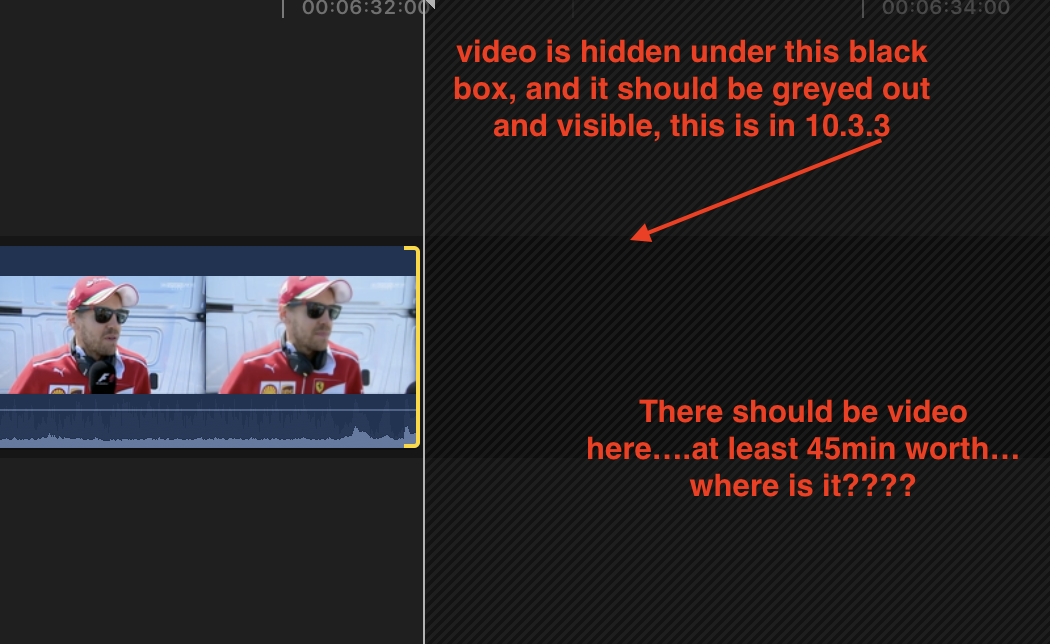
The video to the right is hidden under a black box in the primary storyline, under the grey stripes.
Please Log in to join the conversation.
- Doug Suiter
-
Topic Author
- Offline
- Elite Member
-
Less
More
- Posts: 244
- Thank you received: 12
11 May 2017 08:41 - 11 May 2017 08:43 #87981
by Doug Suiter
Replied by Doug Suiter on topic Length Indicators (diagonal strips) inside compound clip are inaccurate
"There should be 45 minutes of video where is it?"
It is there. Simply trim out the handle you have selected. It isn't hidden" under" a black box. That black box is empty space on your storyline. This is not related to the diagonal lines.
Maybe this video will clear things up.
vimeo.com/216975532
It is there. Simply trim out the handle you have selected. It isn't hidden" under" a black box. That black box is empty space on your storyline. This is not related to the diagonal lines.
Maybe this video will clear things up.
vimeo.com/216975532
Last edit: 11 May 2017 08:43 by Doug Suiter.
Please Log in to join the conversation.
Less
More
- Posts: 971
- Thank you received: 46
11 May 2017 08:52 - 11 May 2017 08:55 #87982
by MsJustine
Replied by MsJustine on topic Length Indicators (diagonal strips) inside compound clip are inaccurate
Hi Doug...
That is just my point, that is the "bug" at 1:22 in the video, you should be seeing greyed out video, of the "handles" or extra media, the black box is incorrectly used by Apple Dev, that is the problem you are having...
The black box is a placeholder, it is WRONG, look the thin grey diagonals indicate what???? I say media not in use, extra video handles, but that damn black box...
If you append two clips in the storyline, double click the section where they are "joined" you can see extra handles greyed out, so you see video material, if you slip, slide, trim, you see a 2 up display, last frame outgoing, and 1st frame incoming...
When you compound a clip in the storyline as you did in video "msjustine", then you should see the media, under the grey stripes, at the head and foot of the clip. you cannot, it is because of the damned grey box.. I may have done lower grade maths and failed plenty at uni, but sure as chickens don't lay bombs, this I know...
That cursed damn black box is the problem... Of course Apple will remain mute, like a dying swan, and we will never know, but I promise you, a cup of hot Joe, that it is the black box, and nothing else... I swear it, the damn black box is the problem, THE BLACK BOX!!!!!!!
PS...direct message sent to Doug!
That is just my point, that is the "bug" at 1:22 in the video, you should be seeing greyed out video, of the "handles" or extra media, the black box is incorrectly used by Apple Dev, that is the problem you are having...
The black box is a placeholder, it is WRONG, look the thin grey diagonals indicate what???? I say media not in use, extra video handles, but that damn black box...
If you append two clips in the storyline, double click the section where they are "joined" you can see extra handles greyed out, so you see video material, if you slip, slide, trim, you see a 2 up display, last frame outgoing, and 1st frame incoming...
When you compound a clip in the storyline as you did in video "msjustine", then you should see the media, under the grey stripes, at the head and foot of the clip. you cannot, it is because of the damned grey box.. I may have done lower grade maths and failed plenty at uni, but sure as chickens don't lay bombs, this I know...
That cursed damn black box is the problem... Of course Apple will remain mute, like a dying swan, and we will never know, but I promise you, a cup of hot Joe, that it is the black box, and nothing else... I swear it, the damn black box is the problem, THE BLACK BOX!!!!!!!
PS...direct message sent to Doug!
Last edit: 11 May 2017 08:55 by MsJustine.
Please Log in to join the conversation.
- Doug Suiter
-
Topic Author
- Offline
- Elite Member
-
Less
More
- Posts: 244
- Thank you received: 12
11 May 2017 09:03 #87983
by Doug Suiter
Replied by Doug Suiter on topic Length Indicators (diagonal strips) inside compound clip are inaccurate
Hey again MsJustine.
The extra media only shows in the precision editor. You're confusing two functions. Let me prove it to you:
i.imgur.com/EQ932fs.png
.
The extra media only shows in the precision editor. You're confusing two functions. Let me prove it to you:
i.imgur.com/EQ932fs.png
.
Please Log in to join the conversation.
Less
More
- Posts: 971
- Thank you received: 46
11 May 2017 09:11 #87984
by MsJustine
Replied by MsJustine on topic Length Indicators (diagonal strips) inside compound clip are inaccurate
Um well you are never too old to learn something new.... But the point is...
That black box to the right is wrong...it should not be there, simple pimple, you either have the grey stripes or nothing...That black box should be at the end of the media, not obscuring media.
Apple Dev made a mistake, yes the precision editor you use to create J and L cuts, but in this case, a single clip with media available at both head/tail of the clip, the black box is in the wrong place...that is all the problem is...Apple made a mistake, the black box is just used incorrectly...
Move that black box, make the handles less bright, the black box after the less bright media, and chickens lay eggs...
That black box to the right is wrong...it should not be there, simple pimple, you either have the grey stripes or nothing...That black box should be at the end of the media, not obscuring media.
Apple Dev made a mistake, yes the precision editor you use to create J and L cuts, but in this case, a single clip with media available at both head/tail of the clip, the black box is in the wrong place...that is all the problem is...Apple made a mistake, the black box is just used incorrectly...
Move that black box, make the handles less bright, the black box after the less bright media, and chickens lay eggs...
Please Log in to join the conversation.
- Doug Suiter
-
Topic Author
- Offline
- Elite Member
-
Less
More
- Posts: 244
- Thank you received: 12
11 May 2017 09:47 #87985
by Doug Suiter
Replied by Doug Suiter on topic Length Indicators (diagonal strips) inside compound clip are inaccurate
I'm afraid I have to disagree with your take on how fcpx is designed.
What you are looking at is the storyline within the compound clip. You don't have an issue with the handles of that clip not being shown outside the compound clip, yet the same behaviour on the storyline once nested inside the compound clip is an issue?
The precision editor allows you to view the handles visually and neatly hide then again when you don't need to see the extra unused footage.
When you suggest that the unused footage should be visible past the striped barrier You are asking for these handles to be visible by default. Fine with a single clip but what if there was another immediately after that?
No. This is not a design flaw, this has been thought out properly.
Also I'd like to not stray from the original point of this thread which is that the striped indicators do not accurately reflect the portion of the compound clip that it used in the project in which it resides - which is not related to the points you are arguing.
What you are looking at is the storyline within the compound clip. You don't have an issue with the handles of that clip not being shown outside the compound clip, yet the same behaviour on the storyline once nested inside the compound clip is an issue?
The precision editor allows you to view the handles visually and neatly hide then again when you don't need to see the extra unused footage.
When you suggest that the unused footage should be visible past the striped barrier You are asking for these handles to be visible by default. Fine with a single clip but what if there was another immediately after that?
No. This is not a design flaw, this has been thought out properly.
Also I'd like to not stray from the original point of this thread which is that the striped indicators do not accurately reflect the portion of the compound clip that it used in the project in which it resides - which is not related to the points you are arguing.
Please Log in to join the conversation.
