


- Posts: 3
- Thank you received: 0
3 Post Moderation Rule for New Boarders (25 Jan 2021)
New boarders will have their posts moderated - Don't worry if you cannot see your post immediately.
Resolve to FCP XML creates "black" videos
06 May 2017 23:17 #87844
by Ivo
Resolve to FCP XML creates "black" videos was created by Ivo
I wonder if anyone has an answer to this. I know I'm not the only one who's encountered it, I know it's a common thing but nobody seems to know how to fix it. Bear with me.
I have a 90 mins timeline of half-res RED quicktime files, that we used to edit the film. Now at online stage (which FCPx sucks big time at) we've conformed all Red RAW files to 2K, with the same fps, same audio, just larger footprint. Obviously FCP refuses to link (that old chestnut). So written XML of lowres timeline, imported XML into Resolve, re-linked to hi-res in Resolve, exported new Resolve XML, and imported it back into FCP.
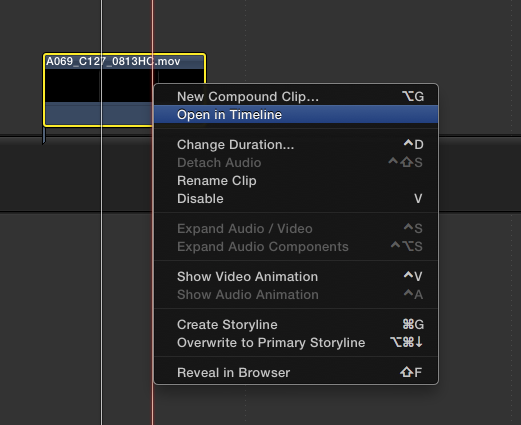
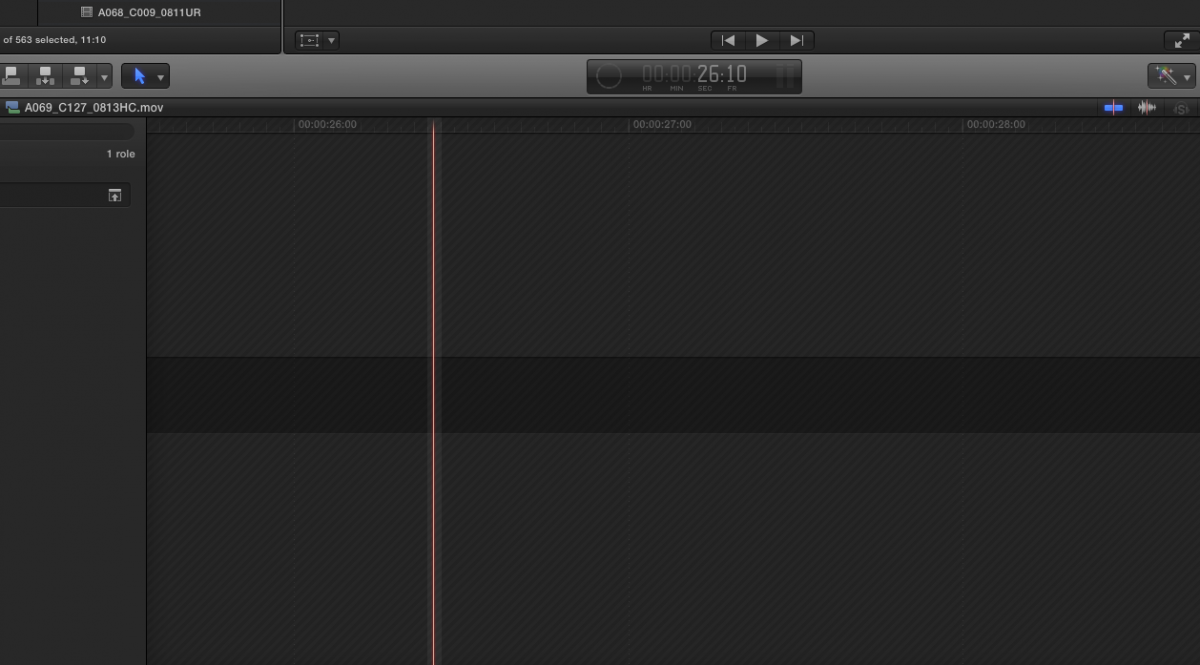
Only now, in FCP, all the clips are black. And if I open any of them in their own timeline, they are actually empty. They link correctly to the hires files, but the clip on the timeline is empty and black. This has taken days now and still no solution in sight. Needless to say, we won't be using FCP again for a feature until Apple give it forced linkage. It's just been nightmare after nightmare at the post stage.
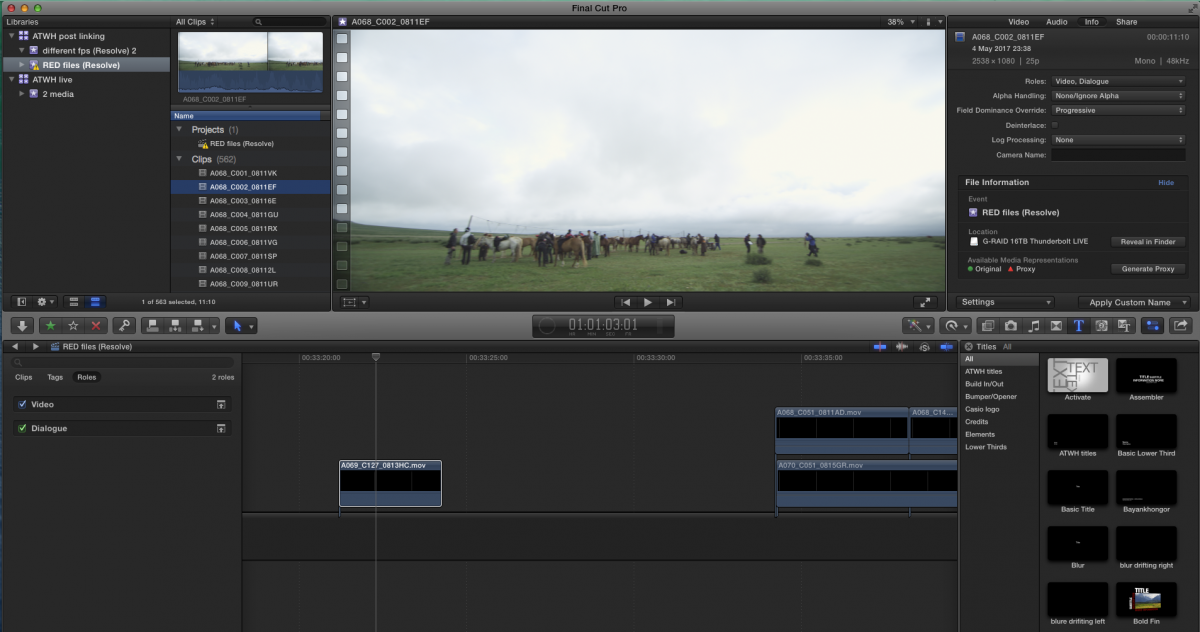
In the pics you see the empty black clips on the timeline, linking correctly to the hires clips. Any ideas?
I have a 90 mins timeline of half-res RED quicktime files, that we used to edit the film. Now at online stage (which FCPx sucks big time at) we've conformed all Red RAW files to 2K, with the same fps, same audio, just larger footprint. Obviously FCP refuses to link (that old chestnut). So written XML of lowres timeline, imported XML into Resolve, re-linked to hi-res in Resolve, exported new Resolve XML, and imported it back into FCP.
Only now, in FCP, all the clips are black. And if I open any of them in their own timeline, they are actually empty. They link correctly to the hires files, but the clip on the timeline is empty and black. This has taken days now and still no solution in sight. Needless to say, we won't be using FCP again for a feature until Apple give it forced linkage. It's just been nightmare after nightmare at the post stage.
In the pics you see the empty black clips on the timeline, linking correctly to the hires clips. Any ideas?
Please Log in to join the conversation.
- ronny courtens
-

- Offline
- Moderator
-

Less
More
- Posts: 4455
- Thank you received: 962
07 May 2017 14:37 #87858
by ronny courtens
Replied by ronny courtens on topic Resolve to FCP XML creates "black" videos
Hello Ivo,
Many movies have been edited and finished in FCP X without any issues, so let's see why this does not work for you. There are a few things in your workflow that are not clear, so I have a few questions:
1. You say "I have a 90 minute timeline of half-res RED quicktime files". Can you tell me exactly what these half-res files really are? Are they half-res ProRes files you have created from the native Red Raw files in RedCine X or in any other application, or are these half-res Red Raw files?
2. You say "Now at the online stage we have conformed all Red Raw files to 2K". Again, to what format have you conformed the Red Raw files? To ProRes 2K, Red Raw 2K or what?
3. If the online 2K files are Red Raw, are you sure you have installed the RED Apple workflow installer? You need this to be able to play Red Raw files on a Mac. If you haven't installed it yet, this is where you can find it: www.red.com/downloads/5340f90826465a7c2b000338
I have assisted with many FCP X workflows for movies, and I have never seen any such problems. So I'm sure there is a simple explanation for what you are experiencing.
- Ronny
Many movies have been edited and finished in FCP X without any issues, so let's see why this does not work for you. There are a few things in your workflow that are not clear, so I have a few questions:
1. You say "I have a 90 minute timeline of half-res RED quicktime files". Can you tell me exactly what these half-res files really are? Are they half-res ProRes files you have created from the native Red Raw files in RedCine X or in any other application, or are these half-res Red Raw files?
2. You say "Now at the online stage we have conformed all Red Raw files to 2K". Again, to what format have you conformed the Red Raw files? To ProRes 2K, Red Raw 2K or what?
3. If the online 2K files are Red Raw, are you sure you have installed the RED Apple workflow installer? You need this to be able to play Red Raw files on a Mac. If you haven't installed it yet, this is where you can find it: www.red.com/downloads/5340f90826465a7c2b000338
I have assisted with many FCP X workflows for movies, and I have never seen any such problems. So I'm sure there is a simple explanation for what you are experiencing.
- Ronny
Please Log in to join the conversation.
07 May 2017 15:21 #87860
by Ivo
Replied by Ivo on topic Resolve to FCP XML creates "black" videos
Hi Ronny,
Thank you so much for your reply, and input! This is my first query on FCP.co.
Sorry I wasn't completely clear.
The film was shot over 4 years, so the edit took 3 years. In that time we were loathe to update FCP in order not to upset the system, and it worked very well until this very last hurdle.
It's actually a very simple paired down set-up and workflow. We weren't working with R3D RAW files for asthetic reasons as the film was shot on 8 different formats so we were working towards a happy medium in picture quality.
Edited in 720p quicktime files that were produced from R3D RAW files.
Now wanted to re-link the 720p files to the 2k Prores 4444 files for final 2k output.
As this can't be done in FCP, I wrote the XML, brought it into Resolve 12.5, where the timeline openes fine and re-links fine.
Finally, on the trip back, the Resolve XML does open fine in X, but then there are only empty video containers. Strangely though, these blank files point towards the new 2k Prores files that they are supposed to link to, but their timeline representation is blank – no audio, no video.
I have seen other people on various forums have this issue, but no one seems to have found an answer.
Does this make sense?
Thanks so much, Ronny!!!
Thank you so much for your reply, and input! This is my first query on FCP.co.
Sorry I wasn't completely clear.
The film was shot over 4 years, so the edit took 3 years. In that time we were loathe to update FCP in order not to upset the system, and it worked very well until this very last hurdle.
It's actually a very simple paired down set-up and workflow. We weren't working with R3D RAW files for asthetic reasons as the film was shot on 8 different formats so we were working towards a happy medium in picture quality.
Edited in 720p quicktime files that were produced from R3D RAW files.
Now wanted to re-link the 720p files to the 2k Prores 4444 files for final 2k output.
As this can't be done in FCP, I wrote the XML, brought it into Resolve 12.5, where the timeline openes fine and re-links fine.
Finally, on the trip back, the Resolve XML does open fine in X, but then there are only empty video containers. Strangely though, these blank files point towards the new 2k Prores files that they are supposed to link to, but their timeline representation is blank – no audio, no video.
I have seen other people on various forums have this issue, but no one seems to have found an answer.
Does this make sense?
Thanks so much, Ronny!!!
Please Log in to join the conversation.
- ronny courtens
-
- Offline
- Moderator
-
Less
More
- Posts: 4455
- Thank you received: 962
07 May 2017 23:20 - 07 May 2017 23:28 #87874
by ronny courtens
Replied by ronny courtens on topic Resolve to FCP XML creates "black" videos
Hi Ivo, welcome to the forums and I'm really sorry to hear that you are having these issues. Must be a frustrating experience.
Thank you for the information. Your workflow makes sense. Although I might suggest that simply importing the media and creating proxies in FCP X would have been much more straightforward and much faster. It would also have allowed you to use the RED RAW color correction features right inside FCP X during the edit. But that's something that cannot be changed anymore at this point. So let's try to find a solution.
There are two ways we can approach this problem:
1. Relinking the 720p offline clips to the 2K ProRes 4444 master clips.
What surprises me is that you cannot relink the 720p clips to the ProRes 4444 clips straight away. Would it be possible for you to send me one of the 720 clips and its corresponding ProRes 4444 clip so I can look inside the metadata of these clips to see how we could override the relinking issue?
If the files are big, you can use a free file transfer provider that allows sending big files, like this one: transfer.pcloud.com
2. Displaying the Relinked ProRes 4444 files from the Resolve XML.
I have seen this before. In most cases just letting FCP X do its background processing resolves the issue. In your screenshot I see that the Background Process indicator wheel is still running. Click on that wheel to see what kind of processes are still running and how long they will take.
Note: if in the meantime you have shut down the computer, you might have interrupted the processing. In that case I would advise to start over. Delete the clips that refer to the Resolve XML, reset your FCP X preferences and the re-import the Resolve XML and let the background processing finish.
If none of these suggestions work, I will be happy to connect to your computer via Teamviewer and assist you in getting through this problem.
- Ronny
Thank you for the information. Your workflow makes sense. Although I might suggest that simply importing the media and creating proxies in FCP X would have been much more straightforward and much faster. It would also have allowed you to use the RED RAW color correction features right inside FCP X during the edit. But that's something that cannot be changed anymore at this point. So let's try to find a solution.
There are two ways we can approach this problem:
1. Relinking the 720p offline clips to the 2K ProRes 4444 master clips.
What surprises me is that you cannot relink the 720p clips to the ProRes 4444 clips straight away. Would it be possible for you to send me one of the 720 clips and its corresponding ProRes 4444 clip so I can look inside the metadata of these clips to see how we could override the relinking issue?
If the files are big, you can use a free file transfer provider that allows sending big files, like this one: transfer.pcloud.com
2. Displaying the Relinked ProRes 4444 files from the Resolve XML.
I have seen this before. In most cases just letting FCP X do its background processing resolves the issue. In your screenshot I see that the Background Process indicator wheel is still running. Click on that wheel to see what kind of processes are still running and how long they will take.
Note: if in the meantime you have shut down the computer, you might have interrupted the processing. In that case I would advise to start over. Delete the clips that refer to the Resolve XML, reset your FCP X preferences and the re-import the Resolve XML and let the background processing finish.
If none of these suggestions work, I will be happy to connect to your computer via Teamviewer and assist you in getting through this problem.
- Ronny
Last edit: 07 May 2017 23:28 by ronny courtens.
Please Log in to join the conversation.
