




- Posts: 4
- Thank you received: 0
3 Post Moderation Rule for New Boarders (25 Jan 2021)
New boarders will have their posts moderated - Don't worry if you cannot see your post immediately.
Final Cut add colors to the clips itself?
30 Apr 2017 22:23 #87683
by chala
Final Cut add colors to the clips itself? was created by chala
Hello everyone,
Thanks for taking time to read my post.
I edited a movie on Final Cut Pro X, the real colors are quite flat, they shot it that way so we could easily add colors afterwards, although when I import them to Final Cut Pro they change color, it's like it adds colors to the clips itself. I checked the color options and it says it does not have any effects on clips.
I also exported the film just to see if it's still like that, and yes it lost that flat color. How do I fix this?
I attached some images for you to see the difference.
Thanks in advance!!
Thanks for taking time to read my post.
I edited a movie on Final Cut Pro X, the real colors are quite flat, they shot it that way so we could easily add colors afterwards, although when I import them to Final Cut Pro they change color, it's like it adds colors to the clips itself. I checked the color options and it says it does not have any effects on clips.
I also exported the film just to see if it's still like that, and yes it lost that flat color. How do I fix this?
I attached some images for you to see the difference.
Thanks in advance!!
Please Log in to join the conversation.
- Tom Wolsky
-

- Offline
- Moderator
-

01 May 2017 08:47 #87686
by Tom Wolsky
Replied by Tom Wolsky on topic Final Cut add colors to the clips itself?
In the Settings section of the Info inspector is a popup menu to select LUTs. FCP automatically adds standard LUTs for many cameras.
Please Log in to join the conversation.
- ronny courtens
-

- Offline
- Moderator
-
Less
More
- Posts: 4455
- Thank you received: 962
01 May 2017 09:02 - 01 May 2017 09:04 #87688
by ronny courtens
Replied by ronny courtens on topic Final Cut add colors to the clips itself?
Hello Çaǧla, welcome to the forums.
Some cameras embed metadata in the media file, enabling Final Cut Pro to turn on the appropriate log processing setting automatically. You have recorded with a flat gamma and, as the camera has embedded the log processing data in your clips, FCP X has automatically applied a LUT to your video (as Tom has explained). This is a good thing, e.g. when you want to view the clips with the correct colors in your clip browser instead of seeing the flat curve. But sometimes you don't want this.
If you don't want this to happen:
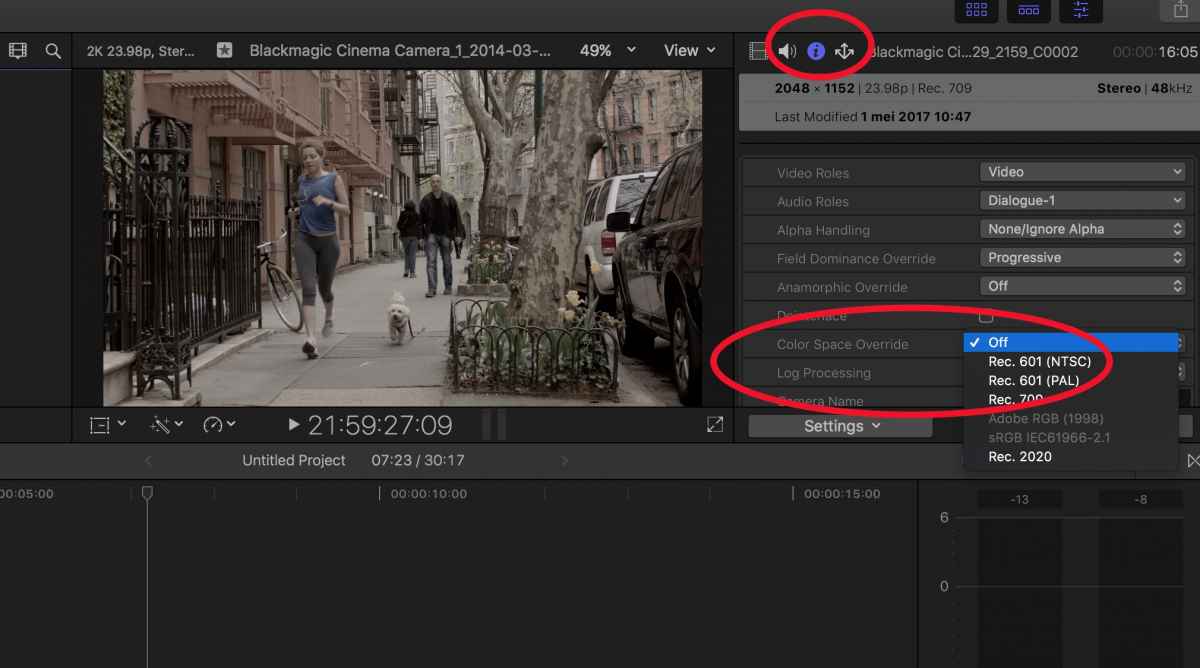
Select all the flat clips in your clip browser, then go to the Inspector. Make sure the Settings view is enabled, then press the Information (i) button and set Color Space Override to "Off". This should remove the log processing from your clips and return them to their flat look.
- Ronny
Some cameras embed metadata in the media file, enabling Final Cut Pro to turn on the appropriate log processing setting automatically. You have recorded with a flat gamma and, as the camera has embedded the log processing data in your clips, FCP X has automatically applied a LUT to your video (as Tom has explained). This is a good thing, e.g. when you want to view the clips with the correct colors in your clip browser instead of seeing the flat curve. But sometimes you don't want this.
If you don't want this to happen:
Select all the flat clips in your clip browser, then go to the Inspector. Make sure the Settings view is enabled, then press the Information (i) button and set Color Space Override to "Off". This should remove the log processing from your clips and return them to their flat look.
- Ronny
Last edit: 01 May 2017 09:04 by ronny courtens.
Please Log in to join the conversation.
- Tom Wolsky
-
- Offline
- Moderator
-
01 May 2017 11:01 #87689
by Tom Wolsky
Replied by Tom Wolsky on topic Final Cut add colors to the clips itself?
Color Space Overrude or Log Processing?
Please Log in to join the conversation.
- ronny courtens
-
- Offline
- Moderator
-
Less
More
- Posts: 4455
- Thank you received: 962
01 May 2017 11:05 #87690
by ronny courtens
Replied by ronny courtens on topic Final Cut add colors to the clips itself?
Indeed, my bad.
Both Log Processing Override and Color Space should be set to Off/None.
Thanks for correcting this, Tom.
- Ronny
Both Log Processing Override and Color Space should be set to Off/None.
Thanks for correcting this, Tom.
- Ronny
Please Log in to join the conversation.
03 May 2017 00:03 #87755
by chala
Replied by chala on topic Final Cut add colors to the clips itself?
Thank you very much everyone and for the detailed explanation!
I managed to do so.
Best!
I managed to do so.
Best!
Please Log in to join the conversation.
