


- Posts: 63
- Thank you received: 0
3 Post Moderation Rule for New Boarders (25 Jan 2021)
New boarders will have their posts moderated - Don't worry if you cannot see your post immediately.
How to collapse expanded view synchronised clips ??
29 Apr 2017 09:36 #87657
by Dinky
How to collapse expanded view synchronised clips ?? was created by Dinky
A mysterie in FCPX 10.3. Who can help ?
I created a synchronised clips from two clips, using audio as syncing source. Works fine. Then I want to edit the individual clips a=so I drop the synced clip into the time line and select "Open Clip" from the drop down menu. Works fine also
Now, after editing I want to go back to the normal view of the synced clip, but I cannot work out how to do that. Until now I "solved" this by opening another project and going back to the project I was working on. There must, however, be a normal way to collapse the expanded view of a synchronised clip. But how ?????
I created a synchronised clips from two clips, using audio as syncing source. Works fine. Then I want to edit the individual clips a=so I drop the synced clip into the time line and select "Open Clip" from the drop down menu. Works fine also
Now, after editing I want to go back to the normal view of the synced clip, but I cannot work out how to do that. Until now I "solved" this by opening another project and going back to the project I was working on. There must, however, be a normal way to collapse the expanded view of a synchronised clip. But how ?????
Please Log in to join the conversation.
- ronny courtens
-

- Offline
- Moderator
-

Less
More
- Posts: 4455
- Thank you received: 962
29 Apr 2017 12:04 #87659
by ronny courtens
Replied by ronny courtens on topic How to collapse expanded view synchronised clips ??
Hi Hans,
Actually this is very easy to do. You don't need to drop a synched clip into a project in order to work inside it.
1. Select the synched clip in the clip browser, R-click the clip and select "Open Clip". This will open the clip in its own timeline:

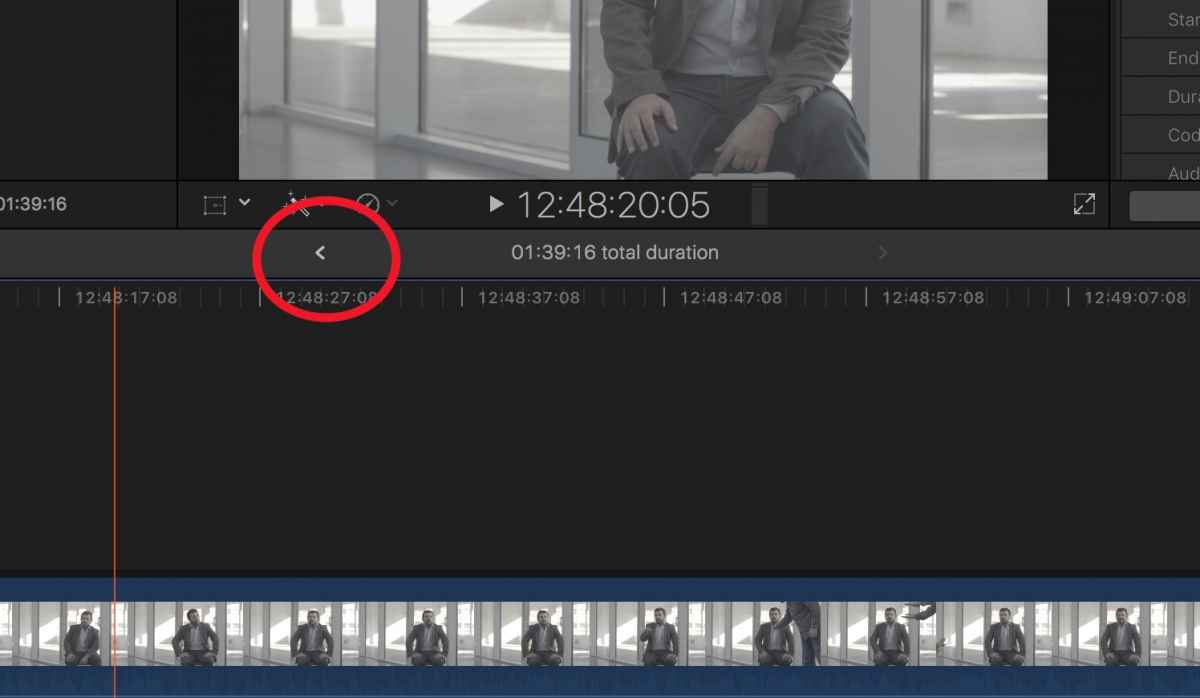
2. Do whatever you need to do inside the clip, then use the little Timeline History arrow to return the timeline view to whatever project was opened before. Or just open any other project from within the clip browser.
- Ronny
Actually this is very easy to do. You don't need to drop a synched clip into a project in order to work inside it.
1. Select the synched clip in the clip browser, R-click the clip and select "Open Clip". This will open the clip in its own timeline:
2. Do whatever you need to do inside the clip, then use the little Timeline History arrow to return the timeline view to whatever project was opened before. Or just open any other project from within the clip browser.
- Ronny
Please Log in to join the conversation.
29 Apr 2017 12:33 #87661
by Dinky
Replied by Dinky on topic How to collapse expanded view synchronised clips ??
Thanks Ronny, that is really useful comment. Not very intuitive, though, but that is increasingly the case after each FCPX update.
Thanks again
Thanks again
Please Log in to join the conversation.
