


- Posts: 321
- Thank you received: 6
3 Post Moderation Rule for New Boarders (25 Jan 2021)
New boarders will have their posts moderated - Don't worry if you cannot see your post immediately.
Finalize or Collapse Multicam Clip to selection
28 Apr 2017 10:04 #87634
by AppleGuru
Finalize or Collapse Multicam Clip to selection was created by AppleGuru
Is there a way to Finalize or Collapse Multicam Clip to its selected part?
The reason I am wanting to this is... it is not possible to edit audio in subframes when assigned to the Multicam clip.
I count figure it out nor find anything on the web.
Thanks
The reason I am wanting to this is... it is not possible to edit audio in subframes when assigned to the Multicam clip.
I count figure it out nor find anything on the web.
Thanks
Please Log in to join the conversation.


28 Apr 2017 14:37 #87639
by canelson
--
Matias Canelson
www.canelson.us
Replied by canelson on topic Finalize or Collapse Multicam Clip to selection
Can't be done. You have two options:
1) Send feedback to Apple requesting the feature (as I did).
2) Wait until T. Payton app is ready for consumers > tpayton.com/shot-splitter-x/
1) Send feedback to Apple requesting the feature (as I did).
2) Wait until T. Payton app is ready for consumers > tpayton.com/shot-splitter-x/
--
Matias Canelson
www.canelson.us
Please Log in to join the conversation.

28 Apr 2017 15:11 #87642
by JoeEditor
Replied by JoeEditor on topic Finalize or Collapse Multicam Clip to selection
I can trim audio to sub-frames with my multicams. Select a clip, Expand Audio, trim the audio's head or tail. Or use the Option key with either < or > (common & period).
Or are you trying to do something different?
Or are you trying to do something different?
Please Log in to join the conversation.
16 Jun 2017 02:11 #88805
by canelson
--
Matias Canelson
www.canelson.us
Replied by canelson on topic Finalize or Collapse Multicam Clip to selection
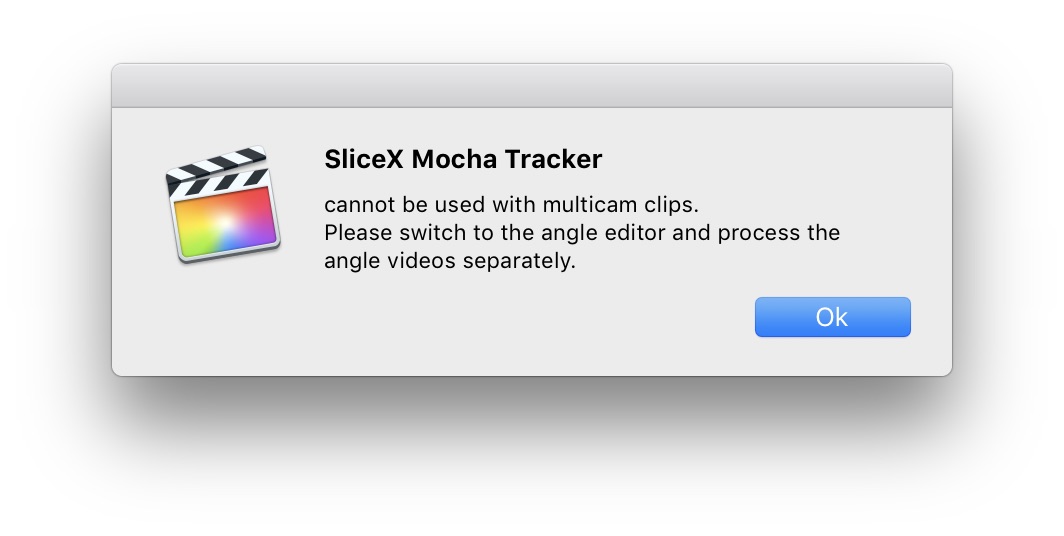
On a follow up to this. I have to add an effect to a video I'm working on and the effect does not apply to multicam clips, I have to apply it to the clip inside the angle editor...which is incredible time consuming because I'll have to search which part of each clip is being used, blade the section, apply the effect and so on for every cut (and this multicam is really long, btw).
--
Matias Canelson
www.canelson.us
Please Log in to join the conversation.
16 Jun 2017 03:34 - 16 Jun 2017 03:35 #88806
by JoeEditor
Replied by JoeEditor on topic Finalize or Collapse Multicam Clip to selection
I'd simply create a new angle, copy the angle you want to apply the Coremelt plugin to, and apply it to the new duplicated angel. Then just go switch those angle in the Timeline. Way faster and easier.
Last edit: 16 Jun 2017 03:35 by JoeEditor.
Please Log in to join the conversation.
16 Jun 2017 05:37 #88807
by canelson
--
Matias Canelson
www.canelson.us
Replied by canelson on topic Finalize or Collapse Multicam Clip to selection
The problem is that I have to apply the mask to both cameras and is a "reality" video with this person entering the frame, moving around, leaving, etc for 15 minutes (and this is a short one, I have longers).
--
Matias Canelson
www.canelson.us
Please Log in to join the conversation.
16 Jun 2017 13:07 #88809
by canelson
--
Matias Canelson
www.canelson.us
Replied by canelson on topic Finalize or Collapse Multicam Clip to selection
TRUTH BE TOLD... I just found out it was a limitation of the plugin, not FCPX.
SliceX Free does not work with multicam clips (for the moment according to their website), but I tried the trial version of Crumplepop's FaceBlur and it does work.
SliceX Free does not work with multicam clips (for the moment according to their website), but I tried the trial version of Crumplepop's FaceBlur and it does work.
--
Matias Canelson
www.canelson.us
Please Log in to join the conversation.
