


3 Post Moderation Rule for New Boarders (25 Jan 2021)
New boarders will have their posts moderated - Don't worry if you cannot see your post immediately.
Audio organisation fcpx


Here is the complete path.
Drop your music folders into:
Startup Drive/Library/Audio/Apple Loops/Apple/Apple Loops For Soundtrack Pro/
(likewise you could put your sound effects in:
Startup Drive/Library/Audio/Apple Loops/Apple/Final Cut Pro Sound Effects
or
Startup Drive/Library/Audio/Apple Loops/Apple/iLife Sound Effects
and I expect you could drill down from there if wanted specifics placed in things like Foley, ambience, etc.
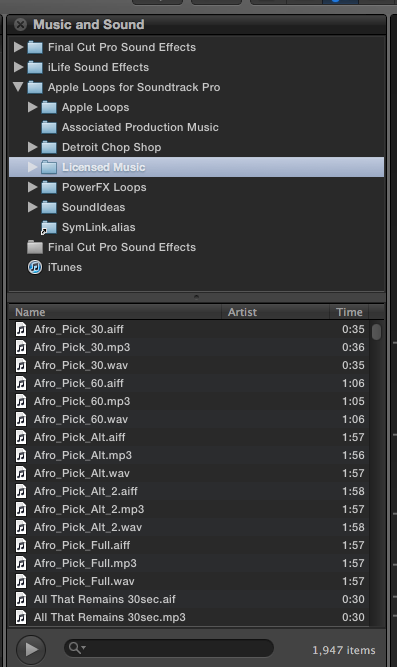
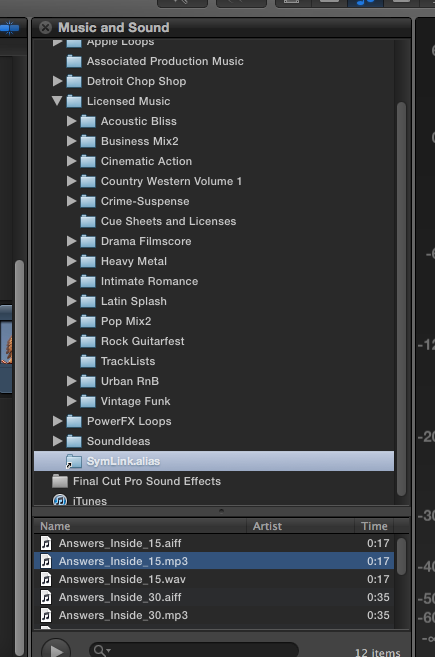
And good news...symbolic links also work. I made an alias to an offline drive for media with a test folder (symlink.alias) and it comes up in the media browser and the songs play. I have included some screen shots.
Picture 2 shows the symbolic link folder selected and its' enclosed tunes.
Picture 1 shows the "Licensed Music" folder (which I made) and and one directory of songs.
Clicking the disclosure triangle reveals all the enclosed themes.
EDIT: I originally posted the same picture twice...hopefully this now shows two different screen shots.
EDIT2: Also notice my Licensed music folder includes a directory for cue sheets. Obviously the media browser won't do anything when this folder is selected. I just forgot to remove the cue sheets folder that was contained within my custom licensed music folder.
Creating history....one edit at a time !
Please Log in to join the conversation.

So don't feel you need to source all your music as uncompressed AIFs or WAVs.
I tried a method of creating an event and then importing (but not copying) all my soundfx.
It worked perfectly but I found the overhead on FCP X was too irksome.
So I went back to other method which is an alternate library in iTunes. (Hold Option as you fire it up then select the different library.)
I have an iTunes plug in that takes the track selected and converts it to an AIF.
Or I just drag them to a Compressor Droplet that does the same thing.
Sean Lander - Editing since 1982 - AVID 1991 - FCP 1999 - FCPX 2011
Please Log in to join the conversation.

STRONGLY disagree. Those highly compressed formats throw away way too much fidelity information to ever compare to AIFF.
Please Log in to join the conversation.

Please Log in to join the conversation.
fcpguru wrote: not sure if this was said already, but you can drag and drop folders from the finder into FCPX's music media browser and it will create a folder that you can search through. Really great if (like me) you don't want to muck up your iTunes library.
Haha, that was too easy!

Please Log in to join the conversation.
BenB wrote: STRONGLY disagree. Those highly compressed formats throw away way too much fidelity information to ever compare to AIFF.
Sorry what I'm talking about here is music for TV shows.
Most Production music in OZ is delivered to production houses on USB Drives. All the music is mp3 320kb/s it's then converted to AIF or WAV and used this way.
Just want to allay any fears that the OP might have had thinking that he HAS to use AIF or WAV in his project. It's not the case. That's all.
There's no doubt uncompressed is better than compressed. Just like Uncompressed video is better than say HDV. Still doesn't stop it from being broadcast though.
Sean Lander - Editing since 1982 - AVID 1991 - FCP 1999 - FCPX 2011
Please Log in to join the conversation.
Please Log in to join the conversation.
