


- Posts: 77
- Thank you received: 6
3 Post Moderation Rule for New Boarders (25 Jan 2021)
New boarders will have their posts moderated - Don't worry if you cannot see your post immediately.
how do you handle and compare revision in fcpx?
26 Apr 2017 19:10 - 26 Apr 2017 19:12 #87582
by ronfya
how do you handle and compare revision in fcpx? was created by ronfya
hi guys
I was wondering how you handle and compare revisions in fcpx?
I mean I am having a harder time doing that in fcpx since we cannot stack 2 projects to compare their timelines.
Of course i can jump back & forth between 2 projects or use reference videos exported from one of them but this is not really convenient sometimes.
Especially when needing to move quickly with the director or client next to me always asking for "that edit which was better in some precious version, can we compare? ... oh yeah let's do a mix of both" ... and now you need to copy paste some parts of the edit from one project to another.
(Side note: for color turarounds and conform, when the cut has been locked and simplified, I sometimes create a video role named "color corrected" and have it sitting above the edit to conform. But it is not really the ideal way to compare 2 complicated edits)
So how do you handle that?
I was wondering how you handle and compare revisions in fcpx?
I mean I am having a harder time doing that in fcpx since we cannot stack 2 projects to compare their timelines.
Of course i can jump back & forth between 2 projects or use reference videos exported from one of them but this is not really convenient sometimes.
Especially when needing to move quickly with the director or client next to me always asking for "that edit which was better in some precious version, can we compare? ... oh yeah let's do a mix of both" ... and now you need to copy paste some parts of the edit from one project to another.
(Side note: for color turarounds and conform, when the cut has been locked and simplified, I sometimes create a video role named "color corrected" and have it sitting above the edit to conform. But it is not really the ideal way to compare 2 complicated edits)
So how do you handle that?
Last edit: 26 Apr 2017 19:12 by ronfya.
Please Log in to join the conversation.


27 Apr 2017 04:09 #87591
by JoeEditor
Replied by JoeEditor on topic how do you handle and compare revision in fcpx?
Audition Clips?
What NLE opens 2 timelines at once?
What NLE opens 2 timelines at once?
Please Log in to join the conversation.
27 Apr 2017 06:45 #87594
by ronfya
Replied by ronfya on topic how do you handle and compare revision in fcpx?
Audition clips helps comparing just that : different choices for clips. Not cuts.
Wanna stack 4 timelines ? Sure you can. Not in FCPX.
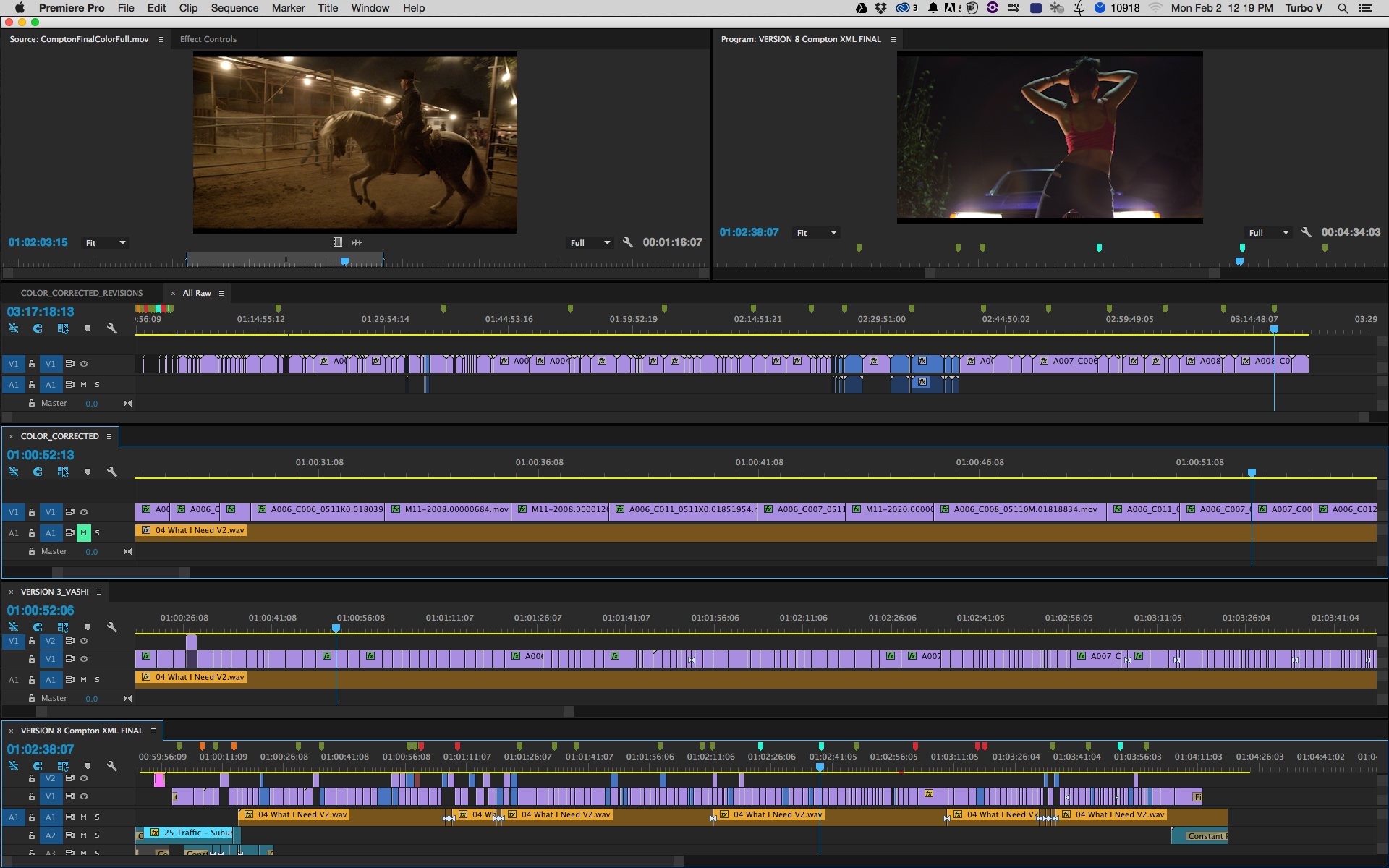
Wanna stack 4 timelines ? Sure you can. Not in FCPX.
Please Log in to join the conversation.
27 Apr 2017 11:37 #87606
by JoeEditor
Replied by JoeEditor on topic how do you handle and compare revision in fcpx?
Compound Clips do the same thing. Muting Roles will achieve the same thing. In over a decade of this business, never once had the need to open more than one timeline altogether. That's odd.
Please Log in to join the conversation.

27 Apr 2017 13:26 #87609
by joema
As Ben said, you can create a compound clip of project 1 and skim it in separately in the browser, having its own Browser Viewer. You can select ranges from it and paste/insert/overwrite to project 2 in the timeline.
Another way is to attach the compound clip of project 1 to project 2 as a connected clip in the timeline. You can cut and paste between them in the timeline.
Another way is copy/paste the full project 1 timeline to project 2, then move #1 on top of #2 timeline as a series of connected clips. In the above two cases, clip skimming allows you to independently skim each timeline "lane".
Replied by joema on topic how do you handle and compare revision in fcpx?
ronfya wrote: ....I am having a harder time doing that in fcpx since we cannot stack 2 projects to compare their timelines.....the director or client next to me always asking for "that edit which was better in some precious version, can we compare? ... oh yeah let's do a mix of both" ... and now you need to copy paste some parts of the edit from one project to another....
As Ben said, you can create a compound clip of project 1 and skim it in separately in the browser, having its own Browser Viewer. You can select ranges from it and paste/insert/overwrite to project 2 in the timeline.
Another way is to attach the compound clip of project 1 to project 2 as a connected clip in the timeline. You can cut and paste between them in the timeline.
Another way is copy/paste the full project 1 timeline to project 2, then move #1 on top of #2 timeline as a series of connected clips. In the above two cases, clip skimming allows you to independently skim each timeline "lane".
Please Log in to join the conversation.
- Scott Markowitz
-

- Offline
- Elite Member
-

Less
More
- Posts: 161
- Thank you received: 31
27 Apr 2017 13:52 #87610
by Scott Markowitz
Replied by Scott Markowitz on topic how do you handle and compare revision in fcpx?
As mentioned before, a compound clip of the first project works pretty good.
I'll sometimes make 2 instances of the compound clip stacked exactly over each other. Then, I'll set one of them to a transfer mode of "Difference"
If you turn off the normal instance. (V on the keyboard), you can skim very quickly over the resulting composite, and see anything that's different. (It will NOT be black in the preview monitor. - Because with Difference Transfer mode, any pixels that are identical will cancel each other out, and you will end up with a black pixel.)
I do agree with your fundamental question, though.
In my experience the only time I would want to open up another timeline and compare it is in cases where someone else did work in a project, and I had no documentation or notes about what had changed.
Not needed for me often, but would be useful in those cases to be able to compare the cut graphically.
Send Apple some Feedback. I think this should be part of the package!
I'll sometimes make 2 instances of the compound clip stacked exactly over each other. Then, I'll set one of them to a transfer mode of "Difference"
If you turn off the normal instance. (V on the keyboard), you can skim very quickly over the resulting composite, and see anything that's different. (It will NOT be black in the preview monitor. - Because with Difference Transfer mode, any pixels that are identical will cancel each other out, and you will end up with a black pixel.)
I do agree with your fundamental question, though.
In my experience the only time I would want to open up another timeline and compare it is in cases where someone else did work in a project, and I had no documentation or notes about what had changed.
Not needed for me often, but would be useful in those cases to be able to compare the cut graphically.
Send Apple some Feedback. I think this should be part of the package!
Please Log in to join the conversation.
27 Apr 2017 14:22 #87611
by davechap
Replied by davechap on topic how do you handle and compare revision in fcpx?
I'm pretty sure we are going to see some workflow ideas based around exporting to Resolve 14. Since it can compare 2 timelines and show what's different, I suspect that you can export the XML from both projects in FCPX and import those into Resolve 14 (beta). Then use the comparison view to see what's similar/different between the two projects.
Does it work? I dunno. Someone needs to try.

Does it work? I dunno. Someone needs to try.
Please Log in to join the conversation.
- Tom Wolsky
-

- Offline
- Moderator
-

27 Apr 2017 20:29 #87627
by Tom Wolsky
Replied by Tom Wolsky on topic how do you handle and compare revision in fcpx?
"I'll sometimes make 2 instances of the compound clip stacked exactly over each other. Then, I'll set one of them to a transfer mode of "Difference""
Nice one. Thanks for sharing that.
Nice one. Thanks for sharing that.
Please Log in to join the conversation.
- Tom Wolsky
-
- Offline
- Moderator
-
27 Apr 2017 20:50 #87628
by Tom Wolsky
Replied by Tom Wolsky on topic how do you handle and compare revision in fcpx?
Legacy FCP did this with riundyripped versions from Soundtrack Pro.
Please Log in to join the conversation.
28 Apr 2017 01:07 #87629
by spurratic
Replied by spurratic on topic how do you handle and compare revision in fcpx?
This is where frame.io shines
You can save all previous versions of an edit.....with all the notes in one place.
You can side by side compare 2 versions and then mark the timecode for any changes.....and now with the new frame.io update it will send the notes back to FCPX.
I know it is a diff platform than what you are referring to.....but the newest update of frame.io is a whole new ballgame.
I use that now for all of my reviews.
You can save all previous versions of an edit.....with all the notes in one place.
You can side by side compare 2 versions and then mark the timecode for any changes.....and now with the new frame.io update it will send the notes back to FCPX.
I know it is a diff platform than what you are referring to.....but the newest update of frame.io is a whole new ballgame.
I use that now for all of my reviews.
Please Log in to join the conversation.
29 Apr 2017 07:54 #87656
by Axel
Thank you. Very smart. Will try immediately.
Replied by Axel on topic how do you handle and compare revision in fcpx?
Scott Markowitz wrote: I'll sometimes make 2 instances of the compound clip stacked exactly over each other. Then, I'll set one of them to a transfer mode of "Difference"
Thank you. Very smart. Will try immediately.
Please Log in to join the conversation.
04 May 2017 22:23 #87802
by ronfya
Replied by ronfya on topic how do you handle and compare revision in fcpx?
thank you guys for your insights
And nice tip using the difference blending mode to compare edits !
I really wonder why I didn't think of that since I use it regularly in photoshop for the same reason :blink:
And nice tip using the difference blending mode to compare edits !
I really wonder why I didn't think of that since I use it regularly in photoshop for the same reason :blink:
Please Log in to join the conversation.
