


- Posts: 971
- Thank you received: 46
3 Post Moderation Rule for New Boarders (25 Jan 2021)
New boarders will have their posts moderated - Don't worry if you cannot see your post immediately.
A skype call to hel me understand a few things, please?????
Less
More
14 Apr 2017 06:22 #87186
by MsJustine
Hi All,
I really really would appreciate a short skype call to help me understand what is going on with FCPX, there is just something I am sure has been missed by Apple and I would love to find out if I am just stupid or am I not stupid...
I feel I am not stupid, and I understand things, what I don't get is why Apple has 2 settings in the view menu for the timeline and 3 for the clip itself, namely Original, Optimized and Proxy.. Why is the timeline view Original+Optimized and Proxy, why not Original, Optimized, Proxy, 3 settings...
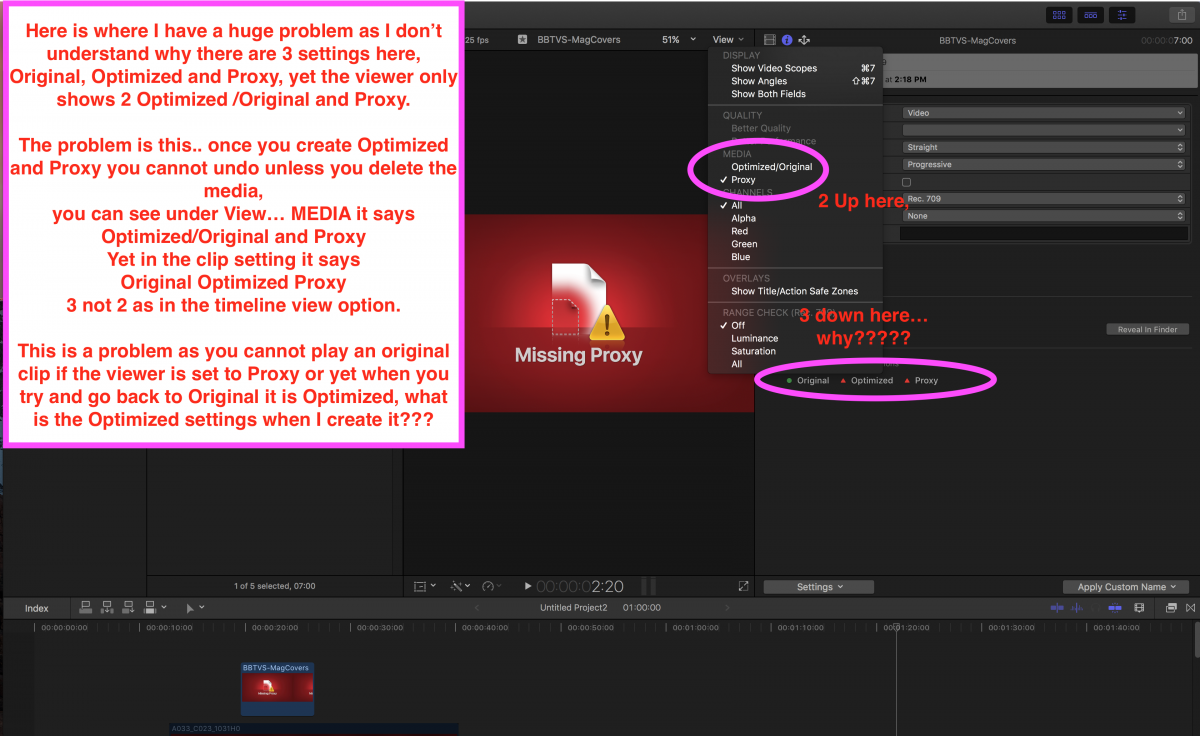
Please please can someone spare a few minutes to discuss...I really want to understand why my project works si=ome of the time and at other times hasz problems...
I really really would appreciate a short skype call to help me understand what is going on with FCPX, there is just something I am sure has been missed by Apple and I would love to find out if I am just stupid or am I not stupid...
I feel I am not stupid, and I understand things, what I don't get is why Apple has 2 settings in the view menu for the timeline and 3 for the clip itself, namely Original, Optimized and Proxy.. Why is the timeline view Original+Optimized and Proxy, why not Original, Optimized, Proxy, 3 settings...
Please please can someone spare a few minutes to discuss...I really want to understand why my project works si=ome of the time and at other times hasz problems...
Please Log in to join the conversation.

14 Apr 2017 11:44 #87190
by davechap
Replied by davechap on topic A skype call to hel me understand a few things, please?????
There are not 3 settings. Original/Optimized are one and Proxy is the other. Depending on the footage and the computer, FCPX may never create Optimized versions for playback so you'll always be editing the original. The light that turns on there will let you know that a clip has been Optimized (meaning it's converted to ProRes).
Proxy on the other hand can be generated for almost anything and the light shows if it's been generated or not.
So the viewer is just a toggle between Original/Optimized as a choice and then Proxy as a second choice. If you generate Optimized media, there's no need for a toggle between Optimized and Original since the Optimized is really your new source material.
The reason for the lights is to give you insight on what's been created for each clip. In your case, you have original media and no Optimized or Proxys generated. You can create a Proxy version of that clip and then toggle between the view to see how it works. Though you may not be able to make and Optimized version at all... again this is just for media/computer incompatibilities.
Proxy on the other hand can be generated for almost anything and the light shows if it's been generated or not.
So the viewer is just a toggle between Original/Optimized as a choice and then Proxy as a second choice. If you generate Optimized media, there's no need for a toggle between Optimized and Original since the Optimized is really your new source material.
The reason for the lights is to give you insight on what's been created for each clip. In your case, you have original media and no Optimized or Proxys generated. You can create a Proxy version of that clip and then toggle between the view to see how it works. Though you may not be able to make and Optimized version at all... again this is just for media/computer incompatibilities.
Please Log in to join the conversation.
Less
More
- Posts: 971
- Thank you received: 46
14 Apr 2017 11:50 #87191
by MsJustine
Replied by MsJustine on topic A skype call to hel me understand a few things, please?????
Hi Dave,
Thanks, and that is the problem, Final Cut making unilateral uniformed decisions about my media and not giving me any way of control. Prores is not the best choice, I should have the choice of what format the conversion is into, prores, or whatever.
This unilateral decision about you will eat what we serve is unfair and harmful, it prevents my media from working, I have been wondering for the longest time what the problem was, why does my media work when it is not optimized, not proxy, but only original.
The 2nd problem I have found there is no way to know what codec, format, the data does not exist to tell me, FCPX does not tell you this, "magic sauce" is used, and it has destroyed my editing business..
Thanks, and that is the problem, Final Cut making unilateral uniformed decisions about my media and not giving me any way of control. Prores is not the best choice, I should have the choice of what format the conversion is into, prores, or whatever.
This unilateral decision about you will eat what we serve is unfair and harmful, it prevents my media from working, I have been wondering for the longest time what the problem was, why does my media work when it is not optimized, not proxy, but only original.
The 2nd problem I have found there is no way to know what codec, format, the data does not exist to tell me, FCPX does not tell you this, "magic sauce" is used, and it has destroyed my editing business..
Please Log in to join the conversation.
14 Apr 2017 11:58 #87192
by davechap
Replied by davechap on topic A skype call to hel me understand a few things, please?????
The documentation spells it out pretty well and others have done deep testing to give very detailed specs. The functionally works great.
Sounds like there's no reason to convert to Optimized or Proxy. If it's only 180 seconds long, just get rid of the Optimized and Proxy and work with the original.
Sounds like there's no reason to convert to Optimized or Proxy. If it's only 180 seconds long, just get rid of the Optimized and Proxy and work with the original.
Please Log in to join the conversation.
14 Apr 2017 11:59 #87193
by Axel
Replied by Axel on topic A skype call to hel me understand a few things, please?????
The clip inspector shows the "Available Media Representation". Now if it says Original only and for some reason you want to edit with an intermediate or proxy substitute, you can transcode the clip.
Once a clip was added to he project (=timeline) and you had created Optimized Media before, you can no longer choose which one is currently displayed. You are not the only one who wonders why this is so.
My explanation may be wrong, so please correct me. ProRes will be the preview render codec anyway, no matter which was your camera codec or whether you had Optimized Media from the start. There are all flavors of ProRes available in custom project settings as well as Uncompressed. You can't render for preview in, say, AVCHD. So the differentiation between Original and Optimized is somewhat irrelevant there. I guess - but I may err - that FCP X plays back what can be decoded faster. This may have to do with your hardware (Quicksync or not) and how many effects you applied. I can't see much difference between Original and Optimized for hard edits, but once I add effects, I need to transcode to improve real time performance. This doesn't bother me much. For preview.
Does FCP X always use original media for export renders? Clearly not. Why then was there a danger to *forget* switching back from Proxy to Original/Optimized prior to export? Wouldn't make much sense to export to ProResHQ if the initial codec wasn't referred to any more, and, as you say, you have no option for anything else but ProRes422 for Optimized ...
Can someone confirm that FCP X automatically switches back from ProRes422 to Original?
Once a clip was added to he project (=timeline) and you had created Optimized Media before, you can no longer choose which one is currently displayed. You are not the only one who wonders why this is so.
My explanation may be wrong, so please correct me. ProRes will be the preview render codec anyway, no matter which was your camera codec or whether you had Optimized Media from the start. There are all flavors of ProRes available in custom project settings as well as Uncompressed. You can't render for preview in, say, AVCHD. So the differentiation between Original and Optimized is somewhat irrelevant there. I guess - but I may err - that FCP X plays back what can be decoded faster. This may have to do with your hardware (Quicksync or not) and how many effects you applied. I can't see much difference between Original and Optimized for hard edits, but once I add effects, I need to transcode to improve real time performance. This doesn't bother me much. For preview.
Does FCP X always use original media for export renders? Clearly not. Why then was there a danger to *forget* switching back from Proxy to Original/Optimized prior to export? Wouldn't make much sense to export to ProResHQ if the initial codec wasn't referred to any more, and, as you say, you have no option for anything else but ProRes422 for Optimized ...
Can someone confirm that FCP X automatically switches back from ProRes422 to Original?
Please Log in to join the conversation.
14 Apr 2017 12:03 #87194
by davechap
Replied by davechap on topic A skype call to hel me understand a few things, please?????
There's no "magic sauce" involved here. What I suggest is to buy training and actually learn the application. If you don't have the budget, at least watch all of Ripple Training's videos on YouTube. Between those and the articles on here with Sam Mastman, Thomas Grove Carter and others, there's no reason why one doesn't know FCPX like the back of their hand. Just takes some time invested from you.
Please Log in to join the conversation.
Less
More
- Posts: 971
- Thank you received: 46
14 Apr 2017 12:03 #87195
by MsJustine
Replied by MsJustine on topic A skype call to hel me understand a few things, please?????
In my case I would say once there has been Optimized clips used, even if you delete then using the delete option, the clip has been altered, the only way I have found is to keep the clip on a thumb drive, remove the thumb drive once imported, and use the clip, if the clip undergoes proxy or optimized mode, it is no longer usable.
There is a serious issue with the Optimized/Original, they are not the same, and thus should not be, in fact original clips cannot play in proxy timelines, Apple has made a serious blunder!
There is a serious issue with the Optimized/Original, they are not the same, and thus should not be, in fact original clips cannot play in proxy timelines, Apple has made a serious blunder!
Please Log in to join the conversation.
Less
More
- Posts: 971
- Thank you received: 46
14 Apr 2017 12:08 #87197
by MsJustine
Replied by MsJustine on topic A skype call to hel me understand a few things, please?????
It has nothing to do with understanding, sorry Dave, you are missing the point.
Apple has made a serious blunder in deciding what is best, and that is just wrong, you would not accept going to a restaurant and all they provide is salt.. NO PEPPER.. you would be confused and find the food less pleasant if you could not add your own pepper...
What Apple has decided is breaking the software, it is only making things worse, and to top it, since updating to 10.3.3 I have noticed artifacts not present in 10.3.2..
Prores is not right for everyone, it is a weak workaround, and I am quite surprised no one has mentioned this before.
Apple has made a serious blunder in deciding what is best, and that is just wrong, you would not accept going to a restaurant and all they provide is salt.. NO PEPPER.. you would be confused and find the food less pleasant if you could not add your own pepper...
What Apple has decided is breaking the software, it is only making things worse, and to top it, since updating to 10.3.3 I have noticed artifacts not present in 10.3.2..
Prores is not right for everyone, it is a weak workaround, and I am quite surprised no one has mentioned this before.
Please Log in to join the conversation.
14 Apr 2017 12:15 #87198
by davechap
Replied by davechap on topic A skype call to hel me understand a few things, please?????
You seem to be getting on an unjustified soapbox about this issue. Clearly, there's something that's not getting through to you. I've read your posts again and there seems to be a few things that are tripping you up and you're blaming this Original/Proxy toggle in the viewer.
Don't make Optimized Media or Proxy Media. Edit the original media and learn about the other settings and when to use them for next time.
The timeline will still render as ProRes (either automatically or when you tell it to) because the world has decided that ProRes is the best option. You do have control over what flavor your timeline is (default is ProRes 422), but you won't be able to render your timeline as AVCHD or other garbage.
Don't make Optimized Media or Proxy Media. Edit the original media and learn about the other settings and when to use them for next time.
The timeline will still render as ProRes (either automatically or when you tell it to) because the world has decided that ProRes is the best option. You do have control over what flavor your timeline is (default is ProRes 422), but you won't be able to render your timeline as AVCHD or other garbage.
Please Log in to join the conversation.
Less
More
- Posts: 971
- Thank you received: 46
14 Apr 2017 12:18 #87199
by MsJustine
Replied by MsJustine on topic A skype call to hel me understand a few things, please?????
I have to edit in proxy mode, the video is 6K in size, and impossible to play without converting to proxy, I have tried to leave the 7 second clip as original, and when the timeline is set to proxy, the 7second clip will not play, it will display the proxy missing message.
This is what I mean, this is a serious issue, I know how to edit, I passed the exam!!!
This is what I mean, this is a serious issue, I know how to edit, I passed the exam!!!
Please Log in to join the conversation.
14 Apr 2017 12:22 #87200
by Axel
You are not forced to transcode to ProRes (other than, as I said, for preview rendering), you can uncheck create Optimized Media in the import window. You can also transcode to whatever you want before import (with 3d party software). ProRes is not for everyone? Well, it's your choice!
I bet if Adobe created their own optimized codec family or if Apple allowed ProRes to be encoded on Windows and be computed in 64bit, a lot less Macs would be sold.
Replied by Axel on topic A skype call to hel me understand a few things, please?????
MsJustine wrote: Prores is not right for everyone, it is a weak workaround, and I am quite surprised no one has mentioned this before.
You are not forced to transcode to ProRes (other than, as I said, for preview rendering), you can uncheck create Optimized Media in the import window. You can also transcode to whatever you want before import (with 3d party software). ProRes is not for everyone? Well, it's your choice!
I bet if Adobe created their own optimized codec family or if Apple allowed ProRes to be encoded on Windows and be computed in 64bit, a lot less Macs would be sold.
Please Log in to join the conversation.
Less
More
- Posts: 971
- Thank you received: 46
14 Apr 2017 12:28 #87201
by MsJustine
Replied by MsJustine on topic A skype call to hel me understand a few things, please?????
Yes, you are right, I can change the media with 3rd party to anything, yet when I import it, Apple destroys it with the inability to use suitable codecs within FCPX.
That is my point, not what happens outside of the app, but what happens inside the app.
The concept is not hard, Apple should have more than 1 flavour of Prores, in fact more than just 1 thing, look I will agree I don't know everything, that is why I asked not to get into a pissing contest.
This is Easter, why not instead of fighting, make that call, it is skype after all, and it would maybe help me instead of all of us getting blisters from typing...
That is my point, not what happens outside of the app, but what happens inside the app.
The concept is not hard, Apple should have more than 1 flavour of Prores, in fact more than just 1 thing, look I will agree I don't know everything, that is why I asked not to get into a pissing contest.
This is Easter, why not instead of fighting, make that call, it is skype after all, and it would maybe help me instead of all of us getting blisters from typing...
Please Log in to join the conversation.
- Andreas Kiel
-

- Offline
- Platinum Member
-

Less
More
- Posts: 1077
- Thank you received: 189
14 Apr 2017 12:50 #87202
by Andreas Kiel
Replied by Andreas Kiel on topic A skype call to hel me understand a few things, please?????
Dear MsJustine,
If you don't understand the explanations given above a Skype call wouldn't be of any help.
- Andreas
If you don't understand the explanations given above a Skype call wouldn't be of any help.
- Andreas
Please Log in to join the conversation.
14 Apr 2017 12:51 #87203
by davechap
Replied by davechap on topic A skype call to hel me understand a few things, please?????
I'm @DaveChap on Twitter and DaveChapFilms on Skype if you have more questions.
Please Log in to join the conversation.
- Karsten Schlüter
-

- Offline
- Moderator
-

Less
More
- Posts: 3790
- Thank you received: 718
14 Apr 2017 12:58 #87204
by Karsten Schlüter
uhm, well, it would … keeping the board clean of such nonsense as
:S
Replied by Karsten Schlüter on topic A skype call to hel me understand a few things, please?????
Andreas Kiel wrote: … a Skype call wouldn't be of any help.…
uhm, well, it would … keeping the board clean of such nonsense as
…
Apple destroys it with the inability to use suitable codecs within FCPX.…
:S
Please Log in to join the conversation.
Less
More
- Posts: 971
- Thank you received: 46
14 Apr 2017 13:00 #87205
by MsJustine
Replied by MsJustine on topic A skype call to hel me understand a few things, please?????
I am reporting Karsten, when I leave it as Original, it works, when set to Optimized, it no longer works, just reporting what I observe!
Please Log in to join the conversation.
14 Apr 2017 13:03 #87206
by davechap
Replied by davechap on topic A skype call to hel me understand a few things, please?????
MsJustine, read this and then let us know if you have any questions.
larryjordan.com/articles/media-in-fcp-x/
larryjordan.com/articles/media-in-fcp-x/
Please Log in to join the conversation.
14 Apr 2017 13:04 #87207
by davechap
Replied by davechap on topic A skype call to hel me understand a few things, please?????
Please Log in to join the conversation.
Less
More
- Posts: 971
- Thank you received: 46
14 Apr 2017 13:08 #87208
by MsJustine
Replied by MsJustine on topic A skype call to hel me understand a few things, please?????
As I said, Apple has decided what is best, and that is not helpful any any way. You have missed my point.
Dave why don't you repost what you posted to me, instead of copy pasting, write it in your own words...
That might actually lead credibility to what you are saying.. Copy pasting proves you know how to copy and paste and does not prove you understand what you pasted as a link!
Dave why don't you repost what you posted to me, instead of copy pasting, write it in your own words...
That might actually lead credibility to what you are saying.. Copy pasting proves you know how to copy and paste and does not prove you understand what you pasted as a link!
Please Log in to join the conversation.
14 Apr 2017 13:11 #87209
by davechap
Replied by davechap on topic A skype call to hel me understand a few things, please?????
What? Larry Jordan has spelled out everything clearly with photos and details on all aspects here. I and others have tried to explain it in previous posts, but it seemed as though you needed an in-depth explanation of how it worked.
Perhaps FCPX isn't right for you. You keep getting upset at things we all agree work great compared to other NLE's. You may try Premiere or even Resolve? I have stayed with Apple BECAUSE of ProRes and I'm sure others have too. If you don't see the value there after reading those posts, then maybe your priorities are different and another NLE would be better.
Perhaps FCPX isn't right for you. You keep getting upset at things we all agree work great compared to other NLE's. You may try Premiere or even Resolve? I have stayed with Apple BECAUSE of ProRes and I'm sure others have too. If you don't see the value there after reading those posts, then maybe your priorities are different and another NLE would be better.
Please Log in to join the conversation.
