



- Posts: 272
- Thank you received: 2
3 Post Moderation Rule for New Boarders (25 Jan 2021)
New boarders will have their posts moderated - Don't worry if you cannot see your post immediately.
Help req! How to Consolidate Backup Library with Library?
14 Apr 2017 01:26 - 14 Apr 2017 01:56 #87180
by Slaughter
Ok, I know I need to learn a few things here.
I am happy to read or watch any tutorials which are recommended. I *have* searched around and I'm immobilised by the breadth of discussion about this on the internet.
Today FCPX shat itself due to my failure to keep tabs on space, and so it did its backup thing and closed down due to my HD having become too full for FCPX to operate. Stupid, yes, but it happened.
So when I created some space and reopened FCPX, my major project was gone. GONE.
However, its backup process worked and I managed to reopen it .
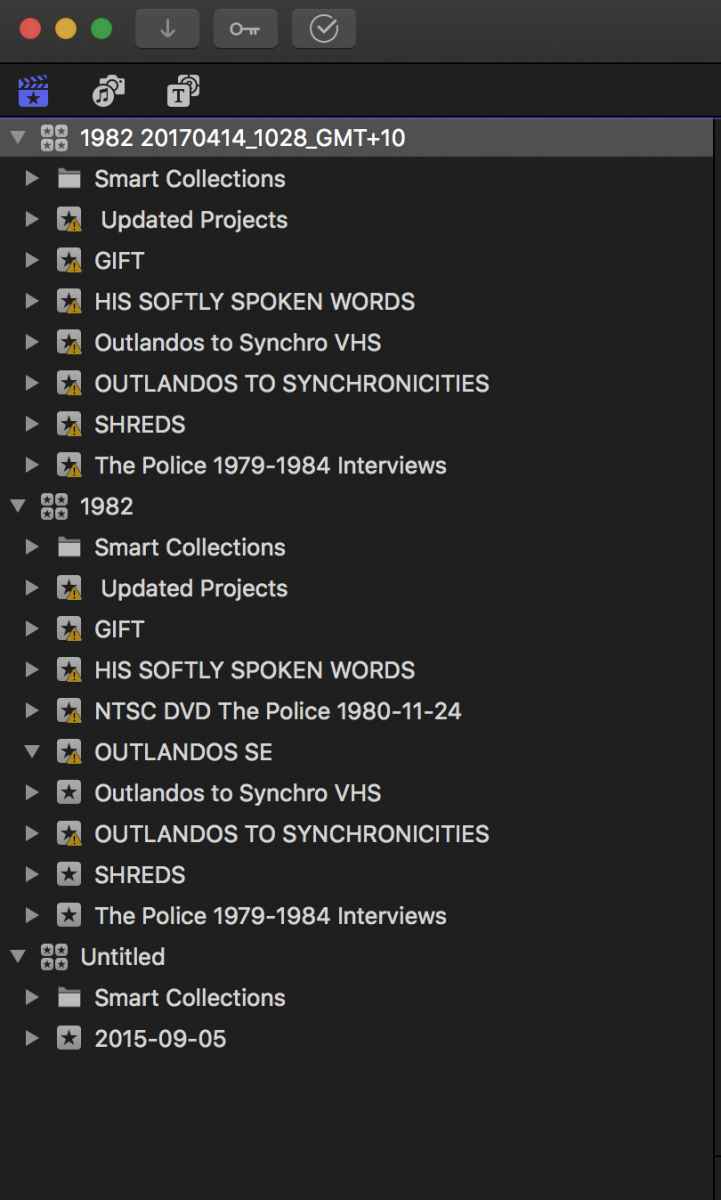
See screenshots. The Library screenshot shows how my already messy library looks now.
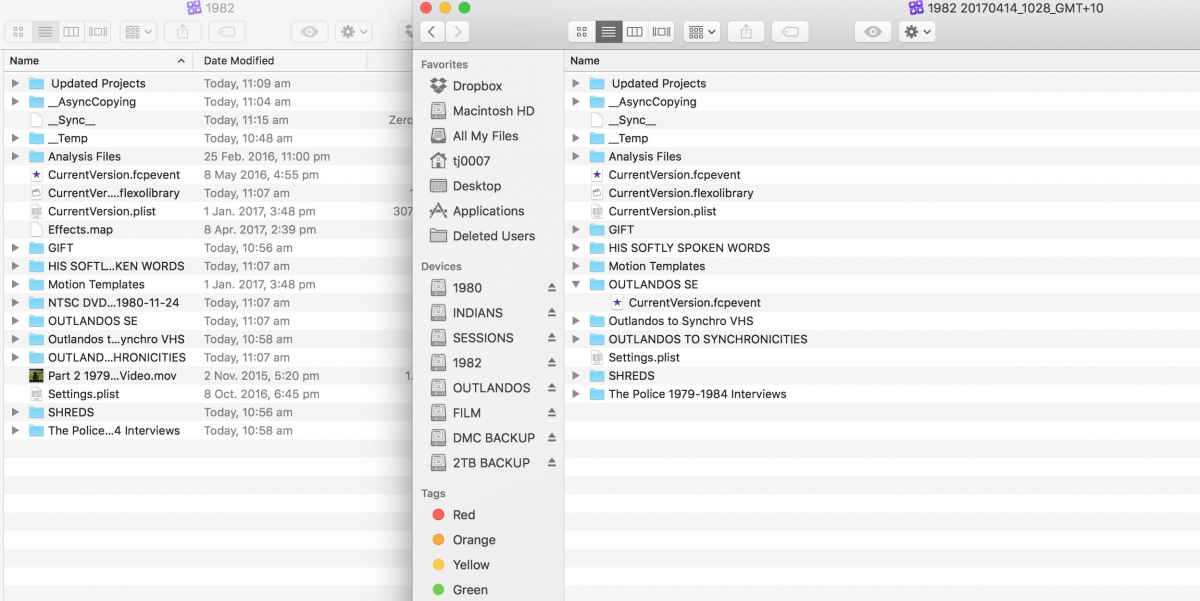
I have no idea how to bring my project ("OUTLANDOS SE") back into my regular library and tidy the whole thing up so it is is just back to being one library again. I have attached a screenshot of my library folders (packages) in finder, as well, so you can see what's in one but not in the other.
Any help to bring it all back into one library will be heavily, massively appreciated!
Please go easy on me for being so diabolically disorganised. I've been very lax with learning how to organise things and to be honest I find the whole library vs event vs project thing really difficult to get my head around, so I've been working a lot more inefficiently than is desireable. This mess I have created, however, is a nightmare. Getting ONE functioning library back is going to be a good start.
I am happy to read or watch any tutorials which are recommended. I *have* searched around and I'm immobilised by the breadth of discussion about this on the internet.
Today FCPX shat itself due to my failure to keep tabs on space, and so it did its backup thing and closed down due to my HD having become too full for FCPX to operate. Stupid, yes, but it happened.
So when I created some space and reopened FCPX, my major project was gone. GONE.
However, its backup process worked and I managed to reopen it .
See screenshots. The Library screenshot shows how my already messy library looks now.
I have no idea how to bring my project ("OUTLANDOS SE") back into my regular library and tidy the whole thing up so it is is just back to being one library again. I have attached a screenshot of my library folders (packages) in finder, as well, so you can see what's in one but not in the other.
Any help to bring it all back into one library will be heavily, massively appreciated!
Please go easy on me for being so diabolically disorganised. I've been very lax with learning how to organise things and to be honest I find the whole library vs event vs project thing really difficult to get my head around, so I've been working a lot more inefficiently than is desireable. This mess I have created, however, is a nightmare. Getting ONE functioning library back is going to be a good start.
Last edit: 14 Apr 2017 01:56 by Slaughter.
Please Log in to join the conversation.


15 Apr 2017 16:14 #87231
by VidGreg
Replied by VidGreg on topic Help req! How to Consolidate Backup Library with Library?
Hi TJ7
So it looks like you opened your backup file into a new library instead of just opening in old library.
You have several choices and it depends on a few factors.
First did you move your Libraries or Media to a different drive? Is everything located on one drive like your internal drive? For all drives try to keep 15-25% free space. Highly recommended to store media on fast ssd external drive(s).
If you are happy with working from your backup Library/Project you could simply hit the disclosure triangle on the other libraries or even close them altogether.
If you want to move or copy the OUTLANDOS SE Event to your other Library "1982" you can just drag it to copy or command drag to move the Event Folder.
See this KB from Apple… support.apple.com/kb/PH12766?locale=en_US
After you make sure you have everything in one library, you can delete the others. I recommend you have backups of your drive onto another drive(s) (2or3) using either TimeMachine or CarbonCopyCloner or SuperDuper.
You can also change the location of Libraries/Media/Backups(don't best to have the Backups folder on separate drive) and render files using the Inspector pane and Settings and Consolidate buttons.
As far as understanding Libraries/Events/Projects it is best to just watch a tutorial like available from Ripple Training (click on the BLOG icon to see free tutorials, then I click to view on YouTube)
They have some good series on Getting Started and what is new. Good place to start.
Finally you can download the FCPX User Manual for free from iBooks. I think there is a link in the FCPX Help menu??
Hope this helps, Greg
So it looks like you opened your backup file into a new library instead of just opening in old library.
You have several choices and it depends on a few factors.
First did you move your Libraries or Media to a different drive? Is everything located on one drive like your internal drive? For all drives try to keep 15-25% free space. Highly recommended to store media on fast ssd external drive(s).
If you are happy with working from your backup Library/Project you could simply hit the disclosure triangle on the other libraries or even close them altogether.
If you want to move or copy the OUTLANDOS SE Event to your other Library "1982" you can just drag it to copy or command drag to move the Event Folder.
See this KB from Apple… support.apple.com/kb/PH12766?locale=en_US
After you make sure you have everything in one library, you can delete the others. I recommend you have backups of your drive onto another drive(s) (2or3) using either TimeMachine or CarbonCopyCloner or SuperDuper.
You can also change the location of Libraries/Media/Backups(don't best to have the Backups folder on separate drive) and render files using the Inspector pane and Settings and Consolidate buttons.
As far as understanding Libraries/Events/Projects it is best to just watch a tutorial like available from Ripple Training (click on the BLOG icon to see free tutorials, then I click to view on YouTube)
They have some good series on Getting Started and what is new. Good place to start.
Finally you can download the FCPX User Manual for free from iBooks. I think there is a link in the FCPX Help menu??
Hope this helps, Greg
Please Log in to join the conversation.

15 Apr 2017 21:57 #87234
by JoeEditor
Replied by JoeEditor on topic Help req! How to Consolidate Backup Library with Library?
You can get the user manual one of three ways. Help menu directly on your screen (slowest), download the iBook version, or go to the web version (searchable and fast). I have all those links for all the pro apps on my Support Links page.
www.finalcutprox.guru/support-main/suppo...s/support-links.html
www.finalcutprox.guru/support-main/suppo...s/support-links.html
Please Log in to join the conversation.
16 Apr 2017 05:41 #87237
by Slaughter
Replied by Slaughter on topic Help req! How to Consolidate Backup Library with Library?
Thanks, Greg.
I didn't move anything at all.
I do all of my work on an extrernal drive connected via thunderbolt.
Everything is located on the one external HD. I don't do any work which is saved to my internal drive, because if my computer dies, bam, everything lost.
$$ but yes, good idea.
However, my thunderbolt setup is working just fine. Very easy to back up - I only have to remind myself more often.
Ok, I will probably try this as it seems the simplest solution. "1982" is my home base library, I just want to keep it all as basic as possible and consolidate back to that.
"don't best"? is it best or not to have backups on separate drives?
Ok, I will take a look!
VidGreg wrote: Hi TJ7
So it looks like you opened your backup file into a new library instead of just opening in old library.
You have several choices and it depends on a few factors.
First did you move your Libraries or Media to a different drive?
I didn't move anything at all.
I do all of my work on an extrernal drive connected via thunderbolt.
VidGreg wrote: Is everything located on one drive like your internal drive?
Everything is located on the one external HD. I don't do any work which is saved to my internal drive, because if my computer dies, bam, everything lost.
VidGreg wrote: For all drives try to keep 15-25% free space. Highly recommended to store media on fast ssd external drive(s).
$$ but yes, good idea.
However, my thunderbolt setup is working just fine. Very easy to back up - I only have to remind myself more often.
VidGreg wrote: If you are happy with working from your backup Library/Project you could simply hit the disclosure triangle on the other libraries or even close them altogether.
If you want to move or copy the OUTLANDOS SE Event to your other Library "1982" you can just drag it to copy or command drag to move the Event Folder.
See this KB from Apple… support.apple.com/kb/PH12766?locale=en_US
After you make sure you have everything in one library, you can delete the others.
Ok, I will probably try this as it seems the simplest solution. "1982" is my home base library, I just want to keep it all as basic as possible and consolidate back to that.
VidGreg wrote: You can also change the location of Libraries/Media/Backups(don't best to have the Backups folder on separate drive) and render files using the Inspector pane and Settings and Consolidate buttons.
"don't best"? is it best or not to have backups on separate drives?
VidGreg wrote: As far as understanding Libraries/Events/Projects it is best to just watch a tutorial like available from Ripple Training (click on the BLOG icon to see free tutorials, then I click to view on YouTube)
They have some good series on Getting Started and what is new. Good place to start.
Ok, I will take a look!
Please Log in to join the conversation.
16 Apr 2017 05:42 #87238
by Slaughter
Thanks!
Replied by Slaughter on topic Help req! How to Consolidate Backup Library with Library?
FCPX.guru wrote: You can get the user manual one of three ways. Help menu directly on your screen (slowest), download the iBook version, or go to the web version (searchable and fast). I have all those links for all the pro apps on my Support Links page.
www.finalcutprox.guru/support-main/suppo...s/support-links.html
Thanks!
Please Log in to join the conversation.
16 Apr 2017 16:16 #87240
by VidGreg
Replied by VidGreg on topic Help req! How to Consolidate Backup Library with Library?
Hi TJ7
Guess I need to clarify a couple of things.
In your original post it was not clear what your set-up is. So you have an external drive connected via a TB port for storing all your media, libraries, and Backups?
For the Folder called "Final Cut Backups" that by default resides in your user "Movies" folder, this "Backup" may not be what you think it is. Really it is logging all the changes you are making as you edit. It is not a full backup of your media for example. The folder generally remains rather small. It is this folder that I think should stay on your internal drive and then you should make a backup of your internal drive to additional external drives. FCPX writes to this file every 15minutes or so, but just the editing changes.
Likewise, you should make backups of your external drives to additional external drives and as additional safety keep offsite backups either via the cloud of by rotating external drives offsite for safe keeping in case of fire/flood/theft. OK truth be told I'm lazy about offsite.
Finally there is the issue of where you keep the Library bundle (pkg). You now have control of what is inside of this bundle. The largest files are typically your media files. If you keep these externally, then the rest of the Library could be quite small. If you keep your render / optimized / proxy files with the library it may get large, just depends. The rest of the library is mostly just "Housekeeping" files like plists, tracking versions etc… It is up to you whether you keep the library on your external drive or internal. Personally, I keep the library pkg and the Final Cut Backups folder internally, keep the media files and other large files externally. The internal drive and PCIe bus is much faster than a external drive, and the "Housekeeping" files are data that FCPX accesses often. Also leaving the I/O bus more open for just the media files may slightly improve the speeds of the editing workflow, but mostly it keeps the internal drive clean and remember the computer is using internal buses for all things/apps/OS/ data that is going on. But this is just old habits and everything is getting so much faster that in reality may not be as important as what it used to.
The advantage of having the "Library" fully contained and on an external drive is being able to use multiple computers. Makes it easier to work in different locations. If this is the case I would recommend you store Motion templets there as well.
Just wanted to clarify that "Backups" have more than one meaning and the Final Cut Backups is not a full backup. If you keep full backups externally then even if your computer goes south, it is not all over. Using a cloning app like CarbonCopyCloner and making the external drive bootable would allow you to just boot into that drive on any computer and keep editing, so long as you back-up. While I use TimeMachine my main back-ups are made with CCC, so much faster to recover from.
Hope this helps, Greg
Guess I need to clarify a couple of things.
In your original post it was not clear what your set-up is. So you have an external drive connected via a TB port for storing all your media, libraries, and Backups?
For the Folder called "Final Cut Backups" that by default resides in your user "Movies" folder, this "Backup" may not be what you think it is. Really it is logging all the changes you are making as you edit. It is not a full backup of your media for example. The folder generally remains rather small. It is this folder that I think should stay on your internal drive and then you should make a backup of your internal drive to additional external drives. FCPX writes to this file every 15minutes or so, but just the editing changes.
Likewise, you should make backups of your external drives to additional external drives and as additional safety keep offsite backups either via the cloud of by rotating external drives offsite for safe keeping in case of fire/flood/theft. OK truth be told I'm lazy about offsite.
Finally there is the issue of where you keep the Library bundle (pkg). You now have control of what is inside of this bundle. The largest files are typically your media files. If you keep these externally, then the rest of the Library could be quite small. If you keep your render / optimized / proxy files with the library it may get large, just depends. The rest of the library is mostly just "Housekeeping" files like plists, tracking versions etc… It is up to you whether you keep the library on your external drive or internal. Personally, I keep the library pkg and the Final Cut Backups folder internally, keep the media files and other large files externally. The internal drive and PCIe bus is much faster than a external drive, and the "Housekeeping" files are data that FCPX accesses often. Also leaving the I/O bus more open for just the media files may slightly improve the speeds of the editing workflow, but mostly it keeps the internal drive clean and remember the computer is using internal buses for all things/apps/OS/ data that is going on. But this is just old habits and everything is getting so much faster that in reality may not be as important as what it used to.
The advantage of having the "Library" fully contained and on an external drive is being able to use multiple computers. Makes it easier to work in different locations. If this is the case I would recommend you store Motion templets there as well.
Just wanted to clarify that "Backups" have more than one meaning and the Final Cut Backups is not a full backup. If you keep full backups externally then even if your computer goes south, it is not all over. Using a cloning app like CarbonCopyCloner and making the external drive bootable would allow you to just boot into that drive on any computer and keep editing, so long as you back-up. While I use TimeMachine my main back-ups are made with CCC, so much faster to recover from.
Hope this helps, Greg
Please Log in to join the conversation.
