


- Posts: 971
- Thank you received: 46
3 Post Moderation Rule for New Boarders (25 Jan 2021)
New boarders will have their posts moderated - Don't worry if you cannot see your post immediately.
Optimized/Original
Less
More
13 Apr 2017 12:20 - 13 Apr 2017 13:29 #87159
by MsJustine
Optimized/Original was created by MsJustine
Hi All,
I am working on the same project from a long time back, it is 180 seconds long, uses footage from a RED camera that has been converted into mov, which on my puny 13inch macbook pro 8GB RAM laptop is a monster to edit...
There is one section in the project that I have to overlay a video over the video, and when I bring the video in, as "original " it does what it is supposed to, yet when I either select proxy or optimized, it fails.
For a long time I have been confused, and my health has not been the best, so today I started getting back into editing, and I tried testing with "newer" version of Sierra, and the same issue crops up.. then it hit me...
Why is there no way to retain the original state of the media, by that I mean if you look in the inspector it is Original/Optimized, that is a huge problem, changing the clip I need into optimized, destroys the alpha channel.
I am not allowed to upload the clip, sadly... The problem is FCPX having a conflict between optimized and original media.
I am working on the same project from a long time back, it is 180 seconds long, uses footage from a RED camera that has been converted into mov, which on my puny 13inch macbook pro 8GB RAM laptop is a monster to edit...
There is one section in the project that I have to overlay a video over the video, and when I bring the video in, as "original " it does what it is supposed to, yet when I either select proxy or optimized, it fails.
For a long time I have been confused, and my health has not been the best, so today I started getting back into editing, and I tried testing with "newer" version of Sierra, and the same issue crops up.. then it hit me...
Why is there no way to retain the original state of the media, by that I mean if you look in the inspector it is Original/Optimized, that is a huge problem, changing the clip I need into optimized, destroys the alpha channel.
I am not allowed to upload the clip, sadly... The problem is FCPX having a conflict between optimized and original media.
Last edit: 13 Apr 2017 13:29 by MsJustine.
Please Log in to join the conversation.

13 Apr 2017 17:39 #87165
by lichinho
Replied by lichinho on topic Optimized/Original
If you need the alpha channel, the solution is to change the project render format to be ProRes 4444.
Select the project in the browser, open the Inspector, click MODIFY.
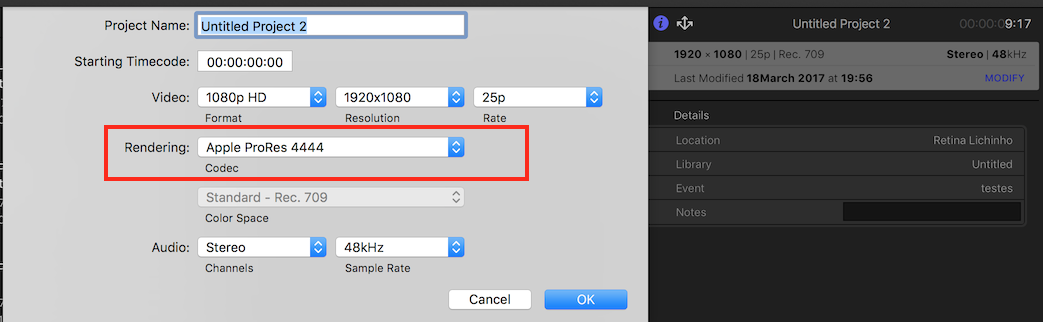
Select the project in the browser, open the Inspector, click MODIFY.
Please Log in to join the conversation.
Less
More
- Posts: 971
- Thank you received: 46
13 Apr 2017 18:18 - 13 Apr 2017 18:27 #87166
by MsJustine
Replied by MsJustine on topic Optimized/Original
That is something I looked at, granted I don't understand everything, but the thing that has me scratching my head in frustration, is when you go to the view-Optimized/Original Proxy setting, to set wether you have proxy or Optimized in the timeline, what has me confused is the Optimized/Original setting..
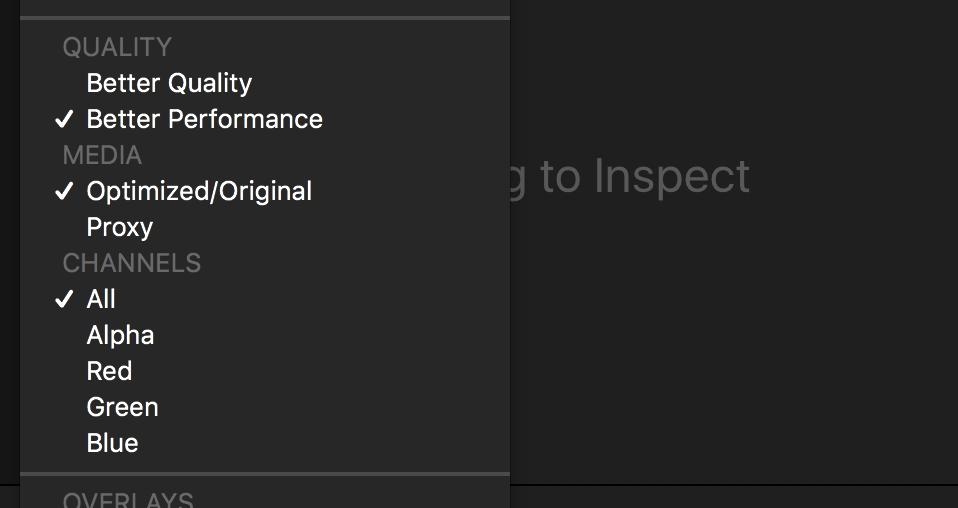
Why Optimized/Original ??? Surely it is either or not both, they are not the same. As a work around, I have to have the problem clip left as original in the proxy timeline, this creates a red banner in the timeline saying missing proxy, which is not ideal, actually damn annoying to beat around the bush.
Why the Optimized/Original ? One of the big problems is power, or the lack of it, 8GB RAM is not enough and I have no idea if an external hard drive would help, and if it would, what sort of hard drive, the footage is fairly chunky in size, would a USB 3. something drive be fast enough to handle the video playback at normal resolution? Or am I just out of luck at 8GB? Not sure 16 would solve any problems...
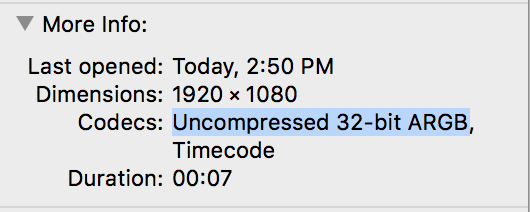
This is the problem video file... I have no idea what the specs mean... Is there a way to change it? If yes, what do I use instead???
I really want to impress the client, and get to edit season 2... Any ideas????
Why Optimized/Original ??? Surely it is either or not both, they are not the same. As a work around, I have to have the problem clip left as original in the proxy timeline, this creates a red banner in the timeline saying missing proxy, which is not ideal, actually damn annoying to beat around the bush.
Why the Optimized/Original ? One of the big problems is power, or the lack of it, 8GB RAM is not enough and I have no idea if an external hard drive would help, and if it would, what sort of hard drive, the footage is fairly chunky in size, would a USB 3. something drive be fast enough to handle the video playback at normal resolution? Or am I just out of luck at 8GB? Not sure 16 would solve any problems...
This is the problem video file... I have no idea what the specs mean... Is there a way to change it? If yes, what do I use instead???
I really want to impress the client, and get to edit season 2... Any ideas????
Last edit: 13 Apr 2017 18:27 by MsJustine.
Please Log in to join the conversation.
14 Apr 2017 17:08 #87221
by lichinho
Replied by lichinho on topic Optimized/Original
Optimized/Original will always use Optimized if available; only uses Original when there is no optimized version.
Optimized media for a RED original should be in ProRes 4444, which should preserve transparency.
Regarding the 8GB, it looks like an important limitation, especially to deal with such high frame sizes and large movies.
Optimized media for a RED original should be in ProRes 4444, which should preserve transparency.
Regarding the 8GB, it looks like an important limitation, especially to deal with such high frame sizes and large movies.
Please Log in to join the conversation.

15 Apr 2017 15:16 #87229
by JoeEditor
Replied by JoeEditor on topic Optimized/Original
Please Log in to join the conversation.
Less
More
- Posts: 971
- Thank you received: 46
15 Apr 2017 15:21 #87230
by MsJustine
Replied by MsJustine on topic Optimized/Original
Ok, what are you trying to explain?
Please Log in to join the conversation.
- Steve McGarrigle
-

- Offline
- Premium Member
-

17 Apr 2017 00:06 #87243
by Steve McGarrigle
Replied by Steve McGarrigle on topic Optimized/Original
By default, FCPX uses ProRes422 as it's optimised media format however, ProRes422 doesn't carry transparency information. If you transcode source material that carries alpha transparency to ProRes422 you will strip away the alpha channel. These specific files should be optimised as ProRes4444 with alpha.
Please Log in to join the conversation.
Less
More
- Posts: 971
- Thank you received: 46
17 Apr 2017 04:20 #87246
by MsJustine
Replied by MsJustine on topic Optimized/Original
I understand all of that, what I have noticed, maybe it is the way Apple has designed final cut x, even if I set all media to Prores 44444 with Alpha, the alpha channel is not respected in proxy mode.
I get that proxy is 1/4 res but what is 1/4 of an alpha channel? it is either on or off, I think the problem is Apple has confused proxy mode and proxy files.
The actual timeline should remain in the native format you intend to expert from, and you hand select the files that need to be played in proxy mode for editing,
switching the entire timeline to proxy mode and demanding all files play in proxy, a bad idea.
What needs I feel to happen is you say, select a file that will not be needing to be edited. just placed on the timeline , as overlay, and this media clip, "cache to RAM" or something like that, the rest of the timeline is unaffected.
The wholesale switch from Optimized/Original to Proxy, yes in theory works, but in reality is not ideal. There must be a better way to run the timeline other than either or...
Either fix the prores with alpha so that prores with alpha is prores with alpha in optimized and proxy mode or fix the timeline so that only selected files are converted to proxy, and those "problem" files are cached to RAM.
I get that proxy is 1/4 res but what is 1/4 of an alpha channel? it is either on or off, I think the problem is Apple has confused proxy mode and proxy files.
The actual timeline should remain in the native format you intend to expert from, and you hand select the files that need to be played in proxy mode for editing,
switching the entire timeline to proxy mode and demanding all files play in proxy, a bad idea.
What needs I feel to happen is you say, select a file that will not be needing to be edited. just placed on the timeline , as overlay, and this media clip, "cache to RAM" or something like that, the rest of the timeline is unaffected.
The wholesale switch from Optimized/Original to Proxy, yes in theory works, but in reality is not ideal. There must be a better way to run the timeline other than either or...
Either fix the prores with alpha so that prores with alpha is prores with alpha in optimized and proxy mode or fix the timeline so that only selected files are converted to proxy, and those "problem" files are cached to RAM.
Please Log in to join the conversation.
Less
More
- Posts: 971
- Thank you received: 46
17 Apr 2017 10:10 #87249
by MsJustine
Replied by MsJustine on topic Optimized/Original
I guess Tom must have deleted his message, tried 3 times to find it...
Yes I know it is a different codec, and that is just my point, and something maybe for Apple to digest..
If you are going to have codecs with alpha, then there must be a way for it to work in proxy mode or failing that a reduced file size that maintains the alpha channel.
What I have done is hand draw a mask around the portion of the screen that the mask is needed, with an alpha channel and full rez clips, the mask is not required, but to aid in position of the talent shot in front of a green screen, to be keyed into the right place on the virtual set, I hand drew the mask.
The clip is 7 seconds long, it should not need a mask, it should not need to be in proxy mode.
I am wondering is the method of converting the timeline to proxy the best method, or is there a better method??? Maybe FCP11 will allow for both proxy and native codecs in the same timeline, and allow for caching of media that would aid editing on less powerful machines.
Of course this would never have been an issue had Apple carried on with user upgrading of RAM and such, the fact that my machine cannot is really not my fault, at the time I would have found the cash to pay for upgrading from 8 to more than 8, and I am sure many thousands of people feel the same way.. If only....
Failing that, then FCPX dev team need to work around the limitations of hardware with more robust codecs, codecs that take into account all workflows, from the Ripple to my silly ways, after all this is how you improve.
If you decrease the codec by 75% then at least leave the alpha channel attached, that can be done????
Yes I know it is a different codec, and that is just my point, and something maybe for Apple to digest..
If you are going to have codecs with alpha, then there must be a way for it to work in proxy mode or failing that a reduced file size that maintains the alpha channel.
What I have done is hand draw a mask around the portion of the screen that the mask is needed, with an alpha channel and full rez clips, the mask is not required, but to aid in position of the talent shot in front of a green screen, to be keyed into the right place on the virtual set, I hand drew the mask.
The clip is 7 seconds long, it should not need a mask, it should not need to be in proxy mode.
I am wondering is the method of converting the timeline to proxy the best method, or is there a better method??? Maybe FCP11 will allow for both proxy and native codecs in the same timeline, and allow for caching of media that would aid editing on less powerful machines.
Of course this would never have been an issue had Apple carried on with user upgrading of RAM and such, the fact that my machine cannot is really not my fault, at the time I would have found the cash to pay for upgrading from 8 to more than 8, and I am sure many thousands of people feel the same way.. If only....
Failing that, then FCPX dev team need to work around the limitations of hardware with more robust codecs, codecs that take into account all workflows, from the Ripple to my silly ways, after all this is how you improve.
If you decrease the codec by 75% then at least leave the alpha channel attached, that can be done????
Please Log in to join the conversation.
- Tom Wolsky
-

- Offline
- Moderator
-

17 Apr 2017 10:12 #87250
by Tom Wolsky
Replied by Tom Wolsky on topic Optimized/Original
You can have proxy and original off whatever you want in the same time. It just has to be in the proxy folder.
Please Log in to join the conversation.
Less
More
- Posts: 971
- Thank you received: 46
17 Apr 2017 10:17 #87251
by MsJustine
Replied by MsJustine on topic Optimized/Original
That is what I do, I import, I check that all the media prior to making a proxy file, the proxy file location is set, then convert to proxy.
Tom the problem is not my laptop, it is not the software per se, it is just that Apple have made a mistake, that mistake is taking a lossless codec and stripping it of it's alpha channel, and leaving no alternative.
Yes the workaround is clumsy, it works, but cumbersome and silly, all I am saying, ano no further comment required, is simply this....
Apple please for the love of Apples, don't strip a 44444 codec of it's alpha channel, if you must, replace like with like, a proxy codec with an proxy alpha channel...
This is just my humble thoughts...
Tom the problem is not my laptop, it is not the software per se, it is just that Apple have made a mistake, that mistake is taking a lossless codec and stripping it of it's alpha channel, and leaving no alternative.
Yes the workaround is clumsy, it works, but cumbersome and silly, all I am saying, ano no further comment required, is simply this....
Apple please for the love of Apples, don't strip a 44444 codec of it's alpha channel, if you must, replace like with like, a proxy codec with an proxy alpha channel...
This is just my humble thoughts...
Please Log in to join the conversation.
- Tom Wolsky
-
- Offline
- Moderator
-
17 Apr 2017 10:33 #87252
by Tom Wolsky
Replied by Tom Wolsky on topic Optimized/Original
If you know how it works and how you want it to work use feedback. If you know it, nothing here can and said or done for you.
Please Log in to join the conversation.
