


3 Post Moderation Rule for New Boarders (25 Jan 2021)
New boarders will have their posts moderated - Don't worry if you cannot see your post immediately.
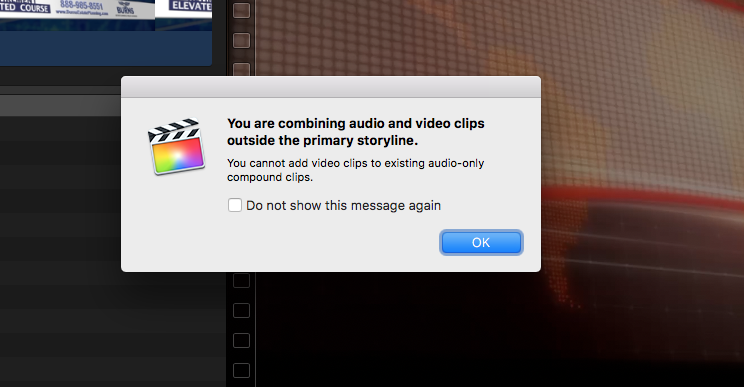
Why can't we add video to a Timeline once it only has audio in it?


12 Apr 2017 23:42 - 12 Apr 2017 23:43 #87142
by JoeEditor
I'm trying to add video as a connected clip, into a Timeline that already has either an audio clip, or an audio only compound, in the Primary Storyline. I used to do this all the time before 10.3.2. What broke? How are we supposed to edit music videos, for example? I'm not doing a music video, but I do have to have my graphics follow a voice. I've been getting this often. Very frustrating. And just to get this clear from the start, I was not adding video to an audio-only compound. What does that even mean?
Last edit: 12 Apr 2017 23:43 by JoeEditor.
Please Log in to join the conversation.
- Tom Wolsky
-

- Offline
- Moderator
-

13 Apr 2017 00:54 #87144
by Tom Wolsky
Replied by Tom Wolsky on topic Why can't we add video to a Timeline once it only has audio in it?
I can't see the timeline but probably exactly what it says. You trying to edit into an audio compound clip. Try editing into a project.
Please Log in to join the conversation.
13 Apr 2017 00:58 - 13 Apr 2017 01:09 #87145
by JoeEditor
Replied by JoeEditor on topic Why can't we add video to a Timeline once it only has audio in it?
As I stated already, " I was not adding video to an audio-only compound." I was using Q to connect a video clip into a Timeline that only had an audio compound in the Primary Timeline.
And what is an "audio only" compound clip? There's never been such a thing as an "audio only" compound.
UPDATE: I just repeated everything from scratch, using the exact same clips. A compound with only audio clips inside of it in the Primary Storyline. Q to connect a video clip to it. EXACTLY as I did before, and it worked.
To test something, I opened up the Compound clip, and tried to connect the video clip there. No warning message, just the error thunk that I was doing something I can' t do. Drag-and-drop won't work either. So since when are we forbidden to connect a video clip to an audio clip in the Primary Storyline inside of a Compound? That just makes no damed sense at all.
And what is an "audio only" compound clip? There's never been such a thing as an "audio only" compound.
UPDATE: I just repeated everything from scratch, using the exact same clips. A compound with only audio clips inside of it in the Primary Storyline. Q to connect a video clip to it. EXACTLY as I did before, and it worked.
To test something, I opened up the Compound clip, and tried to connect the video clip there. No warning message, just the error thunk that I was doing something I can' t do. Drag-and-drop won't work either. So since when are we forbidden to connect a video clip to an audio clip in the Primary Storyline inside of a Compound? That just makes no damed sense at all.
Last edit: 13 Apr 2017 01:09 by JoeEditor.
Please Log in to join the conversation.
- Tom Wolsky
-
- Offline
- Moderator
-
13 Apr 2017 01:04 #87146
by Tom Wolsky
Replied by Tom Wolsky on topic Why can't we add video to a Timeline once it only has audio in it?
I assume it's either a compound clip created in the browser or an audio clip opened in the timeline. If I make a new project, append audio into it, I do not get an error when I connect video/audio to it or video only or audio only. For some reason in your case the application doesn't think it's editing into a project.
Please Log in to join the conversation.
- Tom Wolsky
-
- Offline
- Moderator
-
13 Apr 2017 01:06 #87147
by Tom Wolsky
Replied by Tom Wolsky on topic Why can't we add video to a Timeline once it only has audio in it?
Tried connecting video after opening an audio clip in the timeline and indeed I get the error message you see.
Please Log in to join the conversation.
13 Apr 2017 01:07 - 13 Apr 2017 01:09 #87148
by JoeEditor
Replied by JoeEditor on topic Why can't we add video to a Timeline once it only has audio in it?
Yeah, it thought I was inside a compound when I was inside of a project.
But what is the issue with not being able to add a video to a compound, if there's audio in the primary storyline already? I'm testing it, can't append, replace to a gap clip, connect, insert, nothing. What the heck is going on with that?
BTW, I don't think I've opened a clip, video or audio, into its own timeline, in years.
But what is the issue with not being able to add a video to a compound, if there's audio in the primary storyline already? I'm testing it, can't append, replace to a gap clip, connect, insert, nothing. What the heck is going on with that?
BTW, I don't think I've opened a clip, video or audio, into its own timeline, in years.
Last edit: 13 Apr 2017 01:09 by JoeEditor.
Please Log in to join the conversation.
- Karsten Schlüter
-

- Offline
- Moderator
-
Less
More
- Posts: 3790
- Thank you received: 718
13 Apr 2017 03:55 #87150
by Karsten Schlüter
Most probably - I can re-enact that error message:
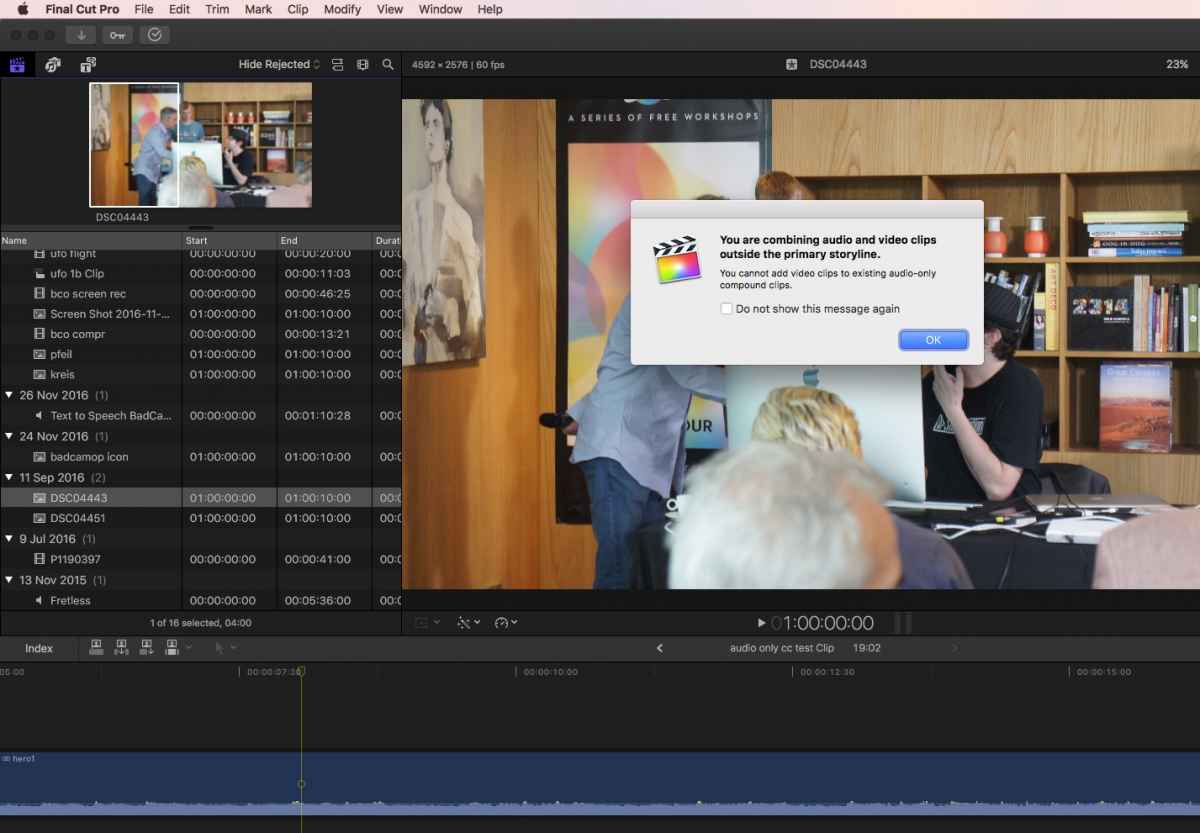
an audio-only CC (made of a single audio track), double-clicked/'opened'; hit Q to 'add' some video = kaboom, no go …
Compound Clips … the root of …
Replied by Karsten Schlüter on topic Why can't we add video to a Timeline once it only has audio in it?
Tom Wolsky wrote: I can't see the timeline but probably exactly what it says. ….
Most probably - I can re-enact that error message:
an audio-only CC (made of a single audio track), double-clicked/'opened'; hit Q to 'add' some video = kaboom, no go …
Compound Clips … the root of …
Please Log in to join the conversation.
13 Apr 2017 11:14 - 13 Apr 2017 11:25 #87157
by JoeEditor
Replied by JoeEditor on topic Why can't we add video to a Timeline once it only has audio in it?
And here's an odd thing. I just now tried again. Select an audio only clip in the Browser, make a new command, and add a video clip as connected into it, worked just fine. So it doesn't do this ALL the time! I just did it, following exactly what you did, Karsten.
I've played around all night with mixing roles, same roles, etc. Seems to be random. Sometimes it works for me, sometimes it doesn't.
So what conditions cause FCPX to label a compound as "audio-only" and when does it not? Since when does FCPX posses an "audio only compound"?
I've played around all night with mixing roles, same roles, etc. Seems to be random. Sometimes it works for me, sometimes it doesn't.
So what conditions cause FCPX to label a compound as "audio-only" and when does it not? Since when does FCPX posses an "audio only compound"?
Last edit: 13 Apr 2017 11:25 by JoeEditor.
Please Log in to join the conversation.

13 Apr 2017 17:35 #87164
by lichinho
Replied by lichinho on topic Why can't we add video to a Timeline once it only has audio in it?
I tried this as well, and here's what I found
1) open an audio clip's timeline: CANNOT connect video to it
2) open a compound clip' s timeline (commade from one audio clip only) :
2a) compound created from a single audio clip in the BROWSER: CAN connect video
2b) compound creates from a single audio clip in the TIMELINE: CANNOT connect video
1) open an audio clip's timeline: CANNOT connect video to it
2) open a compound clip' s timeline (commade from one audio clip only) :
2a) compound created from a single audio clip in the BROWSER: CAN connect video
2b) compound creates from a single audio clip in the TIMELINE: CANNOT connect video
Please Log in to join the conversation.
13 Apr 2017 23:49 - 13 Apr 2017 23:50 #87174
by JoeEditor
Replied by JoeEditor on topic Why can't we add video to a Timeline once it only has audio in it?
Good find! I can verify that from today's experiments.
So, what the fricin' frick of a frickin' frick?
NOW our task is to repeat these tests in the new update. HA!
P.S. Thanks to you all for helping me verify that I'm not insane as far as you know.
So, what the fricin' frick of a frickin' frick?
NOW our task is to repeat these tests in the new update. HA!
P.S. Thanks to you all for helping me verify that I'm not insane as far as you know.
Last edit: 13 Apr 2017 23:50 by JoeEditor.
Please Log in to join the conversation.
