


- Posts: 145
- Thank you received: 1
3 Post Moderation Rule for New Boarders (25 Jan 2021)
New boarders will have their posts moderated - Don't worry if you cannot see your post immediately.
can i create this look or similar in FCP?
03 Apr 2017 17:12 #86933
by owenpga
can i create this look or similar in FCP? was created by owenpga
Can i create a similar intro and exit in FCP thats in the video on the page?
An if so, could you give me a little direction on which transition i should use. i guessing there are many ways to achieve a similar look. thanks
properties.houselens.com/SusieCarpenter/...fax+Station+VA+22039
An if so, could you give me a little direction on which transition i should use. i guessing there are many ways to achieve a similar look. thanks
properties.houselens.com/SusieCarpenter/...fax+Station+VA+22039
Please Log in to join the conversation.
- Karsten Schlüter
-

- Offline
- Moderator
-

Less
More
- Posts: 3790
- Thank you received: 718
03 Apr 2017 18:16 - 03 Apr 2017 18:18 #86936
by Karsten Schlüter
in Motion, perhaps:
when you watch the intro frame by frame, you'll notice:

… these are two masked layers of the same video, just frames apart, AND arrange in z-axis = one layer is 'behind' the other. The candelabra shows it (arrow)…
The masks are obviously triangles and it looks to me, there's some light amount of opacity = two triangles from two diff. layers 'sum up' to some degree…
What makes it look additionally complex is A ) a dissolve of two diff. shots, and B ) both shots are dolly-shots.
So, spinning and moving triangles as masks, same clip twice but frames apart, arranged in depth, plus in-camera work..... phewwww.
Just as a personal note: … omg, those photos, yelling HDR-to-the-max, are just tacky… Do people, spending so much money for housing have no taste…?
Replied by Karsten Schlüter on topic can i create this look or similar in FCP?
owenpga wrote: Can i create a similar intro and exit in FCP thats in the video on the page?…
in Motion, perhaps:
when you watch the intro frame by frame, you'll notice:
… these are two masked layers of the same video, just frames apart, AND arrange in z-axis = one layer is 'behind' the other. The candelabra shows it (arrow)…
The masks are obviously triangles and it looks to me, there's some light amount of opacity = two triangles from two diff. layers 'sum up' to some degree…
What makes it look additionally complex is A ) a dissolve of two diff. shots, and B ) both shots are dolly-shots.
So, spinning and moving triangles as masks, same clip twice but frames apart, arranged in depth, plus in-camera work..... phewwww.
Just as a personal note: … omg, those photos, yelling HDR-to-the-max, are just tacky… Do people, spending so much money for housing have no taste…?
Last edit: 03 Apr 2017 18:18 by Karsten Schlüter.
Please Log in to join the conversation.
03 Apr 2017 18:57 #86938
by owenpga
Replied by owenpga on topic can i create this look or similar in FCP?
there is definitely alot of HDR crap out there. nothing like false marketing.
so how difficult is it (for a novice) to have the mask move? i'd be happy with just a still photo with the mask moving over top of it . i guess there's stuff out there on youtube. thanks for you response.
O
so how difficult is it (for a novice) to have the mask move? i'd be happy with just a still photo with the mask moving over top of it . i guess there's stuff out there on youtube. thanks for you response.
O
Please Log in to join the conversation.
- Karsten Schlüter
-
- Offline
- Moderator
-
Less
More
- Posts: 3790
- Thank you received: 718
04 Apr 2017 04:41 #86941
by Karsten Schlüter
hmm, to make it move you just need keyframes. But you need such a mask at first Have a look (this is NOT FinalCut, but Motion! Doing complex compositings is not FCs main talent …)
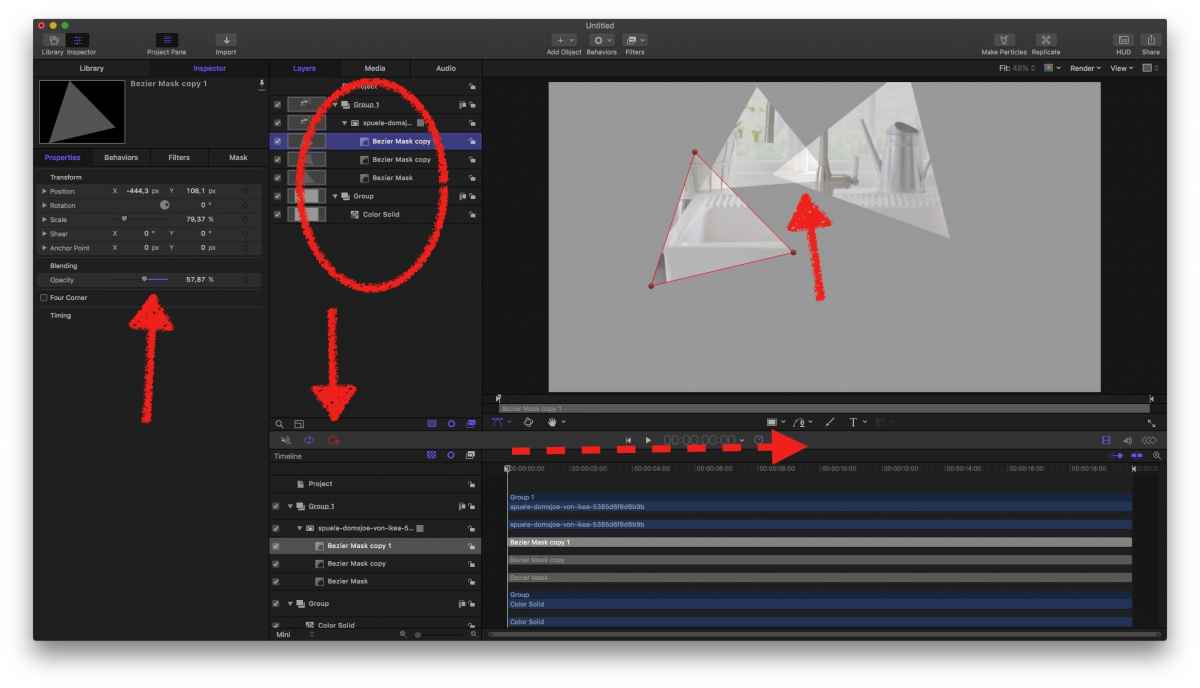
two layers, a solid background and a still …
applied 3 (or as much as you like) masks with Bezier-mask tool
(adjusted opacity to create that 'overlapping/add up' look… cosmetics …)
hit the Record button
move playhead forward
'adjust' each masks position and rotation
done
easy? yes.
beginners task? hmmm…
another option would be, creating the triangles animation in b/w and using that as an image-/alpha-mask in FCPX.... lost you here, didn't I?
hard to help you (would love to create a plugin, or such an alpha-mask), because it depends way too much on your frames layout and pic involved …
your example shows <counting> about 5 major triangles and a handful of tiny ones … AND, has that 3D arrangement … hmmm, no beginners task, if you want to mimic that a 100% …
Replied by Karsten Schlüter on topic can i create this look or similar in FCP?
owenpga wrote: … so how difficult is it (for a novice) to have the mask move? …
hmm, to make it move you just need keyframes. But you need such a mask at first
Have a look (this is NOT FinalCut, but Motion! Doing complex compositings is not FCs main talent …)
two layers, a solid background and a still …
applied 3 (or as much as you like) masks with Bezier-mask tool
(adjusted opacity to create that 'overlapping/add up' look… cosmetics …)
hit the Record button
move playhead forward
'adjust' each masks position and rotation
done
easy? yes.
beginners task? hmmm…
another option would be, creating the triangles animation in b/w and using that as an image-/alpha-mask in FCPX.... lost you here, didn't I?
hard to help you (would love to create a plugin, or such an alpha-mask), because it depends way too much on your frames layout and pic involved …
your example shows <counting> about 5 major triangles and a handful of tiny ones … AND, has that 3D arrangement … hmmm, no beginners task, if you want to mimic that a 100% …
Please Log in to join the conversation.

04 Apr 2017 10:47 #86948
by Schnurr
Replied by Schnurr on topic can i create this look or similar in FCP?
agree would do it as well in M5 but...
just playing around with masks in fcpx. Isn't it possible to define multiple masks on a clip as the 1st one disappears while putting a second on the clip...
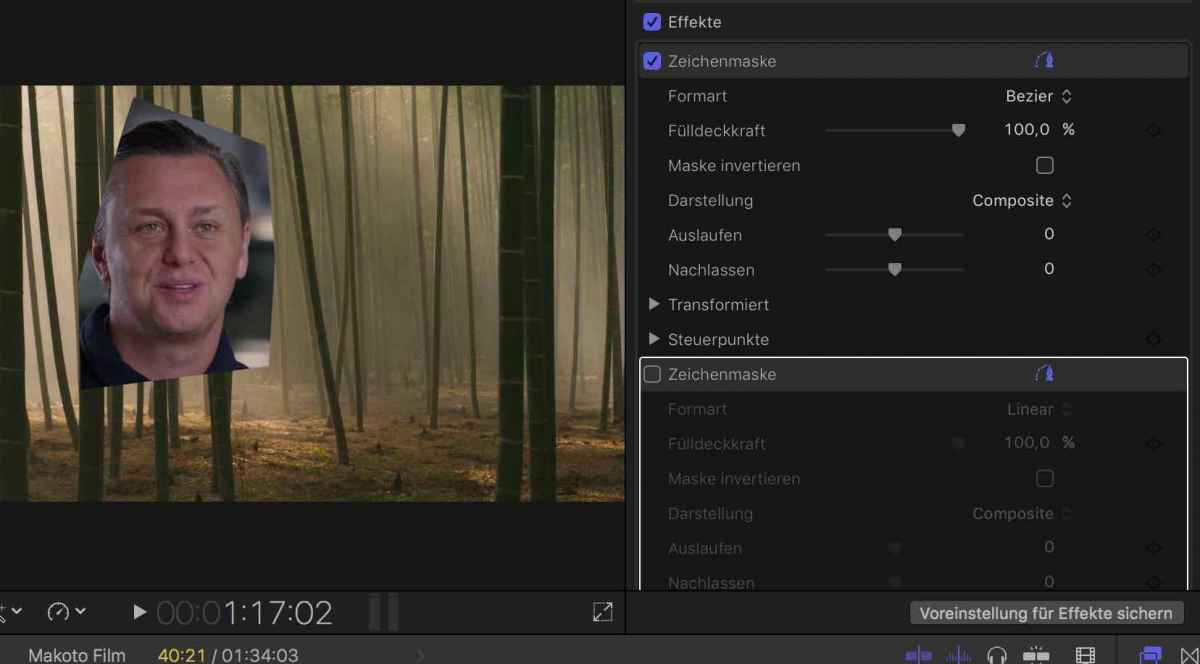
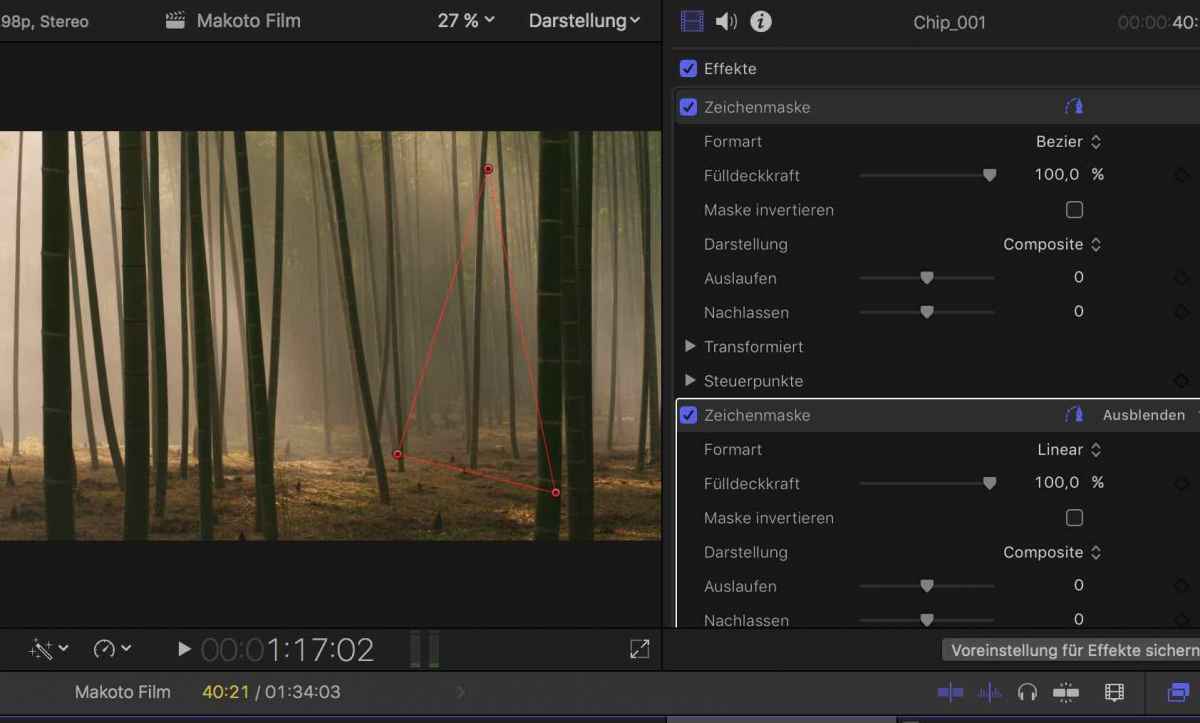
just playing around with masks in fcpx. Isn't it possible to define multiple masks on a clip as the 1st one disappears while putting a second on the clip...
Please Log in to join the conversation.
- Karsten Schlüter
-
- Offline
- Moderator
-
Less
More
- Posts: 3790
- Thank you received: 718
05 Apr 2017 04:08 #86966
by Karsten Schlüter
it doesn't disappear (see your Inspector), is does its job - masking
So, the second layer of mask is just offside the avail content.
In other words, you can not 'sum' several applied Mask effects …in FCPX. In Motion, you can.
… or, I miss some hidden '+' checkbox …………
Replied by Karsten Schlüter on topic can i create this look or similar in FCP?
Schnurr wrote: … Isn't it possible to define multiple masks on a clip as the 1st one disappears while putting a second on the clip...
…
it doesn't disappear (see your Inspector), is does its job - masking
So, the second layer of mask is just offside the avail content.
In other words, you can not 'sum' several applied Mask effects …in FCPX. In Motion, you can.
… or, I miss some hidden '+' checkbox …………
Please Log in to join the conversation.


05 Apr 2017 11:07 - 05 Apr 2017 11:09 #86968
by JoeEditor
Replied by JoeEditor on topic can i create this look or similar in FCP?
Yep, in FCPX you'd have to place a second copy of the clip above itself to apply a second mask. What you're trying to achieve is a Motion thing.
Last edit: 05 Apr 2017 11:09 by JoeEditor.
Please Log in to join the conversation.
- robert.jellicorse
-

- Offline
- New Member
-

Less
More
- Posts: 2
- Thank you received: 0
06 Apr 2017 13:43 #87008
by robert.jellicorse
Replied by robert.jellicorse on topic can i create this look or similar in FCP?
Super helpful, thank you!
Please Log in to join the conversation.
06 Apr 2017 16:52 #87018
by JoeEditor
Replied by JoeEditor on topic can i create this look or similar in FCP?
Please Log in to join the conversation.
