


- Posts: 54
- Thank you received: 0
3 Post Moderation Rule for New Boarders (25 Jan 2021)
New boarders will have their posts moderated - Don't worry if you cannot see your post immediately.
FCP stopped showing LEAVE FILES In PLACE option
- robinsaini
-
 Topic Author
- Offline
- Senior Member
-

Less
More
02 Apr 2017 11:12 - 02 Apr 2017 11:23 #86911
by robinsaini
FCP stopped showing LEAVE FILES In PLACE option was created by robinsaini
Hello,
While importing footage from Sony A7r2(.mp4files), I realised that its no more showing me option "LEAVE FILES In PLACE " as seen on attached screenshot.
This is only happening while I am importing footage from Sony , but when I import footage from 5d Mark III or 5..it shows that option.
Can someone tel me whats happening ?
While importing footage from Sony A7r2(.mp4files), I realised that its no more showing me option "LEAVE FILES In PLACE " as seen on attached screenshot.
This is only happening while I am importing footage from Sony , but when I import footage from 5d Mark III or 5..it shows that option.
Can someone tel me whats happening ?
Last edit: 02 Apr 2017 11:23 by robinsaini.
Please Log in to join the conversation.
- Tom Wolsky
-

- Offline
- Moderator
-

02 Apr 2017 11:24 #86912
by Tom Wolsky
Replied by Tom Wolsky on topic FCP stopped showing LEAVE FILES In PLACE option
You lose that option when importing from a camera or camera card structure. You probably removed your DSKR clips from the folder holding them so you get the leave in place option.
Please Log in to join the conversation.
- robinsaini
-
Topic Author
- Offline
- Senior Member
-
Less
More
- Posts: 54
- Thank you received: 0
02 Apr 2017 12:17 #86913
by robinsaini
I tried copying all files from folder but still not working .
Replied by robinsaini on topic FCP stopped showing LEAVE FILES In PLACE option
Tom Wolsky wrote: You lose that option when importing from a camera or camera card structure. You probably removed your DSKR clips from the folder holding them so you get the leave in place option.
I tried copying all files from folder but still not working .
Please Log in to join the conversation.
- Tom Wolsky
-
- Offline
- Moderator
-
02 Apr 2017 13:11 #86920
by Tom Wolsky
Replied by Tom Wolsky on topic FCP stopped showing LEAVE FILES In PLACE option
Can you post a screenshot of the files you're trying to import and the Finder structure?
Can you open the files in the QuickTime player?
Can you open the files in the QuickTime player?
Please Log in to join the conversation.
- robinsaini
-
Topic Author
- Offline
- Senior Member
-
Less
More
- Posts: 54
- Thank you received: 0
02 Apr 2017 13:22 #86923
by robinsaini
Replied by robinsaini on topic FCP stopped showing LEAVE FILES In PLACE option
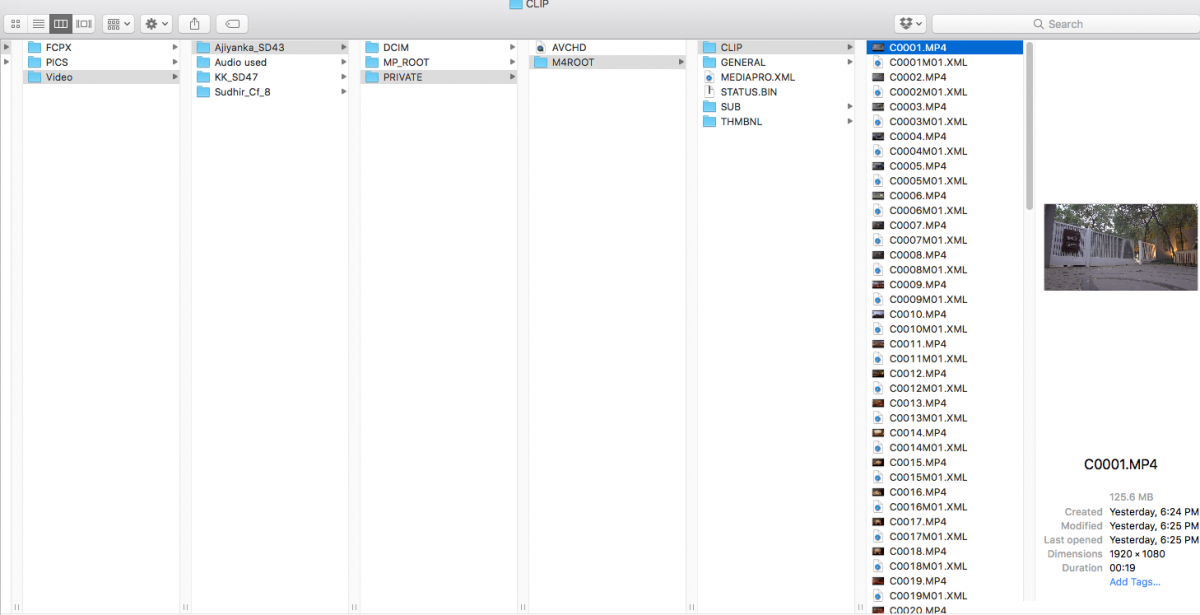
So this is what I like to sort
- Date Name Folder / Person Who shot wedding name foder_card Number / copy contents of card footage
as seen attached
/video /Ajiyanka_sd43/( all card data copied here as seen under Private/mp4root/cli/files and al mp4 files do open in QT.
- Date Name Folder / Person Who shot wedding name foder_card Number / copy contents of card footage
as seen attached
/video /Ajiyanka_sd43/( all card data copied here as seen under Private/mp4root/cli/files and al mp4 files do open in QT.
Please Log in to join the conversation.
- Tom Wolsky
-
- Offline
- Moderator
-
02 Apr 2017 13:28 #86924
by Tom Wolsky
Replied by Tom Wolsky on topic FCP stopped showing LEAVE FILES In PLACE option
DCIM, MP_ROOT, PRIVAYE is a camera card folder structure. This is the Sony media? You can't leave that in place. The application presumes that's an archive of your camera card. If it is you shouldn't edit with that.
Please Log in to join the conversation.
