


- Posts: 3790
- Thank you received: 718
3 Post Moderation Rule for New Boarders (25 Jan 2021)
New boarders will have their posts moderated - Don't worry if you cannot see your post immediately.
Stupid Silly Question Dept.: How do you fade-out foreground when green-screening??
- Karsten Schlüter
-
 Topic Author
- Offline
- Moderator
-

Less
More
31 Mar 2017 07:05 #86865
by Karsten Schlüter
Stupid Silly Question Dept.: How do you fade-out foreground when green-screening?? was created by Karsten Schlüter
ok, I blame myself here, in public, dropping pants coram publico , but since yesterday, I crunch my head on that ultra simple beginners Q:
foreground: someone in front of a green-screen, lower lane: keyed background … anything, a clip.
Now, when I fade the subject, for sure the green is faded too = no key, no bg either!
But I want to continuous play the bg-clip, while the subject is faded-out.
I KNOW the answer will be THAT simple - but doesn't come up here.… (note2myself: ask doctor next time about side-effects of my medication)
… please, after laughing, help the old chicken over the road :blush:
foreground: someone in front of a green-screen, lower lane: keyed background … anything, a clip.
Now, when I fade the subject, for sure the green is faded too = no key, no bg either!
But I want to continuous play the bg-clip, while the subject is faded-out.
I KNOW the answer will be THAT simple - but doesn't come up here.… (note2myself: ask doctor next time about side-effects of my medication)
… please, after laughing, help the old chicken over the road :blush:
Please Log in to join the conversation.
- Tom Wolsky
-

- Offline
- Moderator
-
31 Mar 2017 08:29 #86867
by Tom Wolsky
Replied by Tom Wolsky on topic Stupid Silly Question Dept.: How do you fade-out foreground when green-screening??
The background is the layer below the green screen, no? If you fade out the green screen layer you should see the background layer.
Please Log in to join the conversation.
- Karsten Schlüter
-
Topic Author
- Offline
- Moderator
-
Less
More
- Posts: 3790
- Thank you received: 718
31 Mar 2017 08:47 - 31 Mar 2017 09:11 #86869
by Karsten Schlüter
arrrrghghgh!!!
NOW I see my mistake, have a look, what we have done here in our lil' school project:
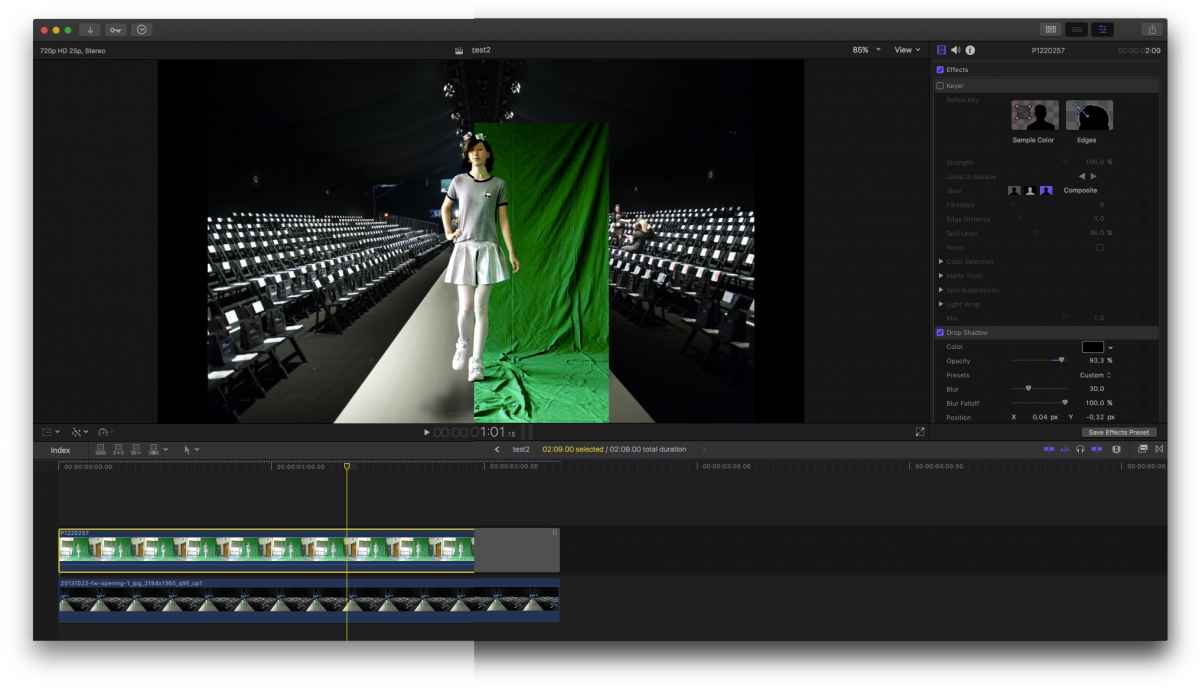
(another example of worst green screen ever) our talent, shot in green, clip cropped, keyer applied
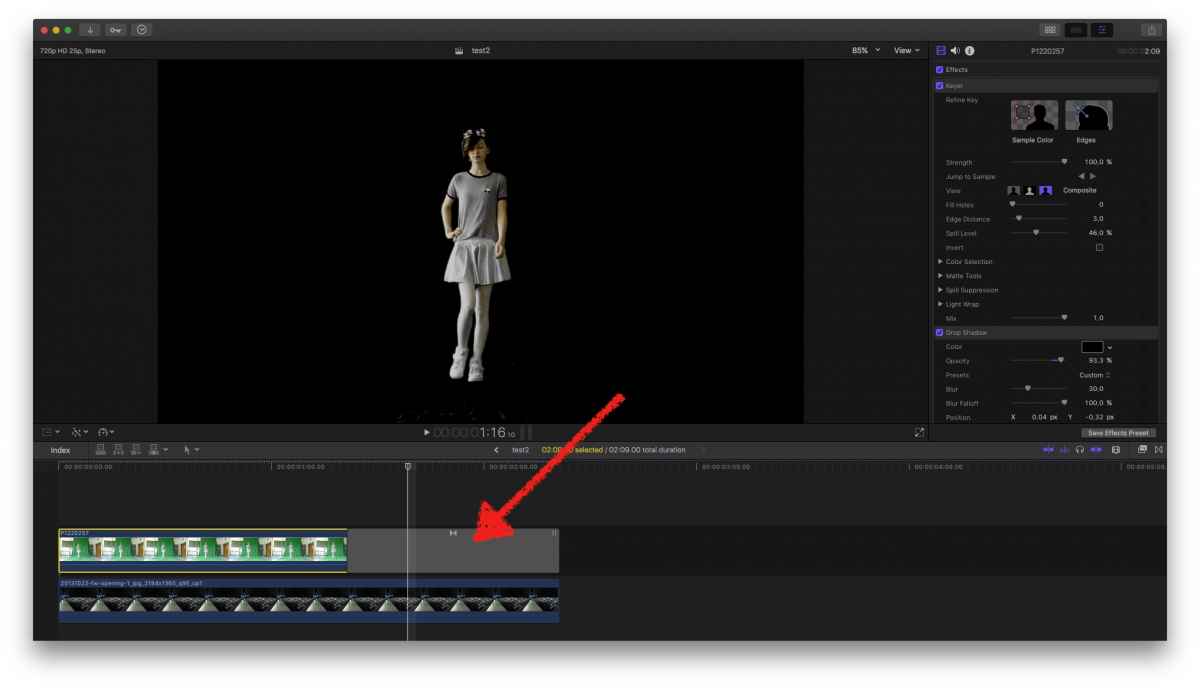
now, MY usual routine to fade-out things is, hammering cmd-T onto keyboard - which results in loss of key (of course: no green, no key)
but:
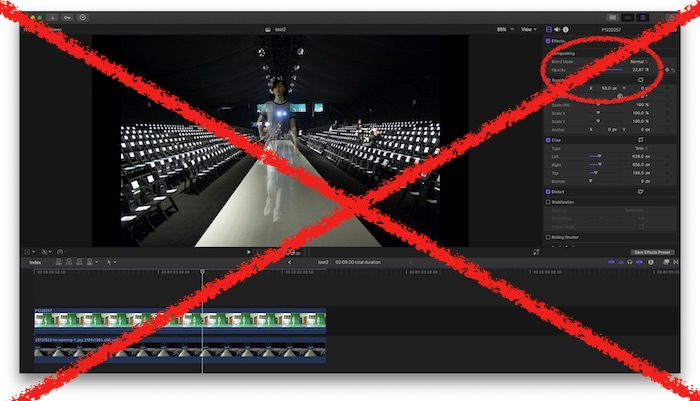
[strike]In such case, I have to keyframe Opacity - THAT simple (slapping own forehead, making weird noises, givin' myself 'names')[/strike]
in such a case, follow Tom's advice…
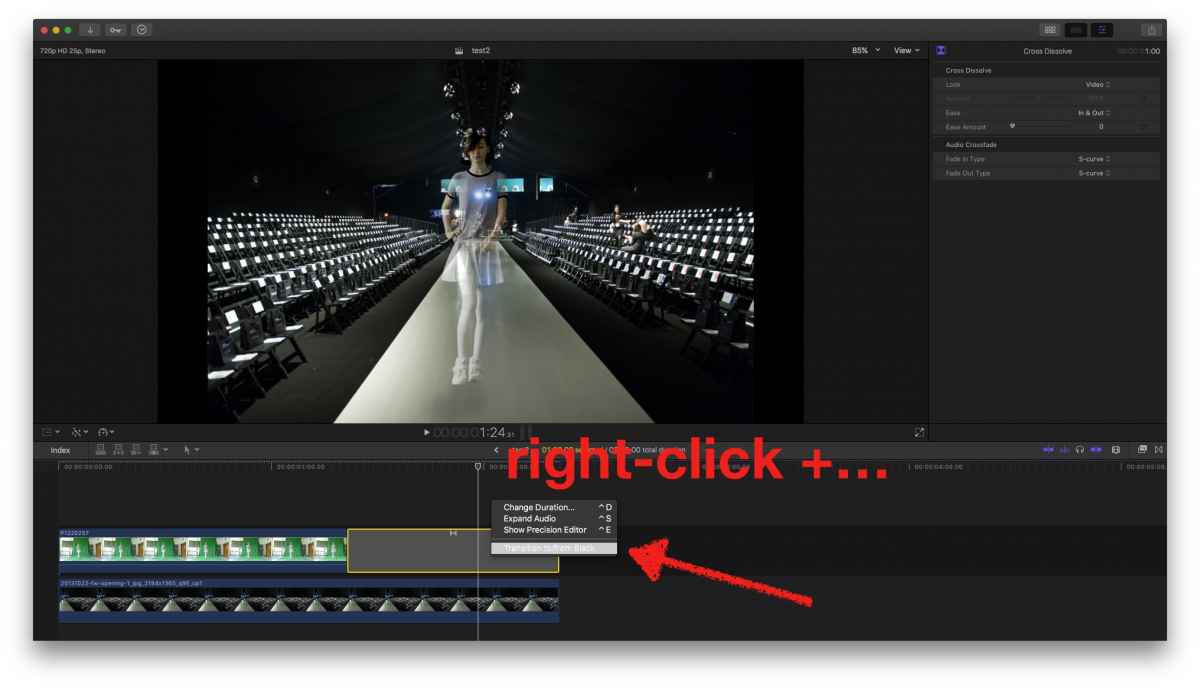
and check that box…
THANKS TOM… sometimes it's just too simple.
Hope, everybody had a laugh ...
(omg, … ) :silly:
Replied by Karsten Schlüter on topic Stupid Silly Question Dept.: How do you fade-out foreground when green-screening??
Tom Wolsky wrote: … If you fade out the green screen layer you should see the background layer.
arrrrghghgh!!!
NOW I see my mistake, have a look, what we have done here in our lil' school project:
(another example of worst green screen ever) our talent, shot in green, clip cropped, keyer applied
now, MY usual routine to fade-out things is, hammering cmd-T onto keyboard - which results in loss of key (of course: no green, no key)
but:
[strike]In such case, I have to keyframe Opacity - THAT simple (slapping own forehead, making weird noises, givin' myself 'names')[/strike]
in such a case, follow Tom's advice…
and check that box…
THANKS TOM… sometimes it's just too simple.
Hope, everybody had a laugh ...
(omg, … ) :silly:
Last edit: 31 Mar 2017 09:11 by Karsten Schlüter.
Please Log in to join the conversation.
- Tom Wolsky
-
- Offline
- Moderator
-
31 Mar 2017 08:55 #86870
by Tom Wolsky
Replied by Tom Wolsky on topic Stupid Silly Question Dept.: How do you fade-out foreground when green-screening??
So why doesn't the cross dissolve work? Right-click on it and make sure it isn't set to fade to black.
Please Log in to join the conversation.
- Karsten Schlüter
-
Topic Author
- Offline
- Moderator
-
Less
More
- Posts: 3790
- Thank you received: 718
31 Mar 2017 09:01 #86871
by Karsten Schlüter
(starting to whine) … 'cause I haven't known of this checkbox yet?
Be gentle, I'm a beginner, using FCPX just for about 5 years now...
Guess, I should buy a good book about How To Use FinalCut - any recommendations, Tom?
Replied by Karsten Schlüter on topic Stupid Silly Question Dept.: How do you fade-out foreground when green-screening??
Tom Wolsky wrote: So why doesn't the cross dissolve work? Right-click on it and make sure it isn't set to fade to black.
(starting to whine) … 'cause I haven't known of this checkbox yet?
Be gentle, I'm a beginner, using FCPX just for about 5 years now...
Guess, I should buy a good book about How To Use FinalCut - any recommendations, Tom?
Please Log in to join the conversation.
- Tom Wolsky
-
- Offline
- Moderator
-
31 Mar 2017 09:09 #86872
by Tom Wolsky
Replied by Tom Wolsky on topic Stupid Silly Question Dept.: How do you fade-out foreground when green-screening??
Have a new edition for 10.3 coming out next week, but you know I'll have to check, but I'm not sure that silly checkbox is mentioned.
Please Log in to join the conversation.
- Karsten Schlüter
-
Topic Author
- Offline
- Moderator
-
Less
More
- Posts: 3790
- Thank you received: 718
31 Mar 2017 09:16 #86873
by Karsten Schlüter
…and it's only available in the context-menu, not in the Inspector …
wow, a hidden feature… at last, to my rescue… how should I know that??
Replied by Karsten Schlüter on topic Stupid Silly Question Dept.: How do you fade-out foreground when green-screening??
Tom Wolsky wrote: …not sure that silly checkbox is mentioned.
…and it's only available in the context-menu, not in the Inspector …
wow, a hidden feature… at last, to my rescue… how should I know that??
Please Log in to join the conversation.


31 Mar 2017 11:16 #86880
by JoeEditor
Replied by JoeEditor on topic Stupid Silly Question Dept.: How do you fade-out foreground when green-screening??
Yep, knew to me, also. But the "Fade to/from black" option is grayed out on all my transitions. Even the fade to color transition. When exactly does it become active?
Please Log in to join the conversation.
- Tom Wolsky
-
- Offline
- Moderator
-
31 Mar 2017 12:03 #86883
by Tom Wolsky
Replied by Tom Wolsky on topic Stupid Silly Question Dept.: How do you fade-out foreground when green-screening??
Believe it's only available at the beginning and end of the project timeline.
Please Log in to join the conversation.
31 Mar 2017 21:43 #86891
by JoeEditor
Replied by JoeEditor on topic Stupid Silly Question Dept.: How do you fade-out foreground when green-screening??
Yes, you're correct. So it speed up the fade, makes it an S-Curve instead of Linear. Would be nice if we had a selection of curves there.
Please Log in to join the conversation.
- Karsten Schlüter
-
Topic Author
- Offline
- Moderator
-
Less
More
- Posts: 3790
- Thank you received: 718
01 Apr 2017 04:38 #86894
by Karsten Schlüter
Replied by Karsten Schlüter on topic Stupid Silly Question Dept.: How do you fade-out foreground when green-screening??
so, … right-click OR keyframe opacity …
In review, perhaps not a too silly question
In review, perhaps not a too silly question
Please Log in to join the conversation.
01 Apr 2017 12:49 #86898
by JoeEditor
Replied by JoeEditor on topic Stupid Silly Question Dept.: How do you fade-out foreground when green-screening??
I have a new 1 minute news headline segment I have to record on green-screen daily now for a client. Fade in and out at the head and tail is a royal PITA. The FCPX dev team needs to tweak transitions to give us some more options in how they interact with other lanes and such. Not a silly question at all. A very necessary and serious question, one the FCPX dev team needs to pay attention to and consider an update to address it.
Please Log in to join the conversation.
- Tom Wolsky
-
- Offline
- Moderator
-
01 Apr 2017 14:34 #86901
by Tom Wolsky
Replied by Tom Wolsky on topic Stupid Silly Question Dept.: How do you fade-out foreground when green-screening??
There are a lot of options for dissolves in the inspector, unfortunately there's no way I can see to make one a preset. Because it's one of the few transitions that can't be opened in Motion, there's no way that I can see to make a custom dissolve and set it as the default.
Please Log in to join the conversation.
- Karsten Schlüter
-
Topic Author
- Offline
- Moderator
-
Less
More
- Posts: 3790
- Thank you received: 718
01 Apr 2017 16:53 #86902
by Karsten Schlüter
Not excactly what you mean, but our friend Simon Ubsdell offers this product:
hawaiki.co/dissolve.html
Replied by Karsten Schlüter on topic Stupid Silly Question Dept.: How do you fade-out foreground when green-screening??
Tom Wolsky wrote: … a custom dissolve ….
Not excactly what you mean, but our friend Simon Ubsdell offers this product:
hawaiki.co/dissolve.html
Please Log in to join the conversation.
