


- Posts: 76
- Thank you received: 1
3 Post Moderation Rule for New Boarders (25 Jan 2021)
New boarders will have their posts moderated - Don't worry if you cannot see your post immediately.
Keyframe an object without smooth movement from one frame to another?
- coffee_king
-
 Topic Author
- Offline
- Senior Member
-

Less
More
27 Mar 2017 14:51 #86743
by coffee_king
Its a little hard for me to try and type what I mean here, but lets just say I want to keyframe an object to move from point
A to B to C to D to E etc , but I DONT want to see the movement at all. I just want it to vanish from one point and appear at the other.
Is this possible with a keyframe?
I think maybe I'm just being thick here and cant see an option.
Thanks in advance.
A to B to C to D to E etc , but I DONT want to see the movement at all. I just want it to vanish from one point and appear at the other.
Is this possible with a keyframe?
I think maybe I'm just being thick here and cant see an option.
Thanks in advance.
Please Log in to join the conversation.
- Tom Wolsky
-

- Offline
- Moderator
-

27 Mar 2017 15:35 #86744
by Tom Wolsky
Replied by Tom Wolsky on topic Keyframe an object without smooth movement from one frame to another?
Not difficult. At A set a keyframe just before you want the object to move. Everything up to that point will be fixed. Go to the next frame and move the object to B. A keyframe will be set. Move the playhead to just before you want to move from B and set another keyframe in the same location. Go forward one frame and move the object to the C location. Repeat.
You will probably have to go into the Viewer and carefully set each keyframe to be linear, not smooth. This can take a little fiddling because keyframes are on top of each other, but it can be done using a combination of the Viewer and precision placement in the inspector controls. It's easiest if your A, B, C etc positions are at whole pixel values.
You will probably have to go into the Viewer and carefully set each keyframe to be linear, not smooth. This can take a little fiddling because keyframes are on top of each other, but it can be done using a combination of the Viewer and precision placement in the inspector controls. It's easiest if your A, B, C etc positions are at whole pixel values.
Please Log in to join the conversation.
- Karsten Schlüter
-

- Offline
- Moderator
-
Less
More
- Posts: 3790
- Thank you received: 718
27 Mar 2017 16:29 #86747
by Karsten Schlüter
Replied by Karsten Schlüter on topic Keyframe an object without smooth movement from one frame to another?
… ehm, and why keyframes?
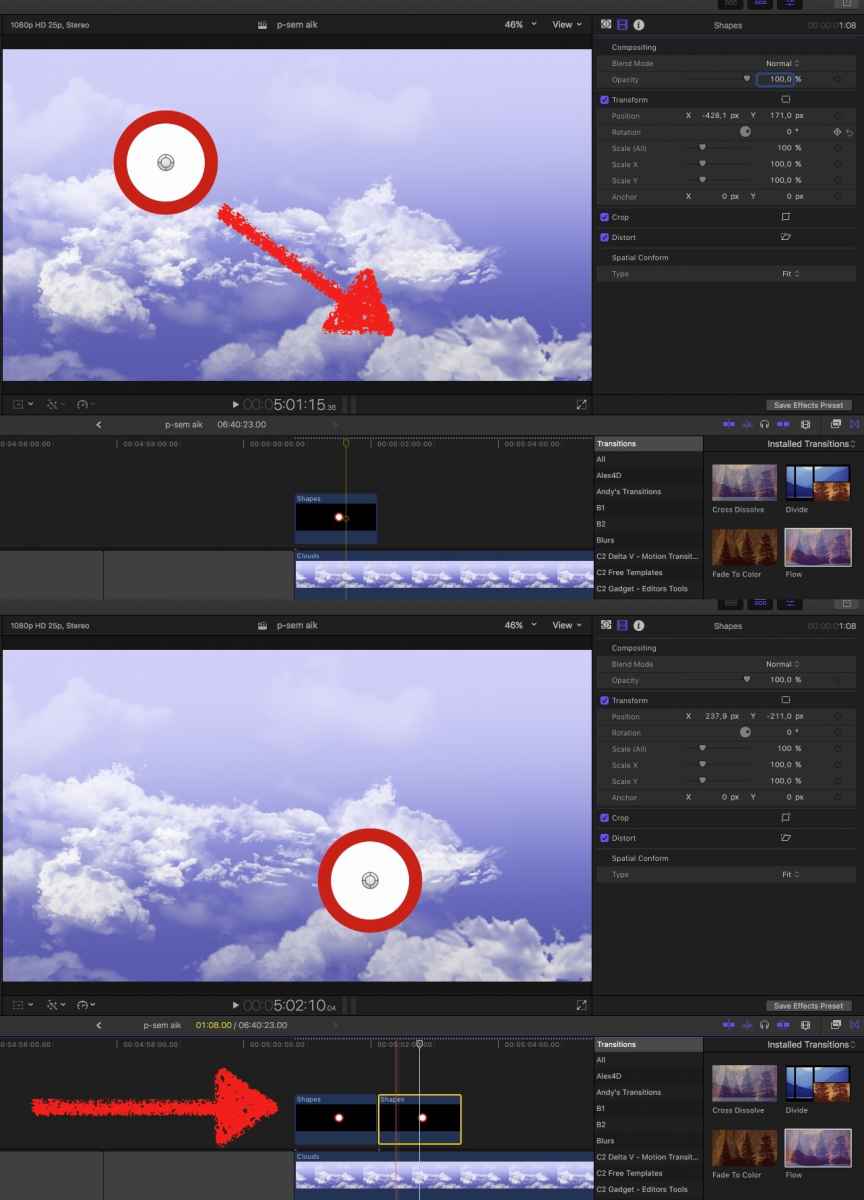
you want NO visible movement, a jump … so, jump-cut:
subject/clip content at Pos A, cut, subject/clip content at Pos B
Don't see the use or need of keyframing …??
you want NO visible movement, a jump … so, jump-cut:
subject/clip content at Pos A, cut, subject/clip content at Pos B
Don't see the use or need of keyframing …??
Please Log in to join the conversation.
- coffee_king
-
Topic Author
- Offline
- Senior Member
-
Less
More
- Posts: 76
- Thank you received: 1
28 Mar 2017 11:40 - 29 Mar 2017 00:42 #86772
by coffee_king
In the end I actually did it like this (Before I posted this as I just wanted to know if it was doable in the future).
Why you ask? Well I wanted some text to appear as if it was being typed manually.
So I created a object and then had it reveal it letter by letter at the pace I wanted
There is are Titles that will do this but I couldnt control how much text was initially visible before it started to manually type the text itself.
Thanks to Karsten Schlüter though.
Replied by coffee_king on topic Keyframe an object without smooth movement from one frame to another?
Karsten Schlüter wrote: … ehm, and why keyframes?
…
In the end I actually did it like this (Before I posted this as I just wanted to know if it was doable in the future).
Why you ask? Well I wanted some text to appear as if it was being typed manually.
So I created a object and then had it reveal it letter by letter at the pace I wanted
There is are Titles that will do this but I couldnt control how much text was initially visible before it started to manually type the text itself.
Thanks to Karsten Schlüter though.
Last edit: 29 Mar 2017 00:42 by Karsten Schlüter.
Please Log in to join the conversation.
- Karsten Schlüter
-
- Offline
- Moderator
-
Less
More
- Posts: 3790
- Thank you received: 718
29 Mar 2017 00:41 - 29 Mar 2017 00:43 #86799
by Karsten Schlüter
consider using the Mask tool:
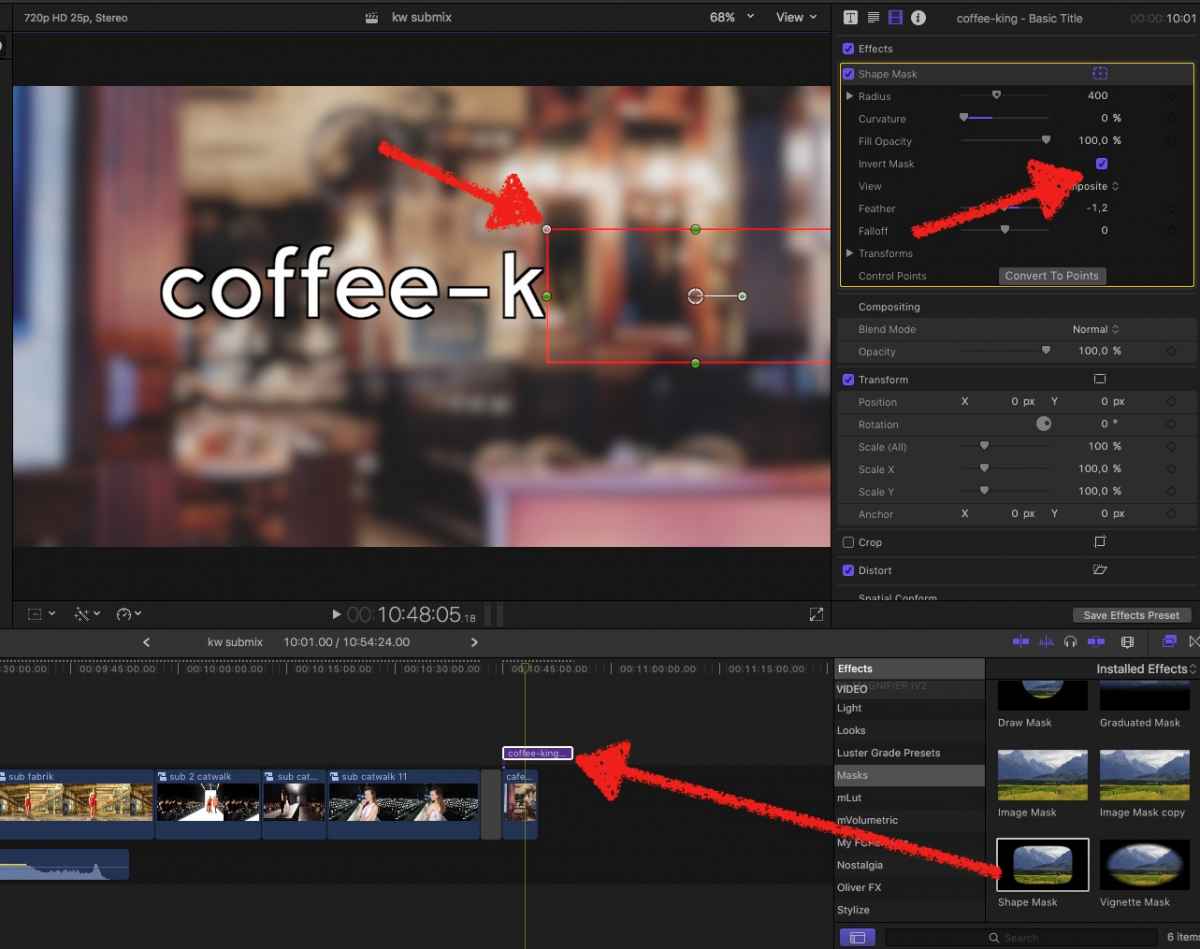
drag the Mask effect onto the title
adjust its form and feather to a clean rectangle
invert mask
//I've edited your reply … me no like full-quotes, esp. not with tons of pics in it :blink: //
Replied by Karsten Schlüter on topic Keyframe an object without smooth movement from one frame to another?
coffee_king wrote: … created a object and then had it reveal it letter by letter at the pace I wanted
There is are Titles that will do this but I couldnt control how much text was initially visible before it started to manually type the text itself. …
consider using the Mask tool:
drag the Mask effect onto the title
adjust its form and feather to a clean rectangle
invert mask
//I've edited your reply … me no like full-quotes, esp. not with tons of pics in it :blink: //
Last edit: 29 Mar 2017 00:43 by Karsten Schlüter.
Please Log in to join the conversation.
