


- Posts: 119
- Thank you received: 0
3 Post Moderation Rule for New Boarders (25 Jan 2021)
New boarders will have their posts moderated - Don't worry if you cannot see your post immediately.
Track/mask person, Make everything else white/black?
27 Mar 2017 04:30 - 27 Mar 2017 04:35 #86735
by mgmartino
Track/mask person, Make everything else white/black? was created by mgmartino
Is there a way to track a person and key out the backround, I know I could typically use a Luma key for this but even though my back round is mostly white there are some shots that have these pipes at the top that would not work with luma keying. I would like to get ride of the pipes. So I figured if There was some sort of plug-in that tracks the subject (the person) then you can white out everything around them that would be great.
I have the Coremelt Everything bundle so if anything from that works that would be great but I am open to ideas.
I have attached a screen shot below
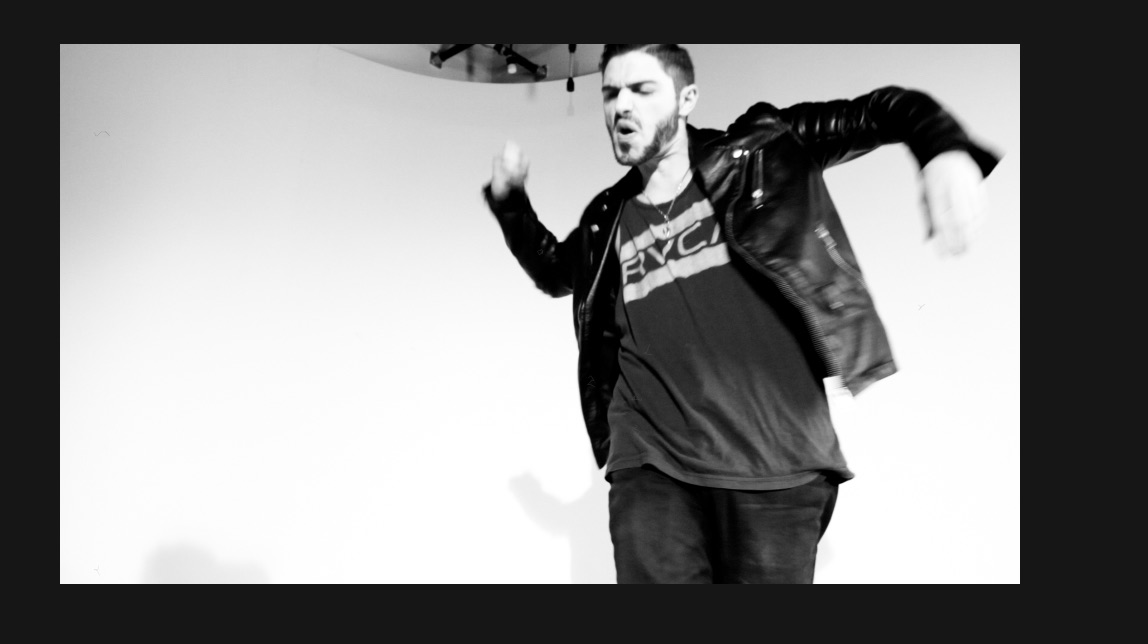
I have the Coremelt Everything bundle so if anything from that works that would be great but I am open to ideas.
I have attached a screen shot below
Last edit: 27 Mar 2017 04:35 by mgmartino. Reason: screen shot does not appear
Please Log in to join the conversation.

27 Mar 2017 14:24 #86742
by bogiesan
Replied by bogiesan on topic Track/mask person, Make everything else white/black?
Did you actually shoot in monochrome?
Please Log in to join the conversation.
- Karsten Schlüter
-

- Offline
- Moderator
-

Less
More
- Posts: 3790
- Thank you received: 718
27 Mar 2017 16:42 #86748
by Karsten Schlüter
No, typically would be usage of a chroma-key, green or blue, for that.
key the bg, replace it with pure white, and then de-saturate your foreground/subject, aka make it b/w.
With SliceX you can create a Mask, following your subjects head and 'cover' your background holes.
But again, that should be done in colour, the low contrasts btw guys white face and white bg makes it close to impossible to track anything .....
Replied by Karsten Schlüter on topic Track/mask person, Make everything else white/black?
mgmartino wrote: … I know I could typically use a Luma key for this …
No, typically would be usage of a chroma-key, green or blue, for that.
key the bg, replace it with pure white, and then de-saturate your foreground/subject, aka make it b/w.
With SliceX you can create a Mask, following your subjects head and 'cover' your background holes.
But again, that should be done in colour, the low contrasts btw guys white face and white bg makes it close to impossible to track anything .....
Please Log in to join the conversation.
28 Mar 2017 00:45 #86758
by mgmartino
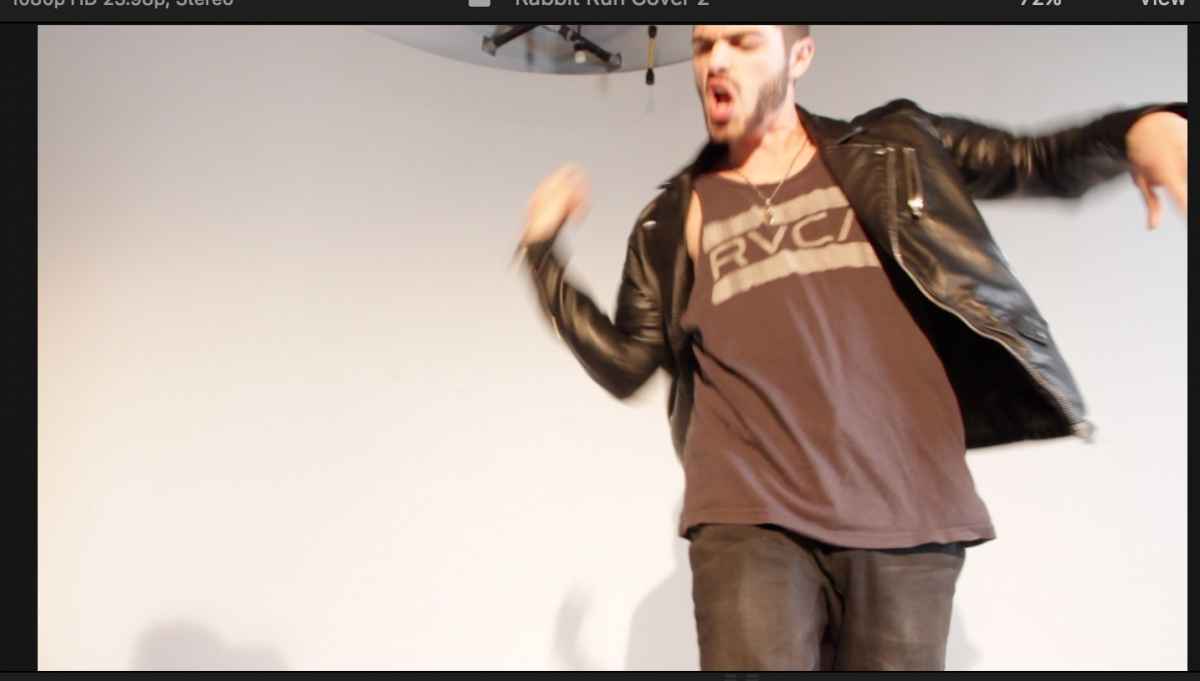
This Is the original frame before I put the effects on
Replied by mgmartino on topic Track/mask person, Make everything else white/black?
bogiesan wrote: Did you actually shoot in monochrome?
This Is the original frame before I put the effects on
Please Log in to join the conversation.
28 Mar 2017 00:58 #86759
by mgmartino
Replied by mgmartino on topic Track/mask person, Make everything else white/black?
"No, typically would be usage of a chroma-key, green or blue, for that.
key the bg, replace it with pure white"
I thought Chorma keyer was used when you actually filmed with a green/blue screen?
When we filmed it was just a white backround so from what I 've read I thought you use Luma-Keyer in that scenario. I could be flat out wrong but i just wanted to clarify my circumstances .
Regardless of what I use to key out the backround. By "keying" I can get it to look more pure white behind the subject/performer which is great for getting rid of scratch marks that were on the white backdrop..but that's not the TRUE problem. The true problem is the pipes at the top of the frame. And the Keyer distinguishes the pipes to different from the backround and would never key them out properly without seriously erasing the subject/performer...from my understanding.
_________________________________________________________
"With SliceX you can create a Mask, following your subjects head and 'cover' your background holes.
But again, that should be done in colour, the low contrasts btw guys white face and white bg makes it close to impossible to track anything"
I have not done this technique before with SliceX I have only removed buildings and birds from shots of the sky.
I will have to look it up, figure out how to do it, and let you know how it works out for me
P.S. here is the frame in color how it was originally shot
key the bg, replace it with pure white"
I thought Chorma keyer was used when you actually filmed with a green/blue screen?
When we filmed it was just a white backround so from what I 've read I thought you use Luma-Keyer in that scenario. I could be flat out wrong but i just wanted to clarify my circumstances .
Regardless of what I use to key out the backround. By "keying" I can get it to look more pure white behind the subject/performer which is great for getting rid of scratch marks that were on the white backdrop..but that's not the TRUE problem. The true problem is the pipes at the top of the frame. And the Keyer distinguishes the pipes to different from the backround and would never key them out properly without seriously erasing the subject/performer...from my understanding.
_________________________________________________________
"With SliceX you can create a Mask, following your subjects head and 'cover' your background holes.
But again, that should be done in colour, the low contrasts btw guys white face and white bg makes it close to impossible to track anything"
I have not done this technique before with SliceX I have only removed buildings and birds from shots of the sky.
I will have to look it up, figure out how to do it, and let you know how it works out for me
P.S. here is the frame in color how it was originally shot
Please Log in to join the conversation.
- Karsten Schlüter
-
- Offline
- Moderator
-
Less
More
- Posts: 3790
- Thank you received: 718
28 Mar 2017 04:47 #86765
by Karsten Schlüter
sorry, I'm a bit lost in your workflow here …
Your main prob is the 'hole' in your background - if camera or subjects moves, SliceX comes to rescue, don't miss coremelts many tutorials @vimeo.
Done.
but concerning 'infinite white' … I don't get it why keying a white background to replace it with white???
you either…
do it practical - use a white bg, smart lighting to separate subject from bg, +1 f-stop for clipping whites - bingo.
or…
if you want to key, for whatever reasons:
use a coloured background (green, blue), and use a colour-keyer - bingo#2.
but using an antique Luma-key, by far less 'detailed' than a colour key, 255 diff. shades of grey vs 16mio diff. shades of RGB …? Replacing white by white??
Plus, your subject is a bit/lot overexposed - face same 'colour' as bg = hard to key that.
… you made it yourself more complicated than needed, I'd say :silly:
ok, academic, you just want to get rid of the ceiling installations ....
Replied by Karsten Schlüter on topic Track/mask person, Make everything else white/black?
mgmartino wrote: …When we filmed it was just a white backround so from what I 've read I thought you use Luma-Keyer in that scenario. …
sorry, I'm a bit lost in your workflow here …
Your main prob is the 'hole' in your background - if camera or subjects moves, SliceX comes to rescue, don't miss coremelts many tutorials @vimeo.
Done.
but concerning 'infinite white' … I don't get it why keying a white background to replace it with white???
you either…
do it practical - use a white bg, smart lighting to separate subject from bg, +1 f-stop for clipping whites - bingo.
or…
if you want to key, for whatever reasons:
use a coloured background (green, blue), and use a colour-keyer - bingo#2.
but using an antique Luma-key, by far less 'detailed' than a colour key, 255 diff. shades of grey vs 16mio diff. shades of RGB …? Replacing white by white??
Plus, your subject is a bit/lot overexposed - face same 'colour' as bg = hard to key that.
… you made it yourself more complicated than needed, I'd say :silly:
ok, academic, you just want to get rid of the ceiling installations ....
Please Log in to join the conversation.
28 Mar 2017 21:53 #86793
by bogiesan
Replied by bogiesan on topic Track/mask person, Make everything else white/black?
Should have shot it on green or blue. Should have been more careful with the framing. Should have used a taller set . Should plan these things so they do not need to be fixed in post. Still, stuff happens.to all of us on the most carefully staged shoots. But. Post production fixes are often more expensive, far more difficult (and they are usually obvious) than just properly shooting.
If you can mask out the junk, you're going to have a seam at the mask. It's unavoidable since you're not keying (which has its own set of issues, thank you Karsten).
If you can mask out the junk, you're going to have a seam at the mask. It's unavoidable since you're not keying (which has its own set of issues, thank you Karsten).
Please Log in to join the conversation.
