


- Posts: 10
- Thank you received: 1
3 Post Moderation Rule for New Boarders (25 Jan 2021)
New boarders will have their posts moderated - Don't worry if you cannot see your post immediately.
Audio Midi Settings missing Multichannel in Sierra
- robkennedy
-
 Topic Author
- Offline
- New Member
-

Less
More
21 Mar 2017 12:48 #86649
by robkennedy
Audio Midi Settings missing Multichannel in Sierra was created by robkennedy
Hello all,
When monitoring mono audio via BlackMagic devices I have previously had to change the Audio Midi Settings so that Multichannel Audio is set to Stereo. If you don't do that you don't hear any sound out of the BlackMagic outputs 1 and 2.
That's worked fine up until now, where I have a clean install of macOS Sierra. Here there does not appear to be any Multichannel option in the Audio Midi settings, and therefore I can't hear any sound.
Interestingly, if you have changed these setting in a previous OS version, then upgraded to Sierra, all is well - it works! You can't access Multichannel audio, but the settings have stuck.
Anyone found a workaround?
Thanks,
Rob
When monitoring mono audio via BlackMagic devices I have previously had to change the Audio Midi Settings so that Multichannel Audio is set to Stereo. If you don't do that you don't hear any sound out of the BlackMagic outputs 1 and 2.
That's worked fine up until now, where I have a clean install of macOS Sierra. Here there does not appear to be any Multichannel option in the Audio Midi settings, and therefore I can't hear any sound.
Interestingly, if you have changed these setting in a previous OS version, then upgraded to Sierra, all is well - it works! You can't access Multichannel audio, but the settings have stuck.
Anyone found a workaround?
Thanks,
Rob
Please Log in to join the conversation.


21 Mar 2017 16:54 #86656
by JoeEditor
Replied by JoeEditor on topic Audio Midi Settings missing Multichannel in Sierra
Can you post a screen shot?
Please Log in to join the conversation.
- robkennedy
-
Topic Author
- Offline
- New Member
-
Less
More
- Posts: 10
- Thank you received: 1
21 Mar 2017 17:13 #86657
by robkennedy
Replied by robkennedy on topic Audio Midi Settings missing Multichannel in Sierra
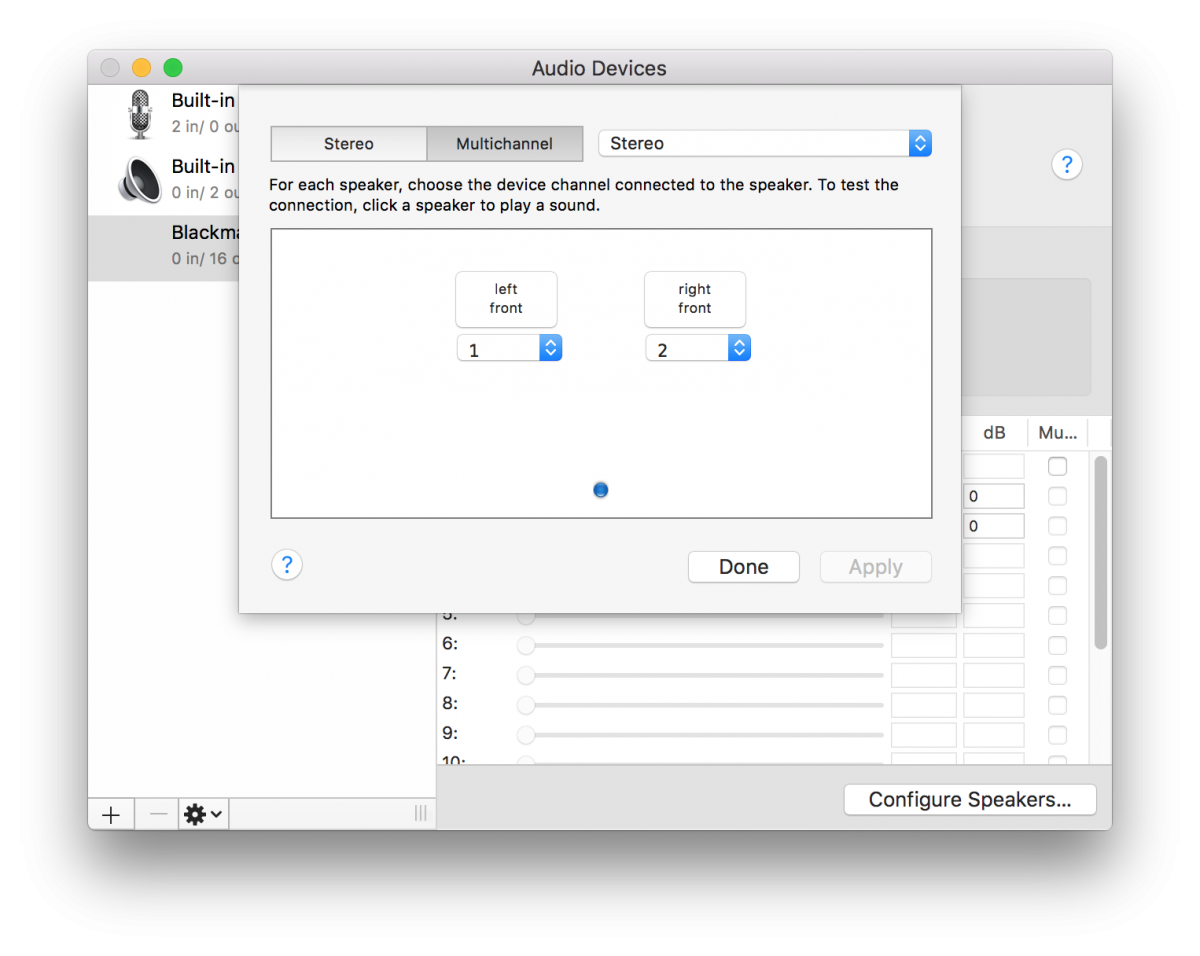
So these are the Audio Midi settings in El Cap -note that there are two settings for Stereo and Multichannel.
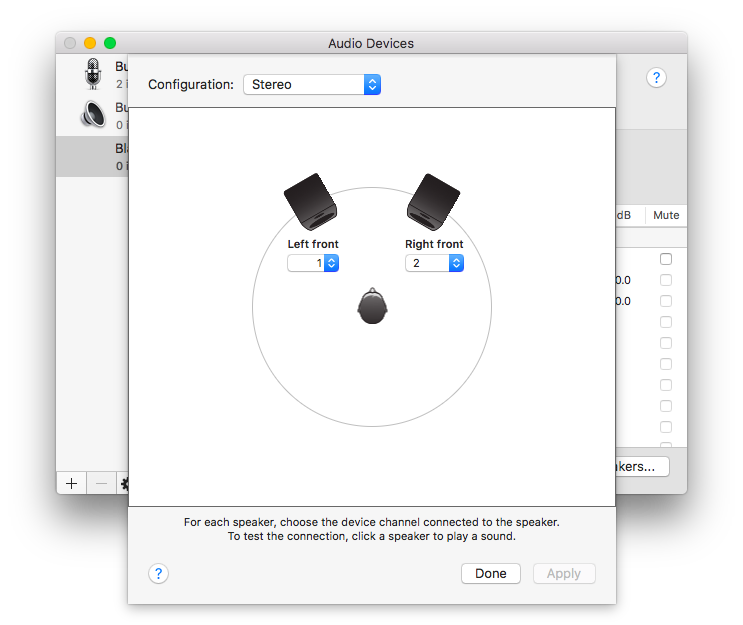
In the second pic you can see the Audio Midi settings in Sierra - note that only the Stereo option is available.
In the second pic you can see the Audio Midi settings in Sierra - note that only the Stereo option is available.
Please Log in to join the conversation.
- robkennedy
-
Topic Author
- Offline
- New Member
-
Less
More
- Posts: 10
- Thank you received: 1
03 Apr 2017 19:48 #86940
by robkennedy
Replied by robkennedy on topic Audio Midi Settings missing Multichannel in Sierra
I’ve finally got the bottom of this so thought I’d tell you how to fix it should anyone else have an issue…
Set Audio Midi Settings to 5.1 surround on your Blackmagic device - FCP tries to output any mono audio via channel 3. Now change Audio Midi Settings to Stereo - FCP still plays mono audio via audio 3.
Now change it to 2.0 surround - it works! FCP sends mono audio out of 1&2.
It gets better, if you change from to 2.0 surround back to Stereo it sticks, and FCP plays out of 1&2 as expected.
Has to be a bug I think – you should be able to just switch to 5.0 or stereo and it just works.

Set Audio Midi Settings to 5.1 surround on your Blackmagic device - FCP tries to output any mono audio via channel 3. Now change Audio Midi Settings to Stereo - FCP still plays mono audio via audio 3.
Now change it to 2.0 surround - it works! FCP sends mono audio out of 1&2.
It gets better, if you change from to 2.0 surround back to Stereo it sticks, and FCP plays out of 1&2 as expected.
Has to be a bug I think – you should be able to just switch to 5.0 or stereo and it just works.
Please Log in to join the conversation.
