


- Posts: 37
- Thank you received: 3
3 Post Moderation Rule for New Boarders (25 Jan 2021)
New boarders will have their posts moderated - Don't worry if you cannot see your post immediately.
favorited clips in the Browser disappearing in 10.3.2
17 Mar 2017 00:58 - 17 Mar 2017 01:05 #86581
by jvasey
favorited clips in the Browser disappearing in 10.3.2 was created by jvasey
I am editing a multicam project which consists of interviews with French circus performers. And in terms of a showing a transcription of the interviews, I have been using the option of favoriting a sound bite, then relabeling the "favorite" name with some of the key words/sentences from the soundbite. This has been working fine up until just recently where I opened the Browser window to see some of my favorited clips...and in 2 sections those favorited clips have disappeared.
If you look at the attached screen shot, you will see in the Browser one clip above that is showing the favorited material, with some transcript inserted, but if you look below the selected blue bar, you will see 2 clips which contained about 30 favorites each, with transcript material, and they have disappeared.. And now only one favorite is showing...but for the entire clip.
I could reconstitute the favoriting of soundbites, but I already have some of those vanished favorited clips in the timeline. I have been worked on this edit for several weeks, but only recently discovered this behavior in the last 1-2 days.
Should I try to trash preferences as a first attempt at trying to regain the favorited clips that were in the Browser? Of do others have alternative suggestions?
As a sidenote this is regular 1080p Pro Res HD and is being edited on a late 2013 Mac Pro with 32 GB of RAM. And the multicam clips are only composed of two camera angles.
Thanks, John
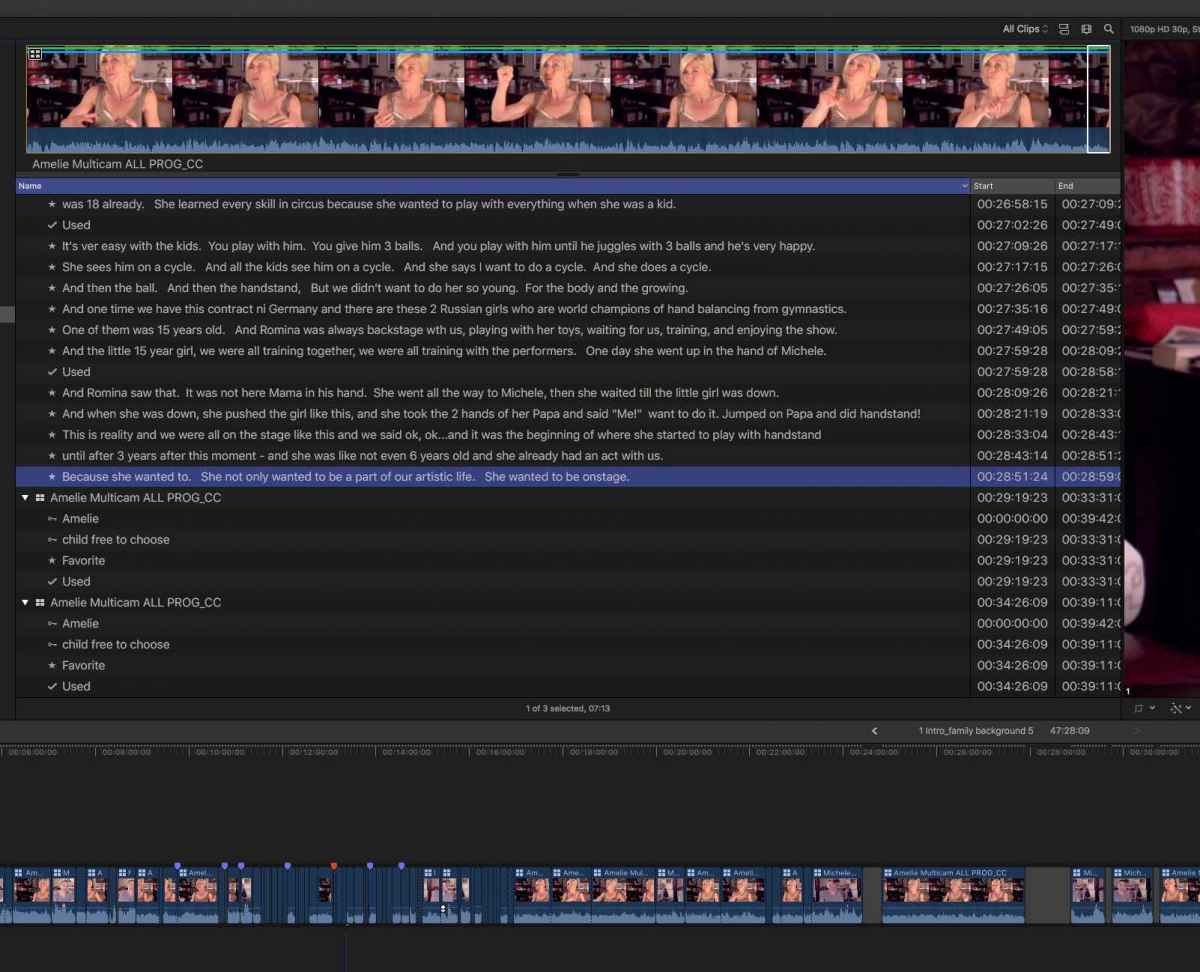
If you look at the attached screen shot, you will see in the Browser one clip above that is showing the favorited material, with some transcript inserted, but if you look below the selected blue bar, you will see 2 clips which contained about 30 favorites each, with transcript material, and they have disappeared.. And now only one favorite is showing...but for the entire clip.
I could reconstitute the favoriting of soundbites, but I already have some of those vanished favorited clips in the timeline. I have been worked on this edit for several weeks, but only recently discovered this behavior in the last 1-2 days.
Should I try to trash preferences as a first attempt at trying to regain the favorited clips that were in the Browser? Of do others have alternative suggestions?
As a sidenote this is regular 1080p Pro Res HD and is being edited on a late 2013 Mac Pro with 32 GB of RAM. And the multicam clips are only composed of two camera angles.
Thanks, John
Last edit: 17 Mar 2017 01:05 by jvasey.
Please Log in to join the conversation.

18 Mar 2017 12:23 #86603
by ianstubbs
Replied by ianstubbs on topic favorited clips in the Browser disappearing in 10.3.2
Hi John, not sure why they have vanished but I don't think they will return if you trash preferences. Have you tried opening a backup of your library? Maybe the data is in one of those?
Ian.
Ian.
Please Log in to join the conversation.
18 Mar 2017 17:45 #86608
by jvasey
Replied by jvasey on topic favorited clips in the Browser disappearing in 10.3.2
Thanks, Ian, for your advice. After a few days with this issue, I think I've deduced what may have happened to the disappearing favorited clip ranges. What I've theorized (but haven't confirmed) is that I may have accidentally hit the keyboard shortcut OPTION-X which would delete all selected ranges. And if I did that, it would have removed all my favorited clip ranges in one fell swoop.
Because I had already done some additional editing for about 2 days before discovering the issue, I decided the easiest course was to just spend about one hour re-doing the transcription of the favorited clips...and forge ahead...but this time being mindful of the OPTION-X keyboard shortcut going forward.
However, if the disappearing favorited clip issue rears its head again, then maybe it is not operator error but something else. That said while investigating my issue, I did run across the bug that many others have reported -- which is intermittent vanishing clip names in the Browser. Which in my case is restored to normal if I quit then restart the app. I fully expect this annoying bug to be corrected in the next release of FCPX.
Thanks again for sharing your comments regarding the value of having the backups to rely on...John
Because I had already done some additional editing for about 2 days before discovering the issue, I decided the easiest course was to just spend about one hour re-doing the transcription of the favorited clips...and forge ahead...but this time being mindful of the OPTION-X keyboard shortcut going forward.
However, if the disappearing favorited clip issue rears its head again, then maybe it is not operator error but something else. That said while investigating my issue, I did run across the bug that many others have reported -- which is intermittent vanishing clip names in the Browser. Which in my case is restored to normal if I quit then restart the app. I fully expect this annoying bug to be corrected in the next release of FCPX.
Thanks again for sharing your comments regarding the value of having the backups to rely on...John
Please Log in to join the conversation.


18 Mar 2017 18:50 - 18 Mar 2017 18:53 #86609
by JoeEditor
Replied by JoeEditor on topic favorited clips in the Browser disappearing in 10.3.2
If you did somehow manage to hit Option-X, after making multiple ranges at once, and before hitting F, not an easy maneuver for one's fingers, then yes, you could have inadvertently selected the whole clip and made the whole clip a Favorite.
You could also have, after making many Favorite ranges in a clip, selected the whole clip, hit F accidentally, then that would merge the entire clip into a solid Favorite clip.
If you already had Favorite ranges made, Option-X will not delete them, after the fact.
You could also have, after making many Favorite ranges in a clip, selected the whole clip, hit F accidentally, then that would merge the entire clip into a solid Favorite clip.
If you already had Favorite ranges made, Option-X will not delete them, after the fact.
Last edit: 18 Mar 2017 18:53 by JoeEditor.
Please Log in to join the conversation.
