




- Posts: 269
- Thank you received: 100
3 Post Moderation Rule for New Boarders (25 Jan 2021)
New boarders will have their posts moderated - Don't worry if you cannot see your post immediately.
Ask Deyson anything about Apple’s Motion Software (Free Event)
15 Mar 2017 17:06 - 16 Mar 2017 13:34 #86527
by Deyson
You are cordially invited to this free event.

Please register at this link: www.crowdcast.io/e/learn-motion-webinar/register
Please let me know if you have any questions and have a beautiful day!
Please register at this link: www.crowdcast.io/e/learn-motion-webinar/register
Please let me know if you have any questions and have a beautiful day!
Last edit: 16 Mar 2017 13:34 by Deyson.
Please Log in to join the conversation.
- willypimentel
-

- Offline
- Senior Member
-

Less
More
- Posts: 68
- Thank you received: 3
15 Mar 2017 17:37 #86530
by willypimentel
Replied by willypimentel on topic Ask Deyson anything about Apple’s Motion Software (Free Event)
where is the link?
Please Log in to join the conversation.
- Karsten Schlüter
-

- Offline
- Moderator
-

Less
More
- Posts: 3790
- Thank you received: 718
16 Mar 2017 05:28 #86548
by Karsten Schlüter
www.crowdcast.io/e/learn-motion-webinar/register
@Deyson: I can ask you anything about Motion? :evil:
Best of luck for your AMA!!
Replied by Karsten Schlüter on topic Ask Deyson anything about Apple’s Motion Software (Free Event)
willypimentel wrote: where is the link?
www.crowdcast.io/e/learn-motion-webinar/register
@Deyson: I can ask you anything about Motion? :evil:
Best of luck for your AMA!!
Please Log in to join the conversation.
16 Mar 2017 13:35 #86561
by Deyson
Replied by Deyson on topic Ask Deyson anything about Apple’s Motion Software (Free Event)
I am very sorry about that. I have added it to the post. I guess in my excitement I had forgotten. Thank you for letting me know and have a wonderful day!
Please Log in to join the conversation.
16 Mar 2017 13:36 - 16 Mar 2017 13:37 #86562
by Deyson
Replied by Deyson on topic Ask Deyson anything about Apple’s Motion Software (Free Event)
@Karsten: You may ask anything and I will do my best to answer them. Be gentle my friend as it is my first webinar 
P.S.Thank you for adding the link. You are awesome!
P.S.Thank you for adding the link. You are awesome!
Last edit: 16 Mar 2017 13:37 by Deyson.
Please Log in to join the conversation.
- Karsten Schlüter
-
- Offline
- Moderator
-
Less
More
- Posts: 3790
- Thank you received: 718
16 Mar 2017 14:05 #86563
by Karsten Schlüter
No worries, I'm just the fly at the wall … :side:
Lots of courage, such a complex topic and LIVE answering? - kudos, Dyson!
Do you have an 'backoffice'= some off-camera helper(s)?
Or, do you really fly 'solo'?
Oh, ok, here's one for the start, or whenever a pause happens:
Anytime I start a new Motion project, I have to go to Project, Inspector, settings, and switch the bg color to some tone of dark grey (prefer that than black) - any trick, to force New Project to that colour?
Don't answer! Next week, please! Serious question!
And, another warm-upper (I know the answer, but perhaps your audience not):
How can I change the colour of several objects 'in one rush'?
And a last one (I do know...)
want to create a Moon (grey dot) cycling around an Earth (blue dot) cycling around a Sun (yellow dot) - how do I do that? -
(extra points: without key-framing, GoldstarDoublePoints++: on elliptical tracks!!)
okayyyyy, sorry, last one is not for a start ................... :silly:
Enjoy!
Replied by Karsten Schlüter on topic Ask Deyson anything about Apple’s Motion Software (Free Event)
Deyson wrote: @Karsten:… Be gentle my friend as it is my first webinar
No worries, I'm just the fly at the wall … :side:
Lots of courage, such a complex topic and LIVE answering? - kudos, Dyson!
Do you have an 'backoffice'= some off-camera helper(s)?
Or, do you really fly 'solo'?
Oh, ok, here's one for the start, or whenever a pause happens:
Anytime I start a new Motion project, I have to go to Project, Inspector, settings, and switch the bg color to some tone of dark grey (prefer that than black) - any trick, to force New Project to that colour?
Don't answer! Next week, please! Serious question!
And, another warm-upper (I know the answer, but perhaps your audience not):
How can I change the colour of several objects 'in one rush'?
And a last one (I do know...)
want to create a Moon (grey dot) cycling around an Earth (blue dot) cycling around a Sun (yellow dot) - how do I do that? -
(extra points: without key-framing, GoldstarDoublePoints++: on elliptical tracks!!)
okayyyyy, sorry, last one is not for a start ................... :silly:
Enjoy!
Please Log in to join the conversation.
16 Mar 2017 14:39 #86565
by Deyson
Replied by Deyson on topic Ask Deyson anything about Apple’s Motion Software (Free Event)
Hello, sir.
Yes, I am flying 100% solo. I used to be a demo artist for Discreet and Apple Pro Apps many years ago, so I am used to being asked questions I may not know the answer to or be put on the spot. However, I still hope I do not get too stumped.
Maybe, I may need to pass the microphone to you when I encounter something I have no clue about.
Usually, I do not change the preferences to Motion, so I do not know if we can permanently change the background color of Motion. I will look into it, though. Thank you for asking.
In regard to changing the colors to more than one object, we can select various objects at once and then select the new color in the color selector to the color we want and all of the selects objects will have the new color.
The last one, I had thought would be a simple add on of the Orbit bit behavior, but it seems it is not so simple. I will now need to try all possible options to see how I can get that to work. Great challenge, thank you
Yes, I am flying 100% solo. I used to be a demo artist for Discreet and Apple Pro Apps many years ago, so I am used to being asked questions I may not know the answer to or be put on the spot. However, I still hope I do not get too stumped.
Maybe, I may need to pass the microphone to you when I encounter something I have no clue about.
Usually, I do not change the preferences to Motion, so I do not know if we can permanently change the background color of Motion. I will look into it, though. Thank you for asking.
In regard to changing the colors to more than one object, we can select various objects at once and then select the new color in the color selector to the color we want and all of the selects objects will have the new color.
The last one, I had thought would be a simple add on of the Orbit bit behavior, but it seems it is not so simple.
I will now need to try all possible options to see how I can get that to work. Great challenge, thank you Please Log in to join the conversation.
16 Mar 2017 14:47 #86566
by Deyson
Replied by Deyson on topic Ask Deyson anything about Apple’s Motion Software (Free Event)
@Karsten. Ok, for the last one. I could use Motion Paths to get the elliptical style around the sun and earth. But that sounds too simple, so I am thinking you have another way to do this.
Please Log in to join the conversation.
- Karsten Schlüter
-
- Offline
- Moderator
-
Less
More
- Posts: 3790
- Thank you received: 718
16 Mar 2017 15:14 #86567
by Karsten Schlüter
oh noooo, for a reason, I let my Mac speak in my tutorials .. LOL
Have to rephrase my Q:
Is it possible (it is…) to offer the user in FinalCut ONE colour-selector, which effects severral objects (hinthint: use the LINK behaviour)
watch attached earthsunmoon.mov for the planetarium in action …
keywords: shifted anchor point and grouping… than Rate the z-rotation:
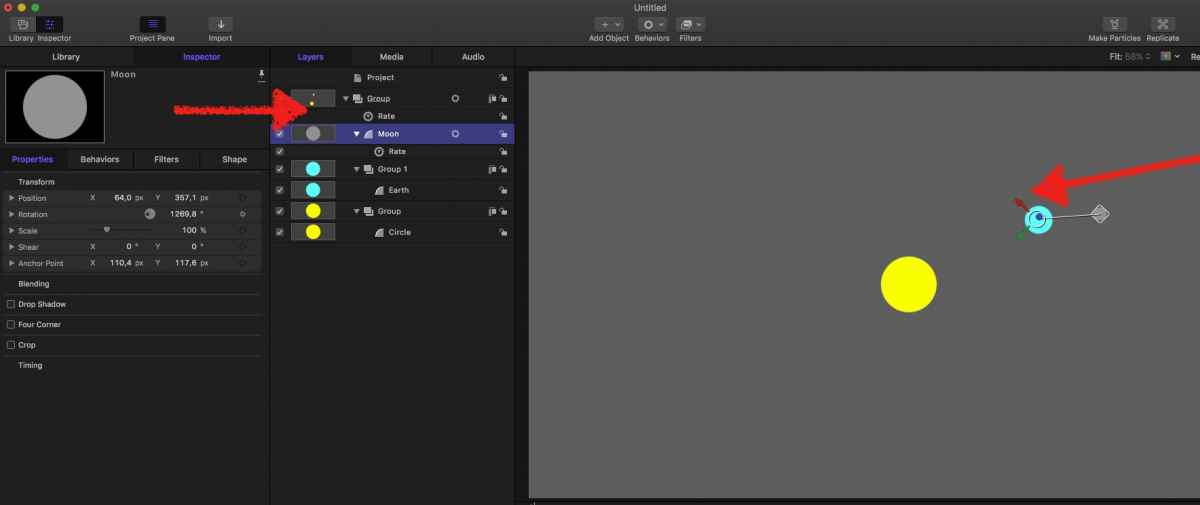
It'll be 9pm, right? not my best time of the day… if I'm awake, and if I can help you, I'll try my very best...
sounds like a fun evening!
Replied by Karsten Schlüter on topic Ask Deyson anything about Apple’s Motion Software (Free Event)
Deyson wrote: …Maybe, I may need to pass the microphone to you when I encounter something I have no clue about.
…
oh noooo, for a reason, I let my Mac speak in my tutorials .. LOL
Deyson wrote: ……
In regard to changing the colors to more than one object, we can select various objects at once …
Have to rephrase my Q:
Is it possible (it is…) to offer the user in FinalCut ONE colour-selector, which effects severral objects (hinthint: use the LINK behaviour)
Deyson wrote: …
The last one, I had thought would be a simple add on of the Orbit bit behavior, but it seems it is not so simple.
watch attached earthsunmoon.mov for the planetarium in action …
keywords: shifted anchor point and grouping… than Rate the z-rotation:
It'll be 9pm, right? not my best time of the day… if I'm awake, and if I can help you, I'll try my very best...
sounds like a fun evening!
Please Log in to join the conversation.
16 Mar 2017 15:25 #86568
by Deyson
Replied by Deyson on topic Ask Deyson anything about Apple’s Motion Software (Free Event)
I hope I do see you there.
If I have a large number objects that I want to change color to with one color parameter, I would make one of the objects a master and link all other objects colors with a link behaviors so they are all linked.
The earth example is a great example. That is what I love about Motion sometimes have many options to get a similar result. However, how do you get the elliptical track with the rate? That is why I had thought an elliptical motion path was the solution.
Thank you so much for the challenges and help good sir. You are awesome!
If I have a large number objects that I want to change color to with one color parameter, I would make one of the objects a master and link all other objects colors with a link behaviors so they are all linked.
The earth example is a great example. That is what I love about Motion sometimes have many options to get a similar result. However, how do you get the elliptical track with the rate? That is why I had thought an elliptical motion path was the solution.
Thank you so much for the challenges and help good sir. You are awesome!
Please Log in to join the conversation.
16 Mar 2017 21:44 - 16 Mar 2017 21:45 #86577
by Pielle
Replied by Pielle on topic Ask Deyson anything about Apple’s Motion Software (Free Event)
Hi Deyson! I'm more merciful than karsten and will not ask you to answer difficult questions. Unfortunately for work I’ll not be able to attend the webinar, but I send you my best wishes for this new adventure
With friendship Pielle
With friendship Pielle
Last edit: 16 Mar 2017 21:45 by Pielle.
Please Log in to join the conversation.
17 Mar 2017 12:50 #86587
by Deyson
Replied by Deyson on topic Ask Deyson anything about Apple’s Motion Software (Free Event)
I like difficult questions. If I do not the answer it gives me something to search out and learn. Motion is so deep and intense I doubt many of us could learn it all.
Thank you for the interest in the webinar. Please sign up so you may get the recording when it is completed. Also, if you want to ask a question you may do so at any time before or during the webinar so I may try to answer it during the webinar.
Thank you for your support and valuable time. Have an amazing day!
Thank you for the interest in the webinar. Please sign up so you may get the recording when it is completed. Also, if you want to ask a question you may do so at any time before or during the webinar so I may try to answer it during the webinar.
Thank you for your support and valuable time. Have an amazing day!
Please Log in to join the conversation.
