


3 Post Moderation Rule for New Boarders (25 Jan 2021)
New boarders will have their posts moderated - Don't worry if you cannot see your post immediately.
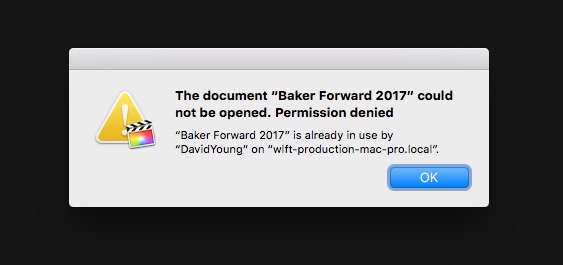
FCPX claims all Libraries are already opened and in use


14 Mar 2017 17:48 - 14 Mar 2017 17:48 #86494
by JoeEditor
FCPX claims all Libraries are already opened and in use was created by JoeEditor
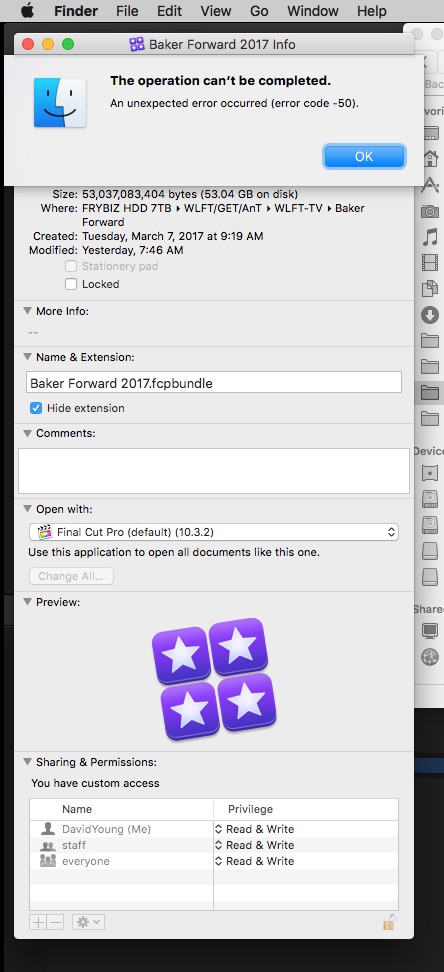
Broadcast, deadlines, and in deep doo-doo. Seems I can't open any Libraries today, because the system claims their already in use by someone else (the same user I'm logged in as, FYI). So NOTHING here at the TV station can be accessed at all. Ran Disk Utility to repair permissions, didn't help. Going to try creating another user and see if they'll open, but I doubt it. Had a Library go bad like this a couple of months ago. Found a corrupted folder inside the Package that wouldn't trash or anything. Eventually it let me delete it. Can't change permissions due to error when I try that. Oy, this ain't good, folks.
Last edit: 14 Mar 2017 17:48 by JoeEditor.
Please Log in to join the conversation.
14 Mar 2017 18:27 #86497
by JoeEditor
Replied by JoeEditor on topic FCPX claims all Libraries are already opened and in use
OK, here's an update. Ran Disk Utility, it froze. Finder froze. Everybody died. Force reboot (hold power button for ten seconds). Ran Disk Utility on all drives immediately. Seems to have everything working fine again. But still troubles me something so serious popped up suddenly.
Also, when running Disk Utility on the system drive, I got a response I'm not used to seeing. Seems it should have completed more steps than that, and given me a different finishing message. Or am I remembering things in correctly?
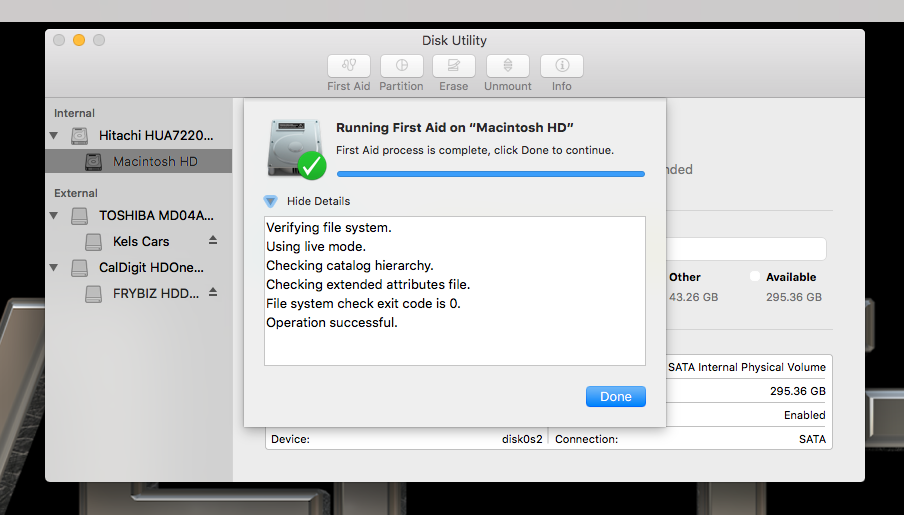
Also, when running Disk Utility on the system drive, I got a response I'm not used to seeing. Seems it should have completed more steps than that, and given me a different finishing message. Or am I remembering things in correctly?
Please Log in to join the conversation.
- ronny courtens
-

- Offline
- Moderator
-

Less
More
- Posts: 4455
- Thank you received: 962
14 Mar 2017 19:15 #86498
by ronny courtens
Replied by ronny courtens on topic FCPX claims all Libraries are already opened and in use
Yes you should see more steps in the process. At least you should see a message at the end of the report confirming that "Macintosh HD" os OK.
But are you saying that everything is working as expected again now? You can open the Libraries without any issues?
- Ronny
But are you saying that everything is working as expected again now? You can open the Libraries without any issues?
- Ronny
Please Log in to join the conversation.


14 Mar 2017 22:42 #86503
by bogiesan
Replied by bogiesan on topic FCPX claims all Libraries are already opened and in use
Tried the old safe boot?
And you can still zap the PRAM but it's called something else these days.
Ripped form the Net: Safe boot
After your Mac shuts down, wait 10 seconds, then press the power button. Immediately after your Mac starts (some Mac computers play a startup sound), press and hold the Shift key. Release the Shift key when you see the gray Apple logo and progress indicator.
from support.apple.com/kb/PH25631?locale=en_US
Choose Apple menu > Shut Down.
Locate the following keys on the keyboard: Option, Command, P, and R. You will need to press and hold these keys simultaneously in step 4.
Turn on your Mac.
And you can still zap the PRAM but it's called something else these days.
Ripped form the Net: Safe boot
After your Mac shuts down, wait 10 seconds, then press the power button. Immediately after your Mac starts (some Mac computers play a startup sound), press and hold the Shift key. Release the Shift key when you see the gray Apple logo and progress indicator.
from support.apple.com/kb/PH25631?locale=en_US
Choose Apple menu > Shut Down.
Locate the following keys on the keyboard: Option, Command, P, and R. You will need to press and hold these keys simultaneously in step 4.
Turn on your Mac.
Please Log in to join the conversation.
15 Mar 2017 03:51 #86505
by PaulG
Replied by PaulG on topic FCPX claims all Libraries are already opened and in use
I've been having permissions issues switching between users and opening the Library from one user to the other. The only thing that helps is to do a Get Info on the media drive and make sure that "Ignore Ownership" is checked on the volume.
Does anyone know if there are any other problems where you switch users but open the Library in either? (This assumes you close out of FCPX before switching to the other user.)
Does anyone know if there are any other problems where you switch users but open the Library in either? (This assumes you close out of FCPX before switching to the other user.)
Please Log in to join the conversation.
15 Mar 2017 15:38 #86523
by bogiesan
Replied by bogiesan on topic FCPX claims all Libraries are already opened and in use
Something probably changed recently on your server or the drive you are sharing. It may need to be reformatted using Sierra's disk utility which, according to people who are smarter than I am and who care about such details, slightly alters logging in and permissions at a granular level. (Unconfirmed by me, I just know they fixed it.)
Sierra's security has totally bolixed our shared storage and Windows shares. Our symptoms are weirder than yours, folders appear and disappear, apparently at random, and the red dashes (indicating the folders are not available to me) flicker in and out.
It took massive efforts from our IT people to fix these permissions issues. Sorry not to have any advice, all I can say is it was very complex and I never could have figured it out on my own.
Sierra's security has totally bolixed our shared storage and Windows shares. Our symptoms are weirder than yours, folders appear and disappear, apparently at random, and the red dashes (indicating the folders are not available to me) flicker in and out.
It took massive efforts from our IT people to fix these permissions issues. Sorry not to have any advice, all I can say is it was very complex and I never could have figured it out on my own.
Please Log in to join the conversation.
15 Mar 2017 16:29 #86526
by PaulG
Replied by PaulG on topic FCPX claims all Libraries are already opened and in use
The machine we're having issues on is stlll in El Capitan. It's a locallly attached CalDigit RAID. Both users have admin privileges. The ownship of the volume will be reset, but over time User B will denied access to the FCP Library while User A will be fine. All media , libraries, caches etc are stored on the RAID.
Please Log in to join the conversation.
15 Mar 2017 21:57 #86542
by JoeEditor
Replied by JoeEditor on topic FCPX claims all Libraries are already opened and in use
Ronny,
Yes, everything is perfectly fine now. I'm going to run Disk Warrior on these drives when time permits. The TV station just got swamped with work this week. But this is the second time I had FCPX Libraries that had permission problems along with claiming they were in use when they weren't. Reported to Apple. I don't do nearly as much work with FCPX in my home studio as I do at the station, so not sure what's up. And the only files effected are FCPX Libraries. No other file type has issues when this happens. It is a mystery.
Yes, everything is perfectly fine now. I'm going to run Disk Warrior on these drives when time permits. The TV station just got swamped with work this week. But this is the second time I had FCPX Libraries that had permission problems along with claiming they were in use when they weren't. Reported to Apple. I don't do nearly as much work with FCPX in my home studio as I do at the station, so not sure what's up. And the only files effected are FCPX Libraries. No other file type has issues when this happens. It is a mystery.
Please Log in to join the conversation.
