


- Posts: 131
- Thank you received: 15
3 Post Moderation Rule for New Boarders (25 Jan 2021)
New boarders will have their posts moderated - Don't worry if you cannot see your post immediately.
Using Hold retimes entire clip
21 Dec 2011 17:41 - 21 Dec 2011 17:43 #2712
by Jimmyfinn
Using Hold retimes entire clip was created by Jimmyfinn
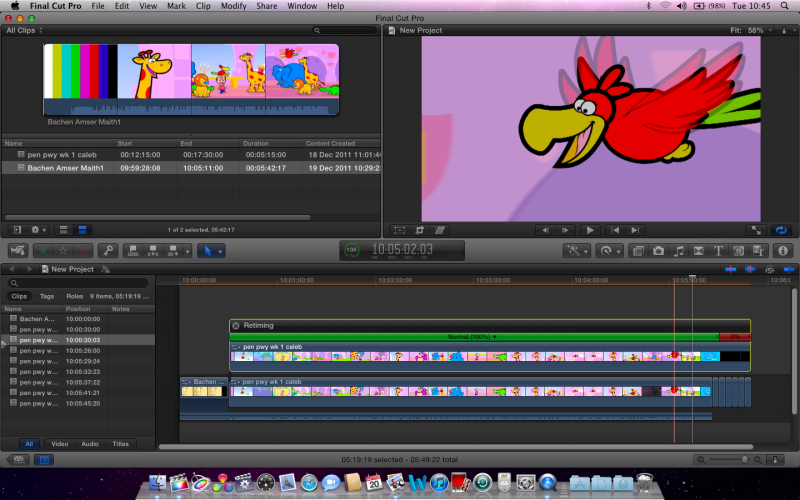
I have a short animation that needs to be married to a M&E and a production credit added with a freeze frame. Loaded from Digibeta 720x576i Prores via AJA Kona
All as expected until I added the hold frame at the end.
FCP X retimes the WHOLE clip and introduces frame blending
attributes across the entire clip. The animation drifts in & out by as much as 5 frames
(grab shows difference in viewer between secondary & primary)
Workaround was to cut & paste production credit or export
still frame and re-import
FCPX retimes the whole clip prior to a Hold frame, that seems wonky to me!
Any thoughts
All as expected until I added the hold frame at the end.
FCP X retimes the WHOLE clip and introduces frame blending
attributes across the entire clip. The animation drifts in & out by as much as 5 frames
(grab shows difference in viewer between secondary & primary)
Workaround was to cut & paste production credit or export
still frame and re-import
FCPX retimes the whole clip prior to a Hold frame, that seems wonky to me!
Any thoughts
Last edit: 21 Dec 2011 17:43 by Jimmyfinn.
Please Log in to join the conversation.

22 Dec 2011 19:55 - 22 Dec 2011 20:06 #2739
by BenB
Replied by BenB on topic Re: Using Hold retimes entire clip
I tried to replicate this, but I can't. When I do it the results are as expected.
But you can try this. Modify > Retiming> Video Quality > Normal.
Also, in the Inspector, under Rate Conform, make sure Frame Sampling is set to Floor.
But you can try this. Modify > Retiming> Video Quality > Normal.
Also, in the Inspector, under Rate Conform, make sure Frame Sampling is set to Floor.
Last edit: 22 Dec 2011 20:06 by BenB.
Please Log in to join the conversation.
23 Dec 2011 18:22 - 23 Dec 2011 18:29 #2784
by Jimmyfinn
Replied by Jimmyfinn on topic Re: Using Hold retimes entire clip
Thanks for checking that Ben.
Rate conform not an option as the clip frame rate and project frame rate match.
Try this:
Drop a clip in the Primary timeline and Option drag it to the secondary.
Change the opacity on secondary to 50% and play. No problems.
Add a hold frame on the end of the secondary clip and now the
secondary clip is playing at different rate to the primary causing ghosting
and out of sync audio. Normal, blending
and OF have no effect. I get this on clips at 25fps and 29.97.
Render this way too.
Rate conform not an option as the clip frame rate and project frame rate match.
Try this:
Drop a clip in the Primary timeline and Option drag it to the secondary.
Change the opacity on secondary to 50% and play. No problems.
Add a hold frame on the end of the secondary clip and now the
secondary clip is playing at different rate to the primary causing ghosting
and out of sync audio. Normal, blending
and OF have no effect. I get this on clips at 25fps and 29.97.
Render this way too.
Last edit: 23 Dec 2011 18:29 by Jimmyfinn.
Please Log in to join the conversation.
23 Dec 2011 20:36 - 23 Dec 2011 20:37 #2785
by BenB
Replied by BenB on topic Re: Using Hold retimes entire clip
I'm going step by step, and can not replicate your problem. Works just fine for me.
Is it just this one clip, or does it do this for all clips in that Timeline?
Is it just this one Timeline, or does it do this for all clips in all Timelines?
Maybe try deleting the render files for that Project and the related Events, and then trashing prefs.
I've no clue what's happening, as I can't replicate the problem.
Is it just this one clip, or does it do this for all clips in that Timeline?
Is it just this one Timeline, or does it do this for all clips in all Timelines?
Maybe try deleting the render files for that Project and the related Events, and then trashing prefs.
I've no clue what's happening, as I can't replicate the problem.
Last edit: 23 Dec 2011 20:37 by BenB.
Please Log in to join the conversation.
