


- Posts: 67
- Thank you received: 5
3 Post Moderation Rule for New Boarders (25 Jan 2021)
New boarders will have their posts moderated - Don't worry if you cannot see your post immediately.
X2Pro Convert 24 bit to 16 bit issue.
10 Mar 2017 12:21 - 10 Mar 2017 12:24 #86418
by John G
X2Pro Convert 24 bit to 16 bit issue. was created by John G
Hi All
We regularly use X2Pro to make AAF files to hand off to an audio house.
All the audio in our projects is WAV 24 bit. But the sound guys have told us that the projects are showing us as 16 bit when opened in ProTools. We don't have ProTools ourselves so can't check our X2Pro AAF files directly.
It's as if X2Pro is somehow changing the bit rate when it creates the AAF, although I can't see how that could happen. Can anyone tell me what might be causing this issue?
Thanks
John
We regularly use X2Pro to make AAF files to hand off to an audio house.
All the audio in our projects is WAV 24 bit. But the sound guys have told us that the projects are showing us as 16 bit when opened in ProTools. We don't have ProTools ourselves so can't check our X2Pro AAF files directly.
It's as if X2Pro is somehow changing the bit rate when it creates the AAF, although I can't see how that could happen. Can anyone tell me what might be causing this issue?
Thanks
John
Last edit: 10 Mar 2017 12:24 by John G. Reason: Added something
Please Log in to join the conversation.


10 Mar 2017 13:56 #86421
by JoeEditor
Replied by JoeEditor on topic X2Pro Convert 24 bit to 16 bit issue.
Why? Very open ended question. I'd venture a guess that because video is standard 16-bit. 24-bit only gives an advantage when you're doing very heavy filtering in a DAW. And those filters, as also the encoding engines, have evolved so much over time so, even that is not such a fact any longer. But I'd not want X2Pro to do that automatically if I used it. I'd want it to at least give me a choice.
I think this is an issue we need to hear from the developer (who has no direct support contact, only a support forum, who's URL is bad on their home page).
I think this is an issue we need to hear from the developer (who has no direct support contact, only a support forum, who's URL is bad on their home page).
Please Log in to join the conversation.

10 Mar 2017 17:02 #86430
by nosbort
Replied by nosbort on topic X2Pro Convert 24 bit to 16 bit issue.
The X2Pro forum recently moved and you probably have a cached home page. Try this:
forum.marquisbroadcast.com/
forum.marquisbroadcast.com/
Please Log in to join the conversation.
11 Mar 2017 12:33 #86443
by John G
Replied by John G on topic X2Pro Convert 24 bit to 16 bit issue.
Thanks for that.
I have posted a question on the Marquis Broadcast forum.
Anyone else seen this issue with X2Pro?
I have posted a question on the Marquis Broadcast forum.
Anyone else seen this issue with X2Pro?
Please Log in to join the conversation.
- Bluebicycle
-

- Offline
- Premium Member
-

Less
More
- Posts: 80
- Thank you received: 5
11 Mar 2017 16:16 #86444
by Bluebicycle
Replied by Bluebicycle on topic X2Pro Convert 24 bit to 16 bit issue.
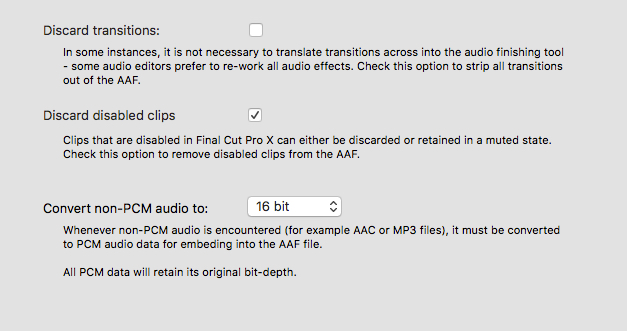
In the X2Pro Preferences you can set the conversion of non PCM material to either 16 or 24 bit
As it says in the screen grab if the audio is already PCM the existing bit depth will be retained
One thing I've found useful for checking AAFs is to buy a copy of Logic and import to there as a check
As it says in the screen grab if the audio is already PCM the existing bit depth will be retained
One thing I've found useful for checking AAFs is to buy a copy of Logic and import to there as a check
Please Log in to join the conversation.
- Bluebicycle
-
- Offline
- Premium Member
-
Less
More
- Posts: 80
- Thank you received: 5
11 Mar 2017 16:18 - 11 Mar 2017 16:20 #86446
by Bluebicycle
Replied by Bluebicycle on topic X2Pro Convert 24 bit to 16 bit issue.
see this screen grab
Last edit: 11 Mar 2017 16:20 by Bluebicycle.
Please Log in to join the conversation.
13 Mar 2017 11:13 #86465
by John G
Replied by John G on topic X2Pro Convert 24 bit to 16 bit issue.
Hi
Thanks for this.
As a test I made two AAF files with this setting set to 16-bit and 24-bit. (Although our audio is all WAV so the setting shouldn't make a difference.)
Our sound guys tell us both these tests showed as 16-bit in their ProTools!??
Marquis Broadcast support tell me that X2Pro does not change the bit depth of WAV or AIIF files. So it's still a mystery.
We had considered getting Logic to import AAF files into, but we've now decided to jump in and get ProTools so we can test our files and be totally compatible with our sound guys. (It doesn't help that they are in London and we are in the far North of England so we rarely get to see them in person!
If I get to the bottom of this I will post with the outcome.
John
Thanks for this.
As a test I made two AAF files with this setting set to 16-bit and 24-bit. (Although our audio is all WAV so the setting shouldn't make a difference.)
Our sound guys tell us both these tests showed as 16-bit in their ProTools!??
Marquis Broadcast support tell me that X2Pro does not change the bit depth of WAV or AIIF files. So it's still a mystery.
We had considered getting Logic to import AAF files into, but we've now decided to jump in and get ProTools so we can test our files and be totally compatible with our sound guys. (It doesn't help that they are in London and we are in the far North of England so we rarely get to see them in person!
If I get to the bottom of this I will post with the outcome.
John
Please Log in to join the conversation.
13 Mar 2017 12:33 #86467
by JoeEditor
Replied by JoeEditor on topic X2Pro Convert 24 bit to 16 bit issue.
I'd want some verification that the original file is 24-bit.
Please Log in to join the conversation.
- Bluebicycle
-
- Offline
- Premium Member
-
Less
More
- Posts: 80
- Thank you received: 5
13 Mar 2017 12:35 #86468
by Bluebicycle
Replied by Bluebicycle on topic X2Pro Convert 24 bit to 16 bit issue.
This seems quite hard to do inside FCPX. I just used the Audio metadata view and although bit depth is included it is just greyed out the files in my Library.
Please Log in to join the conversation.
13 Mar 2017 13:14 #86469
by John G
Replied by John G on topic X2Pro Convert 24 bit to 16 bit issue.
Hi Guys
The audio I'm using is definitely 24-bit. It shows in the inspector and in the finder. (See pics). Also, if I export the files as new WAV's they are still 24-bit. The problem seems to be only when X2Pro makes an AAF.
The show we're working on has an entirely 24-bit workflow. The composer and the dialogue recording studio are providing us with 24-bit WAV's and the show is mixed in ProTools at 24-bit.
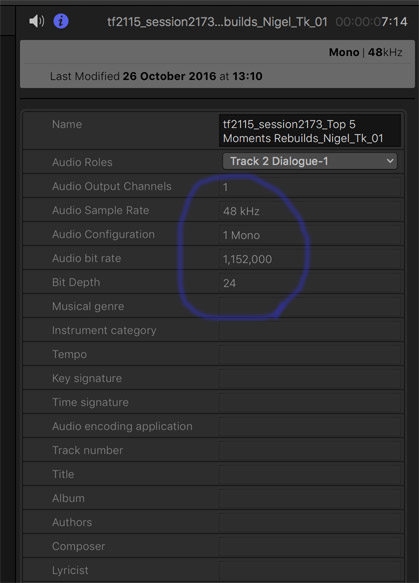

The audio I'm using is definitely 24-bit. It shows in the inspector and in the finder. (See pics). Also, if I export the files as new WAV's they are still 24-bit. The problem seems to be only when X2Pro makes an AAF.
The show we're working on has an entirely 24-bit workflow. The composer and the dialogue recording studio are providing us with 24-bit WAV's and the show is mixed in ProTools at 24-bit.
Please Log in to join the conversation.
- Bluebicycle
-
- Offline
- Premium Member
-
Less
More
- Posts: 80
- Thank you received: 5
13 Mar 2017 15:12 #86471
by Bluebicycle
Replied by Bluebicycle on topic X2Pro Convert 24 bit to 16 bit issue.
Having just talked things over with my Protools dubbing friend, this really does sound like a problem at the Protools end. He says (I'm not a Protools user myself) that every Protools Session presents you with the option to set things like file type, bit depth, bit rate etc., before it creates the session and reads from the AAF. I'd be very surprised if X2Pro was changing things, there is an option (might only be on the upgraded) version to not have the audio files embedded in the AAF file, useful if you are all on the same shared storage for instance. In that case no media would be copied and the AAF would simply point to you existing media, which is 24 bit as you show.So if you have this option you could send them an un-embedded AAF as a test, knowing before you send that you are happy the files referenced are indeed 24bit.
Please Log in to join the conversation.
13 Mar 2017 16:15 #86473
by John G
Replied by John G on topic X2Pro Convert 24 bit to 16 bit issue.
I'd be very surprised if X2Pro was changing things, there is an option (might only be on the upgraded) version to not have the audio files embedded in the AAF file, useful if you are all on the same shared storage for instance. In that case no media would be copied and the AAF would simply point to you existing media, which is 24 bit as you show.So if you have this option you could send them an un-embedded AAF as a test, knowing before you send that you are happy the files referenced are indeed 24bit.
Thanks, that's a very good idea. I will try this. Although I would really like to discover where the problem is originating. At the moment everyone (including Marquis) is telling me X2Pro won't change anything - and I agree with that. Yet the sound guys we use keep saying the AAF's are turning out 16-bit. The audio company we're working with is a large London post house, so I'd expect them to know what they're doing... Hmmm.
I'll keep trying, thanks again.
John
Thanks, that's a very good idea. I will try this. Although I would really like to discover where the problem is originating. At the moment everyone (including Marquis) is telling me X2Pro won't change anything - and I agree with that. Yet the sound guys we use keep saying the AAF's are turning out 16-bit. The audio company we're working with is a large London post house, so I'd expect them to know what they're doing... Hmmm.
I'll keep trying, thanks again.
John
Please Log in to join the conversation.
- Bluebicycle
-
- Offline
- Premium Member
-
Less
More
- Posts: 80
- Thank you received: 5
13 Mar 2017 16:31 #86474
by Bluebicycle
Replied by Bluebicycle on topic X2Pro Convert 24 bit to 16 bit issue.
Obviously you want to keep the extra bit depth at 24bit,for the potential increase in dynamic range, but if your material had originated at 16bit even then, it's just a button push for them at the Protools end to convert it to 24 on import. I must confess I'd be struggling to hear the difference from 24 down to 16 myself. But yes it 's frustrating when you don't know where the problem originates.
Please Log in to join the conversation.
