


- Posts: 3
- Thank you received: 0
3 Post Moderation Rule for New Boarders (25 Jan 2021)
New boarders will have their posts moderated - Don't worry if you cannot see your post immediately.
Masking an adjustment layer
07 Mar 2017 20:52 #86354
by Dabow
Masking an adjustment layer was created by Dabow
I folks. I'm quite new to FCPX but learning as fast as I can. I came across a problem today I've been unable to find a solution to, so hopefully someone on here can help. I've recorded a video which shows my iphone in the top half of the frame and a video of me in the bottom half. It's a tutorial and I want to add a vignette just to the video of me without darkening the video of my phone screen. I've added a vignette as an adjustment layer and adjusted it so that it darkens the edge around my video, but it also darkens the phone video. What I want to do is mask the adjustment layer so that it only affects the video of me. Is there any way of doing this? I've been pulling my hair out for the last couple of hours trying to find a way (and I don't have that much hair to spare). Any help on solving this would be greatly appreciated!
Dave
Dave
Please Log in to join the conversation.
- Karsten Schlüter
-

- Offline
- Moderator
-

Less
More
- Posts: 3790
- Thank you received: 718
08 Mar 2017 05:53 #86363
by Karsten Schlüter
Replied by Karsten Schlüter on topic Masking an adjustment layer
Welcome Dave to fcp.co 
Apply the Vignette only to the lane aka 'track' showing you.
Adjustment layers affect everything below them ...
Apply the Vignette only to the lane aka 'track' showing you.
Adjustment layers affect everything below them ...
Please Log in to join the conversation.
08 Mar 2017 09:14 #86365
by Dabow
Replied by Dabow on topic Masking an adjustment layer
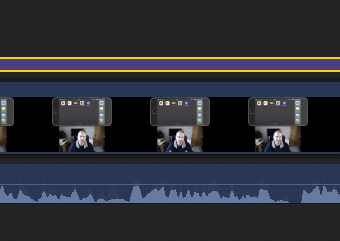
Hi Karsten and thanks for the welcome! Perhaps I wasn't clear in my description of the issue. There's only one track and it contains me and the phone with the adjustment layer adding the vignette above. It was filmed this way. I've added a couple of images which hopefully clarifies this a bit better. Apologies for any confusion.
Dave
Dave
Please Log in to join the conversation.

08 Mar 2017 11:44 #86367
by lichinho
Replied by lichinho on topic Masking an adjustment layer
Add a Shape Mask to the Vignette effect: in the Inspector, click the mask button and choose Shape Mask. Adjust the vignette and the mask accordingly.
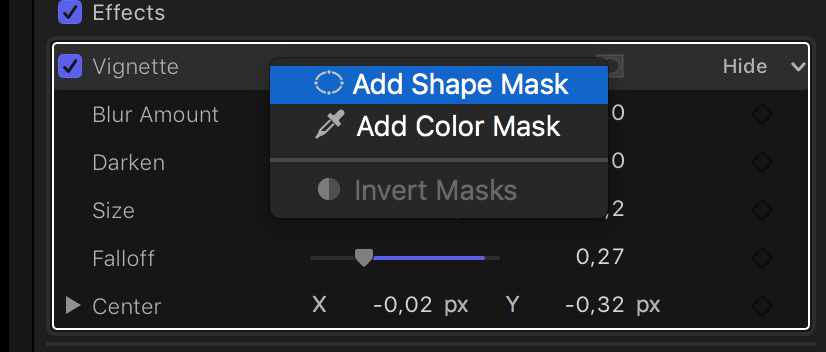
And, as you go about it, why apply this to the adjustment layer? You might as well apply the effect to the clip directly.
And, as you go about it, why apply this to the adjustment layer? You might as well apply the effect to the clip directly.
Please Log in to join the conversation.
08 Mar 2017 15:28 #86373
by Dabow
Replied by Dabow on topic Masking an adjustment layer
Part of the problem it seems is that I come from a Photoshop background and I mistakenly thought layers in FCPX may work along similar lines i.e. you could mask them. Seems I may have been wrong. I got around it in the end by duplicating the track , applying the vignette to it then masking everything out except for the shot of me. That seems to work but is probably a convoluted way of doing it. Thanks - I'll bear your comment in mind about masking the effect itself for future instances where I need to do this. Your help appreciated!
Please Log in to join the conversation.
