


- Posts: 1
- Thank you received: 0
3 Post Moderation Rule for New Boarders (25 Jan 2021)
New boarders will have their posts moderated - Don't worry if you cannot see your post immediately.
Audio Troubles
- BillyBobbyBrown
-
 Topic Author
- Offline
- New Member
-

Less
More
06 Mar 2017 00:07 #86299
by BillyBobbyBrown
Audio Troubles was created by BillyBobbyBrown
I recorded audio on location, I recorded two mono channels (One Lav on the right track and a Boom on the right track)
On the computer the audio files are single with both the mono tracks basically a stereo I guess.
I want to sync the sound with the video but I want to be able to choose what mono channel to use and it seems Final cut made it a stern track. Is there anyway I can view both the right and left channel separately once synced using the synchronize clip feature?
On the computer the audio files are single with both the mono tracks basically a stereo I guess.
I want to sync the sound with the video but I want to be able to choose what mono channel to use and it seems Final cut made it a stern track. Is there anyway I can view both the right and left channel separately once synced using the synchronize clip feature?
Please Log in to join the conversation.


06 Mar 2017 16:39 #86321
by JoeEditor
Replied by JoeEditor on topic Audio Troubles
Please Log in to join the conversation.
- simon.a.billington
-
- Offline
- Elite Member
-

Less
More
- Posts: 179
- Thank you received: 10
17 Mar 2017 10:33 #86586
by simon.a.billington
Replied by simon.a.billington on topic Audio Troubles
If you came to using a mix of both you may end up with phasing issues. This occurs because of the difference between the distance of the mic's and the sound source.
Often using a blend helps the audio to sound more natural, in the context of an environment, but clear and present enough to be more intelligible and sound more professional.
If you do choose to use both tracks it becomes a simple case of aligning the audio with itself to counteract any phasing issues. To do this, you can either add a delay on one of the channels to line it up, but this can become hard and tedious. You can disconnect them and align them by hand, except I don't think FCPX allows you to zoom in to that type of detail. Or you could use a 3rd party tool with a visual display to aid you, such as this one
However, Ive never used this in FCPX. It will induce a latency which FCPX will either automatically compensate for, or you will have to slide the audio forward about 20ms in time.
Or you can do this in an external editor/DAW, do a pro mix there with all the other elements, and import the final result back to FCPX for finalising.
This does sound a lot of trouble. For small projects it may not be worth it, but for anything important enough it is DEFINITELY worth the extra time to get the audio as professionally sounding as possible.
Often using a blend helps the audio to sound more natural, in the context of an environment, but clear and present enough to be more intelligible and sound more professional.
If you do choose to use both tracks it becomes a simple case of aligning the audio with itself to counteract any phasing issues. To do this, you can either add a delay on one of the channels to line it up, but this can become hard and tedious. You can disconnect them and align them by hand, except I don't think FCPX allows you to zoom in to that type of detail. Or you could use a 3rd party tool with a visual display to aid you, such as this one
However, Ive never used this in FCPX. It will induce a latency which FCPX will either automatically compensate for, or you will have to slide the audio forward about 20ms in time.
Or you can do this in an external editor/DAW, do a pro mix there with all the other elements, and import the final result back to FCPX for finalising.
This does sound a lot of trouble. For small projects it may not be worth it, but for anything important enough it is DEFINITELY worth the extra time to get the audio as professionally sounding as possible.
Please Log in to join the conversation.
- EdgarRothermich
-
- Offline
- Senior Member
-

Less
More
- Posts: 45
- Thank you received: 5
17 Mar 2017 16:28 #86590
by EdgarRothermich
Replied by EdgarRothermich on topic Audio Troubles
Using a delay to align two out-of phase signals is theoretically possible, but in the described situation very dangerous and I would strongly advice against it. The side effects might be much worse.
First of all a delay would only compensate for a fixed difference in distance of the two mics from the sound source. If you have a boom mic, then that goes out the window. The position is constantly varying, so there is no fixed delay value that would work. The other problem is that a delay compensation is different for different frequencies, so you talk about potential more phasing depending on your source signal.
One "Plugin" that is often overlooked are your EARS, use them and rely on them with everything related to audio.
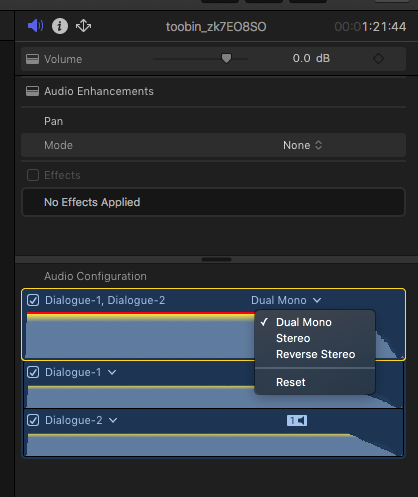
Do as Ben showed in the screenshot, and set the Clip to Dual Mono. You end up with two Audio Components that you can treat independently. Set the level so it sounds best without phasing or other issue that sound strange. If you get phasing in the higher frequency, then lower that higher frequency response on one channel, so it sounds best. Again, your ear will be the judge. If the boom mic is changing too radical, then use automation.
Hope that helps,
Edgar Rothermich
First of all a delay would only compensate for a fixed difference in distance of the two mics from the sound source. If you have a boom mic, then that goes out the window. The position is constantly varying, so there is no fixed delay value that would work. The other problem is that a delay compensation is different for different frequencies, so you talk about potential more phasing depending on your source signal.
One "Plugin" that is often overlooked are your EARS, use them and rely on them with everything related to audio.
Do as Ben showed in the screenshot, and set the Clip to Dual Mono. You end up with two Audio Components that you can treat independently. Set the level so it sounds best without phasing or other issue that sound strange. If you get phasing in the higher frequency, then lower that higher frequency response on one channel, so it sounds best. Again, your ear will be the judge. If the boom mic is changing too radical, then use automation.
Hope that helps,
Edgar Rothermich
Please Log in to join the conversation.
- simon.a.billington
-
- Offline
- Elite Member
-
Less
More
- Posts: 179
- Thank you received: 10
17 Mar 2017 20:42 - 17 Mar 2017 20:48 #86599
by simon.a.billington
Replied by simon.a.billington on topic Audio Troubles
Actually audio alignment with delays is common practice in pro-audio when working with multiple mic setups. It's not as dangerous as you think, but you do need to know what to look out for.
You actually DO have to use your ears in this case, the plugins aren't going to do it for you!!
Simply using multiple sources together may not work straight out of the box and your ears will tell you because phasing occurs. In which case you can ONLY use one mic or the other, unless you DO compensate for delay. And your ears will tell you when you have no more phasing issues.
What your ears do is enable you to competently use more than one mic source in a recording while minimising phase issues. The key thing is the mics must remain at a fixed distance from each other and the source. You're definitely right about that. So it works much better for stationary shots.
Doing it for shots on the move is possible, but you would have to keyframe the delay to compensate for the change of distance.., but only if it becomes noticeable. This is very much akin to key framing a mask as the subject moves around in the shot. Similar principle where the colourist is also compensating for a moving subject. A lot of the cases the sound recordist remain remains a relatively fixed distance from the talent as they move through the shot, with their distance only varying little. This would put the mics at a fixed position from each other, almost. Small enough to make little difference in phase relationship. So keyframing may not even be necessary.
The phasing is most noticeable in lower frequencies, that's where your focus is, higher frequencies become less of an issue. When used in conjunction with a bit of equalisation, your options open up just a little.
The only other solution is to use just one mic. You could, but it's harder to produce pro-level audio from that.
If you're not working with ADR, aligning phases does help you to produce a higher quality sound product. But won't work in every case. That said, even a lot of pro ADR sounds fake, because the recording is too intimate and upfront and not enough of the environment is utilised (or substituted).
It's always about ears. Just because you suggest a plugin solution doesn't mean you're not using your ears. It's clever use of the technology around you that helps you produce more professional results.
It's kind of akin to saying, don't use a color-grade plugin, use your eyes. That doesn't make a lot of sense really. Your eyes are telling there is something not quite right with the image and do you use a color plugin/filter to fix the issue.
You take the same approach with sound too.
You actually DO have to use your ears in this case, the plugins aren't going to do it for you!!
Simply using multiple sources together may not work straight out of the box and your ears will tell you because phasing occurs. In which case you can ONLY use one mic or the other, unless you DO compensate for delay. And your ears will tell you when you have no more phasing issues.
What your ears do is enable you to competently use more than one mic source in a recording while minimising phase issues. The key thing is the mics must remain at a fixed distance from each other and the source. You're definitely right about that. So it works much better for stationary shots.
Doing it for shots on the move is possible, but you would have to keyframe the delay to compensate for the change of distance.., but only if it becomes noticeable. This is very much akin to key framing a mask as the subject moves around in the shot. Similar principle where the colourist is also compensating for a moving subject. A lot of the cases the sound recordist remain remains a relatively fixed distance from the talent as they move through the shot, with their distance only varying little. This would put the mics at a fixed position from each other, almost. Small enough to make little difference in phase relationship. So keyframing may not even be necessary.
The phasing is most noticeable in lower frequencies, that's where your focus is, higher frequencies become less of an issue. When used in conjunction with a bit of equalisation, your options open up just a little.
The only other solution is to use just one mic. You could, but it's harder to produce pro-level audio from that.
If you're not working with ADR, aligning phases does help you to produce a higher quality sound product. But won't work in every case. That said, even a lot of pro ADR sounds fake, because the recording is too intimate and upfront and not enough of the environment is utilised (or substituted).
It's always about ears. Just because you suggest a plugin solution doesn't mean you're not using your ears. It's clever use of the technology around you that helps you produce more professional results.
It's kind of akin to saying, don't use a color-grade plugin, use your eyes. That doesn't make a lot of sense really. Your eyes are telling there is something not quite right with the image and do you use a color plugin/filter to fix the issue.
You take the same approach with sound too.
Last edit: 17 Mar 2017 20:48 by simon.a.billington.
Please Log in to join the conversation.
- EdgarRothermich
-
- Offline
- Senior Member
-
Less
More
- Posts: 45
- Thank you received: 5
18 Mar 2017 03:07 #86600
by EdgarRothermich
Completely agree.
Replied by EdgarRothermich on topic Audio Troubles
simon.a.billington wrote: It's always about ears. Just because you suggest a plugin solution doesn't mean you're not using your ears. It's clever use of the technology around you that helps you produce more professional results.
.
Completely agree.
Please Log in to join the conversation.
