


- Posts: 265
- Thank you received: 7
3 Post Moderation Rule for New Boarders (25 Jan 2021)
New boarders will have their posts moderated - Don't worry if you cannot see your post immediately.
Adjust Color Temperature without plugins?
- bradywurtz
-
 Topic Author
- Offline
- Elite Member
-

Less
More
02 Mar 2017 22:10 #86245
by bradywurtz
Adjust Color Temperature without plugins? was created by bradywurtz
So I want to adjust the color temperature in my video without using a third party plugin (which is usually just a simply way to manipulate the controls you already have access to, to make it easier). What would be the best way to go about this? I'm assuming it would be adjusting the Global puck for Color up or down near a orange or blue color, but idk if there is a specific degree you should move the puck to first before you start adjusting the percentage? Or am i thinking about this all wrong and there's actually an easier way?
Please Log in to join the conversation.


03 Mar 2017 03:10 - 03 Mar 2017 03:14 #86251
by zzchu
Replied by zzchu on topic Adjust Color Temperature without plugins?
In my opinion, I think you will really enjoy watching Denver Riddle's Color Grading Central's color correcting videos on YouTube. He has a free series on color correcting in FCPX.
They are easy to understand and digestable.
www.colorgradingcentral.com/final-cut-pr...g-table-of-contents/
As for moving that Global Color Puck, you should be looking at the scopes when you are doing it and watching the levels. (RGB Parade).
They are easy to understand and digestable.
www.colorgradingcentral.com/final-cut-pr...g-table-of-contents/
As for moving that Global Color Puck, you should be looking at the scopes when you are doing it and watching the levels. (RGB Parade).
Last edit: 03 Mar 2017 03:14 by zzchu.
Please Log in to join the conversation.
- Karsten Schlüter
-

- Offline
- Moderator
-

Less
More
- Posts: 3790
- Thank you received: 718
03 Mar 2017 05:51 #86254
by Karsten Schlüter
Replied by Karsten Schlüter on topic Adjust Color Temperature without plugins?
for a start, I would hit cmd-alt-B… = FCPX' auto-balance feature
unfortunately FCPX keeps it a secret WHAT adjustments it applies = pucks don't move
Another way is is: crop the pic to some white or grey part and use the Vectorscope to adjust …
The brave hearted adjusts 'by eye' …
unfortunately FCPX keeps it a secret WHAT adjustments it applies = pucks don't move
Another way is is: crop the pic to some white or grey part and use the Vectorscope to adjust …
The brave hearted adjusts 'by eye' …
Please Log in to join the conversation.


02 Jan 2021 18:03 #111858
by Stew
Replied by Stew on topic Adjust Color Temperature without plugins?
Just found this thought I would share it. Very short video to adjust white balance (temperature) in FCPX.
Cheers!
Cheers!
Please Log in to join the conversation.
02 Jan 2021 18:06 - 02 Jan 2021 19:08 #111859
by Stew
Replied by Stew on topic Adjust Color Temperature without plugins?
Just found this thought I would share it. Very short video to adjust white balance (temperature) in FCPX.
Sorry for the previous error/typo in the post, new to the site. Hope this works.
Cheers!
Sorry for the previous error/typo in the post, new to the site. Hope this works.
Cheers!
Last edit: 02 Jan 2021 19:08 by Stew. Reason: typo
Please Log in to join the conversation.


02 Jan 2021 18:58 - 03 Jan 2021 21:17 #111864
by JoeEditor
Replied by JoeEditor on topic Adjust Color Temperature without plugins?
Well, first, you should be white balancing in-camera, saves you tons of time in post.
But that aside, as already stated, the Color Balance is your best friend. It is the only tool I've used for white balancing (on the rare occasions I need it) for years now.
I love the auto function, with most of the time does the trick.
But I also like the manual eye-dropper to select something off-white or tan/brown or grey to get a "look".
support.apple.com/guide/final-cut-pro/ma...7/10.5.1/mac/10.15.6
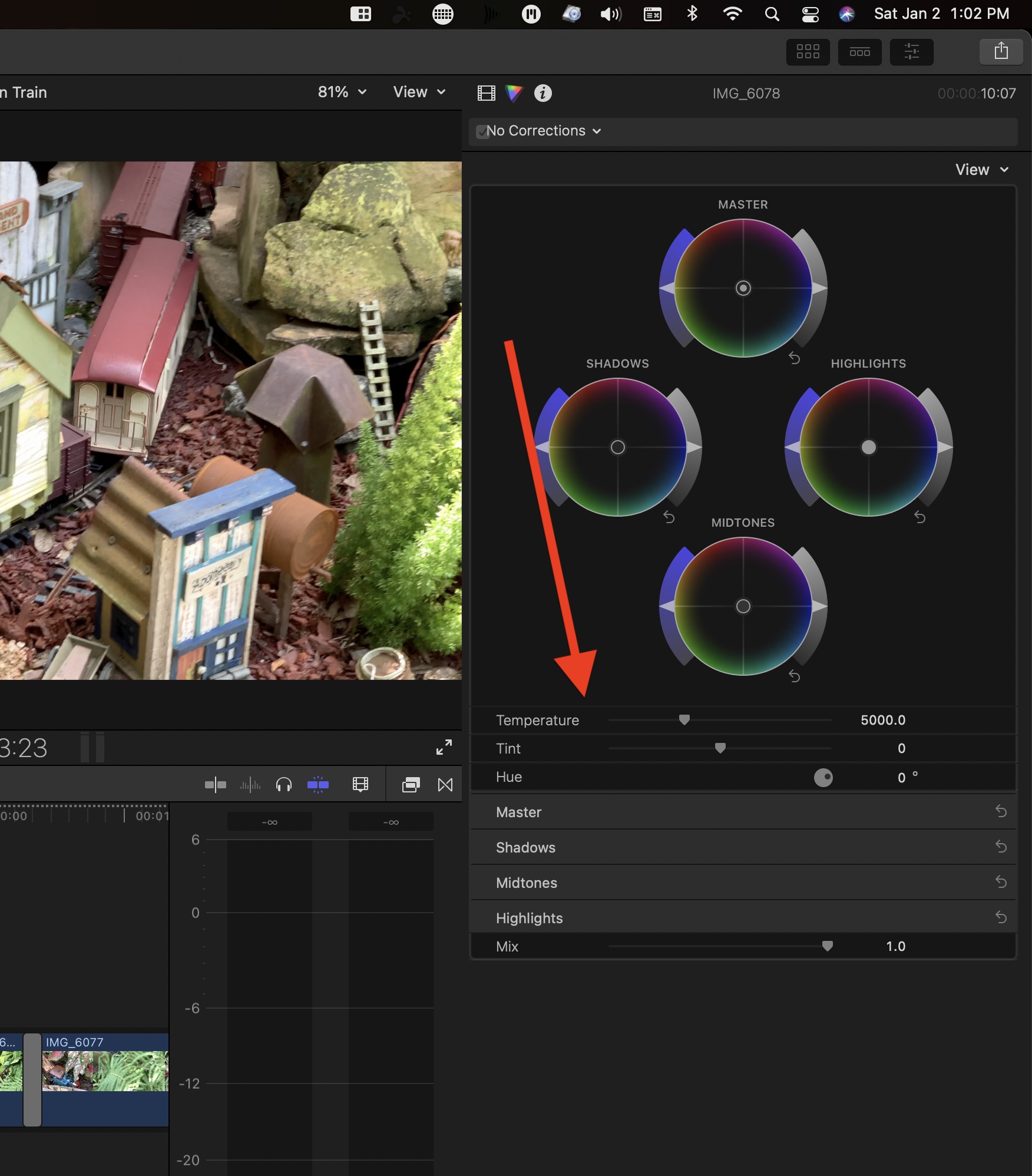
Then there's also the Temperature control with the Color Wheels (see attached images).
I've stopped using X-Rite, especially with Cinema Grade and Chromatic. I never got great results with it. But when I saw a professional colorist's video somewhere showing their automatic adjustments with this system are seriously flawed and not reliable, I uninstalled it all.
I find I white balance with built-in tools faster and easier without all that extra fuss and expense. Rule of thumb I was taught a decade and a half ago; if you're spending more than a minute or two on white balance, you're doing it wrong.
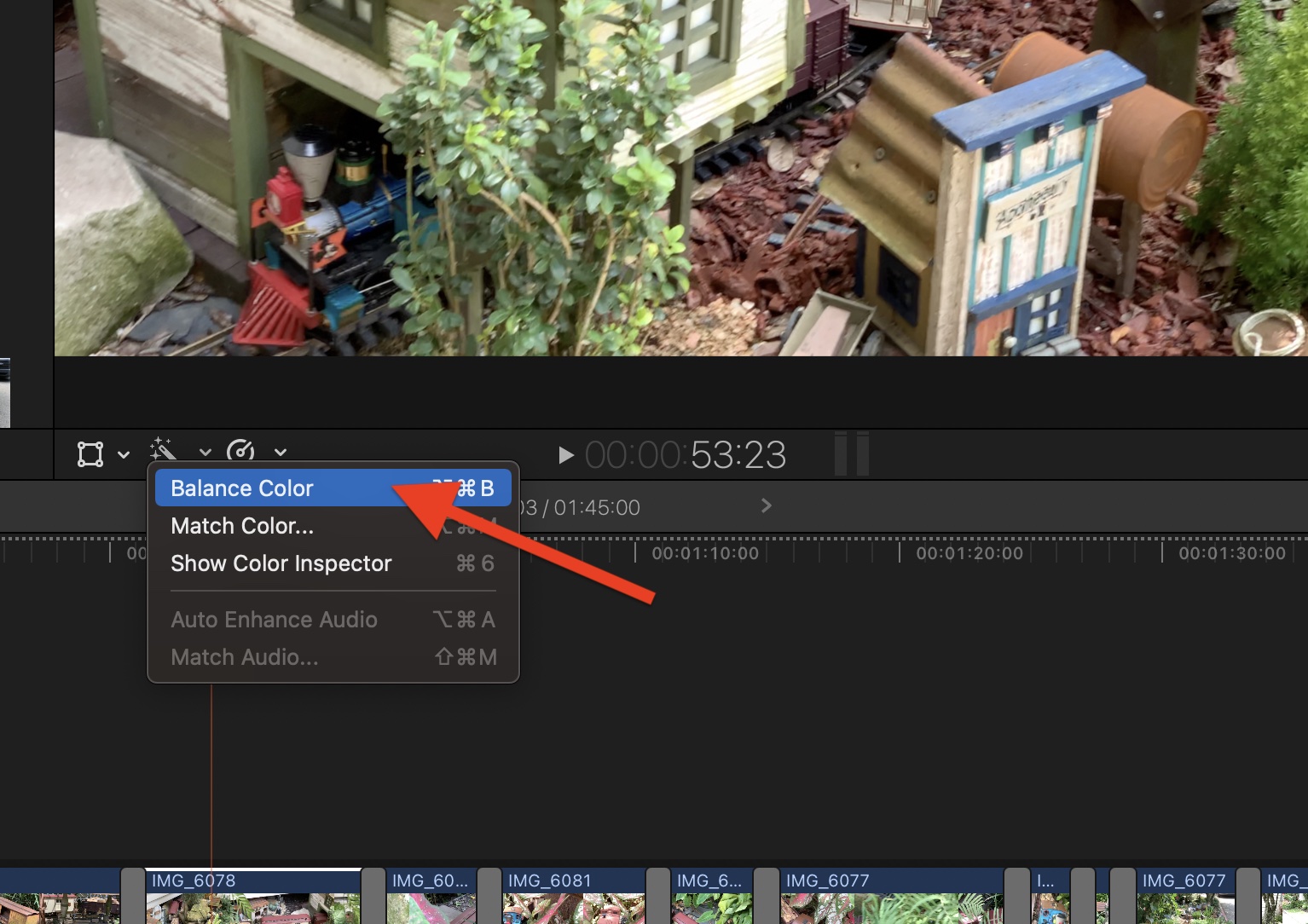
But that aside, as already stated, the Color Balance is your best friend. It is the only tool I've used for white balancing (on the rare occasions I need it) for years now.
I love the auto function, with most of the time does the trick.
But I also like the manual eye-dropper to select something off-white or tan/brown or grey to get a "look".
support.apple.com/guide/final-cut-pro/ma...7/10.5.1/mac/10.15.6
Then there's also the Temperature control with the Color Wheels (see attached images).
I've stopped using X-Rite, especially with Cinema Grade and Chromatic. I never got great results with it. But when I saw a professional colorist's video somewhere showing their automatic adjustments with this system are seriously flawed and not reliable, I uninstalled it all.
I find I white balance with built-in tools faster and easier without all that extra fuss and expense. Rule of thumb I was taught a decade and a half ago; if you're spending more than a minute or two on white balance, you're doing it wrong.
Last edit: 03 Jan 2021 21:17 by peteramwiggins.
Please Log in to join the conversation.
02 Jan 2021 19:12 #111867
by Stew
Replied by Stew on topic Adjust Color Temperature without plugins?
I will try the what appears to be an auto "balance color" option that you suggest next time. FYI: I always set my white balance in camera but sometimes I have footage sent that isn't. Grrr
Thanks!
Thanks!
Please Log in to join the conversation.

02 Jan 2021 19:36 - 02 Jan 2021 19:37 #111869
by joema
I likewise had problems with the X-Rite ColorChecker Passport Video card, when used in Color Finale. The idea of auto-correction on multiple color swatches is great but the card and algorithm were very sensitive. If the slightest color backsplash from apparel happened, or if the black tile had a glare, it would malfunction. That is not unexpected but it was very finicky. I haven't re-tested it on Color Finale 2.0.
To the OP: if you are shooting a log or flat profile, it might be better to use the proper camera LUT to achieve initial correction. Manually grading a severe log profile like VLog, DLog or SLog3 is difficult unless using a card.
As Ben said it is crucial to get the in-camera white balance as close as possible. The above-mentioned passport card has both color targets and black/white/grey patches. That is good for post but it's too small for most cameras to take a white balance reading. I suggest carrying a collapsible grey target like this one:
https://www.amazon.com//dp/B0009QZDL6
And practicing the camera procedure for custom white balance until it's second nature. Be certain you know the camera specs about what % of the frame must be filled to get a valid white balance reading.
OP: A run-and-gun situation may not permit a custom white balance. At least keep a little grey card on a lanyard around your neck, and flash that in front of the camera on each take. If the subject is far away under different lighting, that won't help, but in post it's better than nothing to have a calibrated grey target somewhere in the frame: https://www.amazon.com/dp/B004G3NW5M/
Re how to manually correct colors using the passport card with FCP, the procedure is shown in this tutorial "Get perfect color & skin tones with this chart":
This Larry Jordan video shows how to correct skin tone using the FCP scopes:
https://youtu.be/jX45Yi1spY4
Replied by joema on topic Adjust Color Temperature without plugins?
Ben Balser wrote: I've stopped using X-Rite, especially with Cinema Grade and Chromatic. I never got great results with it. But when I saw a professional colorist's video somewhere showing their automatic adjustments with this system are seriously flawed and not reliable, I uninstalled it all...
I likewise had problems with the X-Rite ColorChecker Passport Video card, when used in Color Finale. The idea of auto-correction on multiple color swatches is great but the card and algorithm were very sensitive. If the slightest color backsplash from apparel happened, or if the black tile had a glare, it would malfunction. That is not unexpected but it was very finicky. I haven't re-tested it on Color Finale 2.0.
To the OP: if you are shooting a log or flat profile, it might be better to use the proper camera LUT to achieve initial correction. Manually grading a severe log profile like VLog, DLog or SLog3 is difficult unless using a card.
As Ben said it is crucial to get the in-camera white balance as close as possible. The above-mentioned passport card has both color targets and black/white/grey patches. That is good for post but it's too small for most cameras to take a white balance reading. I suggest carrying a collapsible grey target like this one:
https://www.amazon.com//dp/B0009QZDL6
And practicing the camera procedure for custom white balance until it's second nature. Be certain you know the camera specs about what % of the frame must be filled to get a valid white balance reading.
OP: A run-and-gun situation may not permit a custom white balance. At least keep a little grey card on a lanyard around your neck, and flash that in front of the camera on each take. If the subject is far away under different lighting, that won't help, but in post it's better than nothing to have a calibrated grey target somewhere in the frame: https://www.amazon.com/dp/B004G3NW5M/
Re how to manually correct colors using the passport card with FCP, the procedure is shown in this tutorial "Get perfect color & skin tones with this chart":
This Larry Jordan video shows how to correct skin tone using the FCP scopes:
https://youtu.be/jX45Yi1spY4
Last edit: 02 Jan 2021 19:37 by joema.
Please Log in to join the conversation.

03 Jan 2021 20:52 - 03 Jan 2021 22:07 #111882
by dgbarar
Replied by dgbarar on topic Adjust Color Temperature without plugins?
Hi All,
Wish I had seen this thread before I purchased Color Finale 2.whatever. Joema et. al. comments regarding failure of the Color Finale algorithm is correct for all the reasons described above. Larry Jordan’s video on the topic is generally a success if you take care to slowly adjust the positions of your Passport Video color card to minimize reflections on the cards. Wish I had my $99 back that I wasted on Color Finale 2.whatever. You do not need this plug-in to do good color correction.
Don Barar
Wish I had seen this thread before I purchased Color Finale 2.whatever. Joema et. al. comments regarding failure of the Color Finale algorithm is correct for all the reasons described above. Larry Jordan’s video on the topic is generally a success if you take care to slowly adjust the positions of your Passport Video color card to minimize reflections on the cards. Wish I had my $99 back that I wasted on Color Finale 2.whatever. You do not need this plug-in to do good color correction.
Don Barar
Last edit: 03 Jan 2021 22:07 by dgbarar.
Please Log in to join the conversation.
04 Jan 2021 00:20 #111887
by JoeEditor
Replied by JoeEditor on topic Adjust Color Temperature without plugins?
Remember that Color Finale, Cinema Grade, and Chromatic were all developed before FCP had color wheels and curves, simply to make up for the lack in that area, way back then. I used them a lot back then. But as soon as FCP got wheels and curves, I've never touched any of them since.
Please Log in to join the conversation.
