


- Posts: 1
- Thank you received: 0
3 Post Moderation Rule for New Boarders (25 Jan 2021)
New boarders will have their posts moderated - Don't worry if you cannot see your post immediately.
Final cut pro X quality
25 Feb 2017 19:42 #86119
by RemcoW
Final cut pro X quality was created by RemcoW
Now If I'm in the wrong forum section I'm sorry I just made this account for this question.
So I'm using Final Cut Pro X as a editing program for my videos although I'm stuck with a problem.
I record my footage with camtasia 3 and then put it in final cut pro X and If I'm honest the quality turns quite poor.
Can anyone please help me (Recommend quality settings with quite an advance explenation I'm sorry but I'm a noob when it goes about numbers and things in to systems if you know what I mean, Or recommend other recording programs that do give good quality (I have tried Screenflow and it was even worse, and quicktime was even more worse))
If you can help me I would be SO THANKFUL
Kind regards Remco
My current quality ( click on fullscreen and the quality is pretty poor) :unsure:
So I'm using Final Cut Pro X as a editing program for my videos although I'm stuck with a problem.
I record my footage with camtasia 3 and then put it in final cut pro X and If I'm honest the quality turns quite poor.
Can anyone please help me (Recommend quality settings with quite an advance explenation I'm sorry but I'm a noob when it goes about numbers and things in to systems if you know what I mean, Or recommend other recording programs that do give good quality (I have tried Screenflow and it was even worse, and quicktime was even more worse))
If you can help me I would be SO THANKFUL
Kind regards Remco
My current quality ( click on fullscreen and the quality is pretty poor) :unsure:
Please Log in to join the conversation.
- Karsten Schlüter
-

- Offline
- Moderator
-

Less
More
- Posts: 3790
- Thank you received: 718
26 Feb 2017 05:37 #86128
by Karsten Schlüter
Replied by Karsten Schlüter on topic Final cut pro X quality
read my reply to your post at Apple
discussions.apple.com/message/31445361#message31445361
discussions.apple.com/message/31445361#message31445361
Please Log in to join the conversation.


26 Feb 2017 06:49 #86129
by JoeEditor
Replied by JoeEditor on topic Final cut pro X quality
Not having read Karsten's reply on the Apple forum...
Use ScreenFlow instead of Camtaisa. Camtasia was originally made for Windows and is simply a bad port to the Mac. ScreenFlow was made for the Mac, top quality.
Also, ScreenFlow has its own editor, which for screen capture is way better than FCPX. It has the tools to resize better, control mouse cursor, audio, and all sorts of handy annotation tools made specifically for editing screen capture movies.
Computer screens are generally higher resolution than HD video in most cases, or can be set to higher resolution, but the issue comes in with aspect ratio. Computer screens are not video aspect ratio,. When I do my screen movies for tutorials at macProVideo.com we use ScreenFlow, and we have a template that is 1080HD size. A simple graphic JPEG. I open that to actual size, there resize my screen (be it FCPX, Motion, a game, whatever) to match that aspect ratio and size.
Then ScreenFlow records in a way that I can zoom in when needed without losing any quality, control the mouse cursor (it's recorded as a sprite, separate from the main screen), and I can annotate it super well inside of ScreenFlow.
I would NEVER attempt to edit screen captures in an NLE, the tools are simply not there.
Just my two cents having done professional video tutorials for 16 years.
Use ScreenFlow instead of Camtaisa. Camtasia was originally made for Windows and is simply a bad port to the Mac. ScreenFlow was made for the Mac, top quality.
Also, ScreenFlow has its own editor, which for screen capture is way better than FCPX. It has the tools to resize better, control mouse cursor, audio, and all sorts of handy annotation tools made specifically for editing screen capture movies.
Computer screens are generally higher resolution than HD video in most cases, or can be set to higher resolution, but the issue comes in with aspect ratio. Computer screens are not video aspect ratio,. When I do my screen movies for tutorials at macProVideo.com we use ScreenFlow, and we have a template that is 1080HD size. A simple graphic JPEG. I open that to actual size, there resize my screen (be it FCPX, Motion, a game, whatever) to match that aspect ratio and size.
Then ScreenFlow records in a way that I can zoom in when needed without losing any quality, control the mouse cursor (it's recorded as a sprite, separate from the main screen), and I can annotate it super well inside of ScreenFlow.
I would NEVER attempt to edit screen captures in an NLE, the tools are simply not there.
Just my two cents having done professional video tutorials for 16 years.
Please Log in to join the conversation.
- Karsten Schlüter
-
- Offline
- Moderator
-
Less
More
- Posts: 3790
- Thank you received: 718
26 Feb 2017 07:18 - 26 Feb 2017 07:26 #86131
by Karsten Schlüter
Replied by Karsten Schlüter on topic Final cut pro X quality
ok, for those lazy clickers 
my other reply which concentrates more on the source of the problem (pun intended)
your linked example is poor. Easy to see.
But the explanation WHY or advice to improve is not so easy.
Let's look closely:
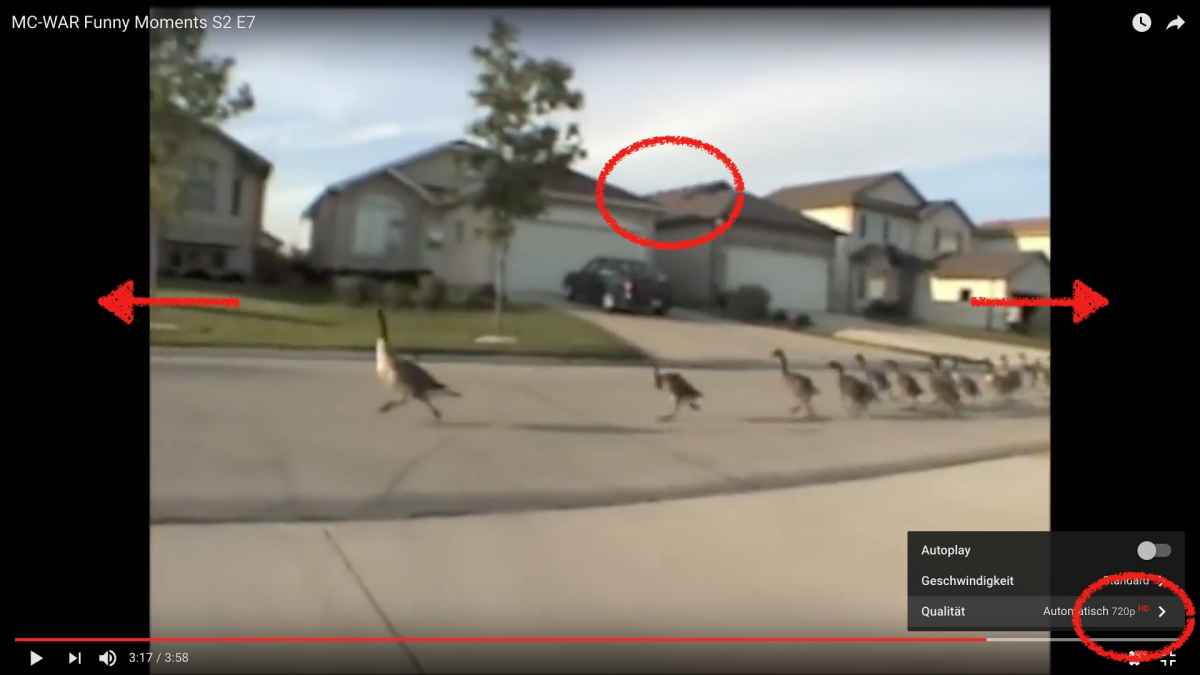
a) your source video seems to be SDef (4:3), and most probably some download or grab of a compressed-to-death interlaced video (circle roof: baked-in interlace lines?)
b) you put it into a HDef project (arrows black-bars 16:9) = zoom-in = blow-up of bad quality = doesn't add but kills quality, if any …
c) watching 'full-screen' on a MacBook for example means 720 pixels (circle lower right) blown-up to a 2000pixels res = more harm
so, how to improve?
• get better source material - your actual source isn't meant for further processing
• check your Camtasia recording resolution = set your FCPX Project settings to Custom and that numbers
• judge final quality only in sources native resolution, e.g. the ducks should be watched in a 720x480 player window = a tiny fraction of display estate …
screen-grabs are in 99% case NOT even close to any video-standard… what FCPX is made for, and what most codecs (another story, but to keep things simple…) are made for.
Sorry to say, but with lacking a little bit more insight, you can tinker for hours with your project …
PS: for a start, learn to download your sources (if allowed) instead of 'grabbing' them …
PPS: There's a slight confusion of understanding what 'screen grabbing' means: recording any 'action', e.g. a programs interface, is done lossless by tools like ScreenFlow, … but catching videos in a player is always a very lossy 'grab'; therefore try to get the source aka upload - Vimeo offers this (if the owner allows it); YT prohibits that by ToU… although tools and tricks (the simple ss-trick) available.
my other reply which concentrates more on the source of the problem (pun intended)
your linked example is poor. Easy to see.
But the explanation WHY or advice to improve is not so easy.
Let's look closely:
a) your source video seems to be SDef (4:3), and most probably some download or grab of a compressed-to-death interlaced video (circle roof: baked-in interlace lines?)
b) you put it into a HDef project (arrows black-bars 16:9) = zoom-in = blow-up of bad quality = doesn't add but kills quality, if any …
c) watching 'full-screen' on a MacBook for example means 720 pixels (circle lower right) blown-up to a 2000pixels res = more harm
so, how to improve?
• get better source material - your actual source isn't meant for further processing
• check your Camtasia recording resolution = set your FCPX Project settings to Custom and that numbers
• judge final quality only in sources native resolution, e.g. the ducks should be watched in a 720x480 player window = a tiny fraction of display estate …
screen-grabs are in 99% case NOT even close to any video-standard… what FCPX is made for, and what most codecs (another story, but to keep things simple…) are made for.
Sorry to say, but with lacking a little bit more insight, you can tinker for hours with your project …
PS: for a start, learn to download your sources (if allowed) instead of 'grabbing' them …
PPS: There's a slight confusion of understanding what 'screen grabbing' means: recording any 'action', e.g. a programs interface, is done lossless by tools like ScreenFlow, … but catching videos in a player is always a very lossy 'grab'; therefore try to get the source aka upload - Vimeo offers this (if the owner allows it); YT prohibits that by ToU… although tools and tricks (the simple ss-trick) available.
Last edit: 26 Feb 2017 07:26 by Karsten Schlüter.
Please Log in to join the conversation.

26 Feb 2017 14:35 #86135
by cseeman
Replied by cseeman on topic Final cut pro X quality
I often do screen captures, first edit as you can in the screen capture software and then go to FCPX for its specific features.
I use ScreenFlow..
When capturing your entire computer screen or anything full screen, understand what the resolution is.
Most screens are 16:10 aspect ratio but some are 16:9 which is standard for video. If it's 16:10 it'll be scaled or cropped in FCPX unless you use a custom project setting. Whether that's viable depends on delivery method. YouTube would be 16:9 . If you're screen capturing an uploaded video that you can't download or get the original source. then man make sure you're playing to video at its top resolution.
ScreenFlow can export ProRes 4444 or 422. I'd avoid exporting H.264. Compressing out of screen capture and the compressing out of FCPX then having it compressed by on online service like YouTube can mash down quality.
In short:
You MUST understand your aspect ratio and capture size, edit settings, delivery settings. The more scaling the worse the quality will get. Alway work in ProRes until delivery export.
I use ScreenFlow..
When capturing your entire computer screen or anything full screen, understand what the resolution is.
Most screens are 16:10 aspect ratio but some are 16:9 which is standard for video. If it's 16:10 it'll be scaled or cropped in FCPX unless you use a custom project setting. Whether that's viable depends on delivery method. YouTube would be 16:9 . If you're screen capturing an uploaded video that you can't download or get the original source. then man make sure you're playing to video at its top resolution.
ScreenFlow can export ProRes 4444 or 422. I'd avoid exporting H.264. Compressing out of screen capture and the compressing out of FCPX then having it compressed by on online service like YouTube can mash down quality.
In short:
You MUST understand your aspect ratio and capture size, edit settings, delivery settings. The more scaling the worse the quality will get. Alway work in ProRes until delivery export.
Please Log in to join the conversation.
