


- Posts: 77
- Thank you received: 6
3 Post Moderation Rule for New Boarders (25 Jan 2021)
New boarders will have their posts moderated - Don't worry if you cannot see your post immediately.
how do you copy a range from the timeline and paste it somewhere else ? (seems silly but ...)
20 Feb 2017 10:39 - 20 Feb 2017 10:43 #85922
by ronfya
how do you copy a range from the timeline and paste it somewhere else ? (seems silly but ...) was created by ronfya
Hello guys,
This seems a silly question, but still, it gives me headaches ...
How do you copy a range from the timeline and paste it somewhere else ? (seems silly but ...)
On the screencap, I would like to copy the selected range (it can be across clips) and paste it in place of the gap clip above. How do you do that quickly (I will have to do this again and again ...)?
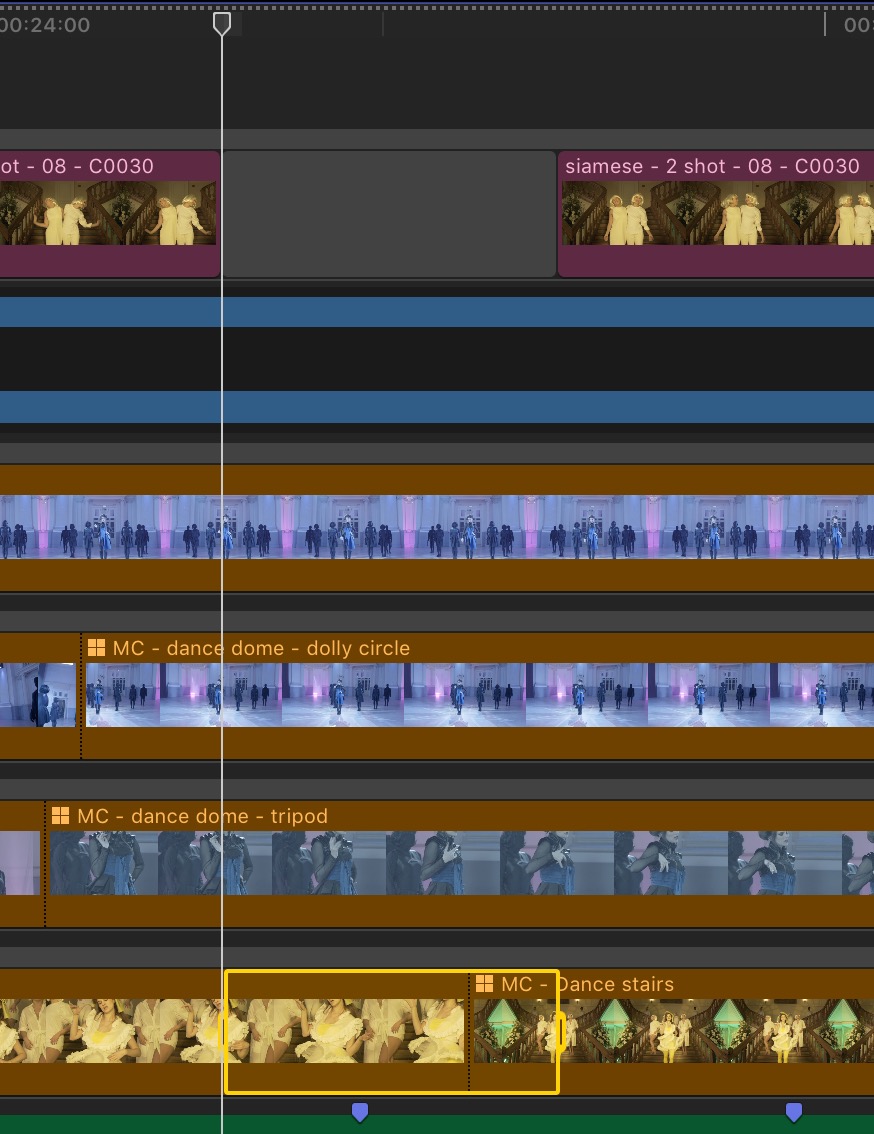
Thanks !!
If some of you wonder why would I want to do this ... or would like to tell me it's not how FCPX works ... etc ... here is the context so you can understand why.
I am cutting a music video, so I cannot use the primary storyline to edit if I want to keep my footage (2 dances and some choregraphed scenes) in sync with the music.
Moreover, since I need to have all my dance cuts synced to the music, I connected them as secondary storylines. I want to pull ranges from them (and keep them in sync !!) and assemble all these in another secondary storyline to make my cut.
For that sync reason, I must admit that I very much like FCPX to cut movies or documentaries ... not so much for music videos ... In premiere I can pull from other synced timelines which is very convenient in case like this.
This seems a silly question, but still, it gives me headaches ...
How do you copy a range from the timeline and paste it somewhere else ? (seems silly but ...)
On the screencap, I would like to copy the selected range (it can be across clips) and paste it in place of the gap clip above. How do you do that quickly (I will have to do this again and again ...)?
Thanks !!
If some of you wonder why would I want to do this ... or would like to tell me it's not how FCPX works ... etc ... here is the context so you can understand why.
I am cutting a music video, so I cannot use the primary storyline to edit if I want to keep my footage (2 dances and some choregraphed scenes) in sync with the music.
Moreover, since I need to have all my dance cuts synced to the music, I connected them as secondary storylines. I want to pull ranges from them (and keep them in sync !!) and assemble all these in another secondary storyline to make my cut.
For that sync reason, I must admit that I very much like FCPX to cut movies or documentaries ... not so much for music videos ... In premiere I can pull from other synced timelines which is very convenient in case like this.
Last edit: 20 Feb 2017 10:43 by ronfya.
Please Log in to join the conversation.
- Tom Wolsky
-

- Offline
- Moderator
-

20 Feb 2017 12:23 #85924
by Tom Wolsky
Replied by Tom Wolsky on topic how do you copy a range from the timeline and paste it somewhere else ? (seems silly but ...)
There is no paste overwrite function in FCP. In the instance you're describing you have portions of clips, so you'll have to copy and paste into the secondary storyline and then delete the corresponding amount from the storyline.
Could you explain though why you're using multiple multicam clips as well as multiple storylines. If you do not want clips to move in relation to where they are placed to the audio, wouldn't it be easier to simply use connected clips.
Could you explain though why you're using multiple multicam clips as well as multiple storylines. If you do not want clips to move in relation to where they are placed to the audio, wouldn't it be easier to simply use connected clips.
Please Log in to join the conversation.
20 Feb 2017 12:55 #85926
by ronfya
I would totally be ok with that ... problem is copying a range FROM THE TIMELINE to a DESIGNATED PLACE does not work. If I paste, it just pastes a connected clip. I cannot force it to paste into the secondary storyline. So I always have to get it from below everything ... and move it ... that is annoying to do over and over for such a simple thing.
The multicam itself does not matter. (I cut different dances together). What matters is that I want to be able to pull from one (or more) SYNCED secondary storyline with all clips and cuts exposed for easy selection and roll edits of the clips.
Replied by ronfya on topic how do you copy a range from the timeline and paste it somewhere else ? (seems silly but ...)
Tom Wolsky wrote: There is no paste overwrite function in FCP. In the instance you're describing you have portions of clips, so you'll have to copy and paste into the secondary storyline and then delete the corresponding amount from the storyline.
I would totally be ok with that ... problem is copying a range FROM THE TIMELINE to a DESIGNATED PLACE does not work. If I paste, it just pastes a connected clip. I cannot force it to paste into the secondary storyline. So I always have to get it from below everything ... and move it ... that is annoying to do over and over for such a simple thing.
Tom Wolsky wrote: Could you explain though why you're using multiple multicam clips as well as multiple storylines. If you do not want clips to move in relation to where they are placed to the audio, wouldn't it be easier to simply use connected clips.
The multicam itself does not matter. (I cut different dances together). What matters is that I want to be able to pull from one (or more) SYNCED secondary storyline with all clips and cuts exposed for easy selection and roll edits of the clips.
Please Log in to join the conversation.
- Tom Wolsky
-
- Offline
- Moderator
-
20 Feb 2017 13:19 #85927
by Tom Wolsky
Replied by Tom Wolsky on topic how do you copy a range from the timeline and paste it somewhere else ? (seems silly but ...)
Select the shelf of the storyline you want to paste into and use Cmd-V.
Please Log in to join the conversation.
- Tom Wolsky
-
- Offline
- Moderator
-
20 Feb 2017 13:19 #85928
by Tom Wolsky
Replied by Tom Wolsky on topic how do you copy a range from the timeline and paste it somewhere else ? (seems silly but ...)
Select the shelf of the storyline you want to paste into and use Cmd-V.
Please Log in to join the conversation.
20 Feb 2017 13:27 #85930
by ronfya
Replied by ronfya on topic how do you copy a range from the timeline and paste it somewhere else ? (seems silly but ...)
yes I figured it out 
Thanks.
Still a paste overwrite would definitely be sooooo useful.
I also found a workaround but it's far from ideal.
1. I select a range and shift+F (instead of copy) to reveal in the browser.
2. Optionally hit shift+2 to select video only (in the case of my music video, I don't want to use the clips audio)
3. Then select the secondary storyline's shelf (as you said), place the skimmer at the desired location and press D to overwrite what's there.
Problem using this method are that the reveal in browser command can get pretty slow if your event gets crowded and the presence of step 2 if you want video only.
Thanks.
Still a paste overwrite would definitely be sooooo useful.
I also found a workaround but it's far from ideal.
1. I select a range and shift+F (instead of copy) to reveal in the browser.
2. Optionally hit shift+2 to select video only (in the case of my music video, I don't want to use the clips audio)
3. Then select the secondary storyline's shelf (as you said), place the skimmer at the desired location and press D to overwrite what's there.
Problem using this method are that the reveal in browser command can get pretty slow if your event gets crowded and the presence of step 2 if you want video only.
Please Log in to join the conversation.
- Tom Wolsky
-
- Offline
- Moderator
-
20 Feb 2017 14:22 #85932
by Tom Wolsky
Replied by Tom Wolsky on topic how do you copy a range from the timeline and paste it somewhere else ? (seems silly but ...)
Still curious why you're using racks of storylines rather than connected clips.
Please Log in to join the conversation.
20 Feb 2017 14:39 #85934
by ronfya
Replied by ronfya on topic how do you copy a range from the timeline and paste it somewhere else ? (seems silly but ...)
I explained it to you.
To make my edit, I want to be able to pull from one (or more) SYNCED secondary storyline with all clips and cuts EXPOSED for easy SELECTION and ROLL EDITS of the clips. Those serve as a timely organized browser to pick from if you will.
This is inherited from old fashion Premiere, but really it is the most efficient way to work for anything synced to music. The FCPX paradigm (in which you sort and pick from the browser) is very efficient for cutting movies or documentaries but it does not just does not work well for anything that needs perfect sync to music.
To make my edit, I want to be able to pull from one (or more) SYNCED secondary storyline with all clips and cuts EXPOSED for easy SELECTION and ROLL EDITS of the clips. Those serve as a timely organized browser to pick from if you will.
This is inherited from old fashion Premiere, but really it is the most efficient way to work for anything synced to music. The FCPX paradigm (in which you sort and pick from the browser) is very efficient for cutting movies or documentaries but it does not just does not work well for anything that needs perfect sync to music.
Please Log in to join the conversation.
- Tom Wolsky
-
- Offline
- Moderator
-
20 Feb 2017 14:57 #85936
by Tom Wolsky
Replied by Tom Wolsky on topic how do you copy a range from the timeline and paste it somewhere else ? (seems silly but ...)
Synced to what? The audio? Connected clips are pinned to the audio and don't move in relation to the audio unless you move them. Secondary storylines, because of the inherent magnetism, makes this much more difficult.
Trying to emulate Premiere in this software may not be the best workflow.
Trying to emulate Premiere in this software may not be the best workflow.
Please Log in to join the conversation.
20 Feb 2017 15:03 #85937
by ronfya
Replied by ronfya on topic how do you copy a range from the timeline and paste it somewhere else ? (seems silly but ...)
Don't want to be rude but : are you used to cut music videos with some kind of move sync (dance or lip) ?
Please Log in to join the conversation.
- Tom Wolsky
-
- Offline
- Moderator
-
20 Feb 2017 15:10 #85938
by Tom Wolsky
Replied by Tom Wolsky on topic how do you copy a range from the timeline and paste it somewhere else ? (seems silly but ...)
I haven't done hardly any music videos, but I've done quite a bit of multicam with a locked audio track. I've used separate storylines a few times, but usually only for B-roll that doesn't need lip sync. To maintain I've always used connected clips.
Please Log in to join the conversation.
20 Feb 2017 15:18 #85940
by ronfya
Replied by ronfya on topic how do you copy a range from the timeline and paste it somewhere else ? (seems silly but ...)
In your case, I agree, FCPX's works perfectly fine. It is even great!
In the case of music videos it is great to have those secondary storylines as "media browser tracks" under your main edit to pickup from since everything is handily placed, ready to go.
And actually, I think we have some misunderstanding. It is not the fact that they are storylines, compound clips, multicam or whatever that is bothering me. It is the fact that I have to use some weird workaround in order to pickup selections from my "media browser tracks" and paste them where I want. And I still want to do that because it is still a much easier process than any other in this case.
Cheers
In the case of music videos it is great to have those secondary storylines as "media browser tracks" under your main edit to pickup from since everything is handily placed, ready to go.
And actually, I think we have some misunderstanding. It is not the fact that they are storylines, compound clips, multicam or whatever that is bothering me. It is the fact that I have to use some weird workaround in order to pickup selections from my "media browser tracks" and paste them where I want. And I still want to do that because it is still a much easier process than any other in this case.
Cheers
Please Log in to join the conversation.


20 Feb 2017 15:24 #85942
by joema
You apparently copied a bunch of separate multicam clips (which all have a common audio sync) to the timeline and are now wanting to cut and paste clips to assemble the edit. That is not the optimal way to use FCPX.
Since much of your material has a common audio sync, you should consider making a single multicam clip with all needed audio and video tracks, adding that to the timeline then handling it as a single multicam edit. You can cut to any camera angle and it will stay in sync.
If you have non-sync'd video-only clips you want to use, just browse those in the Event Browser add those as a connected clip. You can also mark ratings and keyword ranges of the Event Browser material which expedites finding content to add to the timeline.
In Premiere you are forced to organize your material material on a bunch of timelines because its organizational capability is so limited. With FCPX the best way is organize it in the browser, then work from the browser to the timeline -- don't dump a huge amount of unorganized content on the timeline and start cutting and pasting.
In Premiere you are forced to use the timeline itself (or multiple timelines) as a crude Event Browser, since its metadata and Hover Scrub feature are so limited. That is a workflow imposed by the limitations of that product, and ideally you don't want to bring that workflow into FCPX.
You can obviously edit music videos very efficiently in FCPX -- that is commonly done as illustrated here: medium.com/@bkbkbk/have-mercy-on-me-fcpx...eb98fa595#.7dqieh6i7
Replied by joema on topic how do you copy a range from the timeline and paste it somewhere else ? (seems silly but ...)
ronfya wrote: ....I am cutting a music video, so I cannot use the primary storyline to edit if I want to keep my footage (2 dances and some choregraphed scenes) in sync with the music...since I need to have all my dance cuts synced to the music, I connected them as secondary storylines. I want to pull ranges from them (and keep them in sync !!) and assemble all these in another secondary storyline to make my cut....In premiere I can pull from other synced timelines which is very convenient in case like this.
You apparently copied a bunch of separate multicam clips (which all have a common audio sync) to the timeline and are now wanting to cut and paste clips to assemble the edit. That is not the optimal way to use FCPX.
Since much of your material has a common audio sync, you should consider making a single multicam clip with all needed audio and video tracks, adding that to the timeline then handling it as a single multicam edit. You can cut to any camera angle and it will stay in sync.
If you have non-sync'd video-only clips you want to use, just browse those in the Event Browser add those as a connected clip. You can also mark ratings and keyword ranges of the Event Browser material which expedites finding content to add to the timeline.
In Premiere you are forced to organize your material material on a bunch of timelines because its organizational capability is so limited. With FCPX the best way is organize it in the browser, then work from the browser to the timeline -- don't dump a huge amount of unorganized content on the timeline and start cutting and pasting.
In Premiere you are forced to use the timeline itself (or multiple timelines) as a crude Event Browser, since its metadata and Hover Scrub feature are so limited. That is a workflow imposed by the limitations of that product, and ideally you don't want to bring that workflow into FCPX.
You can obviously edit music videos very efficiently in FCPX -- that is commonly done as illustrated here: medium.com/@bkbkbk/have-mercy-on-me-fcpx...eb98fa595#.7dqieh6i7
Please Log in to join the conversation.

20 Feb 2017 15:31 #85944
by JoeEditor
Replied by JoeEditor on topic how do you copy a range from the timeline and paste it somewhere else ? (seems silly but ...)
I've cut lots of music videos, and would never want to do them in anything but FCPX. I think , as has been pointed out, you're thinking in PPro terms, not FCPX terms. Place the music track in the Primary Storyline, everything else will be a snap.
Please Log in to join the conversation.
20 Feb 2017 16:04 #85948
by ronfya
Yes
I know very well how FCPX works and I am a fierce advocate of its paradigm against all other NLEs. Especially for cutting movies and documentaries. Not so so for music videos though, for the very reason that I find to have "media browser tracks" to pick up from REALLY convenient in that case. It is much more convienient and visual to have that global view of every possibilities. Especially when you need to try options quickly. When I use a multicam I don't have that overview for the entire timeline.
I already considered it. But as I said above, that's at the expense of an overview of your options for all the entire timeline.
Yes. On that we agree.
Actually, for that specific case of the music video, I find that what was originally used as a workaround in Premiere is actually the best way to have an overview in the special case of synced material. (i.e. music videos)
I will have a look at this though
Thanks
Replied by ronfya on topic how do you copy a range from the timeline and paste it somewhere else ? (seems silly but ...)
joema wrote: You apparently copied a bunch of separate multicam clips (which all have a common audio sync) to the timeline and are now wanting to cut and paste clips to assemble the edit.
Yes
joema wrote: That is not the optimal way to use FCPX.
I know very well how FCPX works and I am a fierce advocate of its paradigm against all other NLEs. Especially for cutting movies and documentaries. Not so so for music videos though, for the very reason that I find to have "media browser tracks" to pick up from REALLY convenient in that case. It is much more convienient and visual to have that global view of every possibilities. Especially when you need to try options quickly. When I use a multicam I don't have that overview for the entire timeline.
joema wrote: Since much of your material has a common audio sync, you should consider making a single multicam clip with all needed audio and video tracks, adding that to the timeline then handling it as a single multicam edit. You can cut to any camera angle and it will stay in sync.
I already considered it. But as I said above, that's at the expense of an overview of your options for all the entire timeline.
joema wrote: If you have non-sync'd video-only clips you want to use, just browse those in the Event Browser add those as a connected clip. You can also mark ratings and keyword ranges of the Event Browser material which expedites finding content to add to the timeline.
Yes. On that we agree.
joema wrote: In Premiere you are forced to organize your material material on a bunch of timelines because its organizational capability is so limited. With FCPX the best way is organize it in the browser, then work from the browser to the timeline -- don't dump a huge amount of unorganized content on the timeline and start cutting and pasting.
In Premiere you are forced to use the timeline itself (or multiple timelines) as a crude Event Browser, since its metadata and Hover Scrub feature are so limited. That is a workflow imposed by the limitations of that product, and ideally you don't want to bring that workflow into FCPX.
Actually, for that specific case of the music video, I find that what was originally used as a workaround in Premiere is actually the best way to have an overview in the special case of synced material. (i.e. music videos)
joema wrote: You can obviously edit music videos very efficiently in FCPX -- that is commonly done as illustrated here: medium.com/@bkbkbk/have-mercy-on-me-fcpx...eb98fa595#.7dqieh6i7
I will have a look at this though
Thanks
Please Log in to join the conversation.
20 Feb 2017 16:22 #85950
by Axel
Replied by Axel on topic how do you copy a range from the timeline and paste it somewhere else ? (seems silly but ...)
I wondered why you didn't add the new clips to the first existing multiclip. Your whole approach to me looks like asking for trouble, "weird workarounds" instead of - as you put it - an "much easier process".
I wouldn't totally dismiss the famous pancake editing technique you obviously want to apply. It's copying chunks from a parallel timeline that's just used to pre-arrange clip selections (therefore: subclips!) before drawing them down (or up) to the master sequence. They are nested (= in their own sequence) subclips. The hierarchy between the two timelines and their individual (and independent) tracks is arbitrary. Not so in FCP X. You'll never be happy with FCP X if you don't accept the idea that the primary storyline is meant to be primary. See it as a base for the whole, easy, if you think of music videos: the song itself! You can q an MC or as many other sorts of clips to it as you like over (or under!) the primary, compound them, make them secondary sequences, view them independently with clip skimming, blade them and finally move them in or out the primary storyline. If you think of it that way, it's comparable in effect to what can be done with pancake editing, but imo it's much easier to do.
I wouldn't totally dismiss the famous pancake editing technique you obviously want to apply. It's copying chunks from a parallel timeline that's just used to pre-arrange clip selections (therefore: subclips!) before drawing them down (or up) to the master sequence. They are nested (= in their own sequence) subclips. The hierarchy between the two timelines and their individual (and independent) tracks is arbitrary. Not so in FCP X. You'll never be happy with FCP X if you don't accept the idea that the primary storyline is meant to be primary. See it as a base for the whole, easy, if you think of music videos: the song itself! You can q an MC or as many other sorts of clips to it as you like over (or under!) the primary, compound them, make them secondary sequences, view them independently with clip skimming, blade them and finally move them in or out the primary storyline. If you think of it that way, it's comparable in effect to what can be done with pancake editing, but imo it's much easier to do.
Please Log in to join the conversation.
- Karsten Schlüter
-

- Offline
- Moderator
-
Less
More
- Posts: 3790
- Thank you received: 718
20 Feb 2017 16:27 #85951
by Karsten Schlüter
Exactly that's MultiCam is made for. Synching up to 32 tracks, and make your picks while watching ALL sources simultaneously in the Angle Viewer.
Instead of tiny tracks …
And then no iffy workarounds needed…
Replied by Karsten Schlüter on topic how do you copy a range from the timeline and paste it somewhere else ? (seems silly but ...)
ronfya wrote: … for the very reason that I find to have "media browser tracks" to pick up from …
Exactly that's MultiCam is made for. Synching up to 32 tracks, and make your picks while watching ALL sources simultaneously in the Angle Viewer.
Instead of tiny tracks …
And then no iffy workarounds needed…
Please Log in to join the conversation.
20 Feb 2017 16:41 #85954
by ronfya
Replied by ronfya on topic how do you copy a range from the timeline and paste it somewhere else ? (seems silly but ...)
I understand all of what you're saying guys. And I repeat, I am an experienced FCPX user, I know very well how it works, how different it is and I would not want to cut anymore on other NLEs because of the many advantages it has.
BUT ... it's completely beyond me why you can't do a simple thing such as selecting a range from the timeline and duplicating it though drag and drop OR copying it and force pasting it where you place your cursor/skimmer. It can be done in ANY NLE (video or audio).
Whatever the reason I would want to do it, it is such basic stuff that it should be there.
My 2 cents.
BUT ... it's completely beyond me why you can't do a simple thing such as selecting a range from the timeline and duplicating it though drag and drop OR copying it and force pasting it where you place your cursor/skimmer. It can be done in ANY NLE (video or audio).
Whatever the reason I would want to do it, it is such basic stuff that it should be there.
My 2 cents.
Please Log in to join the conversation.
- Karsten Schlüter
-
- Offline
- Moderator
-
Less
More
- Posts: 3790
- Thank you received: 718
20 Feb 2017 16:50 #85955
by Karsten Schlüter
for sure you can - in the storyline.
select a range, cmd-c, set playhead, cmd-v. done.
Or, from the Event Browser, select Range, press W or D
but that is not what you want to do, you want to emulate tracks … andcopy/paste btw them …
Replied by Karsten Schlüter on topic how do you copy a range from the timeline and paste it somewhere else ? (seems silly but ...)
ronfya wrote: ... it's completely beyond me why you can't do a simple thing such as selecting a range from the timeline and duplicating it though drag and drop OR copying it and force pasting it where you place your cursor/skimmer.….
for sure you can - in the storyline.
select a range, cmd-c, set playhead, cmd-v. done.
Or, from the Event Browser, select Range, press W or D
but that is not what you want to do, you want to emulate tracks … andcopy/paste btw them …
Please Log in to join the conversation.
20 Feb 2017 16:58 - 20 Feb 2017 16:58 #85956
by ronfya
Am I really the only one ever wanting to paste the selected range in a secondary storyline directly between 2 clips for example ? Or replacing a clip (which you can do from the browser, not from a selection in the timeline)?
(Maybe I'm crazy ... :blink: )
Replied by ronfya on topic how do you copy a range from the timeline and paste it somewhere else ? (seems silly but ...)
Karsten Schlüter wrote:
ronfya wrote: ... it's completely beyond me why you can't do a simple thing such as selecting a range from the timeline and duplicating it though drag and drop OR copying it and force pasting it where you place your cursor/skimmer.….
for sure you can - in the storyline.
select a range, cmd-c, set playhead, cmd-v. done.
Or, from the Event Browser, select Range, press W or D
but that is not what you want to do, you want to emulate tracks … andcopy/paste btw them …
Am I really the only one ever wanting to paste the selected range in a secondary storyline directly between 2 clips for example ? Or replacing a clip (which you can do from the browser, not from a selection in the timeline)?
(Maybe I'm crazy ... :blink: )
Last edit: 20 Feb 2017 16:58 by ronfya.
Please Log in to join the conversation.
