


- Posts: 228
- Thank you received: 16
3 Post Moderation Rule for New Boarders (25 Jan 2021)
New boarders will have their posts moderated - Don't worry if you cannot see your post immediately.
continuous playback doesn't work ???
19 Feb 2017 16:18 - 19 Feb 2017 16:18 #85902
by Schnurr
continuous playback doesn't work ??? was created by Schnurr
Hi a bit strange but in 10.3.2 the continuous playback in the viewer doesn't work in my environment. As such playing back a clip starts everytime time with the same one instead of jumping to the next one to ease the IO definition process.
Turning it on/off and closing and reopening fcpx doesn't solve the issue.
Any idea?
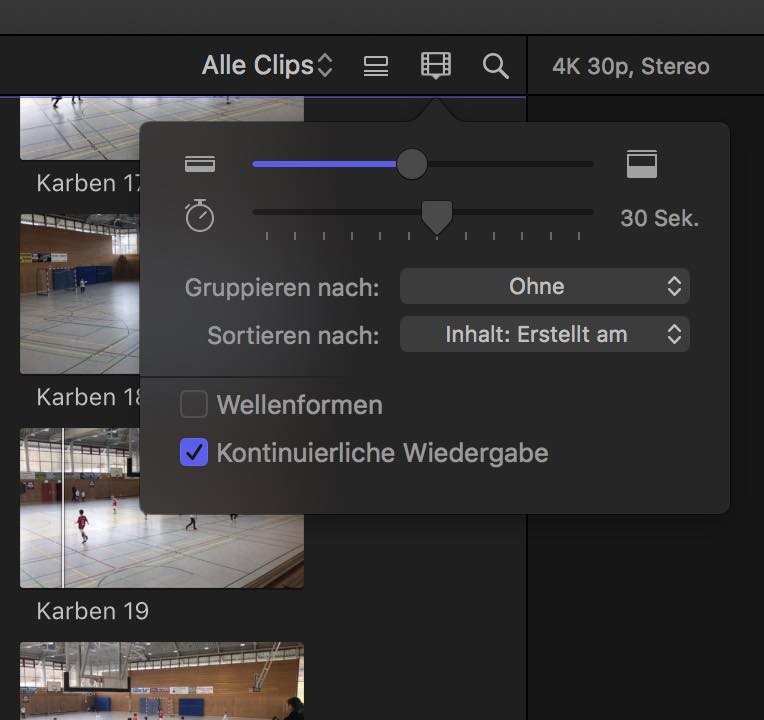
Turning it on/off and closing and reopening fcpx doesn't solve the issue.
Any idea?
Last edit: 19 Feb 2017 16:18 by Schnurr.
Please Log in to join the conversation.


19 Feb 2017 18:36 #85907
by JoeEditor
Replied by JoeEditor on topic continuous playback doesn't work ???
If you have Loop Playback enabled, that's what will happen. Continuous Playback requires Loop Playback be turned off.
It also only works when using the space bar for playback. The Playback Selection key / will do just that, only playback the selected content.
It also only works when using the space bar for playback. The Playback Selection key / will do just that, only playback the selected content.
Please Log in to join the conversation.
20 Feb 2017 09:50 - 20 Feb 2017 13:39 #85920
by Schnurr
Replied by Schnurr on topic continuous playback doesn't work ???
Hi I turned that off and use the space bar to start playback.
I know it was working a couple of weeks ago and really liked the new feature but by surprise now it doesn't work again.... very very strange. Well maybe will call the hotline but they will advise to delete and reinstall again )
SOLVED: Pressed Command L and right now works as expected.
I know it was working a couple of weeks ago and really liked the new feature but by surprise now it doesn't work again.... very very strange. Well maybe will call the hotline but they will advise to delete and reinstall again
)SOLVED: Pressed Command L and right now works as expected.
Last edit: 20 Feb 2017 13:39 by Schnurr.
Please Log in to join the conversation.
