




- Posts: 65
- Thank you received: 0
3 Post Moderation Rule for New Boarders (25 Jan 2021)
New boarders will have their posts moderated - Don't worry if you cannot see your post immediately.
2k footage
17 Feb 2017 02:07 #85821
by steve223
2k footage was created by steve223
Hey Guy,s
Recently started using 2k footage but wondering the 2k footage in full screen displays a big black frame around it and if I choose fit in the editor it also shows a big black frame around it. Any idea why?
4sdata.net/capo/Capto_Capture%202017-02-17_13-07-40_.png
Regards
Steve
Recently started using 2k footage but wondering the 2k footage in full screen displays a big black frame around it and if I choose fit in the editor it also shows a big black frame around it. Any idea why?
4sdata.net/capo/Capto_Capture%202017-02-17_13-07-40_.png
Regards
Steve
Please Log in to join the conversation.


17 Feb 2017 03:39 - 17 Feb 2017 03:39 #85822
by JoeEditor
Replied by JoeEditor on topic 2k footage
Can you verify the Project dimensions in the Inspector?
Also, can you verify the 2K clip dimensions in the Inspector?
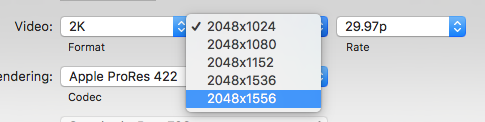
2K can be 2048 x 1024, 1080, 1152, 1536 or 1556.
Also, can you verify the 2K clip dimensions in the Inspector?
2K can be 2048 x 1024, 1080, 1152, 1536 or 1556.
Last edit: 17 Feb 2017 03:39 by JoeEditor.
Please Log in to join the conversation.
17 Feb 2017 04:04 #85824
by steve223
Replied by steve223 on topic 2k footage
sorry 2720 x 1530
Please Log in to join the conversation.
17 Feb 2017 12:51 - 17 Feb 2017 12:57 #85834
by JoeEditor
Replied by JoeEditor on topic 2k footage
Is that the Project timeline setting or the clip itself? Cause that's a 2.7k frame size. Are you allowing FCPX to set the frame size of the Project by the first clip? Or did you specify a frame size?
Last edit: 17 Feb 2017 12:57 by JoeEditor.
Please Log in to join the conversation.
17 Feb 2017 20:20 #85840
by steve223
Replied by steve223 on topic 2k footage
Hi,
FPCX set the settings when draging first clip in
4sdata.net/capo/Capto_Capture%202017-02-18_07-19-03_.png
Regards
Steve
FPCX set the settings when draging first clip in
4sdata.net/capo/Capto_Capture%202017-02-18_07-19-03_.png
Regards
Steve
Please Log in to join the conversation.
17 Feb 2017 21:59 #85843
by JoeEditor
Replied by JoeEditor on topic 2k footage
OK, that's good then! Now, why is it like that? HHmm... Select the clip in the Timeline, go to the Inspector, to the video section, at the bottom, what is special conform set to? Set it to None and see what happens. I'm going to do an experiment here tonight and see what I come up with for that frame size.
Please Log in to join the conversation.
17 Feb 2017 23:28 #85845
by steve223
Replied by steve223 on topic 2k footage
hi,
thanks for all the help
Spatial Conform is set to fit, if I set it to non it zooms in a bit but still keeps the same frame size where video is displayed in.
4sdata.net/capo/Capto_Capture%202017-02-18_10-26-24_.png
4sdata.net/capo/Capto_Capture%202017-02-18_10-27-58_.png
Regards
Steve
thanks for all the help
Spatial Conform is set to fit, if I set it to non it zooms in a bit but still keeps the same frame size where video is displayed in.
4sdata.net/capo/Capto_Capture%202017-02-18_10-26-24_.png
4sdata.net/capo/Capto_Capture%202017-02-18_10-27-58_.png
Regards
Steve
Please Log in to join the conversation.
17 Feb 2017 23:49 #85848
by JoeEditor
Replied by JoeEditor on topic 2k footage
I'm not sure how it happened, but your Timeline is not the same dimensions as your video. Select the video in the Browser, see what the dimensions are. Create a Project and specify those dimensions. Don't let it set automatically.
Please Log in to join the conversation.
17 Feb 2017 23:53 #85849
by steve223
Replied by steve223 on topic 2k footage
yes that's it seems like FCPX does not have the Mavic 2 k resolution as an option, if it set it manually it appears to be correct thank you very much
Steve
Steve
Please Log in to join the conversation.
