


- Posts: 77
- Thank you received: 6
3 Post Moderation Rule for New Boarders (25 Jan 2021)
New boarders will have their posts moderated - Don't worry if you cannot see your post immediately.
auto numbering take field ?
14 Feb 2017 20:10 #85740
by ronfya
auto numbering take field ? was created by ronfya
Hello guys,
Say you have 5 files, one for each take from the same scene. Is there any way to select all 5 files and auto number the "take" field from 1 to 5 ?
Thanks
Say you have 5 files, one for each take from the same scene. Is there any way to select all 5 files and auto number the "take" field from 1 to 5 ?
Thanks
Please Log in to join the conversation.

15 Feb 2017 01:28 #85745
by JoeEditor
Replied by JoeEditor on topic auto numbering take field ?
No, there's no metadata to tell FCPX what take is which, if the camera didn't write it itself.
Please Log in to join the conversation.
15 Feb 2017 08:28 #85748
by ronfya
Replied by ronfya on topic auto numbering take field ?
Since the files are in alphanumeric order, that doesn't matter. It is always in sequential order of the file name.
The things is, for a music video we shot for which I have several takes of each shot, it is painfully annoying to go into EACH "take" field and entering the number in it. I would definitely like to have a faster way to do that.
I could not fill in that field and use a counter from a filename renaming preset, but that would mean the "take" is only there, difficult to read quickly.
The things is, for a music video we shot for which I have several takes of each shot, it is painfully annoying to go into EACH "take" field and entering the number in it. I would definitely like to have a faster way to do that.
I could not fill in that field and use a counter from a filename renaming preset, but that would mean the "take" is only there, difficult to read quickly.
Please Log in to join the conversation.
15 Feb 2017 20:46 #85761
by JoeEditor
Replied by JoeEditor on topic auto numbering take field ?
We rename our clips upon ingest. The naming scheme is traditional broadcast/film. It includes the scene and take number in it. Been doing this since the legacy FCP days, works well.
I personally am moving away from assigning take numbers, as when I ingest, I go through and review my footage, and select what I want to use, mark as a Favorite, mark the bad ones as Rejected.
But no, there's no way for FCPX to magically know what clip is which scene or which take. You're doing to have to do it manually.
I personally am moving away from assigning take numbers, as when I ingest, I go through and review my footage, and select what I want to use, mark as a Favorite, mark the bad ones as Rejected.
But no, there's no way for FCPX to magically know what clip is which scene or which take. You're doing to have to do it manually.
Please Log in to join the conversation.
- DmitriZigany
-

- Offline
- Platinum Member
-

Less
More
- Posts: 730
- Thank you received: 26
16 Feb 2017 11:59 #85775
by DmitriZigany
Replied by DmitriZigany on topic auto numbering take field ?
I wish there at least was a way to set some meta data in the import window, such as Reel, Camera Name, Angle etc... And while they'd be at it they should add automativ take numbering to that too 
Please Log in to join the conversation.
16 Feb 2017 12:06 #85777
by ronfya
I don't want to be rude, but again, what I want is not magical. I know there is no way that FCPX guesses what take it is.
What I want is to incrementally number a chosen field of several selected rows. Just like you would do in Excel.
And if there is no way, then there is no way ... :dry:
Replied by ronfya on topic auto numbering take field ?
FCPX.guru wrote: But no, there's no way for FCPX to magically know what clip is which scene or which take. You're doing to have to do it manually.
I don't want to be rude, but again, what I want is not magical. I know there is no way that FCPX guesses what take it is.
What I want is to incrementally number a chosen field of several selected rows. Just like you would do in Excel.
And if there is no way, then there is no way ... :dry:
Please Log in to join the conversation.
16 Feb 2017 13:36 #85781
by JoeEditor
Replied by JoeEditor on topic auto numbering take field ?
Feedback page, it would make sense to have that function.
Please Log in to join the conversation.
16 Feb 2017 15:29 #85787
by VidGreg
Replied by VidGreg on topic auto numbering take field ?
Hi Ronfya
I think Producer's Best Friend from Intelligent Assistance www.intelligentassistance.com/producer-s-best-friend.html
can do this?? You might have to export the XML into a spread sheet, make the changes and then reimport.
Shoot Greg a line and ask. He can most likely help.
Seems to me it should be doable via XML.
If you want to do it manually, you should be able to set this in the Timeline index?? I think, haven't tried it. If it can be done there, it might be possible to set up an Automator action script to do this in a click or two.
Hope this helps, Greg
I think Producer's Best Friend from Intelligent Assistance www.intelligentassistance.com/producer-s-best-friend.html
can do this?? You might have to export the XML into a spread sheet, make the changes and then reimport.
Shoot Greg a line and ask. He can most likely help.
Seems to me it should be doable via XML.
If you want to do it manually, you should be able to set this in the Timeline index?? I think, haven't tried it. If it can be done there, it might be possible to set up an Automator action script to do this in a click or two.
Hope this helps, Greg
Please Log in to join the conversation.
16 Feb 2017 15:48 #85791
by ronfya
Thanks Greg, though exporting and reimporting an xml seems a little bit overkill ...
So far, the fastest way I found to do it is by selecting the first row of my takes, pressing tab several times so that the "take" field is becomes editable, type the number, press enter and go down to the next row.
Maybe I should be able to write an automator action using that principle.
Thanks guys.
Replied by ronfya on topic auto numbering take field ?
VidGreg wrote: Hi Ronfya
I think Producer's Best Friend from Intelligent Assistance www.intelligentassistance.com/producer-s-best-friend.html
can do this?? You might have to export the XML into a spread sheet, make the changes and then reimport.
Shoot Greg a line and ask. He can most likely help.
Seems to me it should be doable via XML.
If you want to do it manually, you should be able to set this in the Timeline index?? I think, haven't tried it. If it can be done there, it might be possible to set up an Automator action script to do this in a click or two.
Hope this helps, Greg
Thanks Greg, though exporting and reimporting an xml seems a little bit overkill ...
So far, the fastest way I found to do it is by selecting the first row of my takes, pressing tab several times so that the "take" field is becomes editable, type the number, press enter and go down to the next row.
Maybe I should be able to write an automator action using that principle.
Thanks guys.
Please Log in to join the conversation.


16 Feb 2017 15:50 #85792
by Francois
Replied by Francois on topic auto numbering take field ?
I think "Shot Notes X" would be easier to introduce in a shoot to ingest workflow and doing in a CSV file from "Number" or "MS Xcel"
my two cents
my two cents
Please Log in to join the conversation.
16 Feb 2017 15:52 #85794
by ronfya
Replied by ronfya on topic auto numbering take field ?
Yes, but the project or team doesn't always suit that workflow. And sometimes you are just given the material without anything else.
Please Log in to join the conversation.
16 Feb 2017 16:08 - 16 Feb 2017 16:24 #85796
by Francois
Replied by Francois on topic auto numbering take field ?
Well I understand this.. but since "Shot Notes X" essentially is an EVENT list fcpxml matched to a CVS file then back to-> fcpxml and reimport it could be useful.. All you need is to get your camera card clips list or timecode start list imported in spreadsheet then match after adding more metadata ... it could be a temporary workaround.
Any way a good feature request to ask in feedback.
EDIT for matching possibilities
Matching Automatically
Matching based on Final Cut Pro Clip Name
Matching based on file name
Matching based on TIMECODE
Any way a good feature request to ask in feedback.
EDIT for matching possibilities
Matching Automatically
Matching based on Final Cut Pro Clip Name
Matching based on file name
Matching based on TIMECODE
Last edit: 16 Feb 2017 16:24 by Francois.
Please Log in to join the conversation.
- Karsten Schlüter
-

- Offline
- Moderator
-

Less
More
- Posts: 3790
- Thank you received: 718
17 Feb 2017 05:02 #85828
by Karsten Schlüter
Replied by Karsten Schlüter on topic auto numbering take field ?
FCPX' Batch-Renaming abilities maybe a workaround?
select your clips
in the Inspector/Info, click on Apply Custom Name/New
and create your new naming scheme…
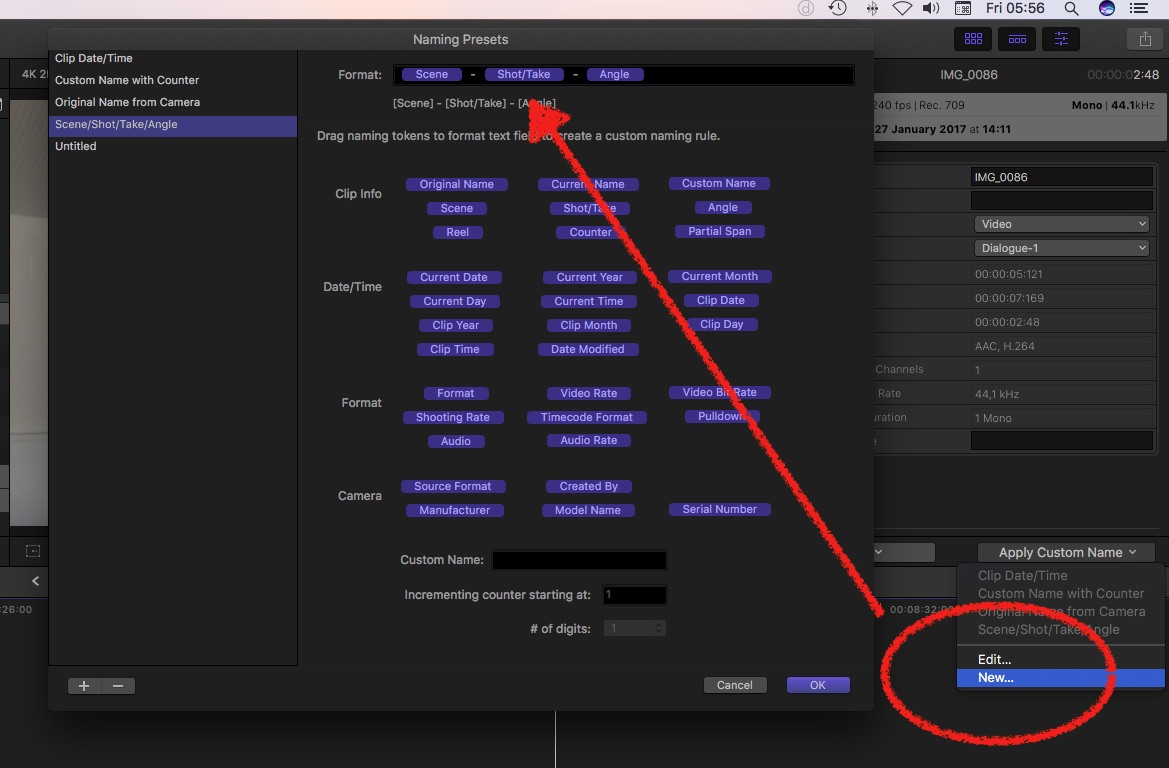
yep, that changes the clips name, not the Take column … but for a start?
select your clips
in the Inspector/Info, click on Apply Custom Name/New
and create your new naming scheme…
yep, that changes the clips name, not the Take column … but for a start?
Please Log in to join the conversation.
17 Feb 2017 10:19 #85832
by ronfya
Replied by ronfya on topic auto numbering take field ?
Hey Karsten,
Like I said above ...
I indeed thought of that but that would mean the take number is difficult to read quickly
Like I said above ...
ronfya wrote: I could not fill in that field and use a counter from a filename renaming preset, but that would mean the "take" is only there, difficult to read quickly.
I indeed thought of that but that would mean the take number is difficult to read quickly
Please Log in to join the conversation.
17 Feb 2017 12:58 #85835
by JoeEditor
Replied by JoeEditor on topic auto numbering take field ?
How would it be difficult? This is how we do it, and it works well. We also do Smart Collections based on this naming scheme.
Please Log in to join the conversation.
- Karsten Schlüter
-
- Offline
- Moderator
-
Less
More
- Posts: 3790
- Thank you received: 718
18 Feb 2017 08:56 #85855
by Karsten Schlüter
huh? you lost me here - why is that difficult to read?? :huh:
The batch-renaming feature allows to put, for example, take# first - so in a list-view you could arrange your clips numerically.
Replied by Karsten Schlüter on topic auto numbering take field ?
ronfya wrote: … but that would mean the take number is difficult to read quickly
huh? you lost me here - why is that difficult to read?? :huh:
The batch-renaming feature allows to put, for example, take# first - so in a list-view you could arrange your clips numerically.
Please Log in to join the conversation.
