


- Posts: 3790
- Thank you received: 718
3 Post Moderation Rule for New Boarders (25 Jan 2021)
New boarders will have their posts moderated - Don't worry if you cannot see your post immediately.
Transferring Markers to another clip??
- Karsten Schlüter
-
 Topic Author
- Offline
- Moderator
-

Less
More
11 Feb 2017 07:53 #85653
by Karsten Schlüter
Transferring Markers to another clip?? was created by Karsten Schlüter
Actually playing with Apogee's Metarecorder, a 5€ audio.app, allowing to set Markers while recording… it creates an xml, FCPX handles flawless … great.
But …
I'd like to use the Markers (of the audio file) with a Multicam clip. Unfortunately the Markers are only available in the 'track', not in the summed MC.
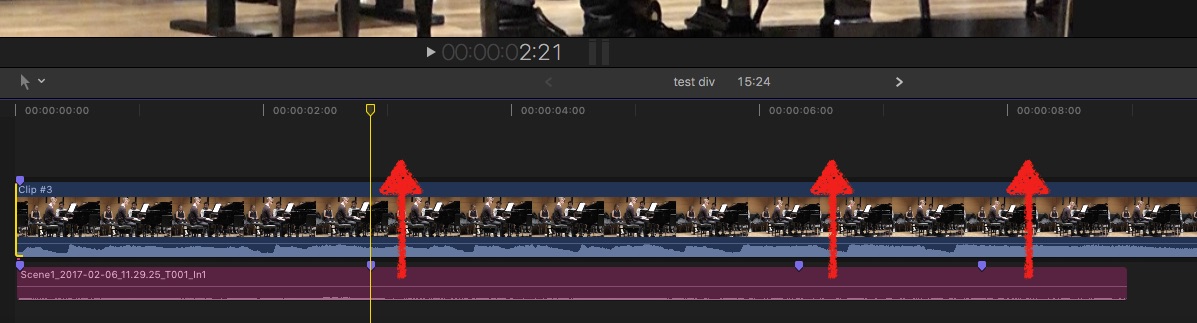
so, is there any xml-voodoo to 'transfer the blue dots'?
But …
I'd like to use the Markers (of the audio file) with a Multicam clip. Unfortunately the Markers are only available in the 'track', not in the summed MC.
so, is there any xml-voodoo to 'transfer the blue dots'?
Please Log in to join the conversation.
- Karsten Schlüter
-
Topic Author
- Offline
- Moderator
-
Less
More
- Posts: 3790
- Thank you received: 718
12 Feb 2017 11:06 - 12 Feb 2017 11:09 #85668
by Karsten Schlüter
Replied by Karsten Schlüter on topic Transferring Markers to another clip??
… to answer partly my own question:
I read Philip Hodgett's article about Demystifying XML … (Thanks for that, btw!!)
www.fcp.co/final-cut-pro/tutorials/1912-...s-and-gregory-clarke
… which is really challenging for a non-engineer like me.
But, at last, I dl TextWrangler as recommended and opened two test files:

in FCPX
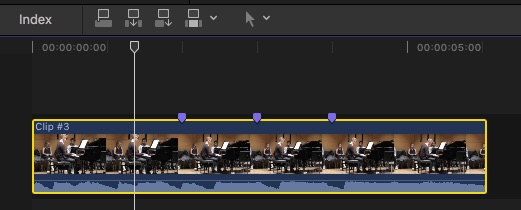
The 3 Markers I had set in that test-video are clearly visible for humans:
When I change the last Marker value from 676/25 to 701/25, the Blue Dots hops a second forward - and as the article describes, the position is described in frames not hh:min:sec … ok.
Now, same with a test-file from AMR…
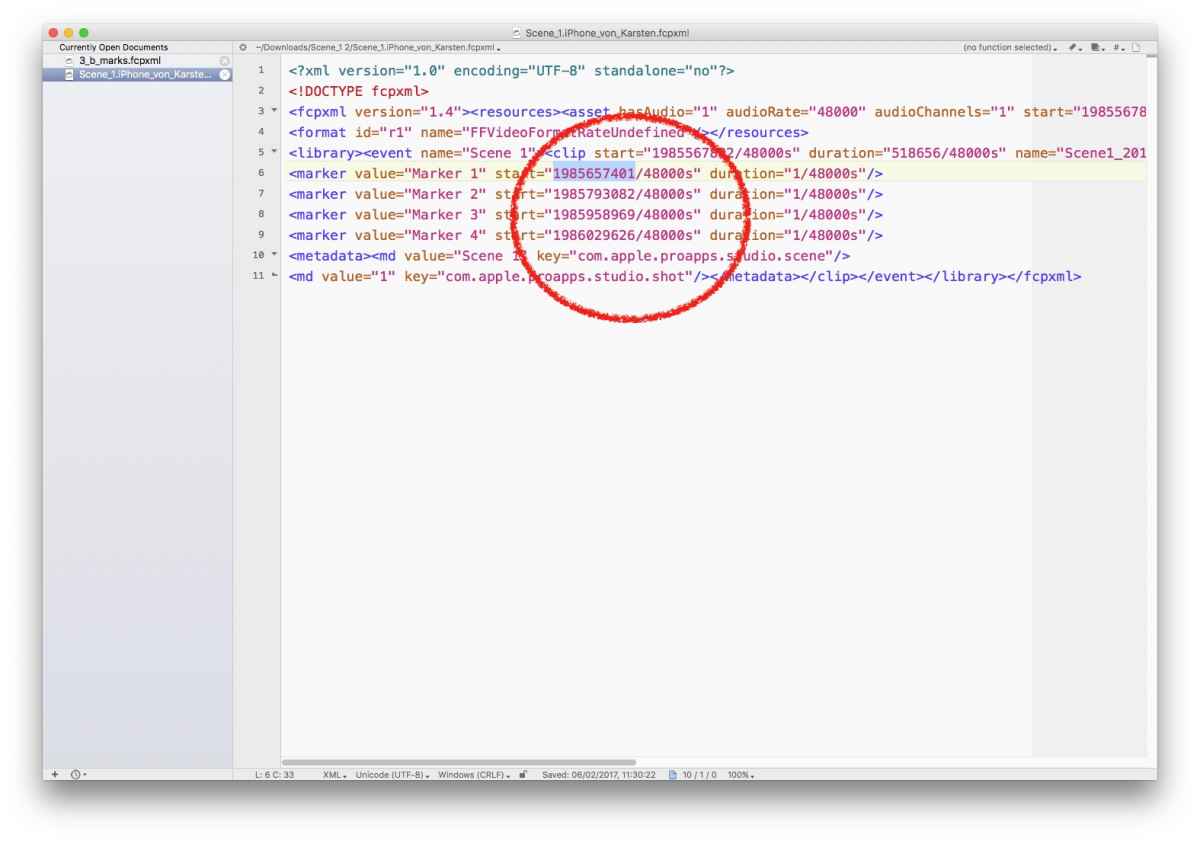
wooow, panic! Huge numbers! How come? hmm, well, easy; audio's smallest tics are not 25 frames/sec but 48.ooo samples per second.
So, I hoped to copy/paste the marker-section of the AMR.xml into the Multicam.xml… that actually doesn't work.
needs some math to calculate a timebase of 48.000 to 25…
hmmmm - concept understood. Now some Excel-Voodoo…
I read Philip Hodgett's article about Demystifying XML … (Thanks for that, btw!!)
www.fcp.co/final-cut-pro/tutorials/1912-...s-and-gregory-clarke
… which is really challenging for a non-engineer like me.
But, at last, I dl TextWrangler as recommended and opened two test files:
in FCPX
The 3 Markers I had set in that test-video are clearly visible for humans:
Code:
<marker start="676/25s" duration="200/5000s" value="Marker 3"/>
Now, same with a test-file from AMR…
Code:
marker value="Marker 1" start="1985657401/48000s" duration="1/48000s"/>
wooow, panic! Huge numbers! How come? hmm, well, easy; audio's smallest tics are not 25 frames/sec but 48.ooo samples per second.
So, I hoped to copy/paste the marker-section of the AMR.xml into the Multicam.xml… that actually doesn't work.
needs some math to calculate a timebase of 48.000 to 25…
hmmmm - concept understood. Now some Excel-Voodoo…
Last edit: 12 Feb 2017 11:09 by Karsten Schlüter.
Please Log in to join the conversation.
- Karsten Schlüter
-
Topic Author
- Offline
- Moderator
-
Less
More
- Posts: 3790
- Thank you received: 718
12 Feb 2017 11:42 #85669
by Karsten Schlüter
Replied by Karsten Schlüter on topic Transferring Markers to another clip??
… work in progress…
Made me a test-Multicam; full-length in the Timeline (allowing me to export it as XML), added a Marker (for reference):
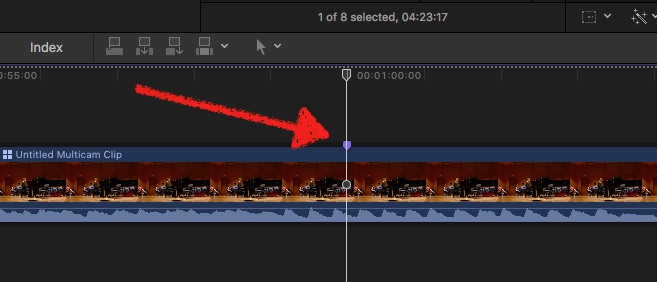
The exported XML in TextWrangler again stuffed with frightening amount of content.......:
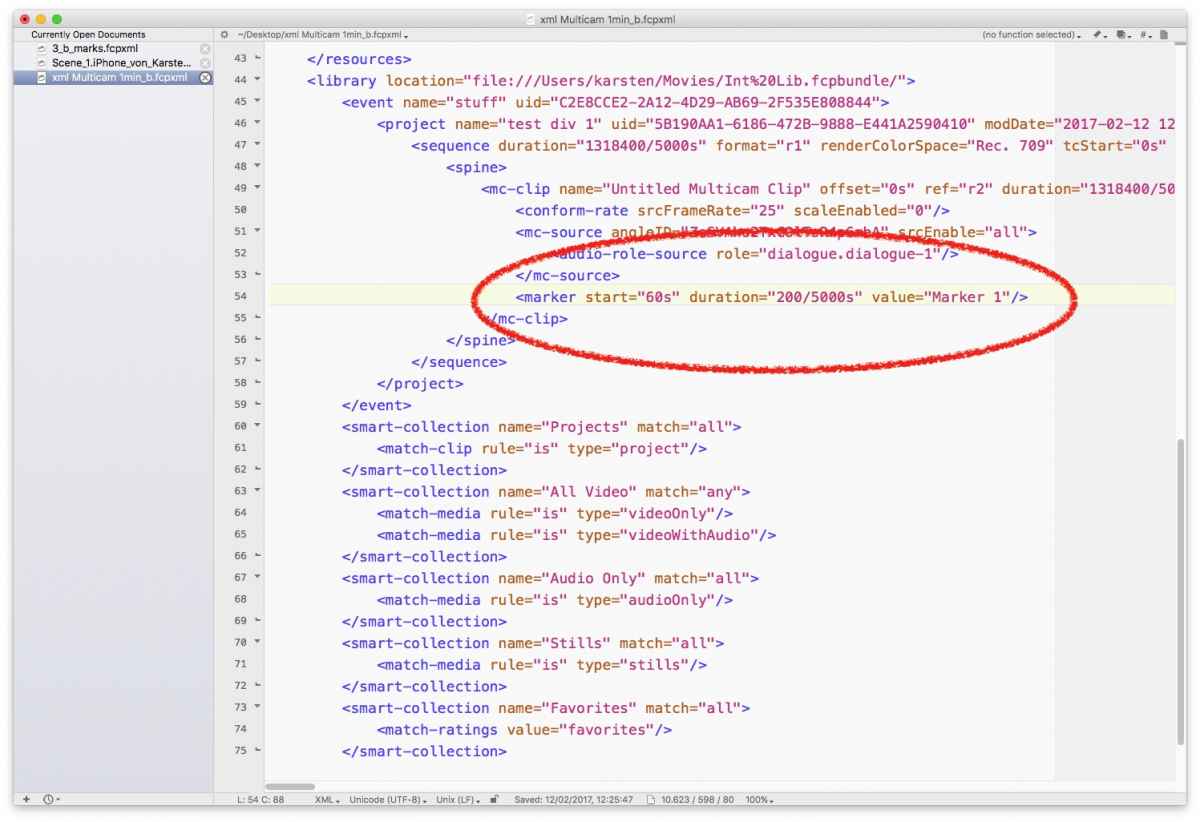
but - again, thanks to fcxml, clearly visible, the marker - interesting; now the timebase is seconds, not frame nor samples......
Next… hand-coding:
adding two new lines of code, mimicking two additional Markers:
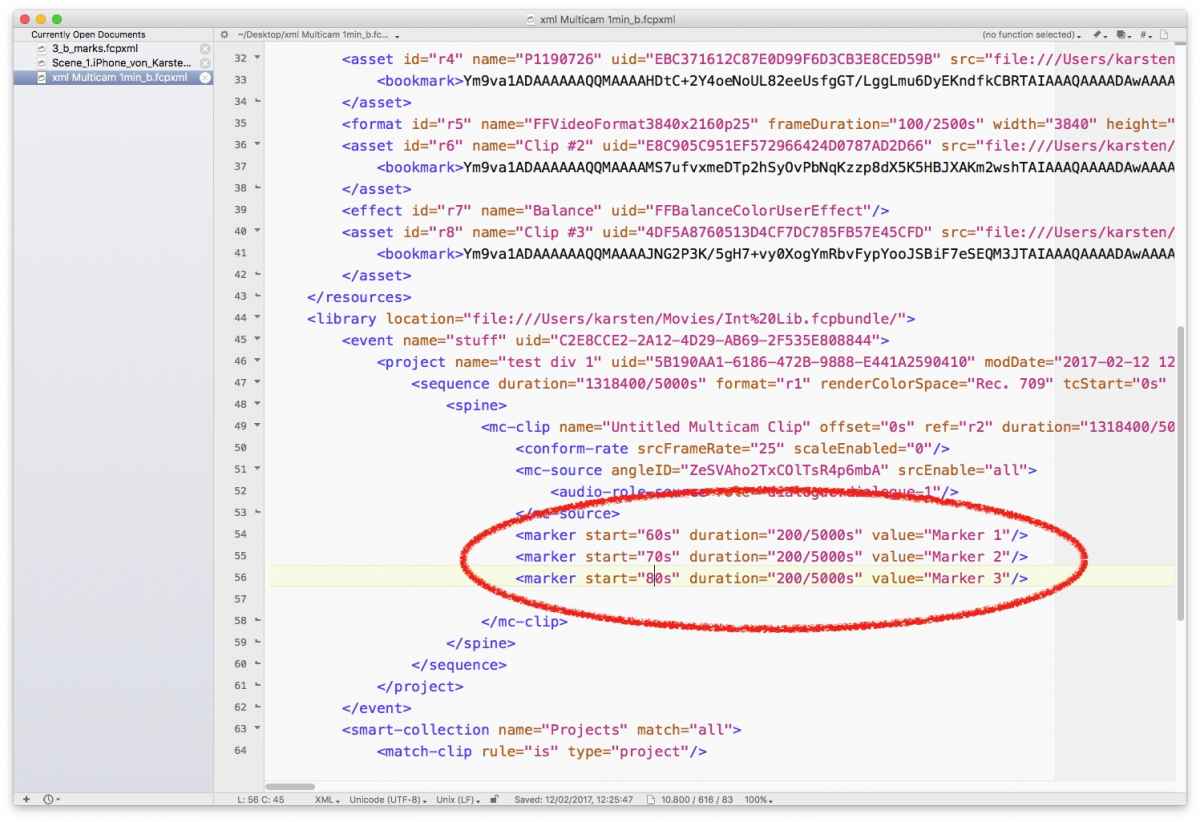
Opening that XML in FCPX - tadahh! - works:
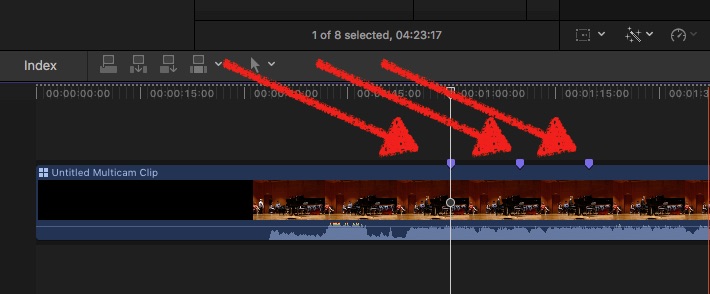
so, for next weekends todo list, mission is:
real-life example of a complex Multicam + an AMR.xml with a dozen of Markers, a two cell Excel sheet, calculating 48.ooo based Markers to seconds-based numbers; and some copy/paste in TextWrangler …
Never thought, I would ever tinker inside XML files!! :woohoo:
Made me a test-Multicam; full-length in the Timeline (allowing me to export it as XML), added a Marker (for reference):
The exported XML in TextWrangler again stuffed with frightening amount of content.......:
but - again, thanks to fcxml, clearly visible, the marker - interesting; now the timebase is seconds, not frame nor samples......
Next… hand-coding:
adding two new lines of code, mimicking two additional Markers:
Opening that XML in FCPX - tadahh! - works:
so, for next weekends todo list, mission is:
real-life example of a complex Multicam + an AMR.xml with a dozen of Markers, a two cell Excel sheet, calculating 48.ooo based Markers to seconds-based numbers; and some copy/paste in TextWrangler …
Never thought, I would ever tinker inside XML files!! :woohoo:
Please Log in to join the conversation.
- Andreas Kiel
-

- Offline
- Platinum Member
-

Less
More
- Posts: 1077
- Thank you received: 189
12 Feb 2017 16:29 #85672
by Andreas Kiel
Replied by Andreas Kiel on topic Transferring Markers to another clip??
Karsten ,
Just a tip: keep in mind that Markers are relative to file-start.
You'll need some more cell to calc/transfer markers from one clip to another.
Just a tip: keep in mind that Markers are relative to file-start.
You'll need some more cell to calc/transfer markers from one clip to another.
Please Log in to join the conversation.
- Karsten Schlüter
-
Topic Author
- Offline
- Moderator
-
Less
More
- Posts: 3790
- Thank you received: 718
12 Feb 2017 16:51 #85675
by Karsten Schlüter
har har NOW you tell me!!
no, kiddin': thanks, Andreas, but I did found out myself on my journey thru XML - some really weird of reverse-engineering I'm practicing here … noted in my two-cells spreadsheet "hmm? first Marker several years into clip??"
again, fcxml is very user-friendly, there is a start-value (called 'start').
so, have a third cell already:
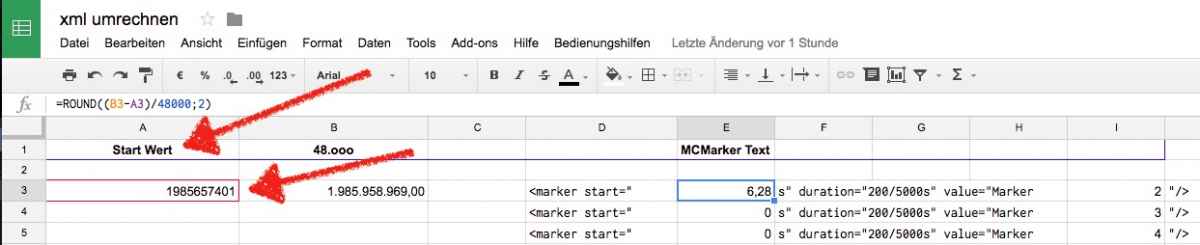
actually too little time to dig deeper into that, but it's fun!
my privilege is, I can build a workflow for this one specific task, e.g. I have with the refs-whistle-blow a superb synch-marker in all sources. Incl, the MetaRecorder.
so it looks like, I do my usual routine for creating the MC, set the first Marker manually, export XML, copy/paste additional Markers from AMR.XML, and - fingers crossed, do have all Markers on my MC …
uptonow, I thought I have to perform what the RippletTwins call 'Reverse Favoriting' - but I guess the Marker-Transfer is faster..
We'll see - THANKS for joining and support, Andreas!
Replied by Karsten Schlüter on topic Transferring Markers to another clip??
Andreas Kiel wrote: …
Just a tip: keep in mind that Markers are relative to file-start.
You'll need some more cell to calc/transfer markers from one clip to another.
har har NOW you tell me!!
no, kiddin': thanks, Andreas, but I did found out myself on my journey thru XML - some really weird of reverse-engineering I'm practicing here … noted in my two-cells spreadsheet "hmm? first Marker several years into clip??"
again, fcxml is very user-friendly, there is a start-value (called 'start').
so, have a third cell already:
actually too little time to dig deeper into that, but it's fun!
my privilege is, I can build a workflow for this one specific task, e.g. I have with the refs-whistle-blow a superb synch-marker in all sources. Incl, the MetaRecorder.
so it looks like, I do my usual routine for creating the MC, set the first Marker manually, export XML, copy/paste additional Markers from AMR.XML, and - fingers crossed, do have all Markers on my MC …
uptonow, I thought I have to perform what the RippletTwins call 'Reverse Favoriting' - but I guess the Marker-Transfer is faster..
We'll see - THANKS for joining and support, Andreas!
Please Log in to join the conversation.
- Andreas Kiel
-
- Offline
- Platinum Member
-
Less
More
- Posts: 1077
- Thank you received: 189
13 Feb 2017 12:52 - 13 Feb 2017 18:14 #85698
by Andreas Kiel
Replied by Andreas Kiel on topic Transferring Markers to another clip??
Just for fun, completeness and the others ones who want to juggle with XMLs 
Remember Euclides and those funny guys?
Grab a coffee, tea or something else and read further.
Time in FCPX is always expressed in fractions or integers followed by lower "s" char: 2s, 1/2s
The "start" value might be printed or not. In case it is not published it is "0s".
The reason Apple uses fractions (not decimal fractions) for time is that they are more accurate compared to decimal numbers. Decimals also can screw up XMLs cause of different number handling (decimal delimiter either "." or ",").
Example (real world) from an audio standard marker set:
<marker start="1408909/80000s" duration="1/48000s" value="Marker 1"/>
<marker start="18315817/720000s" duration="1/48000s" value="Marker 3"/>
<marker start="797797/24000s" duration="1/48000s" value="Marker 2"/>
The marker duration is 1 sample (1/48000 in this timeline). If you divide the start trough sample duration you'll note that the marker is not always placed at a full sample
So FCPX finally gives you back your freedom! Set markers anywhere!
Let's go back to the example above and take "Marker 1"
In this complete example I created a project starting at 10:00:00:00 with 23.976 fps (just for more fun).
I picked a title out of the endless collection.
Double-click adds this title to the timeline with default settings. By default all titles and generators start at 1 hour real world time. In NTSC world a bit later. In my example with a 23.976 project it starts at "6918912000/1920000s".
Adding an audio from iTunes "Bryan Adams - Everything I Do" which was sampled with 44100 Hz (cd). Set it to the offset of the title. Then created the above markers.
Now go further and and create a marker at the video with the same time of "Marker 1".
First we compare the timebase (denominator) of the times: 1920000 (title) <-> 80000 (audio).
Find the greatest common divisor -> 80000
Then multiply the nominator of the smaller value (audio) by higher value divided by the gcd (24) -> 1408909 x -24 -> 33813816.
Now add the start value of the title (6918912000) to this result - > 6952725816
The complete marker entry will be:
<marker start="6952725816/1920000s" duration="1/48000s" value="Marker 1"/>
or better
<marker start="289696909/80000s" duration="1001/24000s" value="Marker 1"/>
Now paste the marker at the end of all entries for this title (just before the "</title>")
You're done. Repeat with the other markers.
In case the audio and the "whatever" do have a different "offset" you have to add them to the above education.
Andreas
Remember Euclides and those funny guys?
Grab a coffee, tea or something else and read further.
Time in FCPX is always expressed in fractions or integers followed by lower "s" char: 2s, 1/2s
The "start" value might be printed or not. In case it is not published it is "0s".
The reason Apple uses fractions (not decimal fractions) for time is that they are more accurate compared to decimal numbers. Decimals also can screw up XMLs cause of different number handling (decimal delimiter either "." or ",").
Example (real world) from an audio standard marker set:
<marker start="1408909/80000s" duration="1/48000s" value="Marker 1"/>
<marker start="18315817/720000s" duration="1/48000s" value="Marker 3"/>
<marker start="797797/24000s" duration="1/48000s" value="Marker 2"/>
The marker duration is 1 sample (1/48000 in this timeline). If you divide the start trough sample duration you'll note that the marker is not always placed at a full sample
So FCPX finally gives you back your freedom! Set markers anywhere!
Let's go back to the example above and take "Marker 1"
In this complete example I created a project starting at 10:00:00:00 with 23.976 fps (just for more fun).
I picked a title out of the endless collection.
Double-click adds this title to the timeline with default settings. By default all titles and generators start at 1 hour real world time. In NTSC world a bit later. In my example with a 23.976 project it starts at "6918912000/1920000s".
Adding an audio from iTunes "Bryan Adams - Everything I Do" which was sampled with 44100 Hz (cd). Set it to the offset of the title. Then created the above markers.
Now go further and and create a marker at the video with the same time of "Marker 1".
First we compare the timebase (denominator) of the times: 1920000 (title) <-> 80000 (audio).
Find the greatest common divisor -> 80000
Then multiply the nominator of the smaller value (audio) by higher value divided by the gcd (24) -> 1408909 x -24 -> 33813816.
Now add the start value of the title (6918912000) to this result - > 6952725816
The complete marker entry will be:
<marker start="6952725816/1920000s" duration="1/48000s" value="Marker 1"/>
or better
<marker start="289696909/80000s" duration="1001/24000s" value="Marker 1"/>
Now paste the marker at the end of all entries for this title (just before the "</title>")
You're done. Repeat with the other markers.
In case the audio and the "whatever" do have a different "offset" you have to add them to the above education.
Andreas
Last edit: 13 Feb 2017 18:14 by Andreas Kiel.
Please Log in to join the conversation.
