


- Posts: 3
- Thank you received: 0
3 Post Moderation Rule for New Boarders (25 Jan 2021)
New boarders will have their posts moderated - Don't worry if you cannot see your post immediately.
fcp7 workflow upgrading to fcpx I can’t get a workable solution
- ana.conlon
-
 Topic Author
- Offline
- New Member
-

Less
More
06 Feb 2017 22:46 #85528
by ana.conlon
I have looked at every tutorial online and even purchased a few to try and help me find a resolution. I am a wedding videographer and when editing ceremony speeches and dancing I use 2-3 cameras and several independant audio (up to 5 at one time).
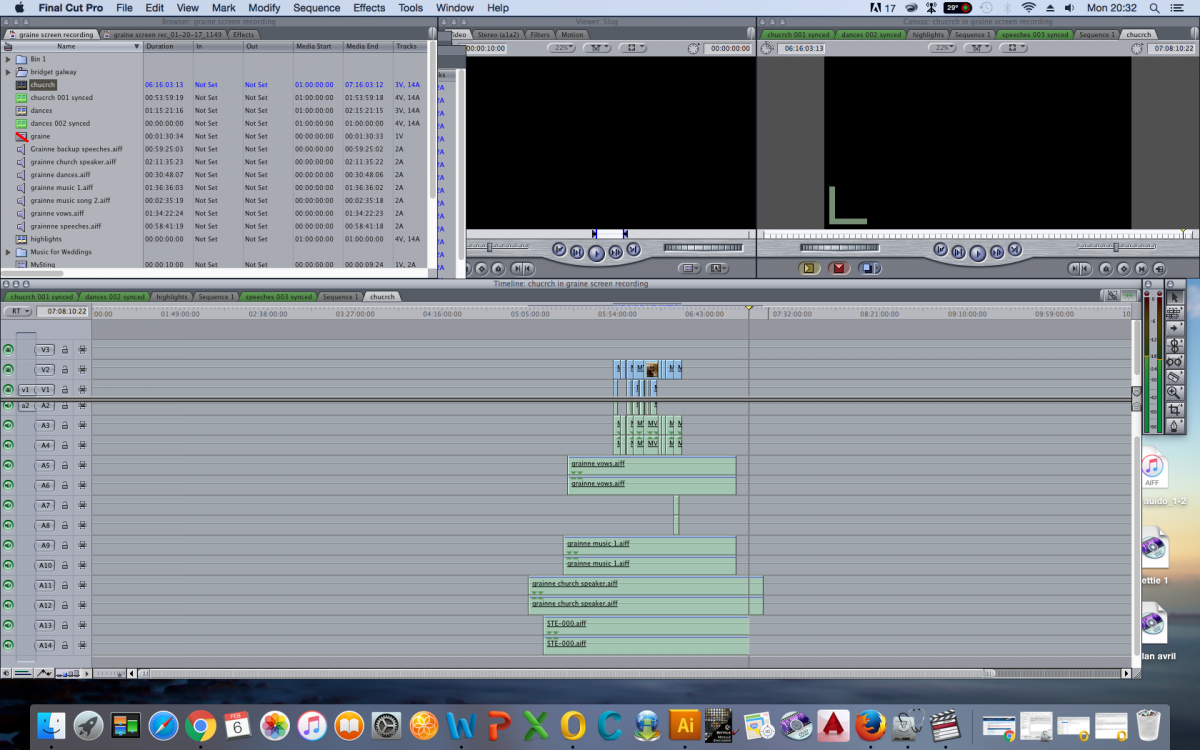
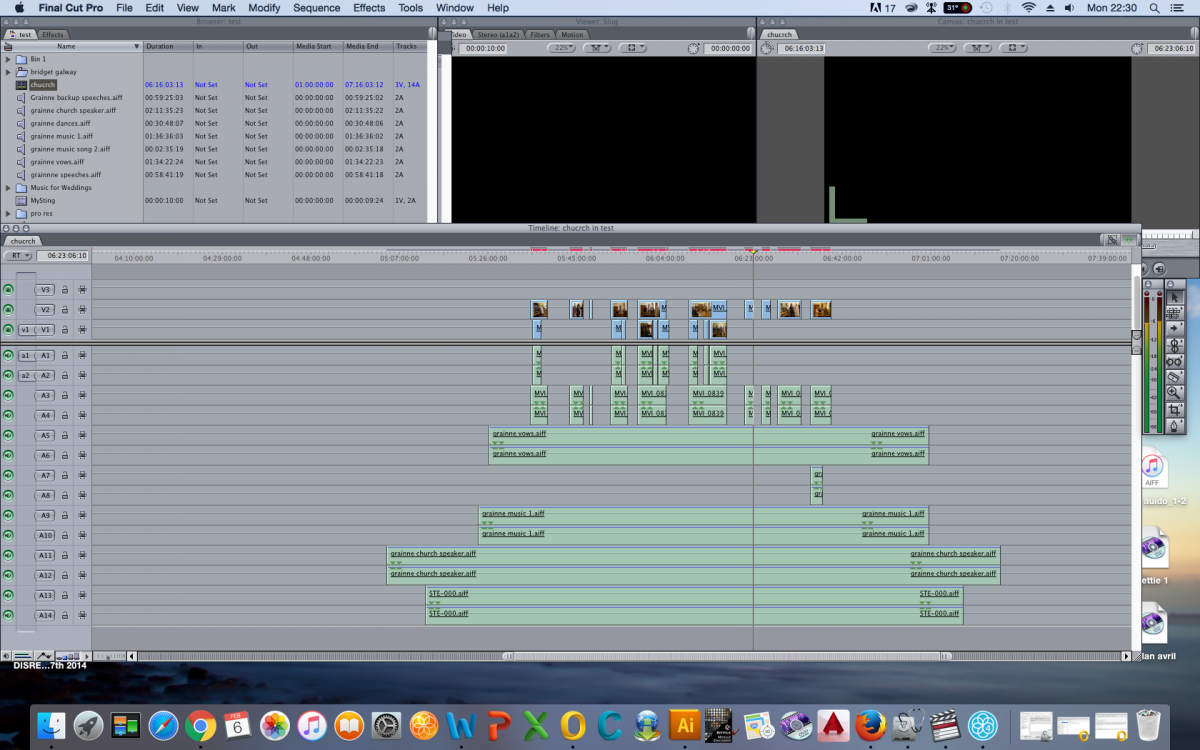
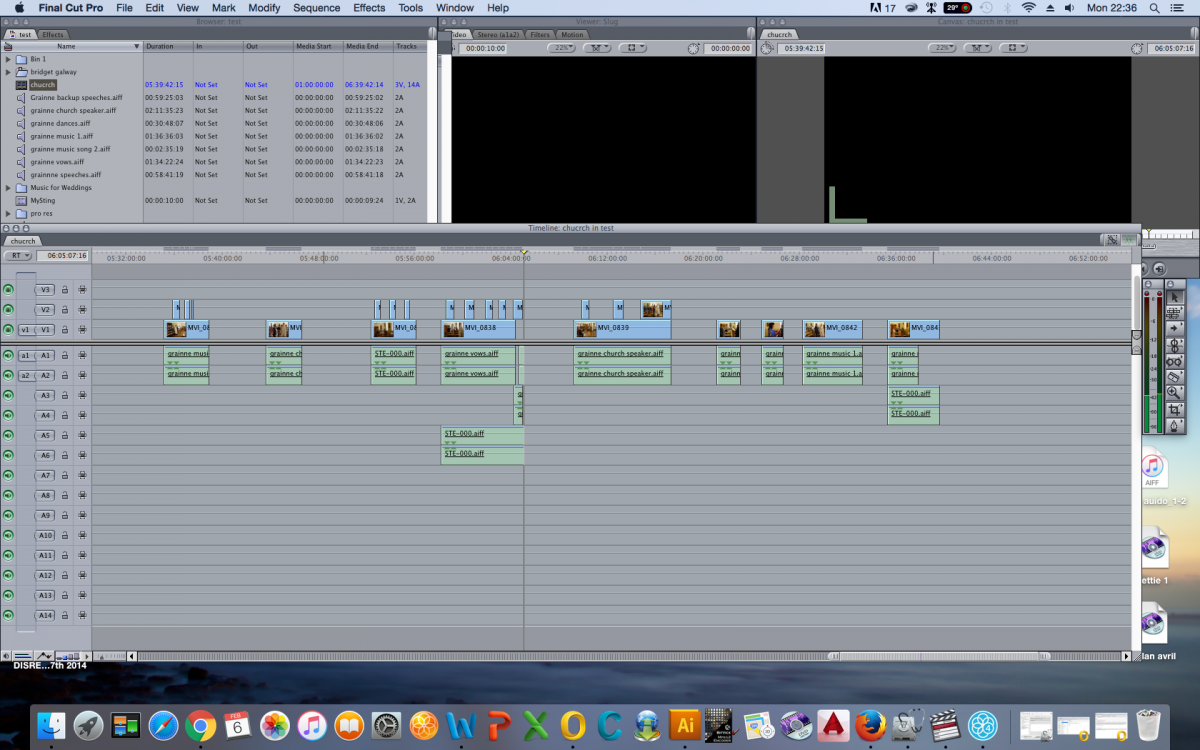
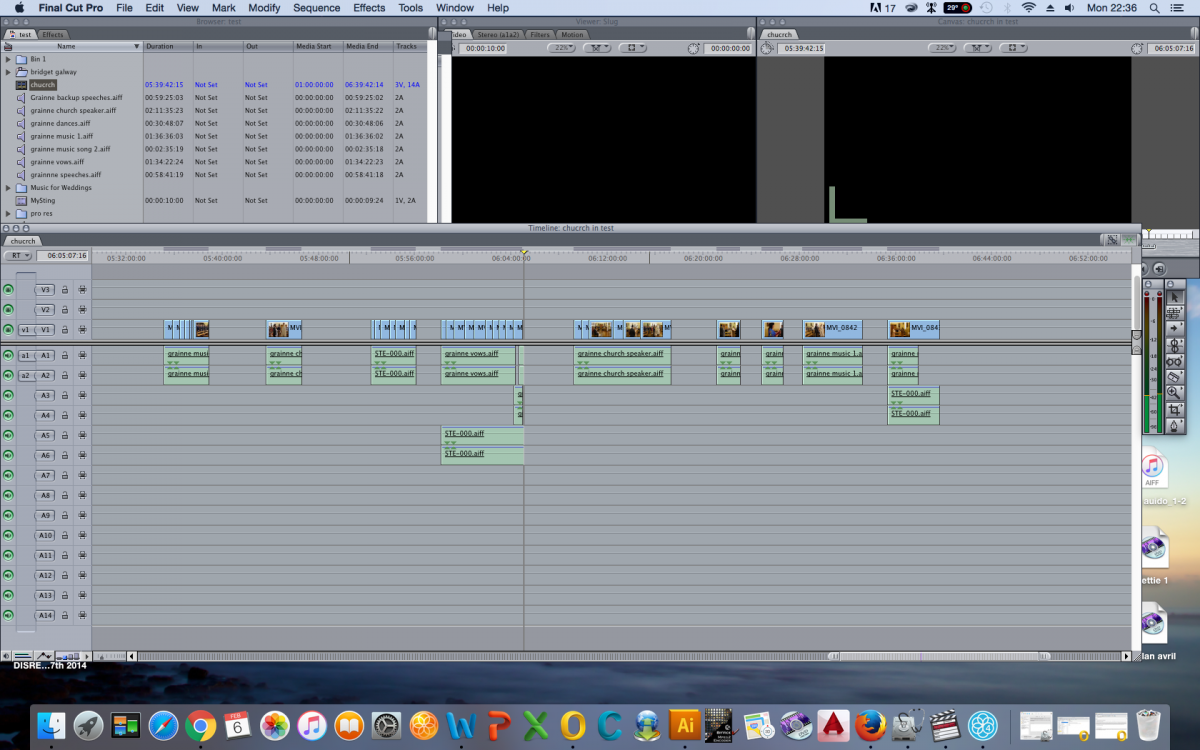
My problem is this; Take for example the ceremony filming. The audio recorders run through the entire ceremony and the two cameras I use run at different points with large gaps not filmed in between. I used plureyes to sync all this data into one timeline. My music mic obviously pick up the best audio for the music part of the ceremony so I cut that audio and put it with the corresponding clips, my grooms mic works best for the vows so I cut this audio and keep it with vows footage, sometimes I also keep the church speakers if it adds to the audio experience during the vows. Once I finished cutting everything to its appropriate best track and cut between cameras I would trim away all the middle parts of the ceremony and audio that wasn’t relevant and pull the entire time line together by deleting the gaps. My old workflow in FCP7 worked like a dream, I can skim through the cameras quickly, cut quickly and logically, then tidy the entire thing up without anything going out of sync.
Here is some still showing the different stages;
How can this be achieved in FCPX ????
In FCPX I can get my plureyes file back into final cut as a event but then the logic ends here. I have tried cutting this event the same way as FCP7 but if I try and put the information together the gaps don’t delete and everything keeps going out of sync. What am I missing? I am starting to feel really thick??? I have looked at multi clips and the audio doesn’t work out, also its difficult to see what your cutting and how do you cut away the empty gaps. I am at my wits end!
My problem is this; Take for example the ceremony filming. The audio recorders run through the entire ceremony and the two cameras I use run at different points with large gaps not filmed in between. I used plureyes to sync all this data into one timeline. My music mic obviously pick up the best audio for the music part of the ceremony so I cut that audio and put it with the corresponding clips, my grooms mic works best for the vows so I cut this audio and keep it with vows footage, sometimes I also keep the church speakers if it adds to the audio experience during the vows. Once I finished cutting everything to its appropriate best track and cut between cameras I would trim away all the middle parts of the ceremony and audio that wasn’t relevant and pull the entire time line together by deleting the gaps. My old workflow in FCP7 worked like a dream, I can skim through the cameras quickly, cut quickly and logically, then tidy the entire thing up without anything going out of sync.
Here is some still showing the different stages;
How can this be achieved in FCPX ????
In FCPX I can get my plureyes file back into final cut as a event but then the logic ends here. I have tried cutting this event the same way as FCP7 but if I try and put the information together the gaps don’t delete and everything keeps going out of sync. What am I missing? I am starting to feel really thick??? I have looked at multi clips and the audio doesn’t work out, also its difficult to see what your cutting and how do you cut away the empty gaps. I am at my wits end!
Please Log in to join the conversation.
- Karsten Schlüter
-

- Offline
- Moderator
-

Less
More
- Posts: 3790
- Thank you received: 718
07 Feb 2017 06:55 - 07 Feb 2017 06:58 #85535
by Karsten Schlüter
Replied by Karsten Schlüter on topic fcp7 workflow upgrading to fcpx I can’t get a workable solution
Welcome, Ana, to fcp.co 
… without digging too much in your habitual workflow = don't force X to mimic 7 - have you spend time on learning about FCPX' MULTICAM feature?
the rippletwins™ offer some excellent and free advice on youtube, search on rippletrainings Chanel for Multicam -should spit out 6-8 tutorials (the ones mentioning vers 10.1 are still valuable!)
More and more indepth advice at izzy, Larry Jordan, in the Manual, by books (as from board member Tom Wolsky - excellent!) or by commercial tuts, again recommending Rippletraining.
The Multicam feature does NOT ask for continuous recording nor matching formats. Only demand is. some crunch in your heads gear-box, skipping the 'track thingie' to some slightly different workflow. For instance, a MC behaves like a single clip in timeline, although all perspectives and audio sources at hand - so no more nesting/synching/consolidating/ex-importing to 'bundle' tracks … cough: lanes.
… MC is a timesaver and does simplify things. Dramatically.
Biggest problem: forgetting your habitual workflow.
// note: the first 3 posts here ask for manual approve - don't get hasty, deleted your double-post //
… without digging too much in your habitual workflow = don't force X to mimic 7 - have you spend time on learning about FCPX' MULTICAM feature?
the rippletwins™
offer some excellent and free advice on youtube, search on rippletrainings Chanel for Multicam -should spit out 6-8 tutorials (the ones mentioning vers 10.1 are still valuable!)More and more indepth advice at izzy, Larry Jordan, in the Manual, by books (as from board member Tom Wolsky - excellent!) or by commercial tuts, again recommending Rippletraining.
The Multicam feature does NOT ask for continuous recording nor matching formats. Only demand is. some crunch in your heads gear-box, skipping the 'track thingie' to some slightly different workflow. For instance, a MC behaves like a single clip in timeline, although all perspectives and audio sources at hand - so no more nesting/synching/consolidating/ex-importing to 'bundle' tracks … cough: lanes.
… MC is a timesaver and does simplify things. Dramatically.
Biggest problem: forgetting your habitual workflow.
// note: the first 3 posts here ask for manual approve - don't get hasty, deleted your double-post //
Last edit: 07 Feb 2017 06:58 by Karsten Schlüter.
Please Log in to join the conversation.


07 Feb 2017 14:33 #85548
by joema
Ana, if it's any consolation many professional editors transitioning to FCPX have had similar frustrations. Mike Matzdorff (Asst Editor on Will Smith movie "Focus") got so mad he nearly threw his computer into a wall and he asked Apple for a refund for FCPX. But he persisted with FCPX, is now a big fan and cuts feature films with FCPX.
While you can probably do something like your familiar workflow with FCPX, it is really better if you adopt a different approach. The reason you previously organized assemblies on the timeline was FCP7 (and all other editors) have very limited organizational tools.
FCPX is designed to work differently, and even if it takes a while to adjust mentally and procedurally, it will pay off. You will be able to work much faster, especially on larger projects.
The FCPX approach is to work first in the Event Browser, marking favorites, rejects, keyword ranges, etc. This would include sync'd multicam clips. By doing that you are effectively cutting away the parts you don't want, and highlighting those you do want -- before you get to the timeline.
If you have a good audio track you want to mostly use, regardless of what camera is selected, this can be done In the Event Browser before marking any ratings or keywords. E.g, bring up the angle viewer (CMD+Shift+7), then adjust the filmstrip length in the browser to taste. Skim within the clip and verify you can see all camera angles and audio sources. Then click the audio waveform icon at the upper left of the angle viewer, then click on the audio source within the viewer you want. This does a persistent audio-only switch to that source for the entire clip. That way when you are later editing on the timeline you don't have to switch each edited clip.
After switching the multicam clip to the main audio, you can then mark favorites, rejects, keywords, etc.
This does raise an interesting workflow issue for multicam. If you mark ratings and keywords on the MC clip, this doesn't indicate what camera. For a favorite range you could put the Event Browser list mode and put "Cam1", etc in the note column, or just rename the favorite itself to Cam1. I'd be interested in how other editors handle this -- how to rate/keyword multicam clips to indicate the preferred angle.
However I don't mark the camera angle -- just favorite and/or keywords, because (as the editor) when later editing the MC timeline it is obvious which angle I wanted.
Note you can browse through the clips in the Event Browser continuously (across clip boundaries) using JKL commands, provided you have View>Browser>Continuous Playback enabled.
Once you've marked rejects, favorites and keywords, you can examine that in the Browser using different filtering criteria, e.g, Hide Rejects, Show Favorites, or many combinations of keywords and ratings. Then you start bringing those into a timeline. With FCPX you pick your initial selects in the browser itself, not the timeline.
See also "One Smart Collection To Rule Them All":
I recommend Ripple Training's Warp Speed Editing in 10.3: www.rippletraining.com/products/final-cu...-in-final-cut-pro-x/
Replied by joema on topic fcp7 workflow upgrading to fcpx I can’t get a workable solution
ana.conlon wrote: ...In FCPX I can get my plureyes file back into final cut as a event but then the logic ends here. I have tried cutting this event the same way as FCP7 but if I try and put the information together the gaps don’t delete and everything keeps going out of sync. What am I missing?...I have looked at multi clips and the audio doesn’t work out, also its difficult to see what your cutting and how do you cut away the empty gaps. I am at my wits end!
Ana, if it's any consolation many professional editors transitioning to FCPX have had similar frustrations. Mike Matzdorff (Asst Editor on Will Smith movie "Focus") got so mad he nearly threw his computer into a wall and he asked Apple for a refund for FCPX. But he persisted with FCPX, is now a big fan and cuts feature films with FCPX.
While you can probably do something like your familiar workflow with FCPX, it is really better if you adopt a different approach. The reason you previously organized assemblies on the timeline was FCP7 (and all other editors) have very limited organizational tools.
FCPX is designed to work differently, and even if it takes a while to adjust mentally and procedurally, it will pay off. You will be able to work much faster, especially on larger projects.
The FCPX approach is to work first in the Event Browser, marking favorites, rejects, keyword ranges, etc. This would include sync'd multicam clips. By doing that you are effectively cutting away the parts you don't want, and highlighting those you do want -- before you get to the timeline.
If you have a good audio track you want to mostly use, regardless of what camera is selected, this can be done In the Event Browser before marking any ratings or keywords. E.g, bring up the angle viewer (CMD+Shift+7), then adjust the filmstrip length in the browser to taste. Skim within the clip and verify you can see all camera angles and audio sources. Then click the audio waveform icon at the upper left of the angle viewer, then click on the audio source within the viewer you want. This does a persistent audio-only switch to that source for the entire clip. That way when you are later editing on the timeline you don't have to switch each edited clip.
After switching the multicam clip to the main audio, you can then mark favorites, rejects, keywords, etc.
This does raise an interesting workflow issue for multicam. If you mark ratings and keywords on the MC clip, this doesn't indicate what camera. For a favorite range you could put the Event Browser list mode and put "Cam1", etc in the note column, or just rename the favorite itself to Cam1. I'd be interested in how other editors handle this -- how to rate/keyword multicam clips to indicate the preferred angle.
However I don't mark the camera angle -- just favorite and/or keywords, because (as the editor) when later editing the MC timeline it is obvious which angle I wanted.
Note you can browse through the clips in the Event Browser continuously (across clip boundaries) using JKL commands, provided you have View>Browser>Continuous Playback enabled.
Once you've marked rejects, favorites and keywords, you can examine that in the Browser using different filtering criteria, e.g, Hide Rejects, Show Favorites, or many combinations of keywords and ratings. Then you start bringing those into a timeline. With FCPX you pick your initial selects in the browser itself, not the timeline.
See also "One Smart Collection To Rule Them All":
I recommend Ripple Training's Warp Speed Editing in 10.3: www.rippletraining.com/products/final-cu...-in-final-cut-pro-x/
Please Log in to join the conversation.

07 Feb 2017 18:11 #85555
by bogiesan
Replied by bogiesan on topic fcp7 workflow upgrading to fcpx I can’t get a workable solution
If you receive a solution, please go back to the other forums where you have posted this same question and close all of your threads.
Please Log in to join the conversation.
- ana.conlon
-
Topic Author
- Offline
- New Member
-
Less
More
- Posts: 3
- Thank you received: 0
07 Feb 2017 18:58 #85557
by ana.conlon
Replied by ana.conlon on topic fcp7 workflow upgrading to fcpx I can’t get a workable solution
I posted in apples fcpx forum but didn't receive anything helpful but I have closed that off.
Please Log in to join the conversation.

07 Feb 2017 19:32 - 07 Feb 2017 19:36 #85560
by odedh
Replied by odedh on topic fcp7 workflow upgrading to fcpx I can’t get a workable solution
Ripple Playlist for 4 videos about multicamhttps://youtu.be/HtZQOEgtj74?list=PLj5Nh9NxSxdmFVqwZ6IXIy6sCXZNndm5F
There's more in their channel
There's more in their channel
Last edit: 07 Feb 2017 19:36 by odedh.
Please Log in to join the conversation.
- ana.conlon
-
Topic Author
- Offline
- New Member
-
Less
More
- Posts: 3
- Thank you received: 0
07 Feb 2017 19:47 #85562
by ana.conlon
Replied by ana.conlon on topic fcp7 workflow upgrading to fcpx I can’t get a workable solution
I won’t lie, I have struggled with this again all day today. I am heartened to hear that really experienced users felt frustrated also.
Karsten I have watched the videos you've recommended and purchased Larrys extended tutorial on editing multi clips. While Larry's calming tones are great I still can't see (as yet) how this is a workable, faster, better, workflow. I totally take your point that I need to think differently but I am finding it hard. Very hard!
Is my old approach no longer workable?…i.e. Selecting all of the ceremony cameras and audio and syncing into one timeline or project with the black gaps in between. I can't see how to cut away these black gaps and when editing with the multi camera editor I find it very hard to see what I am doing. Should each clip have its very own project for example should the vows be a stand along project and if so how do I pull together all of these projects at the end to make one contained movie.
Joema thanks for the links to the tutorials. I think I understand the concept of grouping together data with the relevant meta data. What I am failing to understand is how this is helpful for my own workflow. I continuously work on weddings and the run of the day is always the same so I have no problem finding and identifying footage and audio and organising it onto a project timeline. My main issue are:
how to edit this time line successfully,
delete gaps,
keep everything in sync,
use the best audio to go with relevant footage
how to I create one movie out of all of these projects?
Karsten I have watched the videos you've recommended and purchased Larrys extended tutorial on editing multi clips. While Larry's calming tones are great I still can't see (as yet) how this is a workable, faster, better, workflow. I totally take your point that I need to think differently but I am finding it hard. Very hard!
Is my old approach no longer workable?…i.e. Selecting all of the ceremony cameras and audio and syncing into one timeline or project with the black gaps in between. I can't see how to cut away these black gaps and when editing with the multi camera editor I find it very hard to see what I am doing. Should each clip have its very own project for example should the vows be a stand along project and if so how do I pull together all of these projects at the end to make one contained movie.
Joema thanks for the links to the tutorials. I think I understand the concept of grouping together data with the relevant meta data. What I am failing to understand is how this is helpful for my own workflow. I continuously work on weddings and the run of the day is always the same so I have no problem finding and identifying footage and audio and organising it onto a project timeline. My main issue are:
how to edit this time line successfully,
delete gaps,
keep everything in sync,
use the best audio to go with relevant footage
how to I create one movie out of all of these projects?
Please Log in to join the conversation.
07 Feb 2017 20:37 - 07 Feb 2017 20:38 #85565
by joema
Replied by joema on topic fcp7 workflow upgrading to fcpx I can’t get a workable solution
I forgot to add, before cutting any MC clip in the timeline, it's best to evaluate need for color or audio correction. It's often best to perform that on the base clip rather than the edited MC clip. Here is a good article on that:
blog.frame.io/2016/10/06/6-ways-to-maximize-multicam-fcpx/
The tutorials on MC editing mostly focus on the timeline. That is understandable but with FCPX it's best to do as much as possible in the Browser. Mostly the organizational methods for single-cam clips can be used for MC, but there are some exceptions, such as how to rate or keyword one angle of a MC clip.
The tutorials on MC editing mostly focus on the timeline. That is understandable but with FCPX it's best to do as much as possible in the Browser. Mostly the organizational methods for single-cam clips can be used for MC, but there are some exceptions, such as how to rate or keyword one angle of a MC clip.
Last edit: 07 Feb 2017 20:38 by joema.
Please Log in to join the conversation.

07 Feb 2017 20:43 #85567
by JoeEditor
Replied by JoeEditor on topic fcp7 workflow upgrading to fcpx I can’t get a workable solution
I have a Multicam course coming out soon from macProVideo and I spend time doing coloring and such in the Angle Editor. Super important place to work in and be aware of.
Please Log in to join the conversation.
- Tom Wolsky
-

- Offline
- Moderator
-
08 Feb 2017 11:28 #85575
by Tom Wolsky
Replied by Tom Wolsky on topic fcp7 workflow upgrading to fcpx I can’t get a workable solution
The easiest place to remove the gaps I think is in the browser. Play the multicam clip, mark a selection for the first piece you want to use, edit it into a project. Skip the gap in the browser and then mark a selection for the second piece you want to use and edit that into the project. You treat the multicam clip like any other clip and edit into the project the pieces you want to use,
You can also open the multicam clip by double-clicking and move the content around to close the gaps. Personally I think this is a lot more work, but it can be done there.
Once the pieces of the multicam clip are in the project you can expand the audio components and see the available tracks. Shut off any tracks you don't want to use in audio configuration in the Audio inspector. The disabled tracks will disappear from the timeline. You can mix the tracks and keyframe them however you want.
Many users working with multicam clips prefer to work with a single extended audio clip or with detached audio as it makes key framing the audio much easier.
You can also open the multicam clip by double-clicking and move the content around to close the gaps. Personally I think this is a lot more work, but it can be done there.
Once the pieces of the multicam clip are in the project you can expand the audio components and see the available tracks. Shut off any tracks you don't want to use in audio configuration in the Audio inspector. The disabled tracks will disappear from the timeline. You can mix the tracks and keyframe them however you want.
Many users working with multicam clips prefer to work with a single extended audio clip or with detached audio as it makes key framing the audio much easier.
Please Log in to join the conversation.
08 Feb 2017 13:39 - 08 Feb 2017 14:11 #85579
by joema
Ana, if you mark favorites, rejects and keywords in the long multicam clip in the Event Browser you are cutting out unwanted zones and marking only the good stuff. Once you get used to it, it's much faster than cutting on the timeline. You then set the filters for "show favorites" or "hide rejects", etc. THEN -- when you add that filtered material to the timeline, it already has the black gaps and any low-quality content removed.
Tom's advice is very good. His comments are very precise and informed, so it's usually a good idea to read everything he says at least twice
You could use a single project for each major phase -- pre-wedding, wedding, reception. Or you could use a single project for the whole thing. It depends mostly on the deliverable. If it's a DVD or web page and you want user access to each part, using three sequences/projects/timelines might be OK. If it's a single deliverable video, then you'd only need a single project/timeline.
E.g, if you want vows to be a distinct findable element, just keyword that. There is no need to put that in a project to make it findable.
Here is a Facebook page on FCPX wedding workflows: www.facebook.com/groups/1420260944947336/
Here is a commercial video class on using FCPX wedding workflows. I don't have this but I heard it was pretty good: vimeo.com/ondemand/weddingworkflows
I haven't seen a specific, detailed FCPX multicam class. So I will look forward to Ben's (FCPX.guru) class when that's available. Multicam is a very important workflow area which entails various unique behaviors, limitations and exceptions.
Edit/add: Ripple has a class but it has not yet been updated to 10.3 and it does NOT cover Browser-level organizational aspects of multicam material. While you can mostly use similar rating and keywording on a MC clip as a single-cam clip, as discussed in this thread there are some unique aspects to rating/keywording MC clips. It would be nice if the MC tutorials covered this, plus focused in *detail* on any limitations or exceptions when editing MC clips.
Three main FCPX on-line training providers are listed below (in no particular order). These are paid classes, but the quality is very high and you get a lot for your money. Ripple allows free download of their material at no extra cost. This is a nice advantage since you can browse it very fast using VLC, which has pitch-corrected audio playback.
macProVideo: www.macprovideo.com/
Ripple Training: www.rippletraining.com/
Lynda.com
Ripple also has many free excerpts from their training in MacBreak Studio. These are great for specific areas but for comprehensive coverage it's better to have a complete class: www.pixelcorps.tv/macbreak_studio
A good book on FCPX which focuses on conceptual and procedural aspects is "The Focal Easy Guide to Final Cut Pro X, 2nd Edition" by Rick Young: a.co/28Pf7FM
Tom Wolsky's book "Final Cut Pro X Beyond the Basics" is my favorite and I have the Kindle version on my iPad and reference it frequently: a.co/hTgo74P
These books don't cover the 10.3 improvements but they are still very useful and relevant. Ripple has an entire group of tutorials updated for 10.3.
Replied by joema on topic fcp7 workflow upgrading to fcpx I can’t get a workable solution
ana.conlon wrote: ...Is my old approach no longer workable?…i.e. Selecting all of the ceremony cameras and audio and syncing into one timeline or project with the black gaps in between. I can't see how to cut away these black gaps and when editing with the multi camera editor I find it very hard to see what I am doing...how to edit this time line successfully, delete gaps, keep everything in sync, use the best audio to go with relevant footage...
Ana, if you mark favorites, rejects and keywords in the long multicam clip in the Event Browser you are cutting out unwanted zones and marking only the good stuff. Once you get used to it, it's much faster than cutting on the timeline. You then set the filters for "show favorites" or "hide rejects", etc. THEN -- when you add that filtered material to the timeline, it already has the black gaps and any low-quality content removed.
You are thinking in timeline terms of organizing content on various timelines (projects). In FCPX it's best to organize content in the Event Browser. It has tremendous power and flexibility, but you must get used to it. Most of us had years of experience on track-based editors before FCPX. We formerly dumped content into a bunch of sequences to organize them, so we understand your struggle. However we made the transition and you can too!ana.conlon wrote: ...how to I create one movie out of all of these projects?
Tom's advice is very good. His comments are very precise and informed, so it's usually a good idea to read everything he says at least twice
ana.conlon wrote: ...Should each clip have its very own project for example should the vows be a stand alone project and if so how do I pull together all of these projects at the end to make one contained movie.
You could use a single project for each major phase -- pre-wedding, wedding, reception. Or you could use a single project for the whole thing. It depends mostly on the deliverable. If it's a DVD or web page and you want user access to each part, using three sequences/projects/timelines might be OK. If it's a single deliverable video, then you'd only need a single project/timeline.
E.g, if you want vows to be a distinct findable element, just keyword that. There is no need to put that in a project to make it findable.
Here is a Facebook page on FCPX wedding workflows: www.facebook.com/groups/1420260944947336/
Here is a commercial video class on using FCPX wedding workflows. I don't have this but I heard it was pretty good: vimeo.com/ondemand/weddingworkflows
I haven't seen a specific, detailed FCPX multicam class. So I will look forward to Ben's (FCPX.guru) class when that's available. Multicam is a very important workflow area which entails various unique behaviors, limitations and exceptions.
Edit/add: Ripple has a class but it has not yet been updated to 10.3 and it does NOT cover Browser-level organizational aspects of multicam material. While you can mostly use similar rating and keywording on a MC clip as a single-cam clip, as discussed in this thread there are some unique aspects to rating/keywording MC clips. It would be nice if the MC tutorials covered this, plus focused in *detail* on any limitations or exceptions when editing MC clips.
Three main FCPX on-line training providers are listed below (in no particular order). These are paid classes, but the quality is very high and you get a lot for your money. Ripple allows free download of their material at no extra cost. This is a nice advantage since you can browse it very fast using VLC, which has pitch-corrected audio playback.
macProVideo: www.macprovideo.com/
Ripple Training: www.rippletraining.com/
Lynda.com
Ripple also has many free excerpts from their training in MacBreak Studio. These are great for specific areas but for comprehensive coverage it's better to have a complete class: www.pixelcorps.tv/macbreak_studio
A good book on FCPX which focuses on conceptual and procedural aspects is "The Focal Easy Guide to Final Cut Pro X, 2nd Edition" by Rick Young: a.co/28Pf7FM
Tom Wolsky's book "Final Cut Pro X Beyond the Basics" is my favorite and I have the Kindle version on my iPad and reference it frequently: a.co/hTgo74P
These books don't cover the 10.3 improvements but they are still very useful and relevant. Ripple has an entire group of tutorials updated for 10.3.
Last edit: 08 Feb 2017 14:11 by joema.
Please Log in to join the conversation.
- Karsten Schlüter
-
- Offline
- Moderator
-
Less
More
- Posts: 3790
- Thank you received: 718
09 Feb 2017 06:42 - 09 Feb 2017 06:43 #85597
by Karsten Schlüter
completely off topic, as a Mod I should know better - but: What Is that advice, David??
Why should 'we'/you give advice what a poster does or does not on other boards? <confused> :silly:
Replied by Karsten Schlüter on topic fcp7 workflow upgrading to fcpx I can’t get a workable solution
bogiesan wrote: If you receive a solution, please go back to the other forums where you have posted this same question and close all of your threads.
completely off topic, as a Mod I should know better
- but: What Is that advice, David??Why should 'we'/you give advice what a poster does or does not on other boards? <confused> :silly:
Last edit: 09 Feb 2017 06:43 by Karsten Schlüter.
Please Log in to join the conversation.
- Karsten Schlüter
-
- Offline
- Moderator
-
Less
More
- Posts: 3790
- Thank you received: 718
09 Feb 2017 07:11 - 09 Feb 2017 08:35 #85599
by Karsten Schlüter
following is vague, and very … principally, sorry of being of no 'do this, do that'-help… although I love to share 1,2,3 recipes
You (still) confuse MC with your old tracks-workflow. No need to cut-away gaps. And: the Angle-Viewer shows you ALL 'tracks' simultaneously - did v7 did that? … :woohoo:
So, from Square#1:
Joe and the others gave you already valuable advice (nice board, btw, isn't it?)
As a German, I like to waste time on Square#0 - concepts.
What is your goal using several sources? (whoo, that IS principally)
Diff. perspectives. Fine.
There will be shots, timeline-independent, Mom-in-law pushing the tear aside fits at any point of the ceremony (hint: keyword collection 'reactions'). Just to mention: the parts of a MC are still avail single in the Browser…
And, there are clips to be synched. The priests lips should fit to what he says from any perspective (ok, remembering my wedding, on retrospect … diff. topic)
First benefit of MCs - synching. Drop dead simple, 100% automatic by audio - does even work with the yelling in my soccer-videos = without a music track.
Or, search In each Angle for a common synch point - ok, no ref and his whistle in your projects … but 'any'. Synch by First Marker - which could be at the very end of each Angle (angle, not clips! MC 'thinks' in Angles, aka material from one source, incl. all 'gaps' = your tracks were sorted by topic, lanes of MC are sorted by source.
When all synched, you have ONE clip. In the Event-Browser!
means: you can keyword it, favourite parts, pre-process it .
And use it as a whole, parts, in random order, even 'stacked' several times (synched PiPs)…
Mom's tears clip (and parts of it) could be simultaneously in Reactions, Family, highlite, cut-aways, Speeches … no rigid folders nor 'renaming clips'.
And on playback of that one clip, the Angle-Viewer shows you All sources simultaneously - like in a TV-truck, you're in charge "…aaaand to #3, back to #1…" sounds funny, IS fun! So, little chance to get lost "hard to see what I am doing.".
Best-of-all: it is NOT live - oops, hasty fingers, wrong cam? replace. too early? trim. other audio? mix.
hint: arrange angles in diff. project by same scheme. My 'main cam' is always 1, 2+4 left, 3+5 right, overlays 6. I edit blindfolded = without Angle Viewer 'knowing' what the cams show ....
So, 2nd benefit of MCs, compared to tracks: all at hand, any time, at any point of the timeline.
3rd benefit: no gaps = magnetic. A MC is a clip. You can drag a part of a project - INCL all 'attached' titles, sfx, audio-clips, music, back'n forth along the timeline - without losing parts, without losing synch … ahh, circle closed.
–––––––––––––––––
again, sorry for sounding like a salesman on some booth … or Nietzsche after his 4th beer …
You have the need a) to select, b) organise, c) synch.
For a + b FCPX is a powerhouse, no rigid bins or drawers, flexible meta/keyword/filters
And for c … use 5min of any ceremony for a test project (= you can Multicam parts of clips, not just clips a whole); which incl. a few fix cams, an on/off hand-cam, material from guests phone-videos (eeks!). Make it a MC. Play with it. Do the TV-truck edit. Edit it as any other clip (adding fades to each 'cut'). Make a synched pic-in-pic ....
Easy.
… end of rant.
Listen to the experts with a more hands-on approach than mine.
Larry's voice is … pastoral, indeed, another reason I prefer Mark&Steve :lol:
Replied by Karsten Schlüter on topic fcp7 workflow upgrading to fcpx I can’t get a workable solution
ana.conlon wrote: … Karsten I have watched the videos … I can't see how to cut away these black gaps and when editing with the multi camera editor I find it very hard to see what I am doing. …
following is vague, and very … principally, sorry of being of no 'do this, do that'-help… although I love to share 1,2,3 recipes
You (still) confuse MC with your old tracks-workflow. No need to cut-away gaps. And: the Angle-Viewer shows you ALL 'tracks' simultaneously - did v7 did that? … :woohoo:
So, from Square#1:
Joe and the others gave you already valuable advice (nice board, btw, isn't it?)
As a German, I like to waste time on Square#0 - concepts.
What is your goal using several sources? (whoo, that IS principally)
Diff. perspectives. Fine.
There will be shots, timeline-independent, Mom-in-law pushing the tear aside fits at any point of the ceremony (hint: keyword collection 'reactions'). Just to mention: the parts of a MC are still avail single in the Browser…
And, there are clips to be synched. The priests lips should fit to what he says from any perspective (ok, remembering my wedding, on retrospect … diff. topic)
First benefit of MCs - synching. Drop dead simple, 100% automatic by audio - does even work with the yelling in my soccer-videos = without a music track.
Or, search In each Angle for a common synch point - ok, no ref and his whistle in your projects … but 'any'. Synch by First Marker - which could be at the very end of each Angle (angle, not clips! MC 'thinks' in Angles, aka material from one source, incl. all 'gaps' = your tracks were sorted by topic, lanes of MC are sorted by source.
When all synched, you have ONE clip. In the Event-Browser!
means: you can keyword it, favourite parts, pre-process it .
And use it as a whole, parts, in random order, even 'stacked' several times (synched PiPs)…
Mom's tears clip (and parts of it) could be simultaneously in Reactions, Family, highlite, cut-aways, Speeches … no rigid folders nor 'renaming clips'.
And on playback of that one clip, the Angle-Viewer shows you All sources simultaneously - like in a TV-truck, you're in charge "…aaaand to #3, back to #1…" sounds funny, IS fun! So, little chance to get lost "hard to see what I am doing.".
Best-of-all: it is NOT live - oops, hasty fingers, wrong cam? replace. too early? trim. other audio? mix.
hint: arrange angles in diff. project by same scheme. My 'main cam' is always 1, 2+4 left, 3+5 right, overlays 6. I edit blindfolded = without Angle Viewer 'knowing' what the cams show ....
So, 2nd benefit of MCs, compared to tracks: all at hand, any time, at any point of the timeline.
3rd benefit: no gaps = magnetic. A MC is a clip. You can drag a part of a project - INCL all 'attached' titles, sfx, audio-clips, music, back'n forth along the timeline - without losing parts, without losing synch … ahh, circle closed.
–––––––––––––––––
again, sorry for sounding like a salesman on some booth … or Nietzsche after his 4th beer …
You have the need a) to select, b) organise, c) synch.
For a + b FCPX is a powerhouse, no rigid bins or drawers, flexible meta/keyword/filters
And for c … use 5min of any ceremony for a test project (= you can Multicam parts of clips, not just clips a whole); which incl. a few fix cams, an on/off hand-cam, material from guests phone-videos (eeks!). Make it a MC. Play with it. Do the TV-truck edit. Edit it as any other clip (adding fades to each 'cut'). Make a synched pic-in-pic ....
Easy.
… end of rant.
Listen to the experts with a more hands-on approach than mine.
Larry's voice is … pastoral, indeed, another reason I prefer Mark&Steve :lol:
Last edit: 09 Feb 2017 08:35 by Karsten Schlüter.
Please Log in to join the conversation.
09 Feb 2017 21:20 #85618
by bogiesan
Replied by bogiesan on topic fcp7 workflow upgrading to fcpx I can’t get a workable solution
The same question is on the apple FCPX board. If she gets an answer here, it would be nice to fill in the blanks over there. It's a common courtesy, don't you think? It's as kind and thoughtful as closing any thread with a workable solution.
I've noticed a bunch of cross-posts last few days on both of these forums. Lovely if these oddball issues were marked solved at both forums.
I've noticed a bunch of cross-posts last few days on both of these forums. Lovely if these oddball issues were marked solved at both forums.
Please Log in to join the conversation.
09 Feb 2017 21:27 #85621
by JoeEditor
Replied by JoeEditor on topic fcp7 workflow upgrading to fcpx I can’t get a workable solution
Agreed, too many getting answered on one forum, staying open on the other.
Please Log in to join the conversation.
- Karsten Schlüter
-
- Offline
- Moderator
-
Less
More
- Posts: 3790
- Thank you received: 718
10 Feb 2017 05:57 #85631
by Karsten Schlüter
… it should be …
But 'electronic communications' and 'manners'? :silly:
(for instance: why has any ringing phone a higher priority than the actual real-life talk?? Or, next step, why are most callers under the impression, I waited for that call, and I'm in topic that second?? <grumpy> )
sorry, misread your post as 'close your posts outside fcp.co!!" << two exclamation marks. :lol:
plus, I'm a bit allergic on 'thread can be closed, found a solution (elsewhere, myself, in the manual' WITHOUT sharing the solution …
ok, getting off tracks … back2topic …
Replied by Karsten Schlüter on topic fcp7 workflow upgrading to fcpx I can’t get a workable solution
bogiesan wrote: …. It's a common courtesy, don't you think? ….
… it should be …
But 'electronic communications' and 'manners'? :silly:
(for instance: why has any ringing phone a higher priority than the actual real-life talk?? Or, next step, why are most callers under the impression, I waited for that call, and I'm in topic that second?? <grumpy> )
sorry, misread your post as 'close your posts outside fcp.co!!" << two exclamation marks. :lol:
plus, I'm a bit allergic on 'thread can be closed, found a solution (elsewhere, myself, in the manual' WITHOUT sharing the solution …
ok, getting off tracks … back2topic …
Please Log in to join the conversation.
10 Feb 2017 13:26 #85636
by joema
I see your point and have been frustrated myself many times with discussion threads that "faded out" without posting a solution. Another major problem is over-zealous or misguided mods who squash productive, meaningful discussion and prevent solutions from being posted. One of the worst offenders is stackoverflow.com/ . Countless times I have been tracking a problem, find the exact symptom scenario there, only to see that months ago some mod shut down the thread for a trivial, unwarranted reason. This prevents dissemination of knowledge and solutions and is counterproductive to the entire technical community. It is a grave error.
However in this thread, there is no simple, concise solution to post in the other forum where it was asked. Also with the poor state of forum search engines I'm not sure how widely useful that would be.
Her question involved broad, conceptual workflow issues -- not some bug or specific malfunction. There is no simple solution, which is why the answering posts were thoughtful, long and multifaceted.
I wouldn't expect the OP to try and distill pages of discussion down to a few sentences (as if that were possible) and post that on another forum. What are the other options? Paste a URL to this forum and say it was answered here? While the world wide web was invented to share information this way, local forum policies often disparage or even prohibit this.
The purpose for answering it in the other forums would be to facilitate future searching and finding the solution -- in those forums. Yet forum search software is often slow, unreliable, indexes not updated, and filled with all kinds of limitations such as one search every 30 sec or 60 sec. That's why people either give up and (a) Post a new question, or (b) Use Google to search.
For issues with a simple, concise answer (e.g, a bug number, known fix in a specific version, or KB article) I agree it's best to post that in every forum where it was asked. This is not one of those cases.
The search procedure for future users will likely be Google, not some intra-forum search. That search will lead them here.
Replied by joema on topic fcp7 workflow upgrading to fcpx I can’t get a workable solution
bogiesan wrote: The same question is on the apple FCPX board. If she gets an answer here, it would be nice to fill in the blanks over there. It's a common courtesy, don't you think? It's as kind and thoughtful as closing any thread with a workable solution...
I see your point and have been frustrated myself many times with discussion threads that "faded out" without posting a solution. Another major problem is over-zealous or misguided mods who squash productive, meaningful discussion and prevent solutions from being posted. One of the worst offenders is stackoverflow.com/ . Countless times I have been tracking a problem, find the exact symptom scenario there, only to see that months ago some mod shut down the thread for a trivial, unwarranted reason. This prevents dissemination of knowledge and solutions and is counterproductive to the entire technical community. It is a grave error.
However in this thread, there is no simple, concise solution to post in the other forum where it was asked. Also with the poor state of forum search engines I'm not sure how widely useful that would be.
Her question involved broad, conceptual workflow issues -- not some bug or specific malfunction. There is no simple solution, which is why the answering posts were thoughtful, long and multifaceted.
I wouldn't expect the OP to try and distill pages of discussion down to a few sentences (as if that were possible) and post that on another forum. What are the other options? Paste a URL to this forum and say it was answered here? While the world wide web was invented to share information this way, local forum policies often disparage or even prohibit this.
The purpose for answering it in the other forums would be to facilitate future searching and finding the solution -- in those forums. Yet forum search software is often slow, unreliable, indexes not updated, and filled with all kinds of limitations such as one search every 30 sec or 60 sec. That's why people either give up and (a) Post a new question, or (b) Use Google to search.
For issues with a simple, concise answer (e.g, a bug number, known fix in a specific version, or KB article) I agree it's best to post that in every forum where it was asked. This is not one of those cases.
The search procedure for future users will likely be Google, not some intra-forum search. That search will lead them here.
Please Log in to join the conversation.
