


- Posts: 2
- Thank you received: 0
3 Post Moderation Rule for New Boarders (25 Jan 2021)
New boarders will have their posts moderated - Don't worry if you cannot see your post immediately.
Transform
05 Feb 2017 00:53 #85480
by mortenvb
Hi,
I want to add a transform (scale) but I want it to be added before my Timecode effect, so that the timecode is not zoomed out.
Normally I would just move the effect to the bottom for it to be applied last, but you cannot move effect after Compositing tab.
Do I really need to install a plug-in to solve this ?
I want to add a transform (scale) but I want it to be added before my Timecode effect, so that the timecode is not zoomed out.
Normally I would just move the effect to the bottom for it to be applied last, but you cannot move effect after Compositing tab.
Do I really need to install a plug-in to solve this ?
Please Log in to join the conversation.


05 Feb 2017 14:46 #85488
by mortenvb
Unfortunately that does not give me source file name, which is another thing from Timecode in Effects, instead of the one in Generators.
So I really need a plug-in that will do; scale,rotate, displacement. (a free one?)
Thanks
So I really need a plug-in that will do; scale,rotate, displacement. (a free one?)
Thanks
Please Log in to join the conversation.
- Tom Wolsky
-

- Offline
- Moderator
-

05 Feb 2017 15:41 #85490
by Tom Wolsky
Replied by Tom Wolsky on topic Transform
Source in the timecode generator means the source of the generator, so it starts at zero.
Please Log in to join the conversation.
- ronny courtens
-

- Offline
- Moderator
-
Less
More
- Posts: 4455
- Thank you received: 962
05 Feb 2017 19:57 #85496
by ronny courtens
Replied by ronny courtens on topic Transform
Hi Morten, welcome to the forums.
This free 3D Transform filter will do everything you need, and a little more:
www.finalcutargentina.com/?p=129
It was developed in 2011 by our good friend Leo Hans. I have just tested it with 10.3.2 and it still works like a charm. You can manipulate (and animate) Position, Rotation Scale, Shear, Anchor Point, and you can even add a little drop shadow to you image.
Download the 3D Transform filter from the website (it's in Spanish, click on the blue word aca to start the download). Then place the downloaded folder in User > Movies > Motion templates > Effects
Apply the 3D Transform filter to your image and make sure that the filter sits above your Timecode filter in the Inspector. Thus the effect will only affect your video and not the Timecode overlay.
- Ronny
This free 3D Transform filter will do everything you need, and a little more:
www.finalcutargentina.com/?p=129
It was developed in 2011 by our good friend Leo Hans. I have just tested it with 10.3.2 and it still works like a charm. You can manipulate (and animate) Position, Rotation Scale, Shear, Anchor Point, and you can even add a little drop shadow to you image.
Download the 3D Transform filter from the website (it's in Spanish, click on the blue word aca to start the download). Then place the downloaded folder in User > Movies > Motion templates > Effects
Apply the 3D Transform filter to your image and make sure that the filter sits above your Timecode filter in the Inspector. Thus the effect will only affect your video and not the Timecode overlay.
- Ronny
Please Log in to join the conversation.
05 Feb 2017 21:45 #85509
by JoeEditor
No, I'm using it, and it is reading the clip's own source timecode.
But no, name and such needs to be added.
And free plugins are GREAT! Thanks Ronny!
Tom Wolsky wrote: Source in the timecode generator means the source of the generator, so it starts at zero.
No, I'm using it, and it is reading the clip's own source timecode.
But no, name and such needs to be added.
And free plugins are GREAT! Thanks Ronny!
Please Log in to join the conversation.
- Karsten Schlüter
-

- Offline
- Moderator
-
Less
More
- Posts: 3790
- Thank you received: 718
06 Feb 2017 09:16 #85513
by Karsten Schlüter
hmm, maybe a different one?
Mine behaves as Tom describes, have a look:
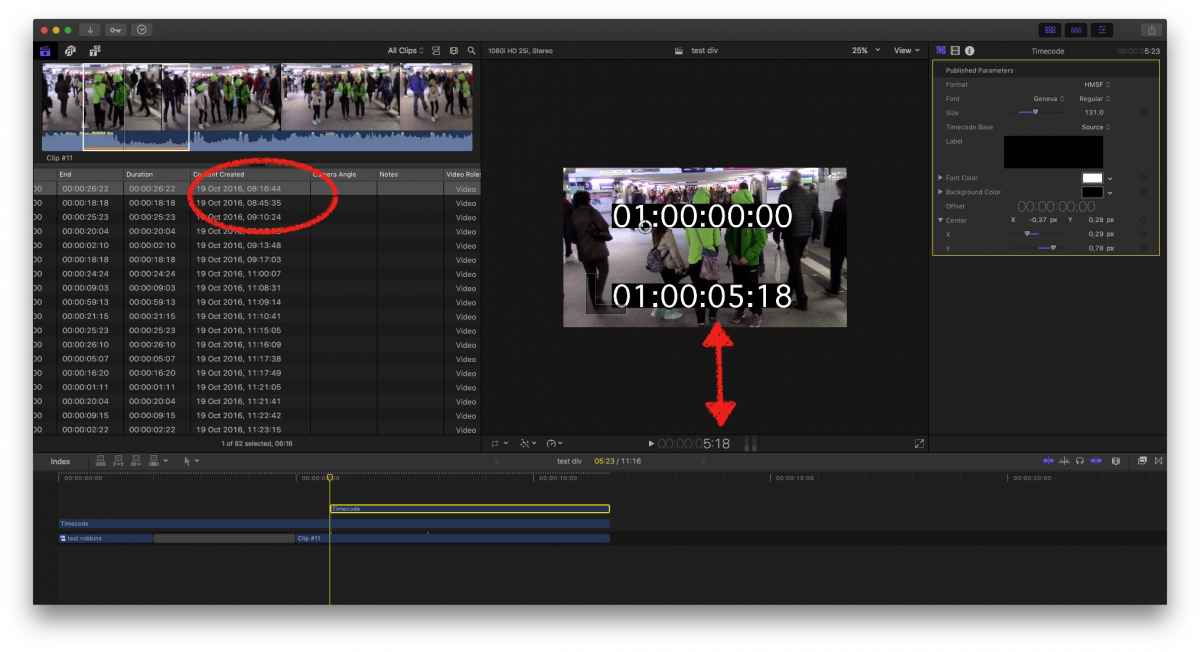
The 2nd, top one, does not read-out the clips Timestamp, which would have been 8:16, but the TC-Generators 'time', here at its start, somewhere in a project and a clip, 00:00 …
Both Gens are set to 'Source'…
Replied by Karsten Schlüter on topic Transform
FCPX.guru wrote:
No, I'm using it, and it is reading the clip's own source timecode.Tom Wolsky wrote: Source in the timecode generator means the source of the generator, so it starts at zero.
…
hmm, maybe a different one?
Mine behaves as Tom describes, have a look:
The 2nd, top one, does not read-out the clips Timestamp, which would have been 8:16, but the TC-Generators 'time', here at its start, somewhere in a project and a clip, 00:00 …
Both Gens are set to 'Source'…
Please Log in to join the conversation.
