


- Posts: 62
- Thank you received: 2
3 Post Moderation Rule for New Boarders (25 Jan 2021)
New boarders will have their posts moderated - Don't worry if you cannot see your post immediately.
Library Organisation Feedback
- gloryhornetboi
-
 Topic Author
- Offline
- Senior Member
-

Less
More
03 Feb 2017 17:40 #85451
by gloryhornetboi
Library Organisation Feedback was created by gloryhornetboi
Hi all, just would like some feedback, totally open to discussion on this one! Attached is a master template I've made for this years tour (I work for a band in the UK). My job requires me following the boys around the world, filming their lives and then putting together a massive amount of deliverables varying from 10 second teasers/bloopers to full feature films for DVD. My question is, how would you do it differently. I put together social media content from each location AND at the end of the tour make a doc film plus a highlight reel and more than likely a bloopers video which the fans love.
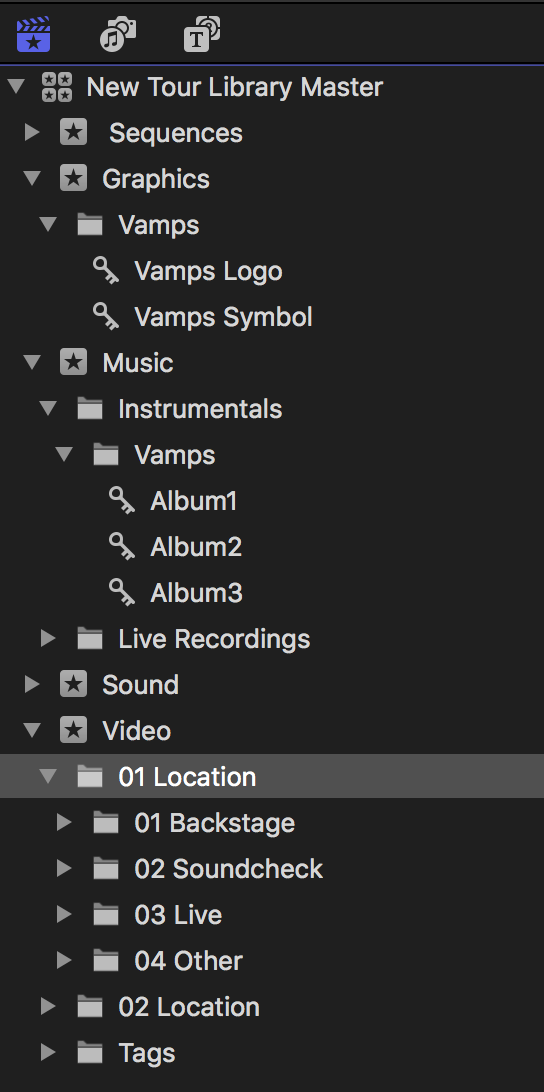
Inside the folders for each location, so for example in the 'Backstage' folder I'll have keywords like 'Catering' Dressing room' etc etc. I will also tag notes to video files that have different frame rates etc so it's all searchable.
Any advice etc would be great!
Inside the folders for each location, so for example in the 'Backstage' folder I'll have keywords like 'Catering' Dressing room' etc etc. I will also tag notes to video files that have different frame rates etc so it's all searchable.
Any advice etc would be great!
Please Log in to join the conversation.


03 Feb 2017 23:02 #85453
by JoeEditor
Replied by JoeEditor on topic Library Organisation Feedback
I would make an Event for each Location, title them "Location - [venue name]". Simply because the two digit numbers in front of everything is looking very confusing to me at first glance. If I don't immediately know what's what with a quick glance, it's not working for me. Personal rule of thumb. I'd keep everything specific to that venue performance in that Event. It's no big deal to add clips to a Project from another Event. FCPX won't duplicate files on your drive.
Please Log in to join the conversation.
04 Feb 2017 00:50 #85455
by spurratic
Replied by spurratic on topic Library Organisation Feedback
Personally I would make the library represent the tour, and then en event for each tour stop (city, venue, etc)
Then in each event I would create smart collections and keyword collections and begin keywording each band member by name, and keywords like 'on stage' 'backstage', etc.
I wouldn't have a separate event for graphics or for sound, rather I would just have smart collections to pull 'images' 'audio' and copy those collections to each new event.
The main reason I would do it this way is to keep the media from each date together.....as that would seem to be the most important organization standpoint.....to not mix up footage from one city with footage from another.
But there's no wrong way, that's for sure.
Then in each event I would create smart collections and keyword collections and begin keywording each band member by name, and keywords like 'on stage' 'backstage', etc.
I wouldn't have a separate event for graphics or for sound, rather I would just have smart collections to pull 'images' 'audio' and copy those collections to each new event.
The main reason I would do it this way is to keep the media from each date together.....as that would seem to be the most important organization standpoint.....to not mix up footage from one city with footage from another.
But there's no wrong way, that's for sure.
Please Log in to join the conversation.
04 Feb 2017 03:53 #85461
by JoeEditor
Replied by JoeEditor on topic Library Organisation Feedback
To add; I also make an Event called "Production Staples". These are the staples of my production such as graphics used over and over or photos or other media used repeatedly that do not really pertain to one specific day or location of production. Like logos and such.
I also make a new Category for my Motion content when I do my lower thirds, openings, bumpers, etc, for a specific production. That way when I go into my titles, I find the custom stuff for that specific production in one easy to locate collection.
I also make a new Category for my Motion content when I do my lower thirds, openings, bumpers, etc, for a specific production. That way when I go into my titles, I find the custom stuff for that specific production in one easy to locate collection.
Please Log in to join the conversation.
- gloryhornetboi
-
Topic Author
- Offline
- Senior Member
-
Less
More
- Posts: 62
- Thank you received: 2
04 Feb 2017 08:02 #85467
by gloryhornetboi
Like this, much simpler, thanks!
Replied by gloryhornetboi on topic Library Organisation Feedback
FCPX.guru wrote: I would make an Event for each Location, title them "Location - [venue name]". Simply because the two digit numbers in front of everything is looking very confusing to me at first glance. If I don't immediately know what's what with a quick glance, it's not working for me. Personal rule of thumb. I'd keep everything specific to that venue performance in that Event. It's no big deal to add clips to a Project from another Event. FCPX won't duplicate files on your drive.
Like this, much simpler, thanks!
Please Log in to join the conversation.
- gloryhornetboi
-
Topic Author
- Offline
- Senior Member
-
Less
More
- Posts: 62
- Thank you received: 2
04 Feb 2017 08:07 #85468
by gloryhornetboi
The smart collections idea makes sense. I didn't realise you could copy smart collections! Thank you.
Replied by gloryhornetboi on topic Library Organisation Feedback
spurratic wrote: Personally I would make the library represent the tour, and then en event for each tour stop (city, venue, etc)
Then in each event I would create smart collections and keyword collections and begin keywording each band member by name, and keywords like 'on stage' 'backstage', etc.
I wouldn't have a separate event for graphics or for sound, rather I would just have smart collections to pull 'images' 'audio' and copy those collections to each new event.
The main reason I would do it this way is to keep the media from each date together.....as that would seem to be the most important organization standpoint.....to not mix up footage from one city with footage from another.
But there's no wrong way, that's for sure.
The smart collections idea makes sense. I didn't realise you could copy smart collections! Thank you.
Please Log in to join the conversation.
- gloryhornetboi
-
Topic Author
- Offline
- Senior Member
-
Less
More
- Posts: 62
- Thank you received: 2
04 Feb 2017 10:17 #85473
by gloryhornetboi
Replied by gloryhornetboi on topic Library Organisation Feedback
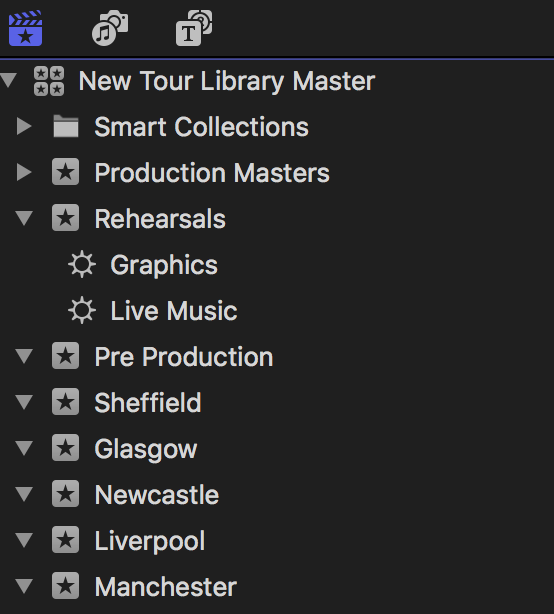
Definitely getting there...
Please Log in to join the conversation.
