


- Posts: 321
- Thank you received: 6
3 Post Moderation Rule for New Boarders (25 Jan 2021)
New boarders will have their posts moderated - Don't worry if you cannot see your post immediately.
To Roll or not to Roll
03 Feb 2017 08:02 #85421
by AppleGuru
To Roll or not to Roll was created by AppleGuru
I am really loving the Role function in FCPX. Except for one thing which is mind blowing that this function can be misinterpreted.
I have a project with subtitles... the English subtitles are assigned to English Title Role and the Spanish subtitles with the Spanish Title Role.
Thinking wow Apple made it easy for me to export each version by a click... wrong disabling Roles don't effect when exported.
You would expect to get what you see and hear on the export.
Any tips or suggestion or I might just leave out the Roles and start creating Project for each location.
I have a project with subtitles... the English subtitles are assigned to English Title Role and the Spanish subtitles with the Spanish Title Role.
Thinking wow Apple made it easy for me to export each version by a click... wrong disabling Roles don't effect when exported.
You would expect to get what you see and hear on the export.
Any tips or suggestion or I might just leave out the Roles and start creating Project for each location.
Please Log in to join the conversation.
- Tom Wolsky
-

- Offline
- Moderator
-

03 Feb 2017 08:16 #85422
by Tom Wolsky
Replied by Tom Wolsky on topic To Roll or not to Roll
You normally set the roles to export in the export module. Are you using a specific share function that doesn't access this?
Please Log in to join the conversation.
03 Feb 2017 09:47 #85426
by AppleGuru
Replied by AppleGuru on topic To Roll or not to Roll
But this function is only available for Multi-Track-QT wanting export h.264 or for the net.
Please Log in to join the conversation.
- ronny courtens
-

- Offline
- Moderator
-
Less
More
- Posts: 4455
- Thank you received: 962
03 Feb 2017 10:47 #85429
by ronny courtens
Replied by ronny courtens on topic To Roll or not to Roll
The ability to turn certain Roles off or on is very useful if you want to temporarily hide a certain Role when working in the Timeline. In your case you have Spanish subtitles stacked upon English subtitles. If you only want to watch the edit with English subtitles, being able to turn the Spanish subtitles off all at once by turning off the Spanish subtitle Role comes in very handy.
But turning a Role off is only for viewing purposes, it does not actually disable the Role when you export the timeline.
To disable all Spanish subtitle clips so they don't appear in the exported file: select the Spanish subtitle Role (which will highlight all Spanish subtitle clips on the timeline), then group-select the highlighted clips and press V. Now when you export the timeline your exported file will not show the Spanish subtitles.
- Ronny
But turning a Role off is only for viewing purposes, it does not actually disable the Role when you export the timeline.
To disable all Spanish subtitle clips so they don't appear in the exported file: select the Spanish subtitle Role (which will highlight all Spanish subtitle clips on the timeline), then group-select the highlighted clips and press V. Now when you export the timeline your exported file will not show the Spanish subtitles.
- Ronny
Please Log in to join the conversation.
- Tom Wolsky
-
- Offline
- Moderator
-
03 Feb 2017 11:29 - 03 Feb 2017 11:40 #85435
by Tom Wolsky
Replied by Tom Wolsky on topic To Roll or not to Roll
The problem is you don't want multiple audio tracks is that right?
Last edit: 03 Feb 2017 11:40 by Tom Wolsky.
Please Log in to join the conversation.
- Tom Wolsky
-
- Offline
- Moderator
-
03 Feb 2017 11:35 #85437
by Tom Wolsky
Replied by Tom Wolsky on topic To Roll or not to Roll
How do you group select the hightlighted clips Ronny? It would be nice if the hightlight could also be made a selection function, perhaps with a modifier key.
Please Log in to join the conversation.
- ronny courtens
-
- Offline
- Moderator
-
Less
More
- Posts: 4455
- Thank you received: 962
03 Feb 2017 12:11 #85439
by ronny courtens
Replied by ronny courtens on topic To Roll or not to Roll
I just select the Role, which will highlight all clips. That makes it easy to range-select them or just select the first one and Shift-select the last one.
I agree it would be very handy if selecting a Role would automatically select all clips belonging to that Role in the Timeline, instead of just highlighting them. This would e.g. allow you to just select the Role and press V to disable all clips belonging to that Role, or to make other changes to those clips all at once. This would vastly enhance the functionality of Roles. I have asked for this feature enhancement many times, hopefully we will see it in a next update.
- Ronny
I agree it would be very handy if selecting a Role would automatically select all clips belonging to that Role in the Timeline, instead of just highlighting them. This would e.g. allow you to just select the Role and press V to disable all clips belonging to that Role, or to make other changes to those clips all at once. This would vastly enhance the functionality of Roles. I have asked for this feature enhancement many times, hopefully we will see it in a next update.
- Ronny
Please Log in to join the conversation.
- Andreas Kiel
-

- Offline
- Platinum Member
-

Less
More
- Posts: 1077
- Thank you received: 189
03 Feb 2017 15:42 - 03 Feb 2017 15:44 #85446
by Andreas Kiel
Replied by Andreas Kiel on topic To Roll or not to Roll
Kind of funny - I asked more or less the same question at the Final Cut Pro X Virtual User Group last night.
While my personal opinion is that FCP is the best (most flexible) NLE to work with - the finish is poor! Meanwhile probably every user knows that roles are essential, Apple's implementation for subtitles is pretty poor.
Roles are nice and somehow needed to keep track of languages - but that's it!
To export as multi-track QT doesn't help in any way.
To create a multi-lang subtitled movie you need 3rd party tools. All these (2) available tools need XML for that. Except you want to create a movie for each language.
Just to be complete - in short and rough.
The format of the result depends on the use (publishing platform).
While the US users think .scc rules the world, other people probably will think different.
Standard for web is the obsolete .srt format while some other formats are excepted. If you go the iTunes way it gets a bit more complicated.
Broadcast is embedded .scc in North America. This will be accepted in Mexico, in Japan (while Japan need a non standard code paging) and some parts of South America and also by some other countries - even though it needs to be converted.
Europe and the other 25er accept EBU.stl.
Both of the latter 2 formats are obsolete but still in use.
Nowadays all countries (dependent on station) will accept EBU XML (TTML).
Digital Cinema needs DCP - either interop or SMPTE. In case you use dcpomatic .srt will work as well.
Standard DVD/Bluray authoring packages on MAC are all discontinued.
Answering Ben's original question: No way.
@ Ronny "hopefully we will see it in a next update" (and rest of us): The hope dies last.
Signed by someone who knows what he is talking about
While my personal opinion is that FCP is the best (most flexible) NLE to work with - the finish is poor! Meanwhile probably every user knows that roles are essential, Apple's implementation for subtitles is pretty poor.
Roles are nice and somehow needed to keep track of languages - but that's it!
To export as multi-track QT doesn't help in any way.
To create a multi-lang subtitled movie you need 3rd party tools. All these (2) available tools need XML for that. Except you want to create a movie for each language.
Just to be complete - in short and rough.
The format of the result depends on the use (publishing platform).
While the US users think .scc rules the world, other people probably will think different.
Standard for web is the obsolete .srt format while some other formats are excepted. If you go the iTunes way it gets a bit more complicated.
Broadcast is embedded .scc in North America. This will be accepted in Mexico, in Japan (while Japan need a non standard code paging) and some parts of South America and also by some other countries - even though it needs to be converted.
Europe and the other 25er accept EBU.stl.
Both of the latter 2 formats are obsolete but still in use.
Nowadays all countries (dependent on station) will accept EBU XML (TTML).
Digital Cinema needs DCP - either interop or SMPTE. In case you use dcpomatic .srt will work as well.
Standard DVD/Bluray authoring packages on MAC are all discontinued.
Answering Ben's original question: No way.
@ Ronny "hopefully we will see it in a next update" (and rest of us): The hope dies last.
Signed by someone who knows what he is talking about
Last edit: 03 Feb 2017 15:44 by Andreas Kiel.
Please Log in to join the conversation.
- ronny courtens
-
- Offline
- Moderator
-
Less
More
- Posts: 4455
- Thank you received: 962
05 Feb 2017 20:37 #85501
by ronny courtens
Replied by ronny courtens on topic To Roll or not to Roll
Just a quick but important correction:
Actually you CAN use the multi-track QT Share destination to export discrete language versions with burnt-in subtitles based on Title Roles.
1. Assign a Spanish Title Role to your Spanish subtitles, and an English Title Role to your English subtitles.
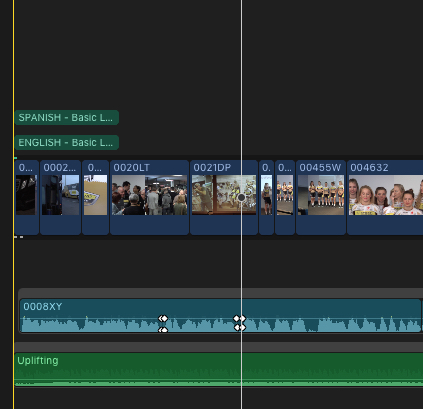
2. No need to select or disable anything.
Just press the Share button and select Master File, then Press the Settings button and use the following settings to export an H.264 movie with English subtitles only:
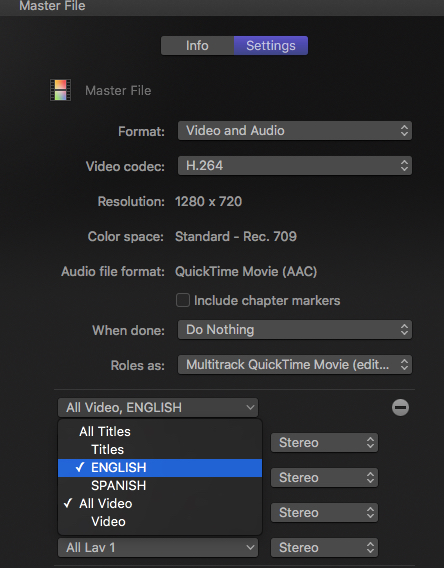
Your exported video will only show the English subtitles.
- Ronny
Actually you CAN use the multi-track QT Share destination to export discrete language versions with burnt-in subtitles based on Title Roles.
1. Assign a Spanish Title Role to your Spanish subtitles, and an English Title Role to your English subtitles.
2. No need to select or disable anything.
Just press the Share button and select Master File, then Press the Settings button and use the following settings to export an H.264 movie with English subtitles only:
Your exported video will only show the English subtitles.
- Ronny
Please Log in to join the conversation.
- Tom Wolsky
-
- Offline
- Moderator
-
05 Feb 2017 20:51 #85502
by Tom Wolsky
Replied by Tom Wolsky on topic To Roll or not to Roll
I think that's what I was suggesting Ronnie. I thought the OP might be worried though about getting multiple tracks for audio. Not sure how you would do that: export selected video roles but collapse your audio roles on output so the files doesn't produce separate audio tracks.
Please Log in to join the conversation.
- Andreas Kiel
-
- Offline
- Platinum Member
-
Less
More
- Posts: 1077
- Thank you received: 189
05 Feb 2017 20:54 #85503
by Andreas Kiel
Replied by Andreas Kiel on topic To Roll or not to Roll
Ronny,
That's what I said above.
Ban said that he doesn't want that.
That's what I said above.
Ban said that he doesn't want that.
Please Log in to join the conversation.
- ronny courtens
-
- Offline
- Moderator
-
Less
More
- Posts: 4455
- Thank you received: 962
05 Feb 2017 21:06 #85504
by ronny courtens
Replied by ronny courtens on topic To Roll or not to Roll
@Tom:
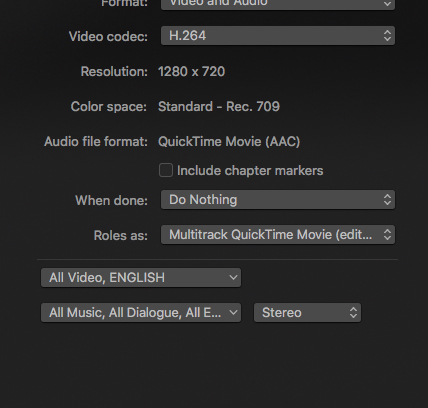
Assign all audio Roles to one Stereo track in the export settings and all the audio will be mixed down in the export.
@Andreas:
Ben said (quote) But this function is only available for Multi-Track-QT wanting export h.264 or for the net.
So he wants to export H.264 for the net, which is perfectly possible when you export as Multi-Track QT using the settings I describe.
- Ronny
Assign all audio Roles to one Stereo track in the export settings and all the audio will be mixed down in the export.
@Andreas:
Ben said (quote) But this function is only available for Multi-Track-QT wanting export h.264 or for the net.
So he wants to export H.264 for the net, which is perfectly possible when you export as Multi-Track QT using the settings I describe.
- Ronny
Please Log in to join the conversation.
- Tom Wolsky
-
- Offline
- Moderator
-
05 Feb 2017 21:12 #85505
by Tom Wolsky
Replied by Tom Wolsky on topic To Roll or not to Roll
Thanks Ronny.
BTW, could you look in your Profile and see if you're having a problem doing things like setting profile picture.
BTW, could you look in your Profile and see if you're having a problem doing things like setting profile picture.
Please Log in to join the conversation.
- Andreas Kiel
-
- Offline
- Platinum Member
-
Less
More
- Posts: 1077
- Thank you received: 189
05 Feb 2017 21:16 #85506
by Andreas Kiel
Replied by Andreas Kiel on topic To Roll or not to Roll
Sorry I misunderstood Ben's intention.
Please Log in to join the conversation.
- ronny courtens
-
- Offline
- Moderator
-
Less
More
- Posts: 4455
- Thank you received: 962
05 Feb 2017 21:23 #85507
by ronny courtens
Replied by ronny courtens on topic To Roll or not to Roll
Tom, I have checked my Profile settings and there are indeed issues if you want to make changes. I will ask Peter to look into this. Thanks for pointing us to the problem.
- Ronny
- Ronny
Please Log in to join the conversation.
