


- Posts: 7
- Thank you received: 0
3 Post Moderation Rule for New Boarders (25 Jan 2021)
New boarders will have their posts moderated - Don't worry if you cannot see your post immediately.
How to add areas of shading or highlight part of a clip
03 Feb 2017 06:21 #85420
by Pete B
How to add areas of shading or highlight part of a clip was created by Pete B
Hi everyone.
I'm new to Final Cut Pro. I'm a photographer and am interested in getting into drone video work, primarily for Real Estate. One of the things I need to master is showing the property boundary, and shading the highlighted area. I'm hoping I can do this so that the highlighted/shaded area can move as the clip gets closer or further away from the property. Does anyone know if this is possible in FCP. I'm guessing I may need a plugin but I'm struggling to find something. Any ideas?
Cheers.
Pete.
I'm new to Final Cut Pro. I'm a photographer and am interested in getting into drone video work, primarily for Real Estate. One of the things I need to master is showing the property boundary, and shading the highlighted area. I'm hoping I can do this so that the highlighted/shaded area can move as the clip gets closer or further away from the property. Does anyone know if this is possible in FCP. I'm guessing I may need a plugin but I'm struggling to find something. Any ideas?
Cheers.
Pete.
Please Log in to join the conversation.

03 Feb 2017 10:47 #85430
by Overturf
Replied by Overturf on topic How to add areas of shading or highlight part of a clip
Hi Pete!
There are several easy ways to do this in FCPX without a plug-in. You can do a color correction for example. Use a shape mask and lower the exposure outside of the mask. The mask can then be keyframed.
Hope this helps!
There are several easy ways to do this in FCPX without a plug-in. You can do a color correction for example. Use a shape mask and lower the exposure outside of the mask. The mask can then be keyframed.
Hope this helps!
Please Log in to join the conversation.

03 Feb 2017 11:23 #85434
by ianstubbs
Replied by ianstubbs on topic How to add areas of shading or highlight part of a clip
Hi Pete,
overturf is right and you can also do this with any of the filters available. Depending on how complex the boundary is and how smooth, or otherwise, the drone movement is, you may want to use a plugin to track the area and keep the mask locked to it. In this case I'd have a look at Slice-X from CoreMelt.com. They have training and demo material so you can get an idea whether it fits your issue.
Good luck with it,
Ian.
overturf is right and you can also do this with any of the filters available. Depending on how complex the boundary is and how smooth, or otherwise, the drone movement is, you may want to use a plugin to track the area and keep the mask locked to it. In this case I'd have a look at Slice-X from CoreMelt.com. They have training and demo material so you can get an idea whether it fits your issue.
Good luck with it,
Ian.
Please Log in to join the conversation.
03 Feb 2017 11:41 #85438
by Pete B
Replied by Pete B on topic How to add areas of shading or highlight part of a clip
Thanks so much Overturf and Ian. Much appreciated. Will look into both of your suggestions.
Cheers.
Pete.
Cheers.
Pete.
Please Log in to join the conversation.

03 Feb 2017 17:20 #85450
by bogiesan
Replied by bogiesan on topic How to add areas of shading or highlight part of a clip
There are many thousands of real estate firms using aerial platforms for sales and marketing. It's a huge part of the property business with user groups and conventions. It's almost all been invented and there are lots of folks willing to train you or to sell you their services and plugins.
You don't need to struggle through this on your own. Just be careful how much you invest and have a good plan to recover your money.
You don't need to struggle through this on your own. Just be careful how much you invest and have a good plan to recover your money.
Please Log in to join the conversation.
04 Feb 2017 05:00 #85463
by Pete B
Replied by Pete B on topic How to add areas of shading or highlight part of a clip
Thanks Bogiesan.
You're right. Using drones for Real Estate is becoming pretty big. I do a reasonable amount of Real Estate photography, maybe two or three homes a week, but I want to do do more. I want to be the full package so I'm learning how to use the drone and edit the footage. I'm really enjoying it. Its been a long time since something photographically related has got me excited!
You're right. Using drones for Real Estate is becoming pretty big. I do a reasonable amount of Real Estate photography, maybe two or three homes a week, but I want to do do more. I want to be the full package so I'm learning how to use the drone and edit the footage. I'm really enjoying it. Its been a long time since something photographically related has got me excited!
Please Log in to join the conversation.
- Karsten Schlüter
-

- Offline
- Moderator
-

Less
More
- Posts: 3790
- Thank you received: 718
04 Feb 2017 06:57 #85464
by Karsten Schlüter
Replied by Karsten Schlüter on topic How to add areas of shading or highlight part of a clip
Hi Pete,
to elaborate the already given answers, there're some (minor) hurdles to go … for a beginner...
Method #1
color-mask...
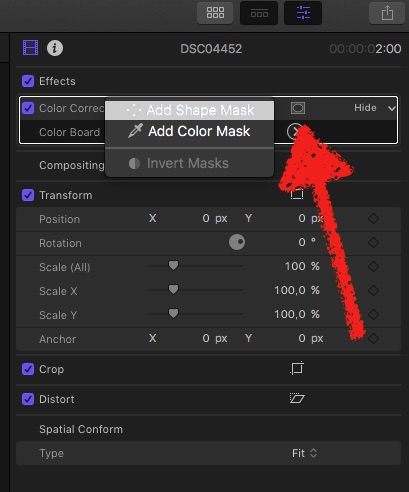
After applying the Colour-Correction effect, no 'masking' to see! … you have to hover over the title of that effect in the Inspector, to make the. button appear; then, choose Shape Mask
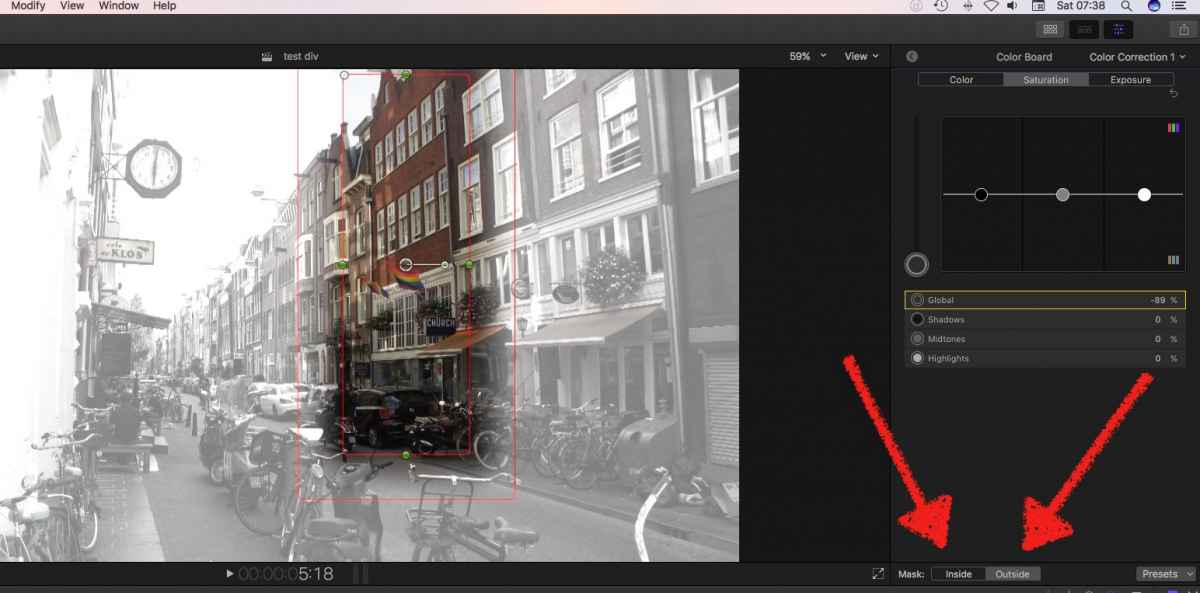
… then an OnScreen Interface appears; in the Inspector you have to choose wether the effect takes place in- or outside the mask.
Method #2
draw-mask
asks for a 'doubled' version of the clip - hint: opt-drag clip to upper lane.
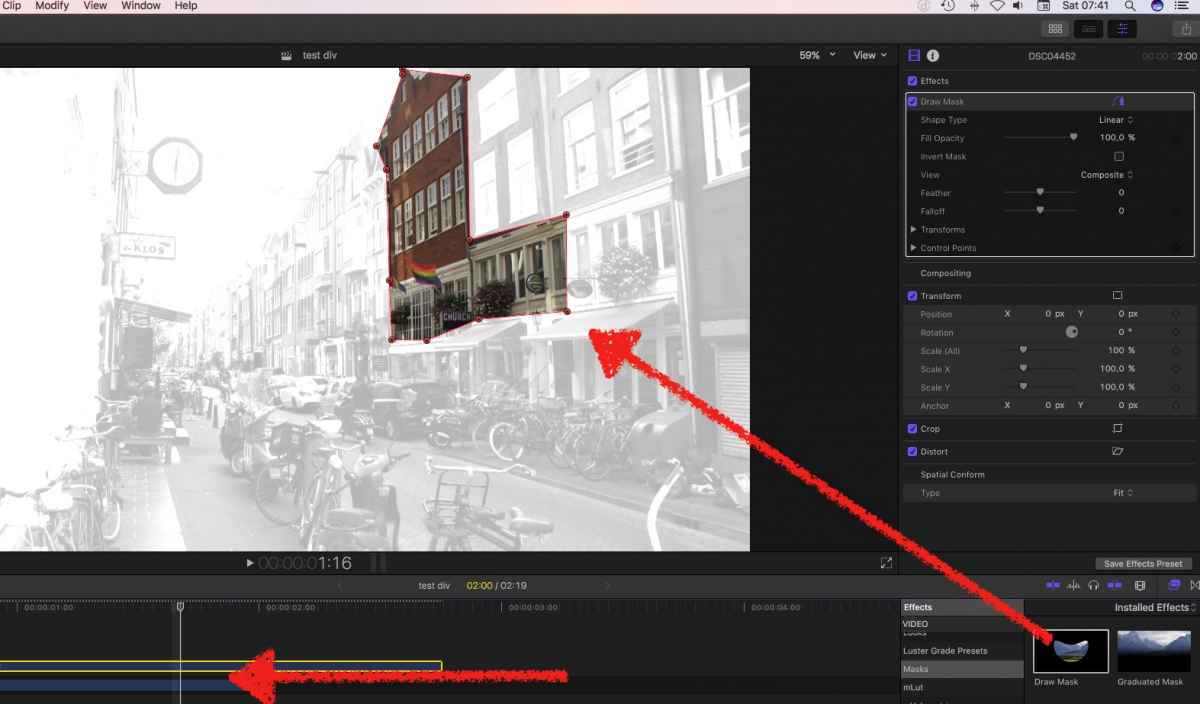
Apply Draw Mask to upper, apply color-correction two lower.
Allows more complex shapes than just rectangular …
Method #3
tracked shapes and masks
If you content moves, you have to animate the Mask - you can keyframe the points (a bit … inconvenient), or use a $$$ 3rd party tool, well known DriveX:
to elaborate the already given answers, there're some (minor) hurdles to go … for a beginner...
Method #1
color-mask...
After applying the Colour-Correction effect, no 'masking' to see! … you have to hover over the title of that effect in the Inspector, to make the. button appear; then, choose Shape Mask
… then an OnScreen Interface appears; in the Inspector you have to choose wether the effect takes place in- or outside the mask.
Method #2
draw-mask
asks for a 'doubled' version of the clip - hint: opt-drag clip to upper lane.
Apply Draw Mask to upper, apply color-correction two lower.
Allows more complex shapes than just rectangular …
Method #3
tracked shapes and masks
If you content moves, you have to animate the Mask - you can keyframe the points (a bit … inconvenient), or use a $$$ 3rd party tool, well known DriveX:
Please Log in to join the conversation.
04 Feb 2017 13:14 #85475
by Pete B
Replied by Pete B on topic How to add areas of shading or highlight part of a clip
Wow. Thanks for your information Karsten. I think the Drive X plugin will be the way to go.
Cheers.
Pete.
Cheers.
Pete.
Please Log in to join the conversation.
07 Feb 2017 10:48 #85542
by Pete B
Replied by Pete B on topic How to add areas of shading or highlight part of a clip
Thanks again Karsten for your previous advise. I have another question for you.
As mentioned I'm trying to get into drone video work for real estate to compliment my photography. I'm doing a few freebie test runs for a client and when I compare my work to one of my competitors it looks soft in comparison. When comparing in FCP to the quick time example of my competitor, they look similar in sharpness (although his is still sharper). When I export the video as a quick time movie it looks noticeably soft in comparison. I have tried exporting as both "Apple ProRes422" and "H.264" and both versions look soft. I shot the footage at 24fps with a shutter speed varying between varying between a 50th and 100th of a second , as an MP4 at 3840x2160 and modified the settings to 1280x720 after importing and editing.
Thank you for your time.
Pete.
As mentioned I'm trying to get into drone video work for real estate to compliment my photography. I'm doing a few freebie test runs for a client and when I compare my work to one of my competitors it looks soft in comparison. When comparing in FCP to the quick time example of my competitor, they look similar in sharpness (although his is still sharper). When I export the video as a quick time movie it looks noticeably soft in comparison. I have tried exporting as both "Apple ProRes422" and "H.264" and both versions look soft. I shot the footage at 24fps with a shutter speed varying between varying between a 50th and 100th of a second , as an MP4 at 3840x2160 and modified the settings to 1280x720 after importing and editing.
Thank you for your time.
Pete.
Please Log in to join the conversation.
- Karsten Schlüter
-
- Offline
- Moderator
-
Less
More
- Posts: 3790
- Thank you received: 718
07 Feb 2017 11:01 #85543
by Karsten Schlüter
I've seen your other post, Pete, and for cosmetics & tidiness of this board, let's keep this thread on its topic and the other for the other one. OK?
Replied by Karsten Schlüter on topic How to add areas of shading or highlight part of a clip
Pete B wrote: Thanks again Karsten for your previous advise. I have another question for you.….
I've seen your other post, Pete, and for cosmetics & tidiness of this board, let's keep this thread on its topic and the other for the other one. OK?
Please Log in to join the conversation.
07 Feb 2017 12:35 #85545
by Pete B
Replied by Pete B on topic How to add areas of shading or highlight part of a clip
Sure thing Karsten. I'm new to forums so not sure on all of the etiquette. Cheers.
Please Log in to join the conversation.
