


- Posts: 164
- Thank you received: 0
3 Post Moderation Rule for New Boarders (25 Jan 2021)
New boarders will have their posts moderated - Don't worry if you cannot see your post immediately.
textkeyframe
- Schwalbach
-
 Topic Author
- Offline
- Elite Member
-

Less
More
02 Feb 2017 09:47 #85397
by Schwalbach
textkeyframe was created by Schwalbach
hi,
why can't I key frame the text settings such as: font size, vertical alignment, tracking etc?
couldn't this be dome prior to 10.3.2?
thanks
joni
why can't I key frame the text settings such as: font size, vertical alignment, tracking etc?
couldn't this be dome prior to 10.3.2?
thanks
joni
Please Log in to join the conversation.
- Tom Wolsky
-

- Offline
- Moderator
-

02 Feb 2017 09:56 #85399
by Tom Wolsky
Replied by Tom Wolsky on topic textkeyframe
No. Only function available in the Title inspector are keyframable.
Please Log in to join the conversation.
- Karsten Schlüter
-

- Offline
- Moderator
-
Less
More
- Posts: 3790
- Thank you received: 718
02 Feb 2017 10:53 #85402
by Karsten Schlüter
Replied by Karsten Schlüter on topic textkeyframe
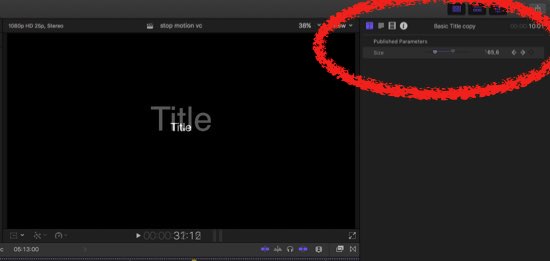
What you can do is, open a copy of your preferred Title in Motion, and Publish the parameters…which make then keyframe-able
Please Log in to join the conversation.
- Schwalbach
-
Topic Author
- Offline
- Elite Member
-
Less
More
- Posts: 164
- Thank you received: 0
03 Feb 2017 15:35 #85445
by Schwalbach
Replied by Schwalbach on topic textkeyframe
Thank you.
Although I have tried publishing these parameters in Motion, then save them, I don't are not appearing in FCPX. I have tried everything, inserting a new instance of the text, re-staring FCPX etc.
any advice
Although I have tried publishing these parameters in Motion, then save them, I don't are not appearing in FCPX. I have tried everything, inserting a new instance of the text, re-staring FCPX etc.
any advice
Please Log in to join the conversation.
- Karsten Schlüter
-
- Offline
- Moderator
-
Less
More
- Posts: 3790
- Thank you received: 718
03 Feb 2017 16:04 #85447
by Karsten Schlüter
as an example…
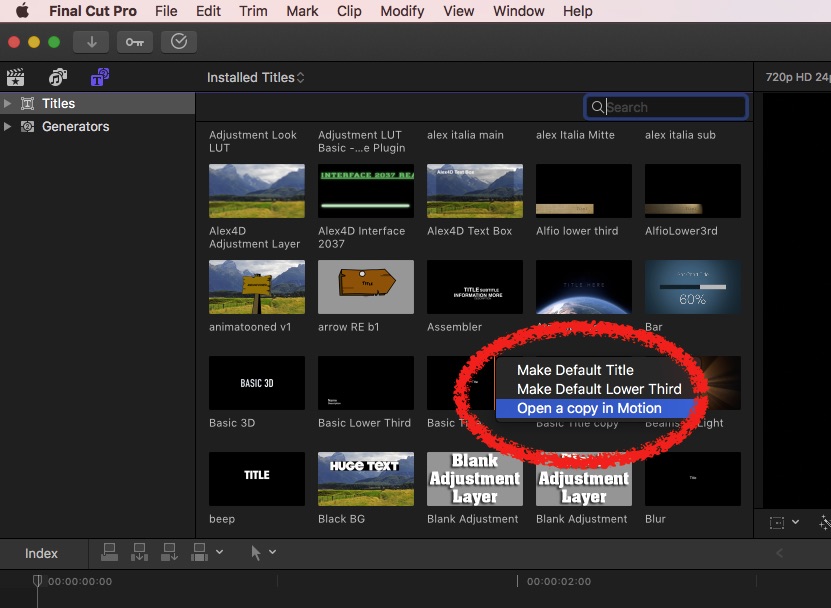
right-click on BASIC Title, choose 'Open Copy in Motion'
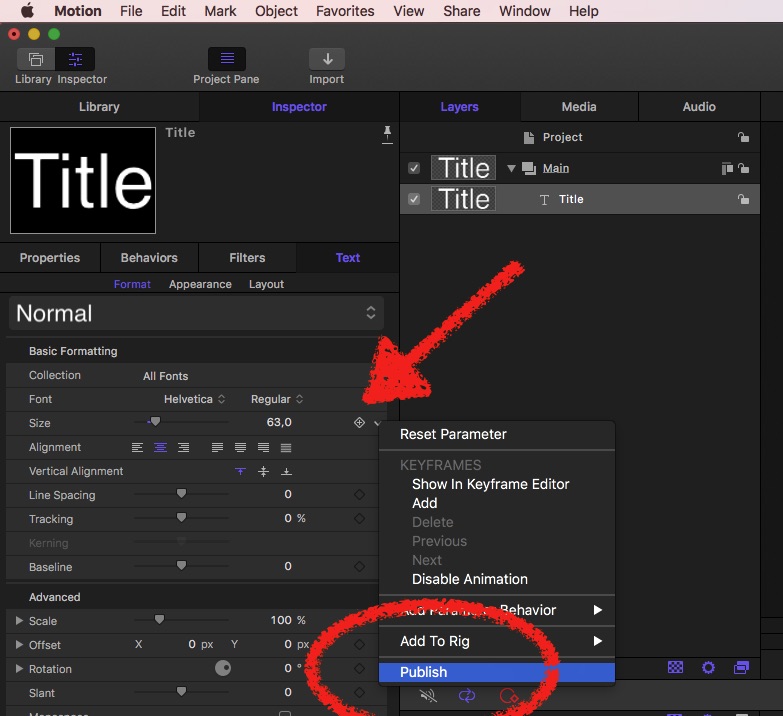
in Motion, PUBLISH the parameters you like to keyframe, here: Font Size
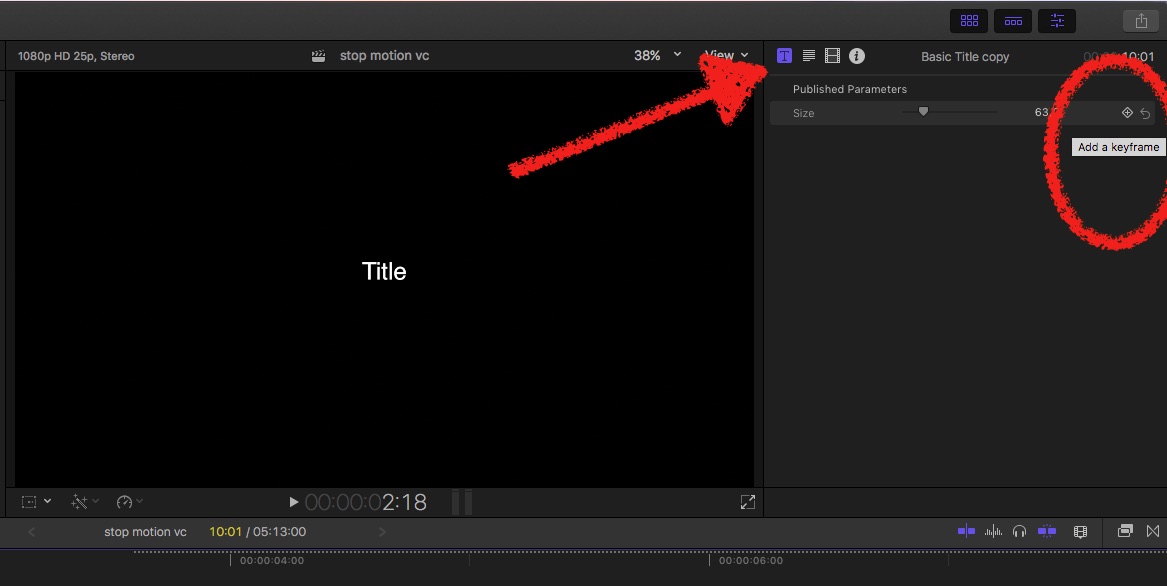
Last step: in FCPX, the keyframe-button does NOT appear in the font-settings, but in the Published Parameters!
Replied by Karsten Schlüter on topic textkeyframe
Schwalbach wrote: … Although I have tried publishing these parameters in Motion, then save them, I don't are not appearing in FCPX. I have tried everything, inserting a new instance of the text, re-staring FCPX etc.
any advice
as an example…
right-click on BASIC Title, choose 'Open Copy in Motion'
in Motion, PUBLISH the parameters you like to keyframe, here: Font Size
Last step: in FCPX, the keyframe-button does NOT appear in the font-settings, but in the Published Parameters!
Please Log in to join the conversation.
03 Feb 2017 17:03 #85448
by bogiesan
Replied by bogiesan on topic textkeyframe
Animating text size is not a good idea. Neither is vertical alignment. Tracking is easily animated using a properly published Motion text file or a text plugin. You change text size using scale. You change vertical alignment by animating positions of text elements.
Please Log in to join the conversation.
