


- Posts: 7
- Thank you received: 0
3 Post Moderation Rule for New Boarders (25 Jan 2021)
New boarders will have their posts moderated - Don't worry if you cannot see your post immediately.
simple soft borders around cropped pic on pic
26 Jan 2017 11:56 #85207
by uli
simple soft borders around cropped pic on pic was created by uli
Hi there, I am on FCPX 10.3 now - and I can´t find the solution anymore I used to have for following topic: I crop a picture, resize and compose it on the main layer. I want to soften the borders of the cropped pic. How in 10.3?? THX for help!!! uli
Please Log in to join the conversation.
- Karsten Schlüter
-

- Offline
- Moderator
-

Less
More
- Posts: 3790
- Thank you received: 718
26 Jan 2017 12:14 #85208
by Karsten Schlüter
Replied by Karsten Schlüter on topic simple soft borders around cropped pic on pic
Welcome, Uli, to fcp.co 
Instead of using Crop tools, apply a Shape Mask, which offers a 'feather' setting
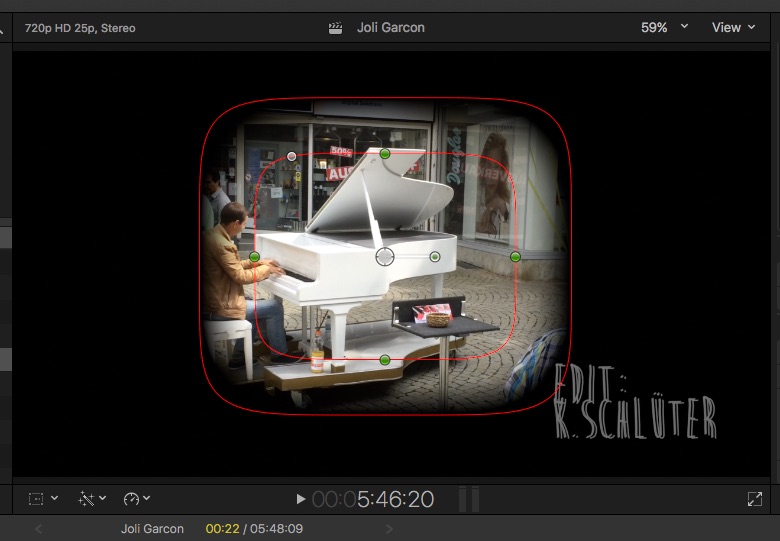
uli wrote: … want to soften the borders of the cropped pic.…
Instead of using Crop tools, apply a Shape Mask, which offers a 'feather' setting
Please Log in to join the conversation.
26 Jan 2017 12:27 #85210
by uli
Replied by uli on topic simple soft borders around cropped pic on pic
I saw that as well, but my crop is different regarding sizing of the original (see pic)

Please Log in to join the conversation.


26 Jan 2017 13:11 #85212
by anickt
Replied by anickt on topic simple soft borders around cropped pic on pic
Tokyo PiPinator on fxfactory is well worth the investment for this kind of thing and a lot more.
Please Log in to join the conversation.
30 Jan 2017 13:15 #85305
by uli
Replied by uli on topic simple soft borders around cropped pic on pic
but there was another feather- solution inside FCPX - did they move it somewhere or did they delete it of FCPX in the update??
Please Log in to join the conversation.
30 Jan 2017 14:02 #85307
by uli
Replied by uli on topic simple soft borders around cropped pic on pic
omg, I just tried it again after I saw the green handles on the pic you posted: you can actually rezize and later transform it! It never showed the handles upfont when I tried it - because I had the transformation too on before: you have to de-activate the transformation/do it in the second step, otherwise it does not show the handles to work on the picture! THX, heled me a lot!!
Please Log in to join the conversation.
