


- Posts: 6
- Thank you received: 0
3 Post Moderation Rule for New Boarders (25 Jan 2021)
New boarders will have their posts moderated - Don't worry if you cannot see your post immediately.
Can't deinterlace h264 footage
19 Jan 2017 12:51 #84966
by Ignatius
Can't deinterlace h264 footage was created by Ignatius
Hi there first post here; thanks for making this available —
I've got h264 footage, appearing as interlaced. I exported in Prores 422 to edit in FCP, but I can't seem to be able to deinterlace it whatever I tried. I tried deinterlacing after an FCP export, or from the h264 file using MPEG Streamclip; no luck. Any idea? I thought I could try to export as 720i somehow, so I could deinterlace from there?
Thanks a lot in advance.
I've got h264 footage, appearing as interlaced. I exported in Prores 422 to edit in FCP, but I can't seem to be able to deinterlace it whatever I tried. I tried deinterlacing after an FCP export, or from the h264 file using MPEG Streamclip; no luck. Any idea? I thought I could try to export as 720i somehow, so I could deinterlace from there?
Thanks a lot in advance.
Please Log in to join the conversation.
19 Jan 2017 15:32 #84974
by Ignatius
Replied by Ignatius on topic Can't deinterlace h264 footage
Update: I tried encoding to 1080i in Compressor, then tried deinterlacing using MPEG Steamclip o Handbrake, that didn't work.
I also tried creating a 1080i project in FCP, then export in h.264, still no luck.
Any other idea? Many TIA's.
I also tried creating a 1080i project in FCP, then export in h.264, still no luck.
Any other idea? Many TIA's.
Please Log in to join the conversation.
- Karsten Schlüter
-

- Offline
- Moderator
-

Less
More
- Posts: 3790
- Thank you received: 718
19 Jan 2017 15:34 #84975
by Karsten Schlüter
Replied by Karsten Schlüter on topic Can't deinterlace h264 footage
Welcome, Adrien, to fcp.co 
A) 'appearing' like interlaced doesn't mean necessarily, it IS interlaced. Select a clip, and have a look in the Inspector - what does it tell about the format?
If is 'manually' transcoded, with some 3rd party software, it could be, the interlacing is baked in - 'lines' in a progressive frame = no chance to get rid of that.
 if it is Interlaced (25i/30i) then, same Inspector, switch it to Settings:
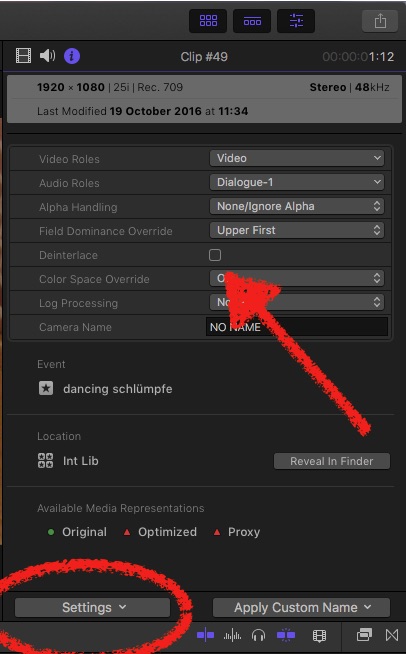
… then check the Deinterlace box
Ignatius wrote: … I've got h264 footage, appearing as interlaced.… …
A) 'appearing' like interlaced doesn't mean necessarily, it IS interlaced. Select a clip, and have a look in the Inspector - what does it tell about the format?
If is 'manually' transcoded, with some 3rd party software, it could be, the interlacing is baked in - 'lines' in a progressive frame = no chance to get rid of that.
if it is Interlaced (25i/30i) then, same Inspector, switch it to Settings:
… then check the Deinterlace box
Please Log in to join the conversation.
19 Jan 2017 15:44 #84976
by Ignatius
Replied by Ignatius on topic Can't deinterlace h264 footage
Thanks a lot for your reply. Yes, it appears that they encoded an interlaced signal into progressive without deinterlacing. So it's h264, progressive, with interlacing lines... I tried enconding in to 1080i with Compressor, then deinterlacing in Handbrake or MPEG SC, no luck... Same with dropping a clip to an FCP 1080i timeline.
So there's no way to work around interlacing lines within progressive material?...
So there's no way to work around interlacing lines within progressive material?...
Please Log in to join the conversation.
- Karsten Schlüter
-
- Offline
- Moderator
-
Less
More
- Posts: 3790
- Thank you received: 718
20 Jan 2017 05:43 #85010
by Karsten Schlüter
Replied by Karsten Schlüter on topic Can't deinterlace h264 footage
… What comes to mind is to halve the resolution, … so, use Compressor to export to 720p, and drag that in your 1080 Project … in hope it 'catches' every second line = h.264 does NOT handle a 'frame' pixel-per-pixel, line-per-line, but in 'blocks' of 8x8, AND the colour-resolution is different to 1920x1080 and and and …
Give it a try. All you can do.
best practice, I don't have to tell you: try to get the Original material… smart, ey? LOL :S
Give it a try. All you can do.
best practice, I don't have to tell you: try to get the Original material… smart, ey? LOL :S
Please Log in to join the conversation.
20 Jan 2017 09:18 #85013
by Ignatius
Replied by Ignatius on topic Can't deinterlace h264 footage
Yes, I wish they knew better, just spent hours trying to work around this..
Thanks a lot for your input anyway.
Thanks a lot for your input anyway.
Please Log in to join the conversation.
- Karsten Schlüter
-
- Offline
- Moderator
-
Less
More
- Posts: 3790
- Thank you received: 718
20 Jan 2017 09:50 #85014
by Karsten Schlüter
Replied by Karsten Schlüter on topic Can't deinterlace h264 footage
… have you tried the 'shrink' option I suggested, reducing its res to 720p?
Share some feedback…
Just for future reference, if that could be a working de-tour ..............
Share some feedback…
Just for future reference, if that could be a working de-tour ..............
Please Log in to join the conversation.
20 Jan 2017 10:51 #85015
by Ignatius
Replied by Ignatius on topic Can't deinterlace h264 footage
Initial footage are 720p. I tried reducing to 640x360, then adding it to a 1080i timeline, besides the fact that I'm losing resolution, that didn't seem to fix the issue. I was on a tight deadline, so I had to deliver as is, and I explained what went wrong. I can't really do other tests right now, but I'm wiling to try other things, in case that happens again (and if that can help here). Thanks again.
Please Log in to join the conversation.
- Karsten Schlüter
-
- Offline
- Moderator
-
Less
More
- Posts: 3790
- Thank you received: 718
20 Jan 2017 10:58 #85016
by Karsten Schlüter
… and some 'smart' one converted that into 1080i?? omg
don't hurry, … just to feed my curiosity…
good luck with your project!
Replied by Karsten Schlüter on topic Can't deinterlace h264 footage
Ignatius wrote: Initial footage are 720p. ….
… and some 'smart' one converted that into 1080i?? omg
don't hurry, … just to feed my curiosity…
good luck with your project!
Please Log in to join the conversation.
20 Jan 2017 11:04 #85017
by Ignatius
Replied by Ignatius on topic Can't deinterlace h264 footage
No, I think they recorded out of 3 cams + a PowerPoint output within a mixer, they would switch signals live, then the output got recorded through a mixer. I think the cam signals where interlaced, and everything got captured in 720p (without deinterlacing). I wasn't there, just guessing (and was unable to talk to the guys who taped this...). But that's just one thing, another one is that the sound is muted during the initial 1h15mn (out of 4hrs)... I guess they were monitoring the master output, not what was being taped... then realized after one hour +...
Well...
Well...
Please Log in to join the conversation.
