


- Posts: 17
- Thank you received: 0
3 Post Moderation Rule for New Boarders (25 Jan 2021)
New boarders will have their posts moderated - Don't worry if you cannot see your post immediately.
transition and background
- michaelft77
-
 Topic Author
- Offline
- New Member
-

Less
More
18 Jan 2017 00:33 #84936
by michaelft77
transition and background was created by michaelft77
I am a music producer who has been producing a radio show for a client for the past three years using Apple Logic pro x.
She has moved into tv and asked me if I wanted to learn how to edit video and do her tv show…….. So, why not. Bought fcpx
and dove in…….. learning as I go
THE SITUATION:
I am doing a logo for the tv show and have been provided with a nice graphic that is transparent……… I have scored with music and am now doing some animation effects which is where i hit the bump in the road.
I have used an effective movement type transition on the logo…. the transition is called “ drop in” and is a standard fcpx movement transition. I have the effect and basically the whole cut the way I want it ….. timings etc…… now I want to put a background behind the whole video. Sadly the background is only visible when the drop in transition goes away……
Can I have a background on the logo during a movement transition?
She has moved into tv and asked me if I wanted to learn how to edit video and do her tv show…….. So, why not. Bought fcpx
and dove in…….. learning as I go
THE SITUATION:
I am doing a logo for the tv show and have been provided with a nice graphic that is transparent……… I have scored with music and am now doing some animation effects which is where i hit the bump in the road.
I have used an effective movement type transition on the logo…. the transition is called “ drop in” and is a standard fcpx movement transition. I have the effect and basically the whole cut the way I want it ….. timings etc…… now I want to put a background behind the whole video. Sadly the background is only visible when the drop in transition goes away……
Can I have a background on the logo during a movement transition?
Please Log in to join the conversation.
- Karsten Schlüter
-

- Offline
- Moderator
-

Less
More
- Posts: 3790
- Thank you received: 718
18 Jan 2017 06:44 #84939
by Karsten Schlüter
sure, …
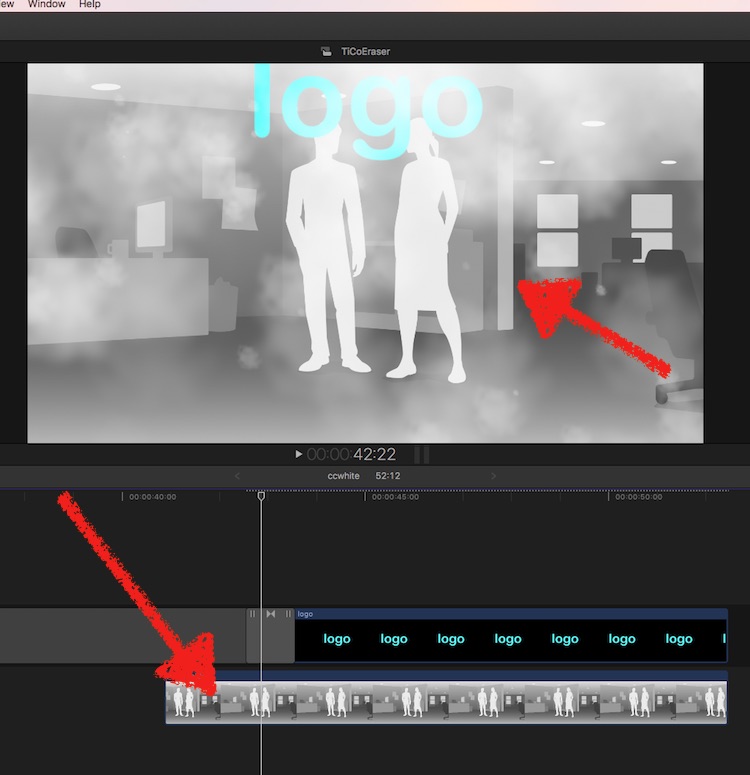
but depends on your arrangement of lanes, clips etc. Post a screenshot of your timeline …
Replied by Karsten Schlüter on topic transition and background
michaelft77 wrote: … Sadly the background is only visible when the drop in transition goes away……
Can I have a background on the logo during a movement transition?
sure, …
but depends on your arrangement of lanes, clips etc. Post a screenshot of your timeline …
Please Log in to join the conversation.
- michaelft77
-
Topic Author
- Offline
- New Member
-
Less
More
- Posts: 17
- Thank you received: 0
18 Jan 2017 15:19 #84943
by michaelft77
Replied by michaelft77 on topic transition and background
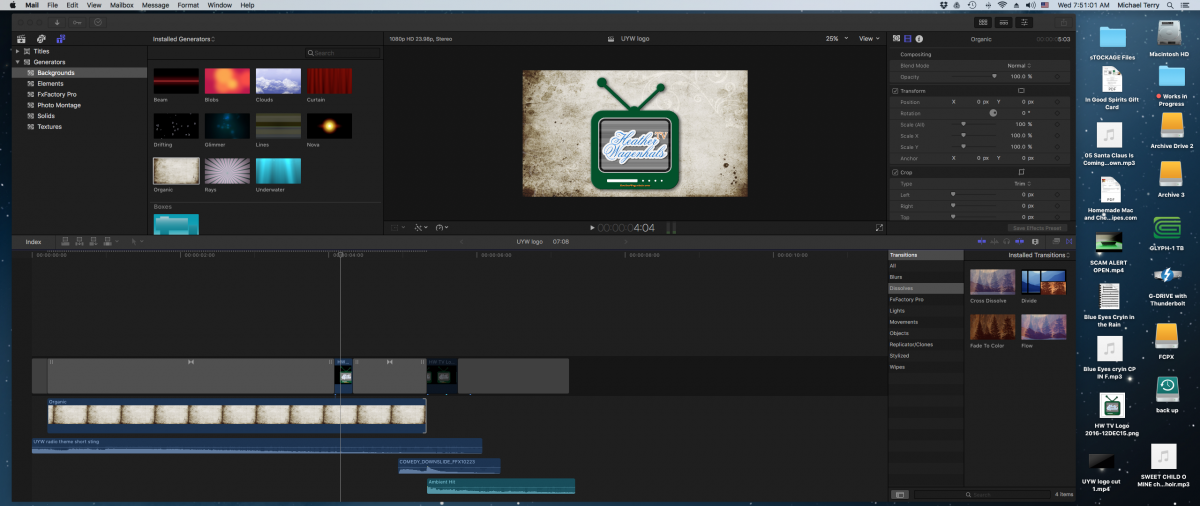
thanks for getting back......... I have added the screen shot......... Again, the white background I've added only shows up when the "drop in " movement transition
is over.
is over.
Please Log in to join the conversation.
- michaelft77
-
Topic Author
- Offline
- New Member
-
Less
More
- Posts: 17
- Thank you received: 0
18 Jan 2017 15:36 #84944
by michaelft77
Replied by michaelft77 on topic transition and background
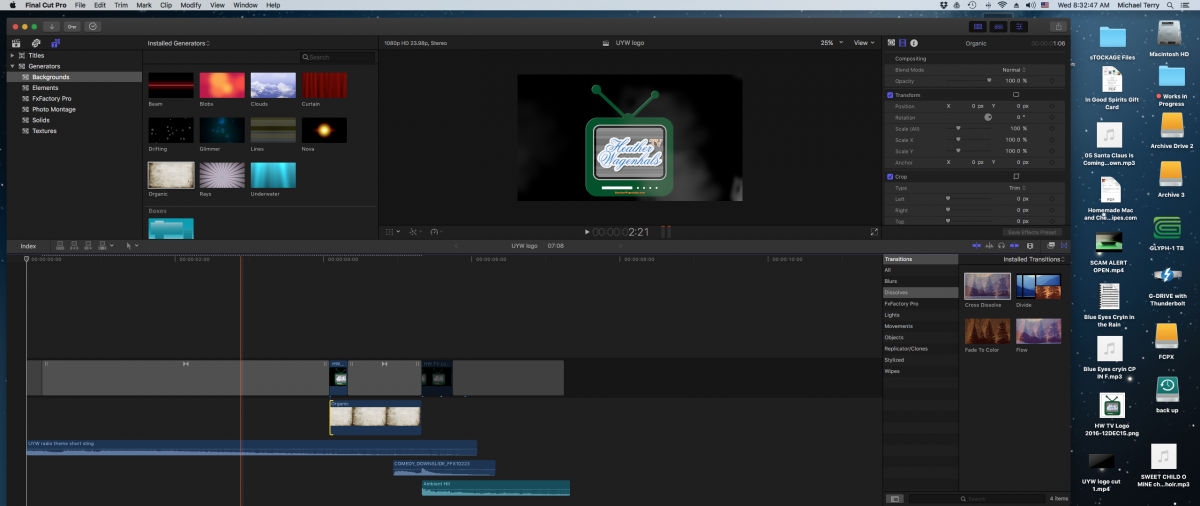
In this lay out........... I brought the white background in after the "drop in"..... the second movement transition I have added in the end is called a "fall"...... the white background shows through that transition just fine.......... strange.
Please Log in to join the conversation.
- Karsten Schlüter
-
- Offline
- Moderator
-
Less
More
- Posts: 3790
- Thank you received: 718
19 Jan 2017 09:41 #84950
by Karsten Schlüter
Replied by Karsten Schlüter on topic transition and background
uhm, well, where to start?
You. have a very confusing way of using a Transition:
A Transition is no 'animation advice' - it is meant to dissolve from ClipA to ClipB in the timeline … Your project lacks content aka video before and after the dropped-in logo … from what or to what do you transit?
So, I would start with the main content of your video - which is the 'Organic' generator, right?
now, put your logo on top or that, apply the transition … should result in what you want …
You. have a very confusing way of using a Transition:
A Transition is no 'animation advice' - it is meant to dissolve from ClipA to ClipB in the timeline … Your project lacks content aka video before and after the dropped-in logo … from what or to what do you transit?
So, I would start with the main content of your video - which is the 'Organic' generator, right?
now, put your logo on top or that, apply the transition … should result in what you want …
Please Log in to join the conversation.
- michaelft77
-
Topic Author
- Offline
- New Member
-
Less
More
- Posts: 17
- Thank you received: 0
19 Jan 2017 14:49 #84970
by michaelft77
Replied by michaelft77 on topic transition and background
haha......... well, I'm totally new at this and just trying stuff out playing with different things........ I liked what I saw and kept going with it...... I will try your approach.
thank you.
thank you.
Please Log in to join the conversation.
- michaelft77
-
Topic Author
- Offline
- New Member
-
Less
More
- Posts: 17
- Thank you received: 0
19 Jan 2017 15:01 #84971
by michaelft77
Replied by michaelft77 on topic transition and background
thank you, thank you........ major success....
One more thing....... Now that I have the cut where I want it, I would like to try different generators..... when I delete the generator that's there so as to replace it, the whole project disappears ...... how do I keep the project intact and simply replace the generator?
One more thing....... Now that I have the cut where I want it, I would like to try different generators..... when I delete the generator that's there so as to replace it, the whole project disappears ...... how do I keep the project intact and simply replace the generator?
Please Log in to join the conversation.
- Karsten Schlüter
-
- Offline
- Moderator
-
Less
More
- Posts: 3790
- Thank you received: 718
19 Jan 2017 15:22 #84972
by Karsten Schlüter
oh ooh, basics of FCPX, the magnetic timeline …
Just drag the new generator onto the old one in the timeline; it gets a white outline; release the mouse-button, and you'r offered several replacement options; choose 'replace from start'.
Next: I'll buy me LogicX, any Kawaii Master-Keyboard, first question to you: what is that midi, can I switch it off?
… what I mean: FCPX is NO 'try'n click' piece of software, not self-explanatory, nor iMovie-on-steroids. Speaking of iMovie: any reason, why you don't use that for your first steps In video-making?
Depending on what sort of learner you are, there is a wide variety of books, videos, tutorials etc which will teach you the basics - … in less than an hour you will do your first projects.
But clicking there and asking here… no joy. Not for you. Not for me/us :lol:
Replied by Karsten Schlüter on topic transition and background
michaelft77 wrote: .... when I delete the generator that's there so as to replace it, the whole project disappears ...... how do I keep the project intact and simply replace the generator?
oh ooh, basics of FCPX, the magnetic timeline …
Just drag the new generator onto the old one in the timeline; it gets a white outline; release the mouse-button, and you'r offered several replacement options; choose 'replace from start'.
Next: I'll buy me LogicX, any Kawaii Master-Keyboard, first question to you: what is that midi, can I switch it off?
… what I mean: FCPX is NO 'try'n click' piece of software, not self-explanatory, nor iMovie-on-steroids. Speaking of iMovie: any reason, why you don't use that for your first steps In video-making?
Depending on what sort of learner you are, there is a wide variety of books, videos, tutorials etc which will teach you the basics - … in less than an hour you will do your first projects.
But clicking there and asking here… no joy. Not for you. Not for me/us :lol:
Please Log in to join the conversation.
- michaelft77
-
Topic Author
- Offline
- New Member
-
Less
More
- Posts: 17
- Thank you received: 0
19 Jan 2017 15:46 #84977
by michaelft77
Replied by michaelft77 on topic transition and background
appreciate your candidness........ I have spent countless hrs on youtube, bought 100.00 dollars worth of video and three books........ every once in awhile you hit a road block....... still happening with logic pro after 8 yrs....
The good news is I'm making $$$ at this after 3 months.... thank God for forums and guys like you.
And yes, you can switch midi off..... (-:
The good news is I'm making $$$ at this after 3 months.... thank God for forums and guys like you.
And yes, you can switch midi off..... (-:
Please Log in to join the conversation.
- Karsten Schlüter
-
- Offline
- Moderator
-
Less
More
- Posts: 3790
- Thank you received: 718
19 Jan 2017 16:08 #84979
by Karsten Schlüter
LOL …
good, you understand my weird humo(u)r …
… and can you elaborate on that 'making $$$' part, …?
enjoy movie making!
Replied by Karsten Schlüter on topic transition and background
michaelft77 wrote: … And yes, you can switch midi off..... (-:
LOL …
good, you understand my weird humo(u)r …
… and can you elaborate on that 'making $$$' part, …?
enjoy movie making!
Please Log in to join the conversation.
