


- Posts: 244
- Thank you received: 12
3 Post Moderation Rule for New Boarders (25 Jan 2021)
New boarders will have their posts moderated - Don't worry if you cannot see your post immediately.
Can anyone explain these export variations - same Library, different Macs, doesn't seem right.
- Doug Suiter
-
 Topic Author
- Offline
- Elite Member
-

Less
More
16 Jan 2017 14:02 - 16 Jan 2017 14:37 #84886
by Doug Suiter
Can anyone explain these export variations - same Library, different Macs, doesn't seem right. was created by Doug Suiter
I made a tutorial some time ago called "Make a slideshow faster than you can watch it with FCPX". It was very popular and I thought that I would update it for 10.3
During the creation of the video I had the feeling that my iMac hasn't felt quite as fluid as it used to. I exported the slideshow (ProRes Master) but it was taking some time so I copied the library to a USB and dashed out.
This was on a 2012 iMac 32 GB 2GB GFX card, 3.4 GHz Core i7. Export took 14 minutes.
At home I am baby-sitting a friend's late 2014 Retina iMac 32GB 4GB GFX card. 4 GHz core i7. Export took under 90 seconds. Same specs, same library.
I expected a difference, but not that. I tested again on the first machine the next day - no difference. I logged out and back in as a guest user. Negligible difference.
I also hapen to own a 2015 MacBook - a wonderfully portable but severely underpowered machine for video which I very rarely edit on. 8GB of Ram. Intel HD Graphics 5300 1536 MB. Rendering to the same specs took 22 minutes.
So...iMac A 14 minutes, iMac B 90 seconds, Macbook 22 minutes.
All Machines were reading to and writing to internal (flash) drives, peripherals unplugged. All machines has plenty of hard drive space. Before each test export I deleted all render files no I a sure it is not pre-rendering.
When exporting from the newest iMac I can use the machine no trouble at all flicking between applications easily and fluidly. When exporting fro my main 2012 Mac it slows to a crawl on export.
I was in the Mac store today discussing this issue (among others) and I asked if i could use a machine for test export. They agreed and the machine was a Intel 2.2Ghz core i7 laptop 16GB 15 inch mid 2015. Export time was 3'15"
So - does anyone have any ideas? I a sure that my iMac is exporting much slower than it should for what it is. Frankly I think so is the MacBook but I'm happy to ignore that for now. The newest iMac is an absolute dream, the instore MacBook Pro seems decent considering.
I'd love to hear your thoughts...
*UPDATE - here is a link to the library itself - it is a large download (a little over 1GB) but I'd be very interested if anyone would care to try to export for themselves.
drive.google.com/open?id=0B6ZiWTliSQ5UUi1GY1NrckhfblU
During the creation of the video I had the feeling that my iMac hasn't felt quite as fluid as it used to. I exported the slideshow (ProRes Master) but it was taking some time so I copied the library to a USB and dashed out.
This was on a 2012 iMac 32 GB 2GB GFX card, 3.4 GHz Core i7. Export took 14 minutes.
At home I am baby-sitting a friend's late 2014 Retina iMac 32GB 4GB GFX card. 4 GHz core i7. Export took under 90 seconds. Same specs, same library.
I expected a difference, but not that. I tested again on the first machine the next day - no difference. I logged out and back in as a guest user. Negligible difference.
I also hapen to own a 2015 MacBook - a wonderfully portable but severely underpowered machine for video which I very rarely edit on. 8GB of Ram. Intel HD Graphics 5300 1536 MB. Rendering to the same specs took 22 minutes.
So...iMac A 14 minutes, iMac B 90 seconds, Macbook 22 minutes.
All Machines were reading to and writing to internal (flash) drives, peripherals unplugged. All machines has plenty of hard drive space. Before each test export I deleted all render files no I a sure it is not pre-rendering.
When exporting from the newest iMac I can use the machine no trouble at all flicking between applications easily and fluidly. When exporting fro my main 2012 Mac it slows to a crawl on export.
I was in the Mac store today discussing this issue (among others) and I asked if i could use a machine for test export. They agreed and the machine was a Intel 2.2Ghz core i7 laptop 16GB 15 inch mid 2015. Export time was 3'15"
So - does anyone have any ideas? I a sure that my iMac is exporting much slower than it should for what it is. Frankly I think so is the MacBook but I'm happy to ignore that for now. The newest iMac is an absolute dream, the instore MacBook Pro seems decent considering.
I'd love to hear your thoughts...
*UPDATE - here is a link to the library itself - it is a large download (a little over 1GB) but I'd be very interested if anyone would care to try to export for themselves.
drive.google.com/open?id=0B6ZiWTliSQ5UUi1GY1NrckhfblU
Last edit: 16 Jan 2017 14:37 by Doug Suiter.
Please Log in to join the conversation.


16 Jan 2017 17:25 #84894
by JoeEditor
Replied by JoeEditor on topic Can anyone explain these export variations - same Library, different Macs, doesn't seem right.
For a really fair test, all Mac's should be cold booted, and only that one Library opened, nothing else done first. Other operations can effect what is or ins't left in RAM when other tasks take place, or what is or isn't still buffered on the hard drive.
I'd also like to know drive sizes and free space specifically.
Do all have the same OS version, and same Pro Video Support package version installed?
What Help apps are running in the background of each machine? Are those the same?
Personally, I'd run Disk Utility, then Disk Warrior on all three, shut them all down, and test from a cold boot. The state o the drive's directory can effect things. The state of the installed RAM can effect things. Daemon processes and other things can effect the overall performance of a computer.
I'd also like to know drive sizes and free space specifically.
Do all have the same OS version, and same Pro Video Support package version installed?
What Help apps are running in the background of each machine? Are those the same?
Personally, I'd run Disk Utility, then Disk Warrior on all three, shut them all down, and test from a cold boot. The state o the drive's directory can effect things. The state of the installed RAM can effect things. Daemon processes and other things can effect the overall performance of a computer.
Please Log in to join the conversation.


16 Jan 2017 19:21 #84899
by spurratic
Replied by spurratic on topic Can anyone explain these export variations - same Library, different Macs, doesn't seem right.
I downloaded to do a test.
Mac Pro Trash Can 3.0GHZ 8 Core
Did not render anything....just straight export to Master File (ProRes)
1 minute 51 secs.
Mac Pro Trash Can 3.0GHZ 8 Core
Did not render anything....just straight export to Master File (ProRes)
1 minute 51 secs.
Please Log in to join the conversation.

16 Jan 2017 20:14 - 16 Jan 2017 20:24 #84902
by rjvddoes
Replied by rjvddoes on topic Can anyone explain these export variations - same Library, different Macs, doesn't seem right.
Hi Doug,
The render to a Master file (ProRes) took 3:35 min on my Mid 2015, 15" Retina MacBook Pro, 2,8 GHz Intel Core i7, 16 GB 1600 MHz DDR3 RAM, 1 TB Flash Drive, AMD Radeon R9 M370X 2048 MB.
I had a few programs open )Motion, Safari, Mail.
I will do a second export after a reboot and report back.
2nd render after reboot and only FCPX open took 3:33 min.
The render to a Master file (ProRes) took 3:35 min on my Mid 2015, 15" Retina MacBook Pro, 2,8 GHz Intel Core i7, 16 GB 1600 MHz DDR3 RAM, 1 TB Flash Drive, AMD Radeon R9 M370X 2048 MB.
I had a few programs open )Motion, Safari, Mail.
I will do a second export after a reboot and report back.
2nd render after reboot and only FCPX open took 3:33 min.
Last edit: 16 Jan 2017 20:24 by rjvddoes. Reason: added results from render after reboot
Please Log in to join the conversation.
- Doug Suiter
-
Topic Author
- Offline
- Elite Member
-
Less
More
- Posts: 244
- Thank you received: 12
17 Jan 2017 13:43 #84925
by Doug Suiter
Replied by Doug Suiter on topic Can anyone explain these export variations - same Library, different Macs, doesn't seem right.
Thank you all so much for your thoughts and especially for downloading the library for a test render - really great! The results you reported are more or less in line with what I would expect given the reported specs.
11-14 minutes on a late 2012 maxed out iMac and 90 seconds on a the equivalently spec'd late 2014 iMac. Perhaps it is possible but we are talking a 7-10 times performance increase from the 2012 to the 2014 model. Surely not...
I have been very well impressed with the performance of the 2012 iMac. I used to replace my machine every 2-3 years but this one just hasn't felt like it was slowing down at all. Until now.
There is nothing at all scientific about this but I will say this just doesn't seem right. Furthermore I never had any issues exporting on this machine while performing other operations and yet I am noticing in the past few months that exporting slows the rest of my system to a crawl. I also strongly feel that exporting a slideshow like this previously did not take anywhere near the 11-14 minute range pre 10.3 - but I can't back that up with any facts. I feel like the next step may have to be a clean install to be 100% sure. But I'd love for someone with a maxed out Late 2012 iMac to take the library for a test export if possible.
I will update this thread as more details reveal themselves - and thank you once again.
11-14 minutes on a late 2012 maxed out iMac and 90 seconds on a the equivalently spec'd late 2014 iMac. Perhaps it is possible but we are talking a 7-10 times performance increase from the 2012 to the 2014 model. Surely not...
I have been very well impressed with the performance of the 2012 iMac. I used to replace my machine every 2-3 years but this one just hasn't felt like it was slowing down at all. Until now.
There is nothing at all scientific about this but I will say this just doesn't seem right. Furthermore I never had any issues exporting on this machine while performing other operations and yet I am noticing in the past few months that exporting slows the rest of my system to a crawl. I also strongly feel that exporting a slideshow like this previously did not take anywhere near the 11-14 minute range pre 10.3 - but I can't back that up with any facts. I feel like the next step may have to be a clean install to be 100% sure. But I'd love for someone with a maxed out Late 2012 iMac to take the library for a test export if possible.
I will update this thread as more details reveal themselves - and thank you once again.
Please Log in to join the conversation.

19 Jan 2017 00:53 #84947
by Redifer
Replied by Redifer on topic Can anyone explain these export variations - same Library, different Macs, doesn't seem right.
Mac Pro Trash can with actual trash in it. Library on RAID drive (not flash drive). Exporting to a different RAID drive (not flash drive). No rendering. No cold boot. Lots of other libraries open and active. 104 seconds.
Perhaps the Flash or "Fusion" drive in your iMac is getting worn. They can only be written to a finite amount of time. Maybe some sectors are getting bad as a result. The new iMac has a perfectly good "Fusion" drive so it wouldn't be affected by that. Check with BlackMagic's disk test app thingy.
Perhaps the Flash or "Fusion" drive in your iMac is getting worn. They can only be written to a finite amount of time. Maybe some sectors are getting bad as a result. The new iMac has a perfectly good "Fusion" drive so it wouldn't be affected by that. Check with BlackMagic's disk test app thingy.
Please Log in to join the conversation.
- Karsten Schlüter
-

- Offline
- Moderator
-

Less
More
- Posts: 3790
- Thank you received: 718
19 Jan 2017 16:02 #84978
by Karsten Schlüter
Replied by Karsten Schlüter on topic Can anyone explain these export variations - same Library, different Macs, doesn't seem right.
… I'm such a curious guy … 
export needed exactly 10 minutes on my 'beast' of an 2012 MacMini :dry:
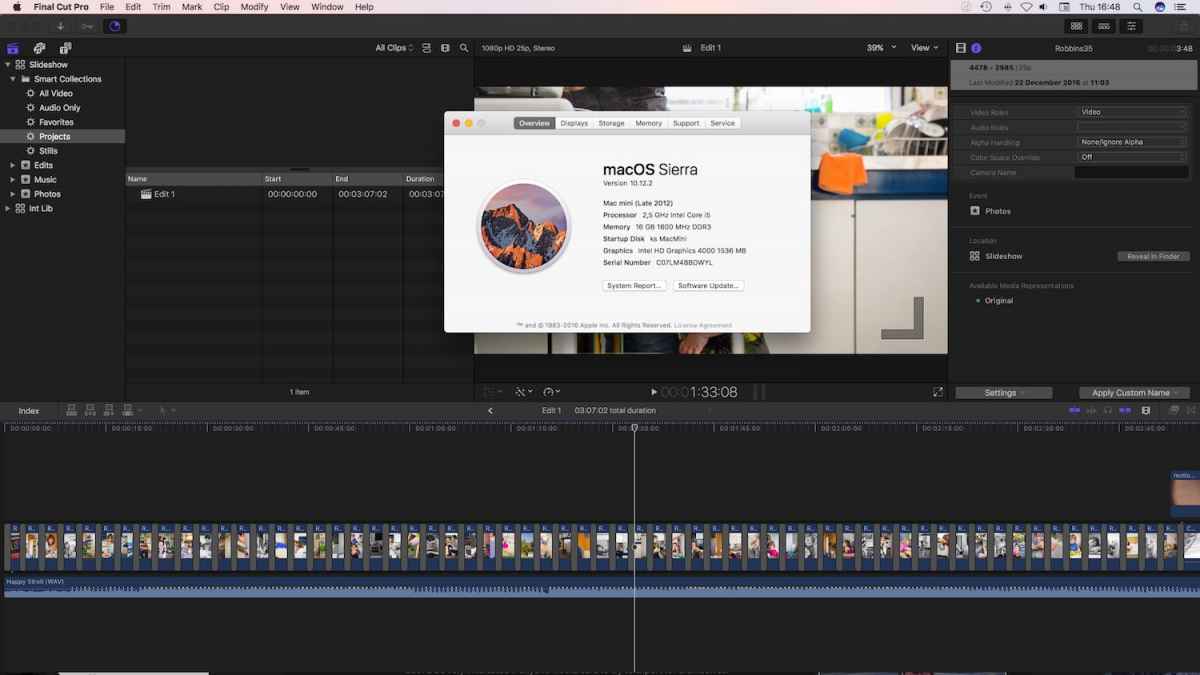
… not scientifically performed, while export browsing the internet, playing music, another Lib in FCPX open …
Mini has 2.5GHz/16GB Ram, int SSD, export to extSSD … not bad - by my standards.
<creeping back in my hobbyist tinker shop>
:lol:
export needed exactly 10 minutes on my 'beast' of an 2012 MacMini :dry:
… not scientifically performed, while export browsing the internet, playing music, another Lib in FCPX open …
Mini has 2.5GHz/16GB Ram, int SSD, export to extSSD … not bad - by my standards.
<creeping back in my hobbyist tinker shop>
:lol:
Please Log in to join the conversation.

19 Jan 2017 16:22 #84981
by cdw1960
Replied by cdw1960 on topic Can anyone explain these export variations - same Library, different Macs, doesn't seem right.
On my set up it takes about 30 seconds... am I doing something wrong? :sick:
Please Log in to join the conversation.
- Doug Suiter
-
Topic Author
- Offline
- Elite Member
-
Less
More
- Posts: 244
- Thank you received: 12
22 Jan 2017 03:10 - 22 Jan 2017 03:11 #85074
by Doug Suiter
Replied by Doug Suiter on topic Can anyone explain these export variations - same Library, different Macs, doesn't seem right.
Thank you all again for the addition insights. I have since had the opportunity to see the exact same render times in another similarly spec'd 2012 iMac - around the 11-12 minute mark.
I would be fascinated to see the results of the same project rendered out of FCPX 10.2 and I may downgrade to try that out.
@Redifer - thank you - I have tested my drives and there is no issue with read/write speed.
i am interested that my 2012 machine slows to a crawl during the export process and the newer iMac is snappy and responsive.
@cdw1960 - what set up are you using? I would suspect that your project is pre-rendered.
@Karsten Schlüter - fascinating that your 2012 Mac Mini is getting slightly better results that my 2012 iMac. My machine is basically unusable while exporting but you say you were "browsing the internet, playing music"? Did you notice any slow-down?
I would be fascinated to see the results of the same project rendered out of FCPX 10.2 and I may downgrade to try that out.
@Redifer - thank you - I have tested my drives and there is no issue with read/write speed.
i am interested that my 2012 machine slows to a crawl during the export process and the newer iMac is snappy and responsive.
@cdw1960 - what set up are you using? I would suspect that your project is pre-rendered.
@Karsten Schlüter - fascinating that your 2012 Mac Mini is getting slightly better results that my 2012 iMac. My machine is basically unusable while exporting but you say you were "browsing the internet, playing music"? Did you notice any slow-down?
Last edit: 22 Jan 2017 03:11 by Doug Suiter.
Please Log in to join the conversation.
- Karsten Schlüter
-
- Offline
- Moderator
-
Less
More
- Posts: 3790
- Thank you received: 718
22 Jan 2017 09:57 #85079
by Karsten Schlüter
No, not really… although the Mini has no designated graphic-card at all, it boldly goes where no Windows machine ever… … no, kiddin'! :lol:
As mentioned above: Safari, browsing some sites (being an fcpco-Janitor, it asks for presence…), music often are 'streams' or from local drive (an older 3.5" ext HDD, usb 2 - fast enough for music)) … Your Lib was still in my Downloads-folder = int SSD, and I've chosen an usb3 connected SSD for export…
No, aside the 16GB Ram and the intSSD, a from-the-shelf Mini; plus, macOS Sierra + FCPX 10_3 … I made the BruceX test, and Sierra alone gave my lame set-up a 30% performance boost … if 10min is 'boost' anyhow, hahaha,, compared to the seconds other reports on more 'actual' hardware.
Big fun, to have a low-end 'pocket calculator' and handling high-res material.
If I could afford it, or doing video professionally=paid, an forthcoming 2017 5kRetina iMacPro would be nice to have, no doubt… but for a hobbyist no real 'need'. Just a 'want' LOL
Next on my shopping list: a 21:9 display…
Replied by Karsten Schlüter on topic Can anyone explain these export variations - same Library, different Macs, doesn't seem right.
Doug Suiter wrote: …
@Karsten Schlüter - fascinating that your 2012 Mac Mini is getting slightly better results that my 2012 iMac. My machine is basically unusable while exporting but you say you were "browsing the internet, playing music"? Did you notice any slow-down?
No, not really… although the Mini has no designated graphic-card at all, it boldly goes where no Windows machine ever… … no, kiddin'! :lol:
As mentioned above: Safari, browsing some sites (being an fcpco-Janitor, it asks for presence…), music often are 'streams' or from local drive (an older 3.5" ext HDD, usb 2 - fast enough for music)) … Your Lib was still in my Downloads-folder = int SSD, and I've chosen an usb3 connected SSD for export…
No, aside the 16GB Ram and the intSSD, a from-the-shelf Mini; plus, macOS Sierra + FCPX 10_3 … I made the BruceX test, and Sierra alone gave my lame set-up a 30% performance boost … if 10min is 'boost' anyhow, hahaha,, compared to the seconds other reports on more 'actual' hardware.
Big fun, to have a low-end 'pocket calculator' and handling high-res material.
If I could afford it, or doing video professionally=paid, an forthcoming 2017 5kRetina iMacPro would be nice to have, no doubt… but for a hobbyist no real 'need'. Just a 'want' LOL
Next on my shopping list: a 21:9 display…
Please Log in to join the conversation.
22 Jan 2017 09:57 #85080
by cdw1960
With new update the output is slightly faster than before!
Tested with 'Render On' and 'Off' makes no difference, its still outputs to desktop in under 30 seconds...
Setup: iMac 5K 27" Late 2015, 4GHz i7, 32GB Ram, AMD R9 M396X 4mb, 500mb ssd HD. :whistle:
Replied by cdw1960 on topic Can anyone explain these export variations - same Library, different Macs, doesn't seem right.
@cdw1960 - what set up are you using? I would suspect that your project is pre-rendered.
With new update the output is slightly faster than before!
Tested with 'Render On' and 'Off' makes no difference, its still outputs to desktop in under 30 seconds...
Setup: iMac 5K 27" Late 2015, 4GHz i7, 32GB Ram, AMD R9 M396X 4mb, 500mb ssd HD. :whistle:
Please Log in to join the conversation.
