


- Posts: 3790
- Thank you received: 718
3 Post Moderation Rule for New Boarders (25 Jan 2021)
New boarders will have their posts moderated - Don't worry if you cannot see your post immediately.
@lichinho/Luis … creating own key combos?
- Karsten Schlüter
-
 Topic Author
- Offline
- Moderator
-

Less
More
16 Jan 2017 04:19 #84866
by Karsten Schlüter
@lichinho/Luis … creating own key combos? was created by Karsten Schlüter
Hi Luís,
you once posted advice how to create system-wide key-combos, esp. for use with/in FCPX - and I can not find it! All my google-fu doesn't help here, me failed ...
Could you please advice me/us once more?
//sorry for public messaging … PM service actually has hiccups… //
you once posted advice how to create system-wide key-combos, esp. for use with/in FCPX - and I can not find it! All my google-fu doesn't help here, me failed ...
Could you please advice me/us once more?
//sorry for public messaging … PM service actually has hiccups… //
Please Log in to join the conversation.

16 Jan 2017 09:15 #84873
by rjvddoes
Replied by rjvddoes on topic @lichinho/Luis … creating own key combos?
Hi Karsten,
Do you mean the shortcuts you can create in System Preferences/Keyboard/Shortcuts?
Those are the only system wide shortcuts that I know of.
Have never played with them though.
Cheers,
Robbert-Jan
Do you mean the shortcuts you can create in System Preferences/Keyboard/Shortcuts?
Those are the only system wide shortcuts that I know of.
Have never played with them though.
Cheers,
Robbert-Jan
Please Log in to join the conversation.
- Karsten Schlüter
-
Topic Author
- Offline
- Moderator
-
Less
More
- Posts: 3790
- Thank you received: 718
16 Jan 2017 09:34 #84875
by Karsten Schlüter
Replied by Karsten Schlüter on topic @lichinho/Luis … creating own key combos?
Hi R-J,
yep those.
I vaguely remember some advice/recipe/tutorial from Luís to 'abuse' those to teach FCPX short-cuts, which are not listed in the Custom Shortcuts lists.
to get specific:
was asked for a 'shortcut', which allows to switch content in a 2-display set-up - what came up to my mind: SysPrefs, Displays, shifting the white Menu bar from screen#1 to screen#2 ... but all that triggered by some single key-combo ....
And I think, Luís did show us some thing … sortof … kinda … like …
Thanks for chiming in… !
yep those.
I vaguely remember some advice/recipe/tutorial from Luís to 'abuse' those to teach FCPX short-cuts, which are not listed in the Custom Shortcuts lists.
to get specific:
was asked for a 'shortcut', which allows to switch content in a 2-display set-up - what came up to my mind: SysPrefs, Displays, shifting the white Menu bar from screen#1 to screen#2 ... but all that triggered by some single key-combo ....
And I think, Luís did show us some thing … sortof … kinda … like …
Thanks for chiming in… !
Please Log in to join the conversation.
- nils.dettmann
-

- Offline
- Elite Member
-

Less
More
- Posts: 161
- Thank you received: 13
16 Jan 2017 23:24 #84909
by nils.dettmann
Replied by nils.dettmann on topic @lichinho/Luis … creating own key combos?
You can trigger an Automator Action with a shortcut which will be bound to FCPX and can contain an AppleScript.
A little more complicated but very powerful. If that is what you are looking for I can elaborate on it tomorrow...
A little more complicated but very powerful. If that is what you are looking for I can elaborate on it tomorrow...
Please Log in to join the conversation.
- Karsten Schlüter
-
Topic Author
- Offline
- Moderator
-
Less
More
- Posts: 3790
- Thank you received: 718
17 Jan 2017 04:46 #84911
by Karsten Schlüter
very helpful!
FCPX, two screen mode, left display Browser as Second Display, right display main screen …
now swap content of #1 and #2 …
when I add 'without touching the displays' it sounds like a bar bet LOL
Replied by Karsten Schlüter on topic @lichinho/Luis … creating own key combos?
nils.dettmann wrote: … If that is what you are looking for I can elaborate on it tomorrow...
very helpful!
FCPX, two screen mode, left display Browser as Second Display, right display main screen …
now swap content of #1 and #2 …
when I add 'without touching the displays' it sounds like a bar bet LOL
Please Log in to join the conversation.
- nils.dettmann
-
- Offline
- Elite Member
-
Less
More
- Posts: 161
- Thank you received: 13
17 Jan 2017 09:41 #84916
by nils.dettmann
Replied by nils.dettmann on topic @lichinho/Luis … creating own key combos?
I haven´t really found an easy solution for switching the screens so I´ll start with adding an Action to FCPX
Part 1:
Add an Automator Action as a service
Open Automator
Create a new Automator Action
As Type Select Service, no input, application Final Cut Pro
Add "Run Apple Script"
- We will insert the code in the second part, for testing you could insert:
Save as.. and chose a meaningful name (eg. Swap Primary Display)
Go To : System Prefs -> Keyboard ->Shortcuts -> Services
Choose the newly created service and click -> Add Shortcut
Chose one (e.g Shift-Cmd-Opt S)
Now you can invoke the applescript from within FCPX via Shortcut.
Will try to add the code for switching screens later but it will probably need an external terminal command...
Part 1:
Add an Automator Action as a service
Open Automator
Create a new Automator Action
As Type Select Service, no input, application Final Cut Pro
Add "Run Apple Script"
- We will insert the code in the second part, for testing you could insert:
Code:
on run {input, parameters}
display dialog "Works!!!" buttons {"OK"}
return input
end run
Save as.. and chose a meaningful name (eg. Swap Primary Display)
Go To : System Prefs -> Keyboard ->Shortcuts -> Services
Choose the newly created service and click -> Add Shortcut
Chose one (e.g Shift-Cmd-Opt S)
Now you can invoke the applescript from within FCPX via Shortcut.
Will try to add the code for switching screens later but it will probably need an external terminal command...
Please Log in to join the conversation.
- nils.dettmann
-
- Offline
- Elite Member
-
Less
More
- Posts: 161
- Thank you received: 13
17 Jan 2017 09:51 #84918
by nils.dettmann
Replied by nils.dettmann on topic @lichinho/Luis … creating own key combos?
Part 2:
Switching screens
We will need an external application which will be invoked by an AppleScript: hmscreens.
It can be found here: HMScreens application
Download the application and copy it to /usr/local/bin on your System drive.
You can actually copy it to any folder you would like to but then we´ll have to change the application path in the script.
Now open the Automator Action from Part one and replace the code within "Run AppleScript" with:
Save and you should be done...
Switching screens
We will need an external application which will be invoked by an AppleScript: hmscreens.
It can be found here: HMScreens application
Download the application and copy it to /usr/local/bin on your System drive.
You can actually copy it to any folder you would like to but then we´ll have to change the application path in the script.
Now open the Automator Action from Part one and replace the code within "Run AppleScript" with:
Code:
on run {input, parameters}
set screenIDs to paragraphs of (do shell script "/usr/local/bin/hmscreens " & " -screenIDs")
if (count of screenIDs) is equal to 2 then
set hmsOutput to paragraphs of (do shell script "/usr/local/bin/hmscreens " & " -info ")
if item 12 of hmsOutput starts with "Global Position: {{-" then
set othersPosition to "right"
else
set othersPosition to "left"
end if
set secondScreen to item 2 of screenIDs
do shell script "/usr/local/bin/hmscreens " & " -setMainID " & secondScreen & " -othersStartingPosition " & othersPosition
else
tell me
activate
display dialog "This only works with exactly two displays!" buttons {"OK"} default button 1 with icon note
end tell
end if
return input
end run
Save and you should be done...
Please Log in to join the conversation.
- Karsten Schlüter
-
Topic Author
- Offline
- Moderator
-
Less
More
- Posts: 3790
- Thank you received: 718
17 Jan 2017 14:45 #84926
by Karsten Schlüter
OMG - it's alive!!:
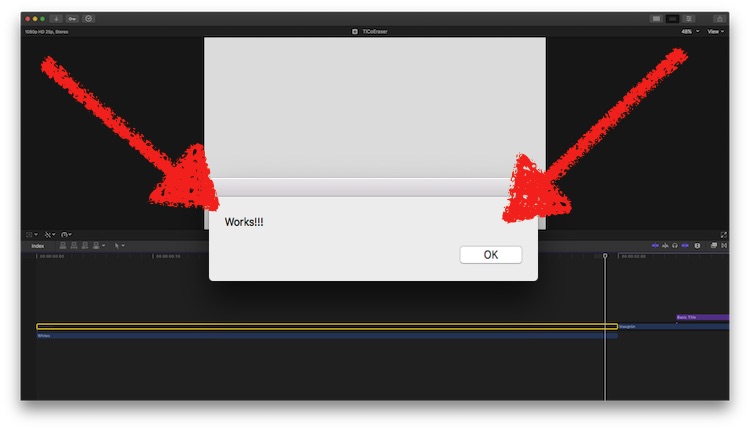
conc. pt II
How do I DE-INSTALL that HMScreens?
… just a bit shy with 'installing' things.
but, up to that point - THANK YOU very much for your efforts!
Far above my head, and best of all: not for me, but for a friend … my suggestion was a hardware-switch LOL :lol:
Replied by Karsten Schlüter on topic @lichinho/Luis … creating own key combos?
nils.dettmann wrote: …Part 1: ….
OMG - it's alive!!:
conc. pt II
How do I DE-INSTALL that HMScreens?
… just a bit shy with 'installing' things.
but, up to that point - THANK YOU very much for your efforts!
Far above my head, and best of all: not for me, but for a friend … my suggestion was a hardware-switch LOL :lol:
Please Log in to join the conversation.
- nils.dettmann
-
- Offline
- Elite Member
-
Less
More
- Posts: 161
- Thank you received: 13
17 Jan 2017 17:20 #84929
by nils.dettmann
Replied by nils.dettmann on topic @lichinho/Luis … creating own key combos?
hmscreens is only one file.
And it won't write any information anywhere else, won't create any folder structures just plain and simple one file.
So if you want to get rid of it, just delete it and it's gone forever...
And it won't write any information anywhere else, won't create any folder structures just plain and simple one file.
So if you want to get rid of it, just delete it and it's gone forever...
Please Log in to join the conversation.
